1. Įvadas
The SHANLING EC Mini is a versatile portable stereo device designed for high-fidelity audio playback. It functions as a CD player, Digital Audio Player (DAP), USB DAC/AMP, and Bluetooth DAC/AMP. This manual provides essential information for setting up, operating, and maintaining your EC Mini.
2. Saugos informacija
- Nelaikykite prietaiso nuo ekstremalių temperatūrų, drėgmės ar tiesioginių saulės spindulių.
- Stenkitės, kad prietaisas nenumestų ar nepatirtų stipraus smūgio.
- Saugokite prietaisą nuo vandens ir kitų skysčių.
- Nebandykite patys ardyti ar taisyti įrenginio. Kreipkitės į įgaliotąjį techninės priežiūros personalą.
- Naudokite tik nurodytus įkrovimo priedus.
- When using in a vehicle, ensure the device is placed securely and does not obstruct driving safety.
3. Produktas baigtasview ir Sąranka
3.1 Pakuotės turinys
- SHANLING EC Mini Unit
- USB-C kabelis
- Vartotojo vadovas
3.2 Įrenginio išdėstymas
Familiarize yourself with the buttons, ports, and display of your EC Mini.

1 pav.: Priekinio skydelio valdikliai. This image displays the front of the SHANLING EC Mini, highlighting the balanced output, power button, CD control buttons (play/pause, skip), input/output selection, and volume controls.
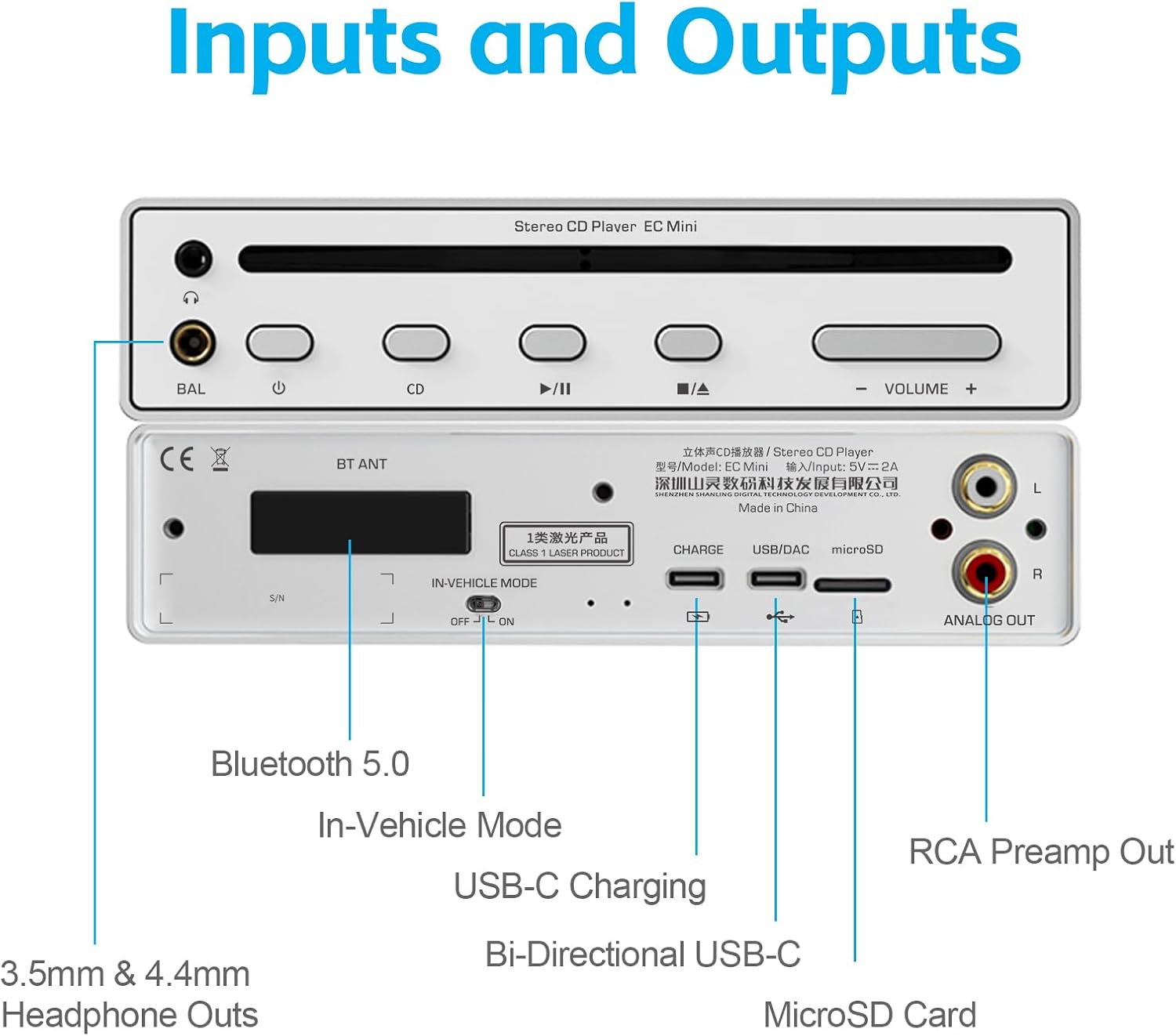
2 pav.: Galinio skydelio prievadai. This image shows the rear panel of the EC Mini, detailing the Bluetooth 5.0 antenna, In-Vehicle Mode switch, USB-C charging port, bi-directional USB-C port, MicroSD card slot, and RCA analog output.

3 pav.: Įrenginio matmenys. This image illustrates the physical dimensions of the SHANLING EC Mini, measuring 156mm x 189mm x 36.5mm, and indicates a weight of 1.2kg.
3.3 Pradinis įjungimas ir įkrovimas
Before first use, fully charge the EC Mini. Connect the provided USB-C cable to the charging port on the rear panel and to a compatible USB power adapter (not included). The device features a 6800mAh battery for extended portable use.

Figure 4: Independent Power Supply. This image emphasizes the EC Mini's 6800mAh battery, providing up to 25 hours of MicroSD playback or 7.5 hours of CD playback, allowing for use independent of power outlets.
4. Naudojimo instrukcijos
4.1 Maitinimo įjungimas/išjungimas
- To power on: Press and hold the power button on the front panel until the screen illuminates.
- To power off: Press and hold the power button until the shutdown prompt appears, then confirm.
4.2 CD atkūrimas
- Gently insert a CD into the disc slot on the front panel. The device will automatically load the disc.
- Select 'CD Play' from the main menu on the touch screen.
- Use the play/pause and skip buttons on the front panel or the touch screen to control playback.
- Garsumą reguliuokite naudodami garsumo mygtukus.
4.3 „MicroSD“ kortelės atkūrimas
- Insert a MicroSD card (up to 2TB supported) into the MicroSD card slot on the rear panel.
- Select 'Local Music' from the main menu.
- Naršykite ir pasirinkite norimą garso įrašą files atkūrimui.
4.4 „Bluetooth“ ryšys
The EC Mini supports two-way Bluetooth 5.0, functioning as both a receiver and a transmitter.
- Bluetooth imtuvas: Connect your smartphone or other Bluetooth-enabled device to the EC Mini to stream audio. Supported codecs: LDAC, AAC, SBC.
- Bluetooth siųstuvas: Connect the EC Mini to Bluetooth headphones or speakers. Supported codecs: LDAC, aptX, AAC, SBC.
- To pair: Navigate to the Bluetooth settings on the EC Mini and your external device, then select the EC Mini from the list of available devices.
4.5 USB DAC/AMP Funkcionalumas
- USB DAC (Input): Connect the EC Mini to a computer or mobile phone via the bi-directional USB-C port. The EC Mini will act as an external sound card, processing digital audio from your connected device.
- USB Audio (Output): Connect the EC Mini to another decoding headphone ampkeltuvas arba preamplifier via the bi-directional USB-C port to use it as a high-performance CD turntable.
4.6 Programų valdymas
The EC Mini can be controlled remotely using the Eddict Player app on Android or iOS devices via Bluetooth SyncLink function.
- Download and install the Eddict Player app on your smartphone or tablet.
- Ensure Bluetooth is enabled on both your device and the EC Mini.
- Open the Eddict Player app and follow the on-screen instructions to connect to your EC Mini.
- Once connected, you can control CD playback and local MicroSD card playback through the app.

Figure 5: Companion App Control. This image shows the SHANLING EC Mini being controlled by the Eddict Player app on a smartphone, demonstrating remote playback control and MicroSD card support up to 2TB.
4.7 Transporto priemonės režimas
The In-Vehicle Mode allows for automatic power on/off when connected to a car's power supply, making it convenient for use in vehicles.
- Activate the 'In-Vehicle Mode' switch on the rear panel.
- Connect the EC Mini to your car's USB port for power.
- Connect the EC Mini to your car's audio system via Bluetooth for sound output.
- Svarbu: For CD playback in a vehicle, ensure the EC Mini is stationary and placed horizontally to prevent skipping or damage.

Figure 6: EC Mini in Vehicle. This image shows the SHANLING EC Mini positioned in a car's center console, demonstrating its use in vehicle mode for playing CDs and connecting to the car's Bluetooth system.
Video 1: SHANLING EC Mini Portable Stereo CD Player in Car. This video demonstrates how to use the SHANLING EC Mini as a car CD player, including inserting a CD, connecting to car Bluetooth, and playing music. (Source: SHANLING Official)
5. Išplėstinės funkcijos
5.1 High-Performance Audio
The EC Mini is equipped with dual ES9219MQ DACs, supporting high-resolution audio up to 384kHz/32bit and DSD256. It also supports MQA-CD disc playback for enhanced audio quality.
5.2 Output Options
The device offers multiple output options:
- Ausinių išėjimai: 3.5mm single-ended and 4.4mm balanced outputs, providing up to 248mW@32Ω.
- RCA Analog Output: Prijungimui prie išorinio ampkeltuvai arba maitinami garsiakalbiai.
- USB garso išvestis: For digital connection to compatible audio devices.
Video 2: What Makes EC Mini Unique. This video highlights the key features and functionalities that differentiate the SHANLING EC Mini, including its versatile playback options and high-fidelity audio components. (Source: SHANLING Official)
Video 3: SHANLING EC Mini Portable CD Player Overview. Šiame vaizdo įraše pateikiama išsami informacijaview of the SHANLING EC Mini, showcasing its design, features, and various usage scenarios. (Source: SHANLING Official)
6. Priežiūra
- Valymas: Įrenginio išorę valykite minkštu, sausu skudurėliu. Nenaudokite abrazyvinių valiklių ar tirpiklių.
- Disko priežiūra: Handle CDs by the edges to avoid fingerprints and scratches. Store discs in their cases when not in use.
- Saugykla: When not in use for extended periods, store the EC Mini in a cool, dry place.
7. Problemų sprendimas
| Problema | Galima priežastis | Sprendimas |
|---|---|---|
| Įrenginys neįsijungia. | Išsikrovusi baterija; netinkamai paspaustas maitinimo mygtukas. | Charge the device; Press and hold the power button for a few seconds. |
| Nėra garso išvesties. | Volume too low; Incorrect output selected; Headphones/speakers not connected properly. | Increase volume; Check output settings on the device; Ensure cables are securely connected or Bluetooth is paired. |
| CD skipping or not reading. | Dirty or scratched CD; Device not stable; Disc not inserted correctly. | Clean the CD; Place the device on a stable, flat surface; Re-insert the CD. |
| Bluetooth ryšio problemos. | Įrenginys nėra susiejimo režime; Už diapazono ribų; Trukdžiai. | Ensure both devices are in pairing mode; Move devices closer; Avoid sources of interference. |
| Eddict Player app not connecting. | Bluetooth not enabled; App permissions not granted; Outdated app version. | Enable Bluetooth on both devices; Check app permissions; Update the app to the latest version. |
8. Specifikacijos
| Funkcija | Detalė |
|---|---|
| Gaminio matmenys | 9.84 x 8.07 x 2.05 colio |
| Prekės svoris | 2.64 svaro |
| Prekės modelio numeris | EC Mini |
| Prekės ženklas | ŠANLINGAS |
| Modelio pavadinimas | EC Mini |
| Ryšio technologija | Bluetooth, USB |
| Ypatinga funkcija | Nešiojami |
| DAC | Dual ES9219MQ |
| Hi-Res palaikymas | 384 kHz / 32 bitų, DSD256 |
| MQA-CD Support | Taip |
| „MicroSD“ kortelių palaikymas | Iki 2TB |
| Balanced Output Power | 248mW@32Ω |
| Baterijos talpa | 6800 mAh |
| Bluetooth versija | 5.0 |
| Bluetooth Receiving Codecs | LDAC, AAC, SBC |
| Bluetooth Transmitting Codecs | LDAC, aptX, AAC, SBC |
9. Garantija ir palaikymas
SHANLING products come with a limited warranty. Please refer to the warranty card included in your package or visit the official SHANLING websvetainėje, kurioje pateikiamos išsamios garantijos sąlygos.
For technical support, troubleshooting assistance, or service inquiries, please contact SHANLING customer support through their official websvetainėje arba kontaktinę informaciją, pateiktą jūsų produkto dokumentuose.


