Įvadas
Thank you for choosing the R-MUSIC KARADUO Complete Karaoke Pack. This manual provides detailed instructions for the safe and efficient use of your new karaoke system, which includes a portable RGB speaker and two wireless microphones. Please read this manual thoroughly before operation and retain it for future reference.
Pakuotės turinys
Išpakuodami įsitikinkite, kad visi daiktai yra supakuoti ir geros būklės:
- 1 x R-MUSIC KARADUO Portable RGB Speaker
- 2x belaidžiai mikrofonai
- 1 x USB-C įkrovimo laidas
- 1 x Naudotojo vadovas (šis dokumentas)

Image: The R-MUSIC KARADUO portable RGB speaker and two wireless microphones, as included in the package.
Produktas baigtasview
Garsiakalbių komponentai ir valdikliai

Vaizdas: Viršus view of the R-MUSIC KARADUO speaker, showing the control buttons.
- LED Animation Button: Press to cycle through 5 different LED light animations.
- Garsumo didinimo / kitos dainos mygtukas: Short press to increase volume. Long press to skip to the next song.
- ON / OFF / Pause / Play Button: Long press to power the speaker on or off. Short press to play or pause music.
- Garsumo / Ankstesnės dainos mygtukas: Short press to decrease volume. Long press to go to the previous song.
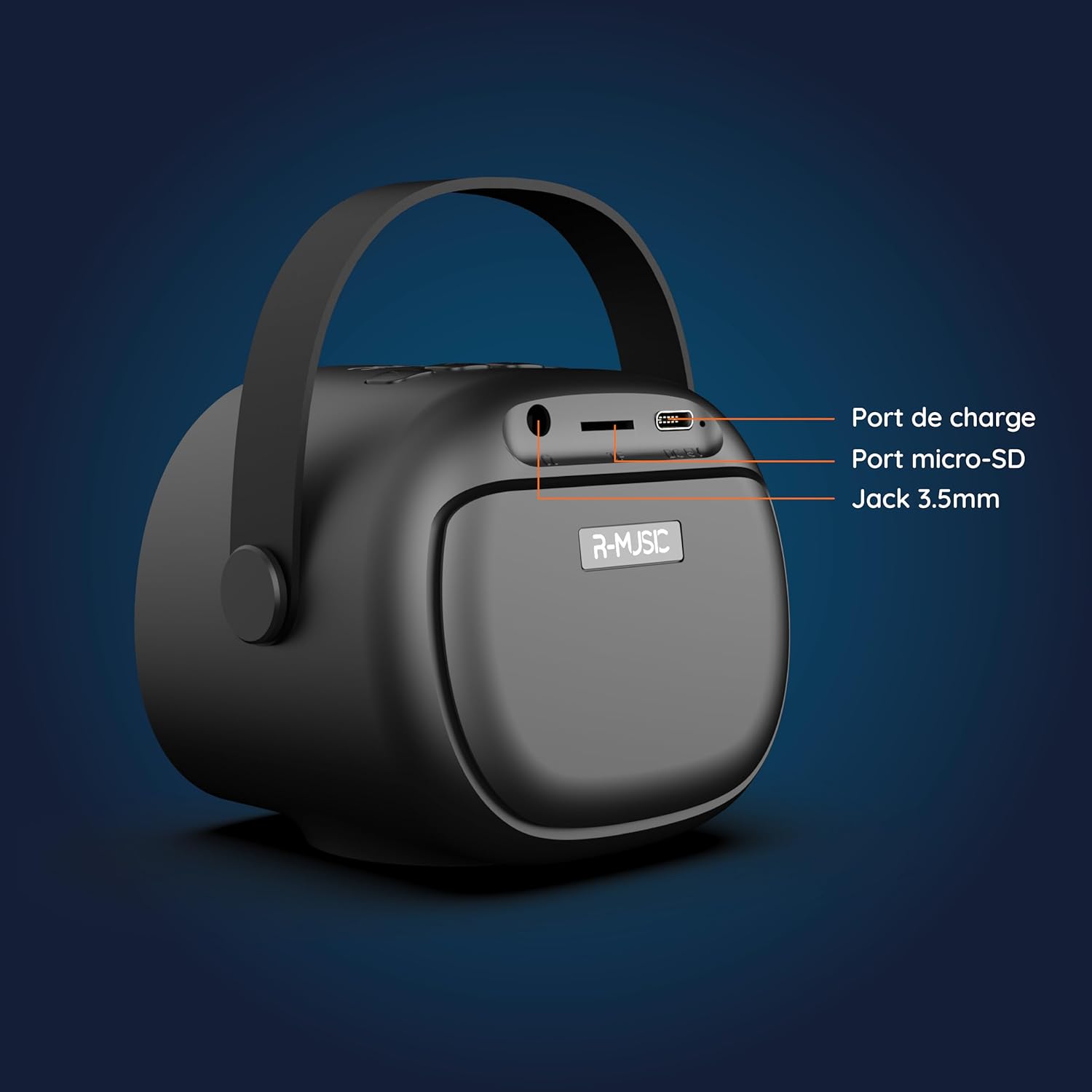
Paveikslėlis: Nugara view of the R-MUSIC KARADUO speaker, highlighting the charging port, Micro-SD card slot, and 3.5mm Jack port.
- Įkrovimo prievadas (USB-C): Connect the provided USB-C cable for charging.
- Micro-SD kortelės lizdas: Įdėkite „Micro SD“ kortelę, kad galėtumėte tiesiogiai atkurti muziką.
- 3.5 mm AUX prievadas: Prijunkite išorinius garso įrenginius naudodami 3.5 mm garso kabelį (nepridedamas).
Mikrofono valdikliai

Image: Close-up of the R-MUSIC wireless microphones, illustrating the power, volume, and mode buttons.
- Maitinimo mygtukas: Long press to power the microphone on or off.
- Garsumo + mygtukas: Padidinkite mikrofono garsumą.
- Garsumo mygtukas: Sumažinti mikrofono garsumą.
- Režimo mygtukas (M): Short press to cycle through 5 voice deformation effects and 3 karaoke modes.
Sąranka
1. Garsiakalbio ir mikrofonų įkrovimas
Prieš pirmą kartą naudodami, visiškai įkraukite garsiakalbį ir abu mikrofonus.
- Pranešėjas: Connect the provided USB-C charging cable to the speaker's charging port and a compatible USB power adapter (not included). The charging indicator will show the charging status.
- Mikrofonai: Each microphone has its own charging port (usually Micro-USB, check the microphone itself). Connect them to a USB power source using appropriate cables (not included, or check if included with microphones).
A full charge provides approximately 14 hours of speaker playback without LED lights, or 7 hours with LED lights activated.
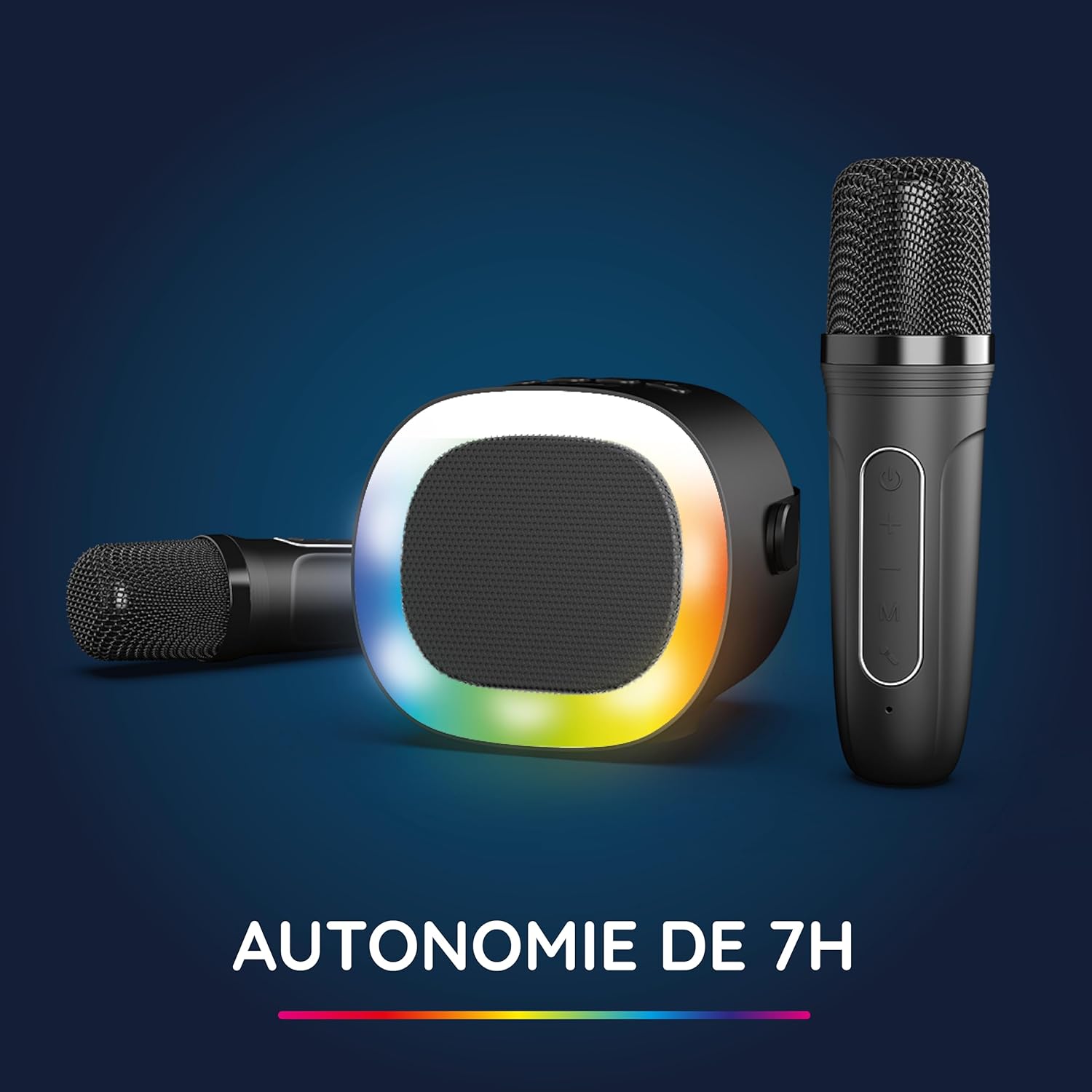
Image: The R-MUSIC speaker and microphones, illustrating the battery life with LED lights active.
2. Powering On and Pairing Microphones
- Įjungimo garsiakalbis: Long press the ON/OFF button on the speaker until it powers on.
- Įjungiami mikrofonai: Long press the Power button on each microphone until they power on.
- The microphones should automatically pair with the speaker. If not, ensure they are within close proximity and try powering them off and on again.
Naudojimo instrukcijos
1. Prijungimas prie garso šaltinių
The KARADUO speaker offers multiple connectivity options:
- "Bluetooth 5.0":
- Įsitikinkite, kad garsiakalbis įjungtas.
- Activate Bluetooth on your smartphone, tablet, PC, or other compatible device.
- Ieškokite "KARADUO" in your device's Bluetooth settings and select it to pair. A confirmation sound will indicate a successful connection.
- The Bluetooth 5.0 technology ensures optimal sound quality and a stable connection up to 10 meters.
- AUX įvestis:
- Connect a 3.5mm audio cable (not included) from your audio device's headphone jack to the speaker's 3.5mm AUX port.
- Garsiakalbis automatiškai persijungs į AUX režimą.
- Micro-SD Card Playback:
- Insert a Micro-SD card containing MP3 audio files into the Micro-SD card slot on the back of the speaker.
- Garsiakalbis automatiškai aptiks kortelę ir pradės groti muziką.
2. Garsiakalbio valdymas
- Leisti / pristabdyti: Short press the ON/OFF/Pause/Play button.
- Garso reguliavimas: Short press the Volume + or Volume - buttons.
- Kitas / ankstesnis takelis: Long press the Volume + (next) or Volume - (previous) buttons.
- LED apšvietimo režimai: Press the LED Animation button to cycle through 5 different LED light animations.

Image: The R-MUSIC speaker showcasing its dynamic LED light animations.
3. Mikrofono valdymas
- Mikrofono garsumas: Use the Volume + and Volume - buttons on the microphone to adjust your vocal volume.
- Voice Deformation Effects: Short press the 'M' (Mode) button on the microphone to cycle through 5 different voice deformation effects.
- Karaoke režimai: Continue pressing the 'M' button to cycle through 3 distinct karaoke modes.
Priežiūra
To ensure the longevity and optimal performance of your R-MUSIC KARADUO system, follow these maintenance guidelines:
- Valymas: Use a soft, dry cloth to clean the speaker and microphones. Do not use abrasive cleaners, solvents, or harsh chemicals.
- Saugykla: Kai nenaudojate, laikykite prietaisą vėsioje, sausoje vietoje, toliau nuo tiesioginių saulės spindulių ir ekstremalių temperatūrų.
- Vandens ekspozicija: Šis gaminys nėra atsparus vandeniui. Venkite sąlyčio su vandeniu ar per didele drėgme.
- Įkrovimas: Only use the provided charging cable and a compatible USB power adapter. Do not overcharge the device.
Trikčių šalinimas
If you encounter issues with your KARADUO system, please refer to the following common problems and solutions:
| Problema | Galima priežastis | Sprendimas |
|---|---|---|
| Nėra galios | Išsikrovęs akumuliatorius arba įrenginys išjungtas. | Charge the speaker/microphones. Long press the power button to turn on. |
| Nėra garso iš garsiakalbio | Volume too low, incorrect input mode, or device not connected. | Increase speaker volume. Ensure correct input (Bluetooth, AUX, Micro-SD). Reconnect Bluetooth or check AUX cable. |
| Mikrofonai neveikia | Mikrofonai išjungti, baterija išsikrovusi arba nesuporuota. | Ensure microphones are charged and powered on. They should automatically pair with the speaker. If not, power cycle them. |
| „Bluetooth“ atjungimas | Device out of range, interference, or low battery. | Move the connected device closer to the speaker (within 10m). Ensure no major obstacles. Recharge the speaker. |
If the problem persists after trying these solutions, please contact R-MUSIC customer support.
Specifikacijos
| Funkcija | Detalė |
|---|---|
| Prekės ženklas | R-MUZIKA |
| Modelio numeris | RM484437 |
| Spalva | Juoda |
| Ryšio technologija | Bluetooth 5.0 |
| Ryšio prievadai | 3.5mm Jack, USB Type-C (charging), Micro-SD Card Slot |
| Ypatingos savybės | 2 Wireless Microphones, Universal Connectivity, 5 Voice Deformation Effects, LED Lights |
| Suderinami įrenginiai | PC, Smartphone, Tablet, TV (via AUX) |
| Maitinimo šaltinis | Maitinamas baterijomis |
| Speaker Battery Life | Up to 14 hours (without LED), 7 hours (with LED) |
| Bluetooth diapazonas | Iki 10 metrų |

Image: Technical dimensions of the R-MUSIC KARADUO speaker, showing its height, width, and depth.
Garantija ir palaikymas
Information regarding specific warranty terms and conditions for the R-MUSIC KARADUO Complete Karaoke Pack is not available in this document. Please refer to the product packaging or the retailer's webSvetainė, kurioje rasite informacijos apie garantiją.
For technical support or further assistance, please contact R-MUSIC customer service through their official websvetainę arba perkant pateiktą kontaktinę informaciją.


