Įvadas
The Sonim XP5 Plus is a rugged, purpose-built communication device designed for demanding environments. It combines cellular and radio-like capabilities, making it ideal for critical communications. This manual provides essential information for setting up, operating, maintaining, and troubleshooting your Sonim XP5 Plus.
Pakuotės turinys
Patikrinkite, ar jūsų prekės pakuotėje yra visi šie daiktai:
- Sonim XP5 Plus XP5900 Rugged Phone
- Maitinimo adapteris
- Ličio jonų baterija
- USB-C kabelis
- Dokumentacija (greito paleidimo vadovas, saugos informacija)
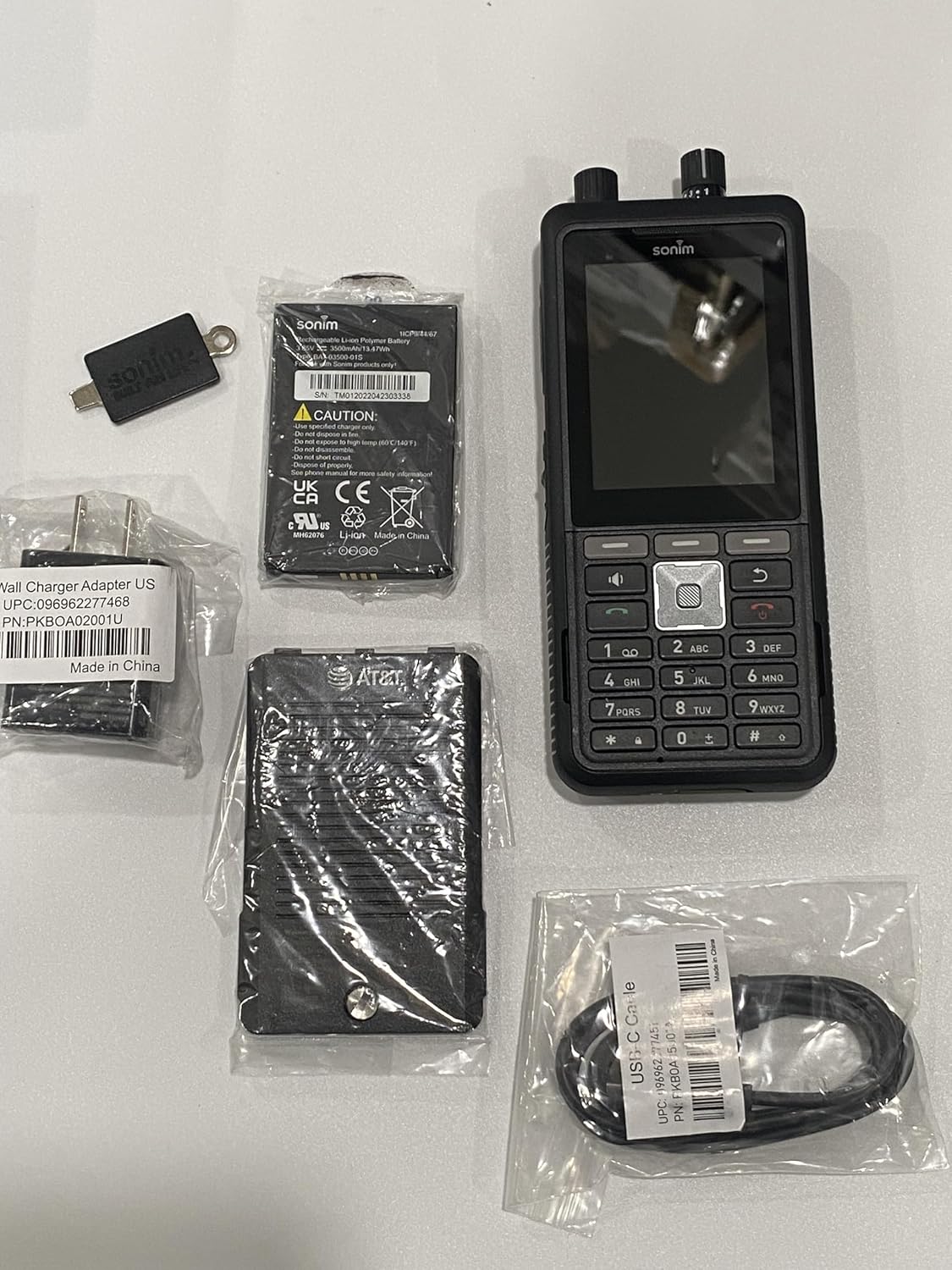
Image: The Sonim XP5 Plus phone, along with its included accessories: a battery, a wall charger adapter, and a USB-C cable. All components are individually packaged.
Produktas baigtasview
Familiarize yourself with the physical features and components of your Sonim XP5 Plus.

Vaizdas: Keli views of the Sonim XP5 Plus phone. The front view shows the display and keypad, the back view shows the camera and speaker, and side views highlight the rugged design and side buttons.
Pagrindiniai komponentai:
- Ekranas: 2.8-inch screen for clear visibility.
- Klaviatūra: Physical buttons for dialing and navigation.
- PTT mygtukas: Large, dedicated button for instant communication.
- Volume Control Knobs: Top-mounted for easy adjustment.
- Kamera: Rear-facing camera for capturing images.
- Garsiakalbiai: Dual 100db+ speakers with noise cancellation for clear audio.
- Sonim SecureAudio Connector: For secure accessory connections.
- USB-C prievadas: Įkrovimui ir duomenų perdavimui.
Sąranka
1. Akumuliatoriaus įdėjimas
- Raskite akumuliatoriaus skyriaus dangtelį telefono gale.
- Atsargiai nuimkite dangtelį.
- Insert the Lithium Ion battery, aligning the gold contacts with the terminals in the phone.
- Replace the battery compartment cover, ensuring it is securely latched to maintain waterproofing.
2. SIM kortelės ir „MicroSD“ kortelės įdėjimas
- With the battery removed, locate the SIM card slot(s) and microSD card slot. The phone supports Dual 4FF Nano SIM cards and up to 512GB microSD.
- Insert your Nano SIM card(s) into the designated slot(s) with the gold contacts facing down.
- If using, insert a microSD card into its slot until it clicks into place.
- Įdėkite bateriją ir baterijos dangtelį atgal.
3. Pradinis įkrovimas
- Prijunkite USB-C laidą prie telefono įkrovimo prievado.
- Connect the other end of the USB-C cable to the provided Power Adapter.
- Įjunkite maitinimo adapterį į sieninį lizdą.
- Allow the phone to charge completely before first use. A full charge takes approximately 2 hours.
Naudojimo instrukcijos
Maitinimo įjungimas/išjungimas
- Norėdami įjungti: Paspauskite ir palaikykite maitinimo mygtuką, kol pasirodys „Sonim“ logotipas.
- Norėdami išjungti: Paspauskite ir palaikykite maitinimo mygtuką, tada ekrane rodomoje parinkčių sąraše pasirinkite „Išjungti“.
Skambinimas
- From the home screen, use the keypad to dial the desired number.
- Norėdami pradėti skambutį, paspauskite žalią skambinimo mygtuką.
- To end a call, press the red End Call button.
Push-to-Talk (PTT) Functionality
The Sonim XP5 Plus features enhanced PTT capabilities for instant communication.
- Dedicated PTT Button: Press and hold the large PTT button on the side of the device to transmit your voice. Release to listen.
- Channel Select Knob: Use the top-mounted knob to quickly switch between communication channels without looking at the screen.
- Garsumo valdymo rankenėlė: Adjust the speaker volume using the other top-mounted knob.

Paveikslėlis: Priekinis planas iš arti view of the Sonim XP5 Plus, highlighting the screen interface, the physical keypad, and the two rotary knobs located at the top of the device for channel and volume control.
Susirašinėjimas žinutėmis
Norėdami siųsti ir gauti tekstinius pranešimus:
- Navigate to the Messaging application from the main menu.
- Pasirinkite „Nauja žinutė“ ir įveskite gavėjo numerį arba pasirinkite iš kontaktų.
- Įveskite pranešimą naudodami klaviatūrą.
- Press the Send button.
Priežiūra
Įrenginio valymas
- Naudokite minkštą, damp cloth to wipe down the exterior of the phone.
- Venkite naudoti stiprių cheminių medžiagų ar abrazyvinių valiklių.
- Ensure all ports and covers are securely closed before cleaning with moisture.
Hidroizoliacijos priežiūra
The Sonim XP5 Plus is designed to be waterproof. To maintain its integrity:
- Always ensure the battery cover and all port covers (e.g., USB-C port) are firmly sealed before exposing the phone to water or dust.
- Do not submerge the phone in water deeper or for longer than specified in the product specifications.
- If the phone has been exposed to saltwater, rinse it thoroughly with fresh water and dry it completely before charging or opening any covers.
Akumuliatoriaus priežiūra
- Use only Sonim-approved chargers and batteries.
- Saugokite, kad akumuliatorius nepatektų į ekstremalias temperatūras.
- Nepradurkite, neišardykite ir nesukurkite trumpojo jungimo akumuliatoriaus.
Trikčių šalinimas
| Problema | Galima priežastis / sprendimas |
|---|---|
| Telefonas neįsijungia. | Battery may be depleted. Charge the phone for at least 30 minutes. Ensure battery is correctly installed. |
| Negalima skambinti arba priimti skambučių. | Check network signal strength. Ensure SIM card is properly inserted and activated. Contact your service provider. |
| Prasta garso kokybė skambučių metu. | Check volume settings. Ensure speakers/microphone are not obstructed. Move to an area with better network coverage. |
| Telefonas nereaguoja. | Perform a soft reset by removing and reinserting the battery. If issue persists, contact support. |
| Baterija greitai išsikrauna. | Sumažinkite ekrano ryškumą. Uždarykite nenaudojamas programas. Apribokite foninių duomenų naudojimą. |
Specifikacijos
| Funkcija | Detalė |
|---|---|
| Modelio pavadinimas | XP5plus (XP5900) |
| Prekės ženklas | Sonimas |
| Operacinė sistema | Proprietary (optimized for rugged use) |
| Ekrano dydis | 2.8 colių |
| Rezoliucija | 240 x 320 |
| RAM atmintis | 2 GB |
| Atminties talpa | 512 GB (išplečiama naudojant „microSD“) |
| Baterijos talpa | 3500 milijonųamp Valandos |
| Pokalbių laikas | 30 valandų |
| Įkrovimo laikas | 2 valandų |
| Belaidės technologijos | Cellular (5G), Wireless |
| SIM tipas | Dual 4FF Nano SIM |
| Ypatingos savybės | Push to Talk, Military Grade Ruggedness (MIL-STD-810H), Non-Incendive Class I, II and III Div 2 ratings, 100db+ speakers with Goodix Echo and Noise Cancellation Technology, Sonim SecureAudio Connector |
| Matmenys (paketas) | 7.5 x 3.5 x 2 colio |
| Prekės svoris | 10 uncijos |
| Spalva | Juoda |
Garantija ir palaikymas
For detailed warranty information, please refer to the warranty card included with your product or visit the official Sonim website. For technical support, product registration, or service inquiries, please contact Sonim customer service through their official channels.
Palaikymas internetu: www.sonimtech.com/support


