1. Įvadas
Thank you for choosing the MageGee Cloud98 Mechanical Keyboard. This manual provides detailed instructions for setting up, operating, and maintaining your keyboard. The Cloud98 features a 98-key layout, triple-mode connectivity (Bluetooth, 2.4GHz wireless, and USB-C wired), RGB backlighting, hot-swappable switches, and PBT keycaps for a premium typing experience.

Image 1.1: MageGee Cloud98 Mechanical Keyboard Overview
2. Pakuotės turinys
Patikrinkite pakuotę, ar joje yra šie daiktai:
- MageGee Cloud98 Mechanical Keyboard
- USB-C kabelis
- 2.4GHz USB Receiver (typically stored in the keyboard's bottom compartment)
- Klaviatūros dangtelio nuėmėjas (jei yra)
- Jungiklio ištraukiklis (jei yra)
3. Produkto ypatybės
- 98 klavišų išdėstymas: Compact yet functional, retaining essential keys.
- Trigubo režimo jungtis: Seamlessly switch between Bluetooth, 2.4GHz wireless, and USB-C wired connections.
- RGB foninis apšvietimas: Customizable full-key RGB backlighting with multiple effects and adjustable brightness.
- Tarpikliu montuojamas dizainas: Enhances typing feel and sound by reducing vibrations and cavity noise.
- PBT Material Keycaps: Durable dual-injection molded keycaps with ASA height for clear legends and ergonomic comfort.
- Karšto keitimo jungikliai: Suderinamas su dauguma 3 ir 5 kontaktų mechaninių jungiklių, todėl juos lengva pritaikyti be litavimo.
- 4000 mAh baterija: Provides extended wireless usage, up to 200 hours with backlight off.
- N klavišo užvedimas: Užtikrina tikslų kiekvieno klavišo paspaudimo registravimą, net ir greitai rašant spaudinius ar žaidžiant žaidimus.
- Platus suderinamumas: Supports Win2000, Win XP, Win ME, Vista, Win7, Win8, Win10, Android, Linux, and Mac operating systems.
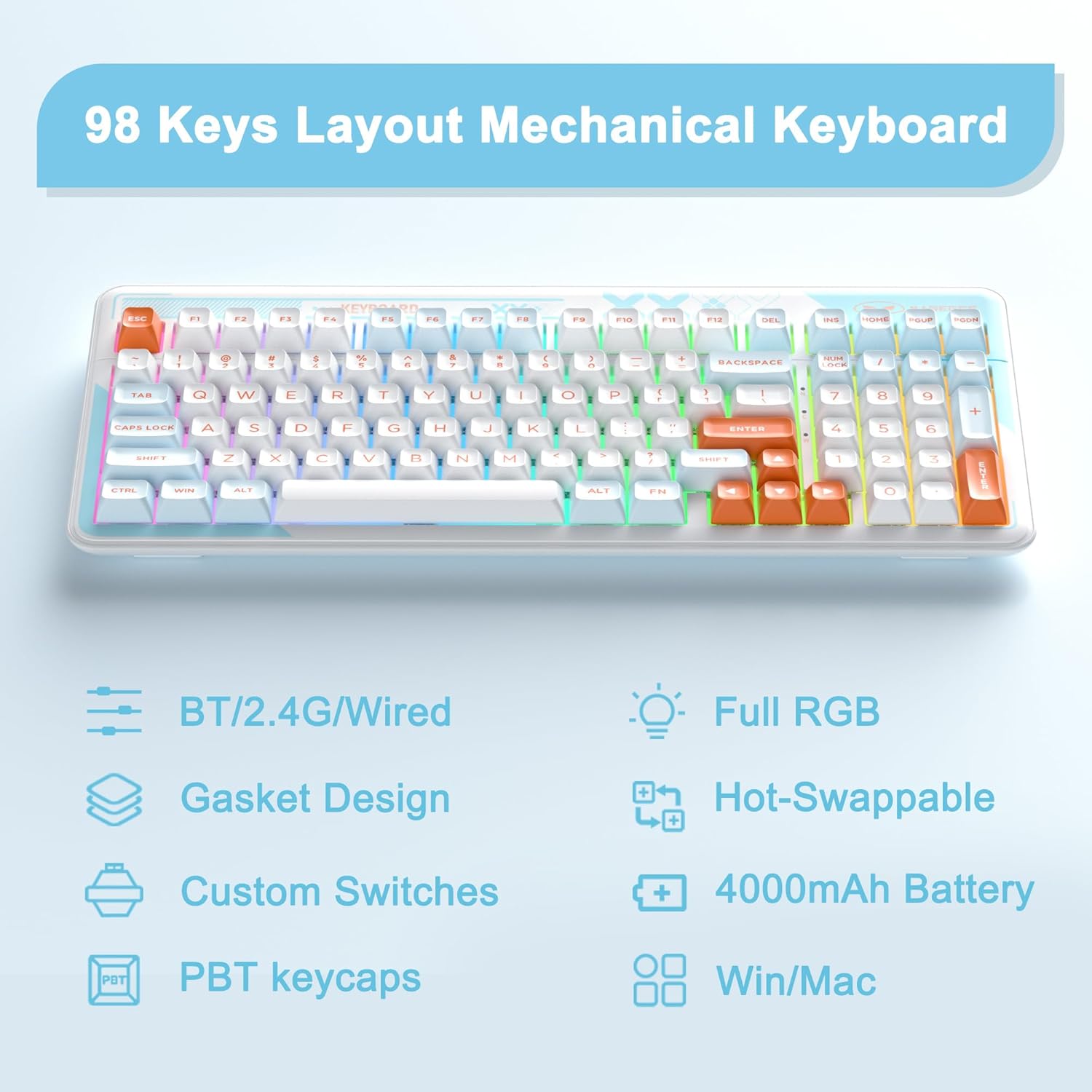
Image 3.1: Key features of the Cloud98 keyboard.

3.2 paveikslas: Išsklaidytas view illustrating the gasket-mounted design and internal components.

3.3 paveikslėlis: Stambus planas view of a Blue Whale mechanical switch.

Image 3.4: Detail of the dual-color injection PBT keycaps.
4. Sąranka ir prijungimas
4.1. Laidinis režimas (USB-C)
- Locate the USB-C port on the keyboard (typically on the top edge).
- Prijunkite vieną pateikto USB-C laido galą prie klaviatūros.
- Prijunkite kitą USB-C kabelio galą prie laisvo kompiuterio USB prievado.
- Klaviatūra bus automatiškai atpažinta ir paruošta naudoti.
- Paspauskite fn+5 for 3 seconds to ensure the keyboard is in wired mode.

4.1 pav.: USB-C laido prijungimas prie klaviatūros.
4.2. 2.4 GHz belaidis režimas
- Locate the 2.4GHz USB receiver, usually stored in a compartment on the bottom of the keyboard.
- Prijunkite 2.4 GHz USB imtuvą prie laisvo kompiuterio USB prievado.
- Turn on the keyboard using the power switch (if present, typically on the back or side).
- Paspauskite ir palaikykite fn+4 for 3 seconds to enter 2.4GHz pairing mode. The indicator light will flash.
- Prijungus, indikatoriaus lemputė nustos mirksėti ir išliks nuolatinė.

Image 4.2: The 2.4GHz USB receiver.
4.3. „Bluetooth“ režimas
- Įsitikinkite, kad klaviatūra įjungta.
- Paspauskite ir palaikykite fn+1, fn+2, arba fn+3 for 3 seconds to enter Bluetooth pairing mode for the respective profile. The indicator light will flash quickly.
- Savo įrenginyje (kompiuteryje, planšetiniame kompiuteryje, išmaniajame telefone) įjunkite „Bluetooth“ ir ieškokite naujų įrenginių.
- Select "MageGee Cloud98" (or similar name) from the list of available devices to pair.
- Once paired, the indicator light will flash slowly when reconnecting, and then remain solid.
- To switch between paired Bluetooth devices, short press fn+1, fn+2, arba fn+3.

Image 4.3: Visual guide for triple mode connection.
5. Naudojimo instrukcijos
5.1. RGB foninio apšvietimo valdymas
The Cloud98 keyboard features full RGB backlighting with 19 RGB modes, 9 monochrome modes, and a custom mode. Use the following key combinations to control the lighting:
- Fn + ← (rodyklė kairėn): Switch backlight flowing direction.
- Fn + → (rodyklė dešinėn): Switch backlight color (single color mode).
- Fn + - (Minus): Decrease backlight flowing speed.
- Fn + = (Equals): Increase backlight flowing speed.
- Fn + Del: Įjungti / išjungti foninį apšvietimą.
- Fn + tarpas: Switch backlight color (RGB mode).
- Fn + Ins: Switch backlight modes.
- Fn + ↑ (rodyklė aukštyn): Padidinkite foninio apšvietimo ryškumą.
- Fn + ↓ (rodyklė žemyn): Sumažinkite foninio apšvietimo ryškumą.

Image 5.1: Keyboard layout showing RGB backlight control key combinations.
5.2. Karšto keitimo jungikliai
The Cloud98 keyboard supports hot-swappable switches, allowing you to change switches without soldering. This feature enables customization of typing feel and sound.
- Nuimti klaviatūros dangtelį: Norėdami švelniai nuimti norimą klavišo dangtelį, naudokite pateiktą klavišo dangtelio traukiklį.
- Nuimkite jungiklį: Pateiktu jungiklio traukikliu atsargiai suimkite viršutinį ir apatinį jungiklio spaustukus ir patraukite jį tiesiai aukštyn.
- Įdėkite naują jungiklį: Align the pins of the new switch with the holes on the PCB. Ensure the pins are straight. Gently push the switch down until it clicks into place. Do not force it to avoid bending pins.
- Pakeiskite klaviatūros dangtelį: Press the keycap onto the new switch stem.
Pastaba: Ensure the keyboard is disconnected or powered off before changing switches to prevent accidental input or damage.
5.3. WIN Key Lock Function
To prevent accidental presses of the Windows key during gaming, you can lock it. Press Fn + Win to toggle the WIN key lock function. An indicator light may illuminate when the WIN key is locked.
5.4. N klavišų perkėlimas
The Cloud98 supports N-Key Rollover, meaning all keys pressed simultaneously will be registered. This is particularly beneficial for fast typists and gamers.

Image 5.2: Illustration of N-Key Rollover capability.
6. Baterija ir įkrovimas
The Cloud98 keyboard is equipped with a 4000mAh battery, providing extended usage in wireless modes.
- Įkrovimas: Connect the keyboard to a USB power source using the provided USB-C cable. The charging indicator light will show the charging status.
- Baterijos veikimo laikas: The keyboard can last up to 200 hours with the backlight off. Battery life will vary depending on backlight usage and connection mode.
- Senkančios baterijos indikatorius: The keyboard may indicate low battery status through a flashing light or reduced functionality. Charge the keyboard promptly when this occurs.

Image 6.1: Information regarding the 4000mAh battery capacity.
7. Priežiūra
Tinkama klaviatūros priežiūra užtikrina jos ilgaamžiškumą ir našumą.
- Klaviatūros dangtelių valymas: Klaviatūros dangteliams nuimti naudokite klavišų dangtelių traukiklį. Nuvalykite juos švelniu muilo tirpalu ir minkšta šluoste, tada kruopščiai nusausinkite prieš vėl uždėdami.
- Klaviatūros korpuso valymas: Klaviatūros paviršių nuvalykite minkšta, sausa šluoste. Įsisenėjusius nešvarumus lengvai nuvalykite.amp cloth can be used, ensuring no moisture enters the keyboard.
- Dulkių šalinimas: Suslėgtu oru pašalinkite dulkes ir šiukšles tarp klaviatūros dangtelių ir jungiklių.
- Saugykla: Klaviatūrą laikykite vėsioje, sausoje vietoje, apsaugotoje nuo tiesioginių saulės spindulių ir ekstremalių temperatūrų.
8. Problemų sprendimas
If you encounter issues with your MageGee Cloud98 keyboard, please refer to the following common solutions:
| Problema | Sprendimas |
|---|---|
| Klaviatūra nereaguoja laidiniu režimu. | Ensure the USB-C cable is securely connected to both the keyboard and the computer. Try a different USB port or cable. Confirm the keyboard is in wired mode (Fn + 5 for 3s). |
| 2.4GHz wireless connection unstable or not connecting. | Ensure the 2.4GHz USB receiver is plugged in. Press and hold Fn + 4 for 3 seconds to re-pair. Move the receiver closer to the keyboard. Check for interference from other wireless devices. |
| Bluetooth ryšio problemos. | Ensure Bluetooth is enabled on your device. Press and hold Fn + 1/2/3 for 3 seconds to enter pairing mode. Remove previous pairings from your device and try again. Ensure the keyboard battery is charged. |
| Foninis apšvietimas neveikia arba užstringa. | Press Fn + Del to toggle the backlight. Adjust brightness with Fn + ↑/↓. Try switching backlight modes with Fn + Ins. Ensure the keyboard battery is charged. |
| Neveikia konkretūs klavišai. | If hot-swappable, carefully remove the keycap and switch. Re-seat the switch firmly, ensuring pins are not bent. If the issue persists, try replacing the switch. |
| Keyboard randomly disconnects. | Ensure the battery is sufficiently charged. For wireless modes, ensure the receiver/device is within range and free from interference. Update drivers if available. |
9. Specifikacijos
| Funkcija | Detalė |
|---|---|
| Modelio numeris | Cloud98 |
| Ryšys | „Bluetooth“, 2.4 GHz belaidis ryšys, USB-C laidinis ryšys |
| Klaviatūros tipas | Mechaninis |
| Foninis apšvietimas | Pilnas RGB |
| Keycap medžiaga | PBT (polibutileno tereftalatas) |
| Ypatinga funkcija | Ergonomic, Gasket Mounted, Hot-Swappable |
| Baterijos talpa | 4000 mAh |
| Gaminio matmenys | 16.5 x 7.87 x 1.57 colio (41.9 x 19.99 x 3.99 cm) |
| Prekės svoris | 2.66 svaro (1.21 kg) |
| Suderinami įrenginiai | Laptop, PC, Android, Mac |
| Operacinės sistemos | Win2000, Win XP, Win ME, Vista, Win7, Win8, Win10, Android, Linux, Mac |
10. Garantija ir palaikymas
MageGee products come with a standard warranty. For specific warranty details, please refer to the warranty card included with your product or visit the official MageGee website. If you encounter any issues not covered in this manual or require further assistance, please contact MageGee customer support through their official channels.
Paprastai palaikymo komandos kontaktinę informaciją galite rasti gamintojo svetainėje websvetainėje arba ant produkto pakuotės.


