1. Įvadas
The Antec C8 is a full-tower E-ATX PC case designed for high-performance computing. It features a dual-chamber layout, seamless tempered glass panels, and extensive cooling support to accommodate modern components. This manual provides detailed instructions for setup, installation, operation, and maintenance of your Antec C8 PC case.

Figure 1: Antec C8 Full-Tower PC Case with internal components and RGB lighting.
2. Pagrindinės savybės
- Pilnas-View Dizainas: Seamless tempered glass front and side panels offer a panoramic view jūsų vidinių komponentų.
- Dviejų kamerų išdėstymas: Separates the main components (CPU, GPU, Motherboard) from the power supply and drives for optimized thermal performance and cable management.
- Platus aušinimo palaikymas: Accommodates up to three 140mm fans or two 160mm fans on both the top and bottom. Supports thick 360mm radiators simultaneously on the top, bottom, and side.
- Tool-less Design: Features 0.8mm and 1.0mm thick steel construction with quick-release panels for easy assembly and maintenance.
- Suderinamumas su vaizdo plokštėmis: Ample width to support wider RTX 40 series GPUs. Supports vertical GPU riser brackets (after removal of horizontal slots) and includes 8 reusable PCIe slot covers.
- Išplėstinis kabelių valdymas: Equipped with interior and rear Velcro straps, along with rubber grommets for routing cables, providing up to 90mm clearance.
- Lanksčios saugojimo parinktys: Modular drive trays support up to two 3.5" HDDs and four 2.5" SSDs.
- Modern I/O Panel: Includes a mainstream Type-C (10Gbps) port, USB 3.0 ports, and a Mic/Audio 2-in-1 port, complete with dust plugs.

Figure 2: Seamless tempered glass panels for a full-view estetinė.

3 pav. Išsamus view of cable management features in the rear chamber.
3. Sąranka ir diegimas
3.1. Skydelio nuėmimas
The Antec C8 features tool-less panels for easy access to internal components. To remove the side and top panels, gently pull them away from the chassis. The bottom dust filter is a pull-out design.

Figure 4: Side panel removal for easy access.

Figure 5: Top panel removal revealing the mounting area.

Figure 6: Rear panel removed to access the second chamber.
3.2. Pagrindinės plokštės montavimas
The Antec C8 supports E-ATX motherboards. Install your motherboard into the main chamber, securing it with the provided screws. Ensure all standoffs are correctly aligned.
3.3. Vaizdo plokštės montavimas
Byloje numatyta ample space for wider RTX 40 series GPUs. You can install your graphics card horizontally into the PCIe slots. For vertical GPU mounting, remove the horizontal PCIe slot covers and install a compatible vertical GPU riser bracket (sold separately).

Figure 7: Graphics card installation options.
3.4. Maitinimo šaltinio įrengimas
The power supply mounts at the bottom of the rear chamber. The case supports power supplies up to 210mm in length and includes a stylish PSU bracket with a rubber pad to prevent scratches.

Figure 8: Power supply unit installation.
3.5. Saugojimo įrenginio diegimas
Utilize the modular drive trays for installing your storage devices. The case supports two 3.5" HDDs and four 2.5" SSDs.

Figure 9: Modular drive trays for storage.
3.6. Kabelių valdymas
The dual-chamber design and included Velcro straps and rubber grommets facilitate excellent cable management. Route cables through the designated channels to maintain a clean interior and optimize airflow.
3.7. Aušinimo sistemos montavimas
The Antec C8 offers versatile cooling options. Fans are not included with this model.
- Top & Bottom: Supports three 140mm fans or two 160mm fans.
- Šonas: Supports three 120mm or two 140mm fans.
- Galinis: Supports one 120mm or one 140mm fan.
For liquid cooling, the case supports thick 360mm radiators on the top, bottom, and side simultaneously.

Figure 10: Vertical cooling airflow demonstration.

Figure 11: Bottom fan configuration with full cut-out design.
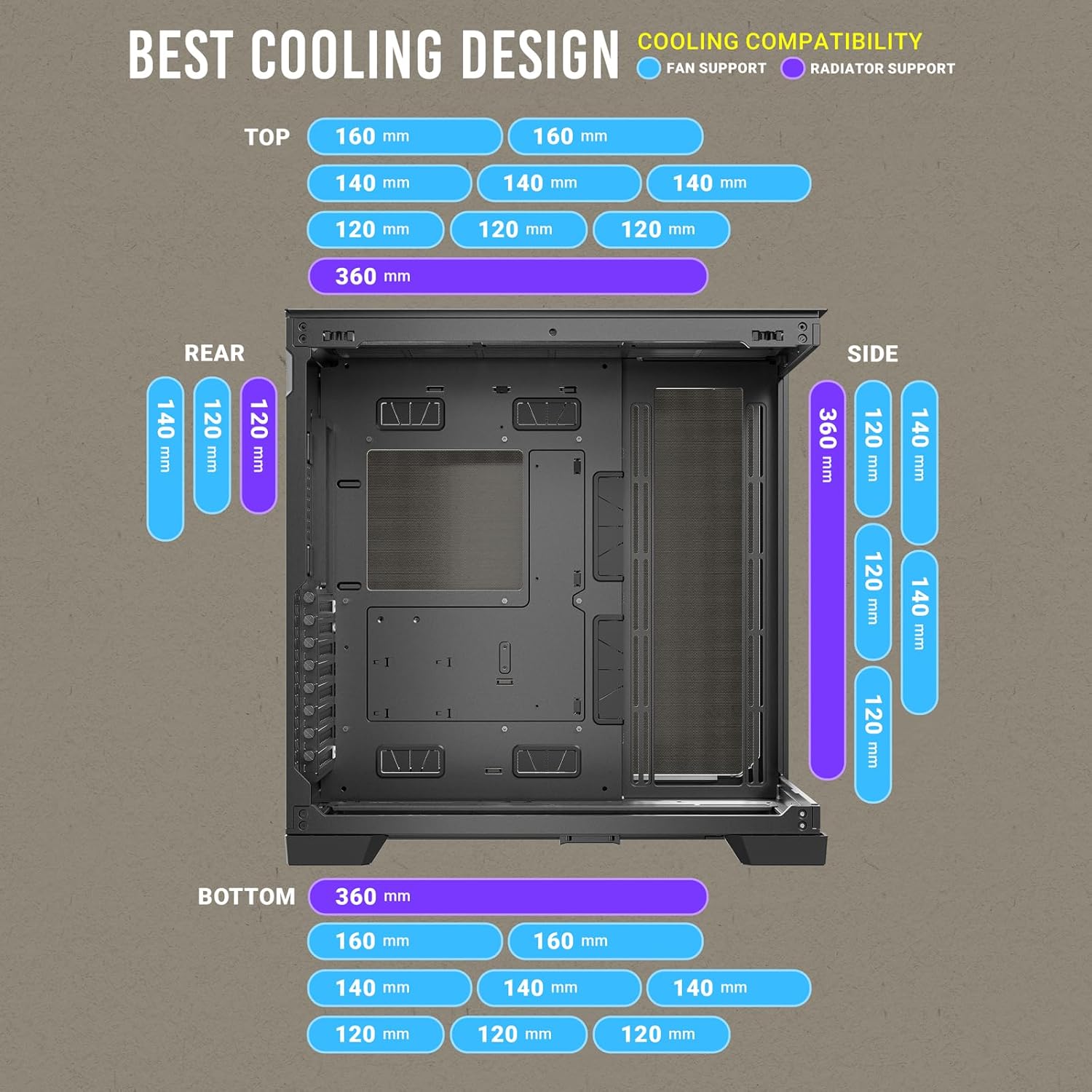
Figure 12: Comprehensive cooling compatibility chart.
4. Naudojimo instrukcijos
4.1. Priekinis įvesties / išvesties skydelis
Priekinis įvesties / išvesties skydelis suteikia patogią prieigą prie svarbiausių prievadų:
- Maitinimo mygtukas
- Atkūrimo mygtukas
- USB 3.0 prievadai (x 2)
- Type-C (10Gbps) Port (x1)
- Headphone/Mic Combo Jack (x1)

Figure 13: Front I/O Panel layout.
5. Priežiūra
5.1. Dulkių filtrai
The Antec C8 includes a pull-out dust filter at the bottom for easy cleaning. Regularly clean the dust filters to maintain optimal airflow and prevent dust buildup inside the case.

Figure 14: Bottom pull-out dust filter for easy maintenance.
5.2. Korpuso valymas
Naudokite minkštą, damp cloth to clean the exterior surfaces of the case. For tempered glass panels, use a glass cleaner and a microfiber cloth to avoid scratches. Ensure the system is powered off and unplugged before cleaning.
6. Specifikacijos
| Funkcija | Specifikacija |
|---|---|
| Prekės ženklas | Antec |
| Modelio pavadinimas | C8 |
| Atvejo tipas | Pilnas bokštas |
| Pagrindinės plokštės suderinamumas | Prailgintas ATX |
| Medžiaga | Grūdintas stiklas |
| Prekės svoris | 10.48 svaro |
| Gaminio matmenys (IxPxH) | 18.7 x 8.26 x 11.92 colio |
| USB 3.0 prievadų skaičius | 2 |
| Maitinimo šaltinio tvirtinimo tipas | Apatinis kalnas |
| Aušinimo būdas | Vanduo |
7. Oficialus produkto vaizdo įrašas
Video 1: Antec C8 motion. This video provides a dynamic overview of the Antec C8 PC case, highlighting its design and features.
8. Problemų sprendimas
Jei diegimo ar eksploatavimo metu iškilo kokių nors problemų, prašomeview the following general troubleshooting steps:
- Maitinimo problemos: Ensure all power cables (PSU, motherboard, GPU, drives) are securely connected. Verify the power supply switch is in the 'ON' position.
- Aušinimo našumas: Check that all fans are spinning correctly and are connected to the motherboard or fan controller. Ensure dust filters are clean and not obstructing airflow.
- Komponentų tinkamumas: Double-check component dimensions against case specifications to ensure compatibility.
- Atsipalaidavę jungtys: Re-seat all major components (RAM, GPU, storage drives) and check all data and power cables.
9. Garantija ir palaikymas
Dėl garantijos informacijos ir techninės pagalbos kreipkitės į oficialią „Antec“ svetainę. websvetainėje arba susisiekite su jų klientų aptarnavimo tarnyba. Išsaugokite pirkimo įrodymą garantiniams reikalavimams.


