1. Įvadas
Ačiū, kad pirkoteasing the TANLANIN CD-001 Portable Rechargeable CD Player. This device offers multiple audio playback options, including CD, Bluetooth input/output, USB, and AUX. This manual provides detailed instructions for setup, operation, maintenance, and troubleshooting to ensure optimal performance and longevity of your device.

1.1 paveikslas: The TANLANIN CD-001 Portable CD Player and included remote control.
2. Produktas baigtasview
2.1 Pakuotės turinys
Patikrinkite pakuotę, ar joje yra šie daiktai:
- 1x TANLANIN CD-001 Vintage CD Player
- 1x Naudotojo vadovas (šis dokumentas)
- 1x nuotolinio valdymo pultas
- 1x C tipo įkrovimo laidas
- 1x garantinis talonas
2.2 Device Features and Controls
Familiarize yourself with the various parts and controls of your CD player.

2.1 paveikslas: Priekyje ir gale view of the CD player, highlighting controls and ports. Key features include the CD play arm, control buttons (Stop, Next, Previous, Play/Pause, Bluetooth Transmit/Repeat), Volume Knob, Headphone Jack (AUX Out), Power Switch, USB Input Port, AUX Input Port, and Type-C Charging Port.

2.2 paveikslas: The LED display indicates the current operating mode: Bluetooth Input Mode (bE), USB Mode (USb), CD Mode (Cd), Line/AUX Mode (LINE), and Bluetooth Output Mode (-bE-).
3. Sąranka
3.1 Pradinis įkrovimas
Before first use, fully charge the CD player. Connect the provided Type-C charging cable to the charging port on the device and the other end to a compatible USB power source (e.g., wall adapter, power bank, computer USB port). The LED indicator will show charging status.
3.2 Įjungimas / išjungimas
To power on the device, locate the power switch on the rear of the unit and slide it to the 'ON' position. To power off, slide the switch to the 'OFF' position.
4. Naudojimo instrukcijos
4.1 CD atkūrimas
- Open the top cover of the CD player.
- Carefully place a CD (CD, CD-R, CD-RW, MP3, WMA formats supported) onto the spindle, pressing gently until it clicks into place.
- Uždarykite viršutinį dangtį.
- Swing the play arm over the CD. The device will automatically detect the CD and begin playback.
- Use the control buttons (Play/Pause, Next Song, Previous Song, Stop) on the device or remote control to manage playback. Adjust volume using the Volume Knob.
4.2 Bluetooth Input Mode (Speaker Function)
This mode allows you to use the CD player as a Bluetooth speaker for your mobile phone or tablet.
- Power on the CD player.
- The LED display will show 'bE' indicating Bluetooth Input Mode. If not, press the 'Mode' button on the remote or the 'Bluetooth Transmit/Repeat' button on the unit until 'bE' is displayed.
- On your mobile device, enable Bluetooth and search for available devices. Select 'TANLANIN CD-001' to pair.
- Once paired, you can play audio from your mobile device through the CD player's speakers.
4.3 Bluetooth Output Mode (Transmitter Function)
This mode allows the CD player to transmit audio to external Bluetooth headphones or speakers.

4.1 paveikslas: The CD player can wirelessly connect to Bluetooth headphones or speakers for audio output.
- Ensure your external Bluetooth headphones or speaker are in pairing mode.
- Power on the CD player and select the desired audio source (CD, USB, or AUX).
- Press and hold the 'Bluetooth Transmit/Repeat' button on the unit or the dedicated Bluetooth output button on the remote until '-bE-' appears on the LED display and starts flashing. This indicates Bluetooth Output Mode and pairing search.
- The CD player will automatically search for and connect to nearby Bluetooth audio devices. Once connected, '-bE-' will stop flashing.
- Audio from the selected source will now play through your connected Bluetooth headphones or speaker.
4.4 USB atkūrimas
Leisti garsą files tiesiai iš USB atmintinės.
- Insert a USB flash drive into the USB Input Port on the rear of the device.
- Press the 'Mode' button on the remote or the 'Bluetooth Transmit/Repeat' button on the unit until 'USb' is displayed.
- The device will automatically begin playing audio files iš USB atmintinės.
- Use the control buttons (Play/Pause, Next Song, Previous Song, Stop) on the device or remote control to manage playback.
4.5 AUX įvestis
Connect external audio devices (e.g., MP3 players, non-Bluetooth phones) using a 3.5mm audio cable.
- Connect one end of a 3.5mm audio cable to the AUX Input Port on the rear of the CD player.
- Kitą galą prijunkite prie išorinio įrenginio ausinių lizdo arba garso išvesties.
- Press the 'Mode' button on the remote or the 'Bluetooth Transmit/Repeat' button on the unit until 'LINE' is displayed.
- Play audio from your external device. The sound will be output through the CD player's speakers.
4.6 Nuotolinio valdymo pulto funkcijos
The included remote control provides convenient access to all playback and mode functions. Refer to the remote control diagram for specific button layouts and functions.
5. Įkrovimas
The TANLANIN CD-001 features a built-in 2000mAh rechargeable Lithium Ion battery, providing 5-8 hours of playtime on a full charge. When the battery is low, the device will indicate this on the LED display or through an audible alert.
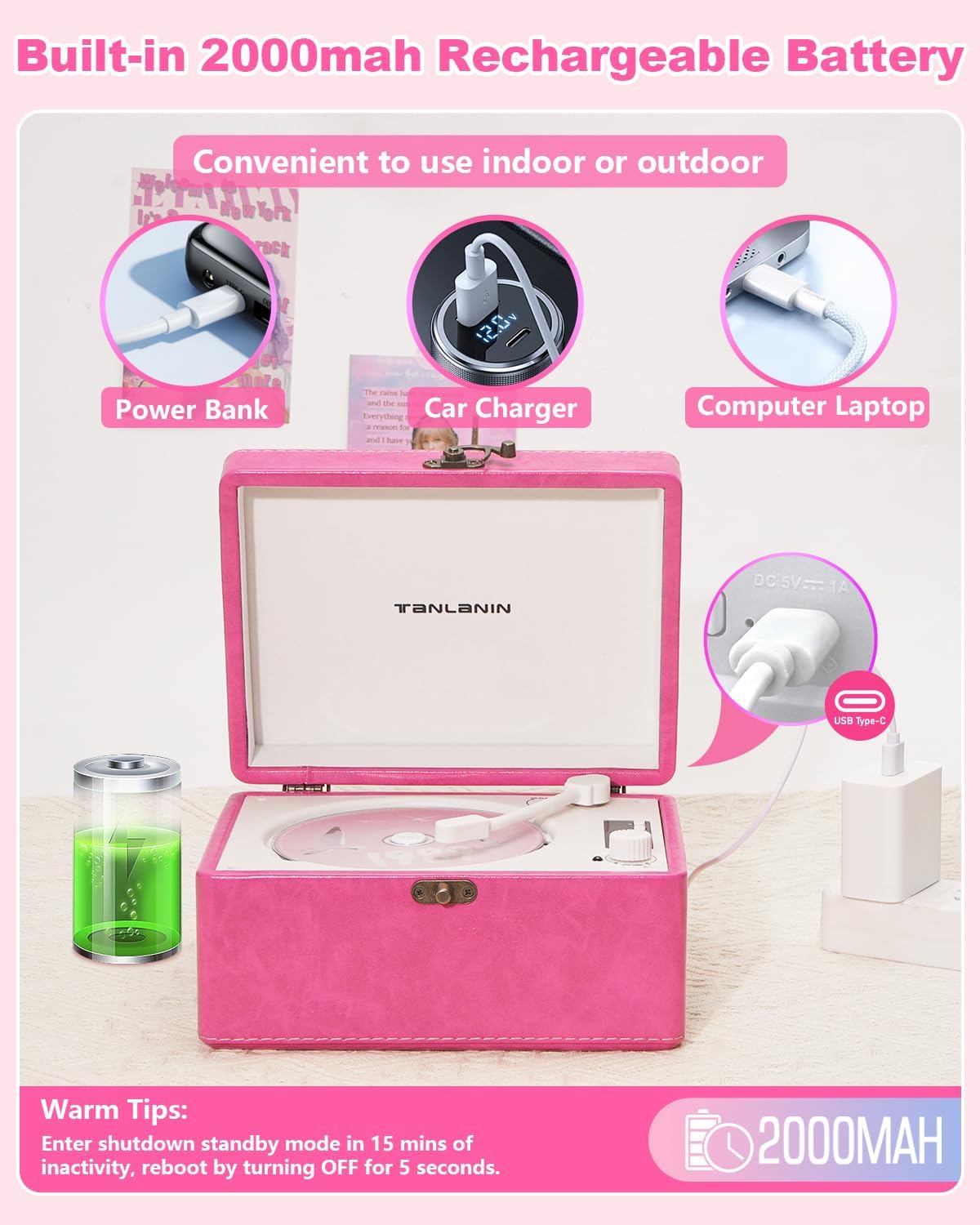
5.1 paveikslas: The CD player can be charged using various USB power sources, including power banks, car chargers, and computer laptops, via the Type-C port.
Norėdami įkrauti įrenginį:
- Connect the provided Type-C charging cable to the Type-C Charging Port on the rear of the CD player.
- Connect the other end of the cable to a 5V/1A USB power adapter (not included), a power bank, or a computer's USB port.
- Įkrovimo indikatorius šviečia įkrovimo metu ir užgęsta arba pakeičia spalvą, kai visiškai įkraunamas.
Šiltas patarimas:
The device will enter shutdown standby mode after 15 minutes of inactivity to conserve battery. To reactivate, turn the power switch OFF for 5 seconds, then turn it back ON.
6. Priežiūra
6.1 Valymas
- Prieš valydami visada išjunkite ir atjunkite įrenginį nuo elektros tinklo.
- Išorę nuvalykite minkšta, sausa šluoste. Nenaudokite abrazyvinių valiklių, vaško ar tirpiklių.
- CD objektyvui naudokite specializuotą CD objektyvo valymo rinkinį. Nelieskite objektyvo tiesiogiai.
6.2 Saugykla
- Laikykite prietaisą vėsioje, sausoje vietoje, apsaugotoje nuo tiesioginių saulės spindulių ir ekstremalių temperatūrų.
- Venkite dėti sunkių daiktų ant grotuvo viršaus.
- Jei ilgesnį laiką sandėliuosite, periodiškai įkraukite akumuliatorių, kad palaikytumėte jo būklę.
7. Problemų sprendimas
| Problema | Galima priežastis | Sprendimas |
|---|---|---|
| Įrenginys neįsijungia. | Baterija išsikrovusi; Maitinimo jungiklis išjungtas. | Charge the device; Ensure power switch is in 'ON' position. |
| Kompaktinis diskas negrojamas arba praleidžia garsą. | CD is dirty, scratched, or inserted incorrectly; Unsupported CD format. | Clean the CD; Reinsert correctly; Ensure CD is a supported format (CD, CD-R, CD-RW, MP3, WMA). |
| Bluetooth device cannot connect (Input Mode). | CD player not in Bluetooth Input Mode; Device too far; Bluetooth not enabled on external device. | Ensure 'bE' is displayed; Move devices closer; Enable Bluetooth on your phone/tablet. |
| No sound from external Bluetooth speaker/headphones (Output Mode). | CD player not in Bluetooth Output Mode; External device not in pairing mode or too far. | Ensure '-bE-' is displayed and flashing during pairing; Put external device in pairing mode; Move devices closer. |
| USB drive not recognized or playing. | CD player not in USB Mode; USB drive not formatted correctly; Unsupported file tipai. | Ensure 'USb' is displayed; Use FAT32 formatted USB drives; Ensure audio fileyra MP3 arba WMA. |
| Nėra garso iš AUX įvesties. | CD player not in AUX Mode; Cable not fully inserted; Volume too low on external device. | Ensure 'LINE' is displayed; Check cable connections; Increase volume on external device. |
8. Specifikacijos
- Gaminio matmenys: 8.07 x 6.1 x 4.13 colio
- Prekės svoris: 3.2 svaro
- Modelio numeris: CD-001
- Baterija: 1 ličio jonų baterija (pridedama)
- Ryšio technologija: 3.5mm AUX input & output, Bluetooth input & output, USB
- Palaikomi CD formatai: CD, CD-R, CD-RW, MP3, WMA
- Ypatingos savybės: Anti-Skip Protection, Battery Level Indicator, Portable, Rechargeable
- Gamintojas: TANLANINAS
9. Garantija ir palaikymas
This TANLANIN CD-001 CD Player comes with a 1 metų gaminio garantijaBe to, a 30-day replacement policy is offered for any manufacturing defects.
For technical support, warranty claims, or any questions regarding your product, please contact TANLANIN customer service through the retailer where the product was purchased.


