1. Įvadas
Thank you for choosing the Daytech TY01-CB04-BL Smart Pet Doorbell. This device is designed to enhance communication between you and your pet, providing a convenient way for your pet to signal their needs and for you to receive instant notifications via your smartphone. This manual provides detailed instructions for setup, operation, and maintenance to ensure optimal performance.
2. Produktas baigtasview
The Daytech Smart Pet Doorbell system consists of a main receiver unit and multiple pet-activated buttons. The receiver connects to your home's 2.4GHz WiFi network and sends notifications to the Tuya Smart app on your smartphone. The pet buttons are touch-sensitive, allowing your pet to easily activate them.
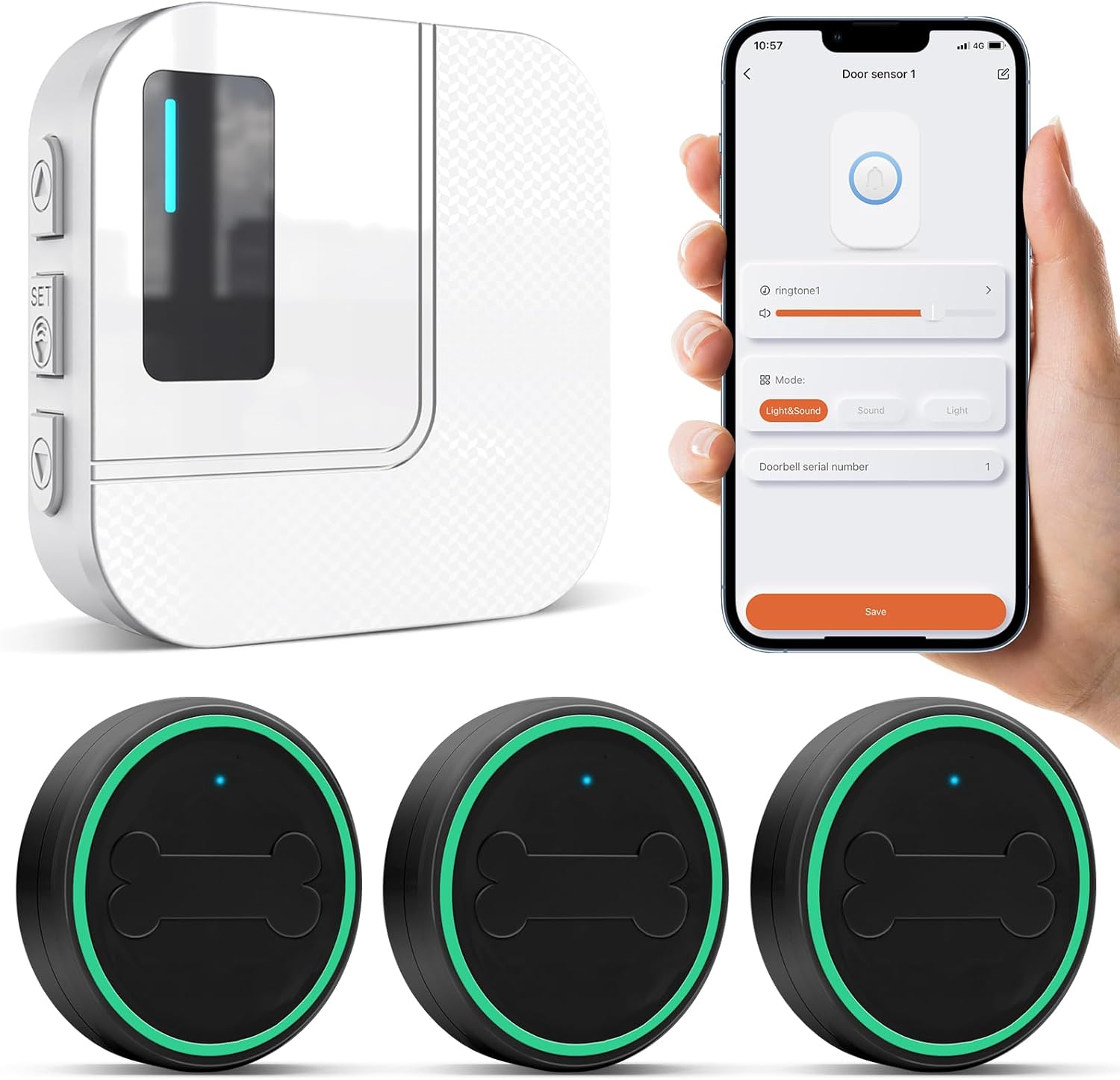
Daytech Smart Pet Doorbell system components: one receiver unit, three pet-activated buttons, and a smartphone displaying the Tuya app interface for doorbell settings.
Pagrindinės funkcijos:
- Programėlės pranešimai: Receive instant alerts on your smartphone when your pet activates the doorbell.
- Pritaikomi nustatymai: Adjust ringtones, volume, and notification preferences through the Tuya Smart app.
- Share Functionality: Easily share device access with family and friends via the app.
- Keičiama sistema: Expand your system by adding more receiver units or pet buttons to suit different areas or multiple pets.
- Neperšlampamas dizainas: Pet buttons are designed to withstand outdoor conditions.
- Emergency Call Function: The system can also be used as an emergency call button for caregivers, sending SOS alerts to connected smartphones.

A Corgi and a kitten interacting with the sensitive touch buttons of the Daytech Smart Pet Doorbell, with a thought bubble from the pet saying, "I can press them when I need them."
3. Sąrankos instrukcijos
- Išpakuokite komponentus: Carefully remove all items from the packaging. Ensure you have the receiver unit, pet buttons, and any included accessories.
- Įjungtas imtuvas: Insert the provided AAA battery into the receiver unit. Ensure correct polarity.
- Atsisiųskite „Tuya Smart“ programą: Ieškokite "Tuya Smart" in your smartphone's app store (iOS App Store or Google Play Store) and install the application.
- Prisijunkite prie WiFi:
- Open the Tuya Smart app and register a new account or log in to an existing one.
- Follow the in-app instructions to add a new device. Select the appropriate device type (e.g., "Doorbell" or "Sensor").
- Ensure your home WiFi network is 2.4 GHzĮrenginys nepalaiko 5 GHz „Wi-Fi“.
- Place the receiver unit within range of your 2.4GHz WiFi router for a stable connection.

The Daytech Smart Pet Doorbell receiver unit positioned near a WiFi router, illustrating the 2.4GHz WiFi connection. A smartphone displays incoming notifications from the doorbell system.
- Pair Pet Buttons: Once the receiver is successfully connected to the app, follow the app's instructions to pair each pet button. This typically involves pressing a pairing button on the receiver and then activating the pet button.
4. Naudojimo instrukcijos
Pet Training and Communication:
Train your pet to press the touch-sensitive button when they need to communicate. This can be for various reasons:
- Going Outside: Your pet can signal when they need to go out for a walk or to use the restroom.
- Hunger: They can indicate when they are hungry and need food.
- Returning Home: If used outdoors, they can signal their return.

Pets using the Daytech Smart Pet Doorbell to communicate needs. Image 1: A dog waiting by the door, indicating a desire to go 'Out'. Image 2: A dog sitting by its food bowl, indicating it is 'Hungry'. Image 3: A dog standing on its hind legs, pressing the doorbell to signal 'Coming Home'.
Behavior Management:
By providing a clear communication method, the doorbell can help reduce undesirable behaviors:
- Reduces Barking: Pets learn to signal their needs instead of barking excessively.
- Prevents Door Scratching: Pets can press the button instead of scratching doors to get attention.
- Aids Potty Training: Helps prevent indoor accidents by giving pets a way to signal when they need to go outside.

The Daytech Smart Pet Doorbell assists in pet training and behavior management. Image 1: A dog pressing the doorbell to signal a need to go potty. Image 2: The doorbell helps prevent undesirable behaviors such as excessive barking. Image 3: It helps deter scratching at doors. Image 4: It aids in preventing indoor urination.
Emergency Call Function:
The pet buttons can also serve as an emergency call system. When activated, an SOS notification will be sent to all connected smartphones, providing a reliable way for individuals (e.g., elderly or those needing assistance) to alert caregivers.

The Daytech Smart Pet Doorbell system can also function as an emergency call system. Image 1 shows an elderly person pressing a call button. Image 2 shows a family member receiving an SOS notification. Image 3 shows a mobile phone displaying a notification center with an SOS alert, indicating high reception range.

Geographic representation of the Daytech Smart Pet Doorbell's SOS notification capability across a wide area, with a note indicating support for 2.4GHz WiFi only. Multiple individuals are shown receiving SOS alerts on their smartphones.
5. Programėlės konfigūracija
The Tuya Smart app provides comprehensive control over your Daytech Smart Pet Doorbell system:
- Nustatymų tinkinimas: Access the device settings within the app to personalize its operation.
- Ringtone and Volume: Select from various ringtones and adjust the volume of the receiver unit to your preference.
- Pranešimų parinktys: Configure how and when you receive alerts on your smartphone, including push notifications for pet activations or SOS calls.
- Bendrinimo prieiga: Use the app's sharing feature to grant family members or caregivers access to the device, allowing them to receive notifications and manage settings.
- Mastelio keitimas: The system supports adding more receiver units or pet buttons. Follow the app's instructions to integrate additional components into your existing setup.

A small dog sitting next to the Daytech Smart Pet Doorbell receiver unit, while a smartphone displays the app interface for customizing ringtones, volume, and other functions.
6. Priežiūra
- Valymas: Gently wipe the receiver unit and pet buttons with a soft, dry cloth. Avoid using abrasive cleaners or harsh chemicals, as these can damage the device.
- Baterijos keitimas: The receiver unit operates on 1 AAA battery. Replace the battery when the low battery indicator appears or if the device's performance diminishes. Ensure proper battery orientation.
- Neperšlampamas dizainas: The pet buttons feature a waterproof design, making them suitable for outdoor placement. However, to ensure longevity, avoid prolonged submersion in water or exposure to extreme weather conditions.
7. Problemų sprendimas
- Negauta jokių pranešimų:
- Verify that the receiver unit is powered on and connected to your WiFi network.
- Ensure your smartphone has an active internet connection and that notifications for the Tuya Smart app are enabled in your phone's settings.
- Confirm that the pet button is correctly paired with the receiver unit.
- Ryšio problemos:
- Prietaisas palaiko Tik 2.4 GHz belaidis internetas. Ensure your router is broadcasting a 2.4GHz signal and that your phone is connected to it during setup.
- Place the receiver unit closer to your WiFi router to improve signal strength.
- Try restarting your WiFi router and the receiver unit.
- Pet Button Not Responding:
- Ensure the button is clean and free from any obstructions that might prevent activation.
- If the button uses a battery (not user-replaceable for this model), contact customer support if it stops functioning.
8. Specifikacijos
| Gaminio matmenys | 10 x 3 x 10 cm (3.94 x 1.18 x 3.94 colio) |
| Svoris | 323 gramai (0.71 svaro) |
| Imtuvo baterija | 1 x AAA baterijos (yra komplekte) |
| Modelio numeris | TY01-CB04-BL (also known as Haustier-Türklingel) |
| Ryšys | Tik 2.4 GHz belaidis internetas |
9. Garantija ir palaikymas
For warranty information or technical support, please refer to the documentation provided with your purchase or contact Daytech customer service through their official website. Please have your model number (TY01-CB04-BL) and purchase details ready when contacting support.


