Įvadas
This manual provides comprehensive instructions for the IPRO P1 GSM 2G Mobile Phone. Designed for ease of use, particularly for seniors, this phone features large buttons, a clear display, and essential functions. Please read this manual carefully before using your device to ensure proper operation and maintenance.
Kas yra dėžutėje
Išpakuodami patikrinkite, ar yra visi šie daiktai:
- 1 x IPRO P1 Mobile Phone
- 1 x Micro-USB Charger
- 1 x Baterija
- 1 x Vartotojo vadovas
Sąranka
1. SIM kortelės ir akumuliatoriaus įdėjimas
- Atsargiai nuimkite telefono galinį dangtelį.
- Insert your 2G GSM SIM card(s) into the designated SIM card slot(s). This phone supports Dual SIM.
- Insert the battery into the battery compartment, ensuring the gold contacts align with the phone's terminals.
- Uždėkite galinį dangtelį, kol jis spragtelėdamas tvirtai užsifiksuos.
2. Akumuliatoriaus įkrovimas
Prieš pirmą kartą naudodami, visiškai įkraukite telefono bateriją.
- Connect the Micro-USB charger cable to the charging port on the phone.
- Įjunkite įkroviklį į maitinimo lizdą.
- The charging indicator on the phone will show the charging status. Once fully charged, disconnect the charger.

1 paveikslas: Priekyje ir gale view of the IPRO P1 mobile phone, showcasing its compact design and textured back cover.
Naudojimo instrukcijos
1. Maitinimo įjungimas/išjungimas
- To power on: Press and hold the Power/End Call button (usually red) until the screen lights up.
- To power off: Press and hold the Power/End Call button until the power off options appear, then select "Power off".
2. Skambinimas
- Įveskite telefono numerį naudodami klaviatūrą.
- Norėdami pradėti skambutį, paspauskite mygtuką „Skambinti“ (dažniausiai žalias).
- Norėdami baigti skambutį, paspauskite maitinimo / skambučio baigimo mygtuką.
3. SMS žinučių siuntimas
- Pagrindiniame ekrane eikite į meniu „Žinutės“.
- Select "Write message" or "New SMS".
- Įveskite savo pranešimą naudodami klaviatūrą.
- Įveskite gavėjo telefono numerį arba pasirinkite jį iš kontaktų.
- Pasirinkite „Siųsti“.
4. Using Key Features

2 paveikslas: The IPRO P1 phone with visual representations of its core functionalities, including communication, settings, multimedia, and utility features.
- FM radijas: Plug in headphones (not included) to use as an antenna, then navigate to the FM Radio application.
- Kamera: Access the camera application from the menu to take photos. The phone has a basic camera.
- Bluetooth: Enable Bluetooth in the settings menu to connect to compatible devices like headsets.
- Žibintuvėlis: The phone features a powerful LED flashlight. It can usually be activated by a dedicated button or a long press of a specific key (refer to quick guide or on-screen prompts).
- Žadintuvas: Set alarms through the "Clock" or "Alarm" application.
- Calendar & Calculator: Basic utility applications are available in the menu.

3 paveikslas: The IPRO P1 phone demonstrating its powerful LED flashlight feature, illuminating a dark path.
Priežiūra
- Valymas: Telefono paviršių valykite minkšta, sausa šluoste. Venkite skystų valiklių ar abrazyvinių medžiagų.
- Akumuliatoriaus priežiūra: Do not expose the battery to extreme temperatures. If the phone will not be used for an extended period, charge it periodically to maintain battery health.
- Saugykla: Telefoną laikykite vėsioje, sausoje vietoje, toliau nuo tiesioginių saulės spindulių ir drėgmės.
- Venkite lašų: While durable, avoid dropping the phone to prevent damage to internal components or the screen.
Trikčių šalinimas
| Problema | Galima priežastis | Sprendimas |
|---|---|---|
| Telefonas neįsijungia | Baterija išsikrovė arba netinkamai įdėta. | Įkraukite bateriją. Įsitikinkite, kad baterija tinkamai įdėta. |
| Negalima skambinti arba priimti skambučių | No SIM card, SIM card not active, or out of network coverage. | Įsitikinkite, kad SIM kortelė įdėta ir aktyvi. Patikrinkite tinklo signalo stiprumą. Susisiekite su savo paslaugų teikėju. |
| Prasta skambučio kokybė | Silpnas tinklo signalas arba trukdžiai. | Move to an area with better signal. Avoid using near other electronic devices. |
| Baterija greitai išsikrauna | Dažnas naudojimas, foninės programos arba sena baterija. | Sumažinkite ekrano ryškumą. Uždarykite nenaudojamas programas. Jei baterija sena, apsvarstykite galimybę ją pakeisti. |
| Ekranas nereaguoja | Programinės įrangos triktis. | Išimkite ir vėl įdėkite bateriją, kad telefonas būtų paleistas iš naujo. |
Specifikacijos
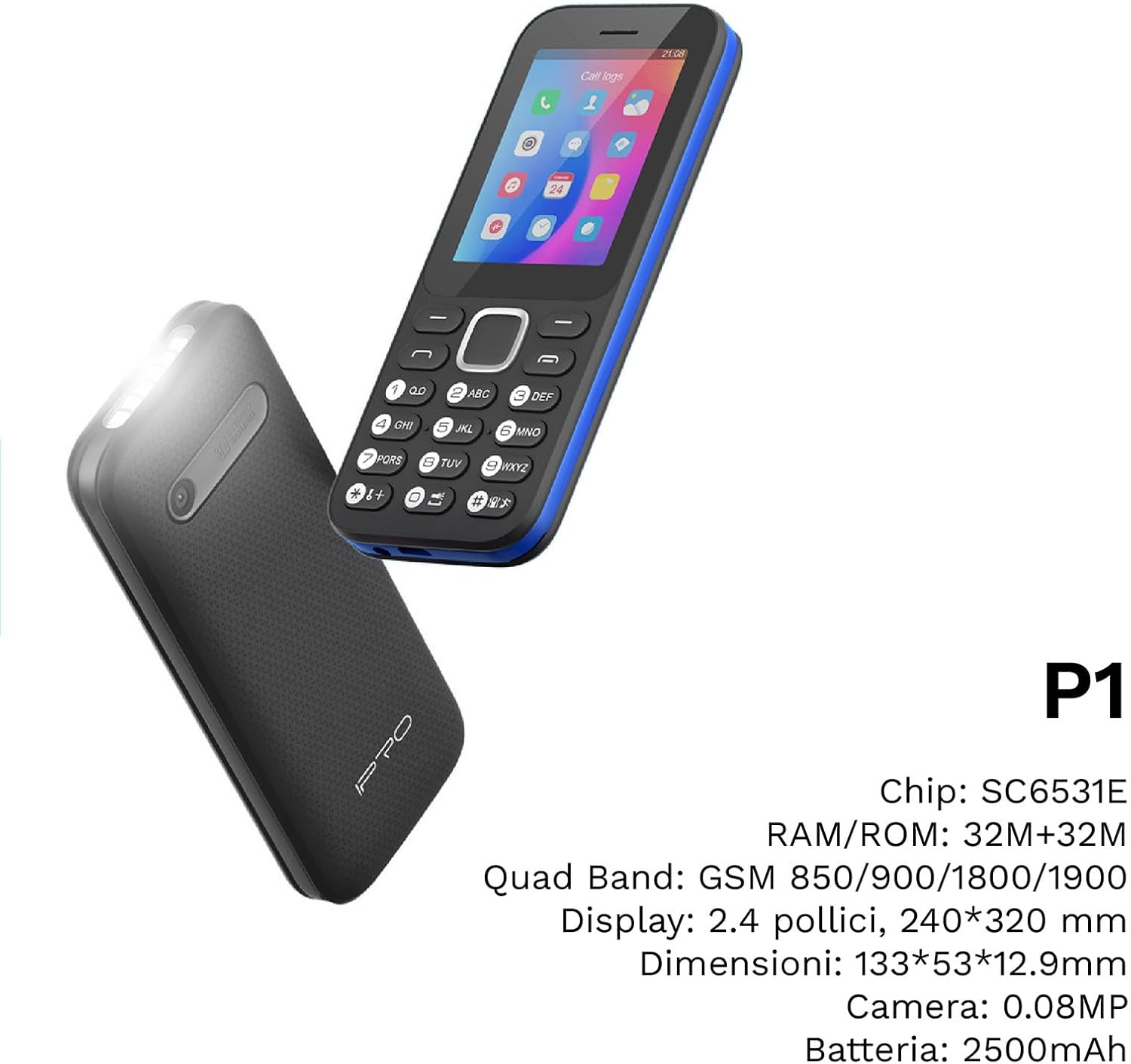
4 paveikslas: Kampinis view of the IPRO P1 phone, accompanied by a summary of its technical specifications.
- Tinklas: 2G GSM Quad Band (850/900/1800/1900 MHz)
- Lustų rinkinys: SC6531E
- Ekranas: 2.4-inch Color Display (240 x 320 resolution)
- RAM: 4 MB
- ROM: 4 MB
- Išplečiama atmintis: Supports up to 16 GB (MicroSD card not included)
- SIM kortelė: Dviejų SIM palaikymas
- Ryšys: Bluetooth
- Savybės: Camera, FM Radio, MP3, MP4, Alarm Clock, Calendar, Calculator, Integrated Games, LED Flashlight
- Baterija: 2500 mAh ličio jonų
- Kalbos: Spanish, English, French, Italian, Portuguese
- Spalva: Juoda
- Gaminio matmenys: 133 x 53 x 12.9 mm
- Svoris: Maždaug 200 gramai

5 paveikslas: A close-up of the IPRO P1's screen, illustrating its 2.4-inch display size for clear viewing.
Garantija ir palaikymas
IPRO offers technical service and customer support for two years from the date of purchase. This warranty covers manufacturing defects but does not include artificial damage.
For support, please contact IPRO customer service through the details provided on the product packaging or the official IPRO website. When contacting support, please have your product model number (IPRO P1) and purchase details ready.

6 paveikslas: A visual representation of the IPRO P1 phone's target audience, showing various seniors comfortably interacting with mobile devices, highlighting its user-friendly design.

7 paveikslas: Display of the IPRO P1 phone in two color variants: classic black and a version with a distinctive blue trim.