1. Įvadas
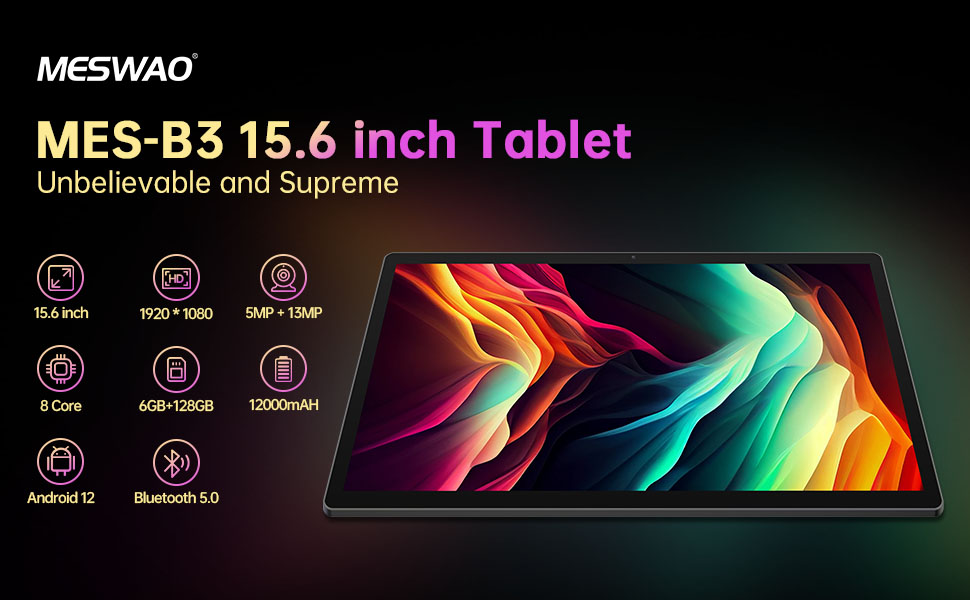
Welcome to the user manual for your MESWAO MES-B3 15.6-inch Android 13 Tablet. This document provides essential information for setting up, operating, maintaining, and troubleshooting your device. The MES-B3 tablet features a large 15.6-inch IPS HD display, an Octa-Core processor, 6GB RAM, 128GB internal storage (expandable), and a 12000mAh battery, designed for a versatile user experience.

Figure 1: MESWAO MES-B3 Tablet Overview
2. Saugos informacija
Please read all safety instructions carefully before using your tablet to prevent injury or damage to the device. Keep this manual for future reference.
- Baterijos sauga: Do not attempt to replace the battery yourself. Do not expose the tablet to extreme temperatures, direct sunlight, or fire. Do not puncture, drop, or disassemble the battery.
- Vanduo ir drėgmė: This tablet is not waterproof. Avoid exposing it to water, rain, or high humidity.
- Valymas: Use a soft, dry cloth to clean the tablet. Do not use liquid cleaners or aerosols.
- Tvarkymas: Venkite planšetinio kompiuterio numetimo ir stiprių smūgių.
- Klausos apsauga: When using headphones, set the volume to a moderate level to avoid hearing damage.
3. Pakuotės turinys
Patikrinkite, ar pakuotėje yra visi reikalingi daiktai:
- MESWAO MES-B3 15.6-inch Android 13 Tablet
- Maitinimo adapteris
- USB-C kabelis
- Vartotojo vadovas (šis dokumentas)
4. Įrenginys baigtasview
Familiarize yourself with the physical components of your MESWAO MES-B3 tablet.

Figure 2: Buttons and Connectors
- Maitinimo mygtukas: Press and hold to turn the tablet on or off. Press briefly to turn the screen on or off.
- Garsumo mygtukai: Sureguliuokite garso garsumą.
- Priekinė kamera: Vaizdo skambučiams ir asmenukėms (5MP).
- Rear Camera with Flashlight: Skirta nuotraukoms ir vaizdo įrašams daryti (13 MP).
- C tipo prievadas: Skirta planšetinio kompiuterio įkrovimui ir prijungimui prie kompiuterio.
- TF kortelės lizdas: Insert a MicroSD card to expand storage.
- Stereo garsiakalbiai: Pateikite garso išvestį.
5. Sąranka
5.1 Planšetinio kompiuterio įkrovimas
Before first use, fully charge your tablet. Connect the USB-C cable to the tablet's Type-C port and the other end to the power adapter. Plug the adapter into a wall outlet. The battery indicator on the screen will show charging status.
5.2 Įjungimas / išjungimas
- Norėdami įjungti: Press and hold the Power Button until the MESWAO logo appears.
- Norėdami išjungti: Press and hold the Power Button until the power options appear, then select 'Power off'.
- Norėdami paleisti iš naujo: Press and hold the Power Button until the power options appear, then select 'Restart'.
5.3 Pradinio nustatymo vedlys
Pirmą kartą įjungus planšetinį kompiuterį, bus atliekami pradiniai nustatymai:
- Pasirinkite norimą kalbą.
- Prisijunkite prie „Wi-Fi“ tinklo.
- Prisijunkite naudodami „Google“ paskyrą arba sukurkite naują.
- Review ir sutikite su sąlygomis ir nuostatomis.
- Nustatykite ekrano užraktą (PIN kodą, šabloną, slaptažodį).
5.4 „MicroSD“ kortelės įdėjimas
To expand the tablet's storage, you can insert a MicroSD card (up to 256GB, as per some product information, though 1TB is also mentioned in images, please verify with product packaging for exact maximum). Locate the TF card slot on the side of the tablet. Gently insert the MicroSD card with the gold contacts facing down until it clicks into place.

Figure 3: Storage Expansion with MicroSD Card
6. Planšetinio kompiuterio valdymas
6.1 Pagrindinė navigacija
The MESWAO MES-B3 runs on Android 13, offering an intuitive touch interface.
- Bakstelėkite: Pasirinkite elementą arba atidarykite programėlę.
- Perbraukimas: Naršykite ekranus, slinkkite sąrašais arba atmeskite pranešimus.
- Žiupsnelis, norint priartinti: Padidinti arba sumažinti turinį ekrane.
- Pagrindinis ekranas: Access your apps and widgets. Swipe down from the top for notifications and quick settings.
4 pav.: „Android 13“ sąsaja
6.2 „Wi-Fi“ ryšys
- Eikite į Nustatymai > Tinklas ir internetas > Internetas.
- Įjunkite „Wi-Fi“.
- Iš sąrašo pasirinkite norimą tinklą ir, jei būsite paraginti, įveskite slaptažodį.
6.3 Bluetooth poravimas
The tablet supports Bluetooth 5.0 for connecting wireless accessories.
- Eikite į Nustatymai > Prijungti įrenginiai > Ryšio nuostatos > Bluetooth.
- Įjunkite Bluetooth.
- Įsitikinkite, kad jūsų „Bluetooth“ įrenginys veikia susiejimo režimu.
- Select your device from the 'Available devices' list and follow on-screen prompts to pair.
6.4 Programėlių valdymas
- Įdiegti programas: Atidarykite „Google Play“ parduotuvės programėlę, suraskite norimą programėlę ir palieskite „Įdiegti“.
- Pašalinti programas: Press and hold an app icon on the home screen or app drawer, then drag it to 'Uninstall' or select 'App info' and choose 'Uninstall'.
- Manage Apps: Eikite į Nustatymai > Programėlės į view, force stop, or clear data for installed applications.
6.5 Ekrano nustatymai
Tinkinkite savo viewpatirtis:
- Eikite į Nustatymai > Ekranas.
- Sureguliuoti Ryškumo lygis.
- Nustatyti Ekrano skirtasis laikas (sleep duration).
- Keisti Šrifto dydis ir Ekrano dydis.
- Įgalinti Tamsi tema skirtas sumažinti akių įtampą.
6.6 Akumuliatoriaus valdymas
The MES-B3 features a 12000mAh battery for extended use.

5 pav.: Ilgesnis baterijos veikimo laikas
- Eikite į Nustatymai > Baterija į view usage and optimize settings.
- Įgalinti Akumuliatoriaus tausojimo priemonė mode to extend battery life when needed.
- Uždarykite nenaudojamas programas, veikiančias fone.
- Sumažinkite ekrano ryškumą.
7. Priežiūra
7.1 Valymas
- Minkšta, nepūkuota šluoste švelniai nuvalykite ekraną ir korpusą.
- Įsisenėjusioms dėmėms šiek tiek pamirkykiteampNuvalykite šluostę vandeniu arba ekrano valikliu, skirtu specialiai elektronikai.
- Avoid using abrasive materials, alcohol, or chemical solvents.
7.2 Saugykla
- Tabletę laikykite vėsioje, sausoje vietoje, apsaugotoje nuo tiesioginių saulės spindulių ir ekstremalių temperatūrų.
- If storing for an extended period, ensure the battery is charged to about 50% to prolong its lifespan.
7.3 Programinės įrangos naujiniai
Reguliariai tikrinkite, ar yra programinės įrangos atnaujinimų, kad užtikrintumėte optimalų našumą ir saugumą.
- Eikite į Nustatymai > Sistema > Sistemos atnaujinimas.
- The tablet will check for available updates. Follow the on-screen instructions to download and install any updates.
8. Problemų sprendimas
Čia pateikiami dažniausiai pasitaikančių problemų, su kuriomis galite susidurti, sprendimai:
| Problema | Sprendimas |
|---|---|
| Planšetinis kompiuteris neįsijungia | Ensure the tablet is charged. Connect it to the charger for at least 30 minutes, then try powering it on again. |
| Wi-Fi ryšio problemos | Restart your Wi-Fi router and the tablet. Go to Settings > Network & internet > Internet, forget the network, and reconnect. |
| Lėtas veikimas | Close unused apps. Clear cache for frequently used apps (Settings > Apps > [App Name] > Storage & cache > Clear cache). Restart the tablet. |
| Baterija greitai išsikrauna | Reduce screen brightness. Disable Wi-Fi/Bluetooth when not in use. Close background apps. Check battery usage in Settings > Battery to identify power-hungry apps. |
| Programėlės stringa arba užstringa | Force stop the app (Settings > Apps > [App Name] > Force stop). Clear the app's cache. If the problem persists, uninstall and reinstall the app. |
9. Specifikacijos
Detailed technical specifications for the MESWAO MES-B3 tablet:

6 pav.: Pagrindinės savybės ir specifikacijos
| Funkcija | Specifikacija |
|---|---|
| Prekės ženklas | MESWAO |
| Modelio numeris | ŠMM-B3 |
| Operacinė sistema | Android 13 |
| Procesorius | MediaTek Octa-Core (MTK6789) |
| RAM | 6 GB |
| Vidinė saugykla | 128 GB |
| Išplečiama saugykla | Up to 256 GB (via TF/MicroSD card) |
| Ekrano dydis | 15.6 colių |
| Ekrano raiška | 1920 x 1080 pikselių (IPS HD) |
| Priekinė kamera | 5 MP |
| Galinė kamera | 13 MP |
| Baterijos talpa | 12000 mAh |
| Baterijos veikimo laikas | Maždaug 10 valandos (priklausomai nuo naudojimo) |
| Ryšys | Bluetooth 5.0, Wi-Fi (802.11ac, 2.4G/5G) |
| Uostai | USB Type-C, TF Card Slot |
| Spalva | Pilka |
| Matmenys (I x P x A) | 36.85 x 22.25 x 0.93 cm |
| Svoris | 1.1 kilogramo |
10. Garantija ir palaikymas
Your MESWAO MES-B3 tablet is covered by a standard manufacturer's warranty. Please refer to the warranty card included in your package for specific terms and conditions, including warranty duration and coverage details.
For technical support, troubleshooting assistance beyond this manual, or warranty claims, please contact MESWAO customer service through the retailer where you purchased the product or visit the official MESWAO websvetainė kontaktinei informacijai.