1. Įvadas
Thank you for choosing the Maxcom Smartwatch FW53 Nitro. This manual provides essential information for the safe and efficient use of your device. Please read it carefully before using the smartwatch and keep it for future reference.
The Maxcom FW53 Nitro is a versatile smartwatch designed to enhance your daily activities, offering features such as activity tracking, notification alerts, and health monitoring when connected to a compatible smartphone.
2. Saugos informacija
- Do not attempt to disassemble, repair, or modify the device. This may void the warranty and cause damage.
- Laikykite įrenginį atokiau nuo ekstremalių temperatūrų, tiesioginių saulės spindulių ir drėgmės.
- Venkite stiprių smūgių ar vibracijos, kad įrenginys nebūtų veikiamas.
- Use only the charger provided or recommended by the manufacturer.
- Consult a medical professional before starting any new exercise regimen or if you have a medical condition that could be affected by using the smartwatch.
- This device is not a medical device and should not be used for diagnosing or treating any medical condition.
3. Pakuotės turinys
Atidarę pakuotę, patikrinkite jos turinį. Jei trūksta kokių nors daiktų arba jie pažeisti, susisiekite su pardavėju.
- Maxcom Smartwatch FW53 Nitro
- Įkrovimo kabelis
- Vartotojo vadovas (šis dokumentas)
4. Įrenginys baigtasview
The Maxcom FW53 Nitro features a rectangular display and a single physical button for navigation and control. The back of the device houses the charging contacts and health sensors.
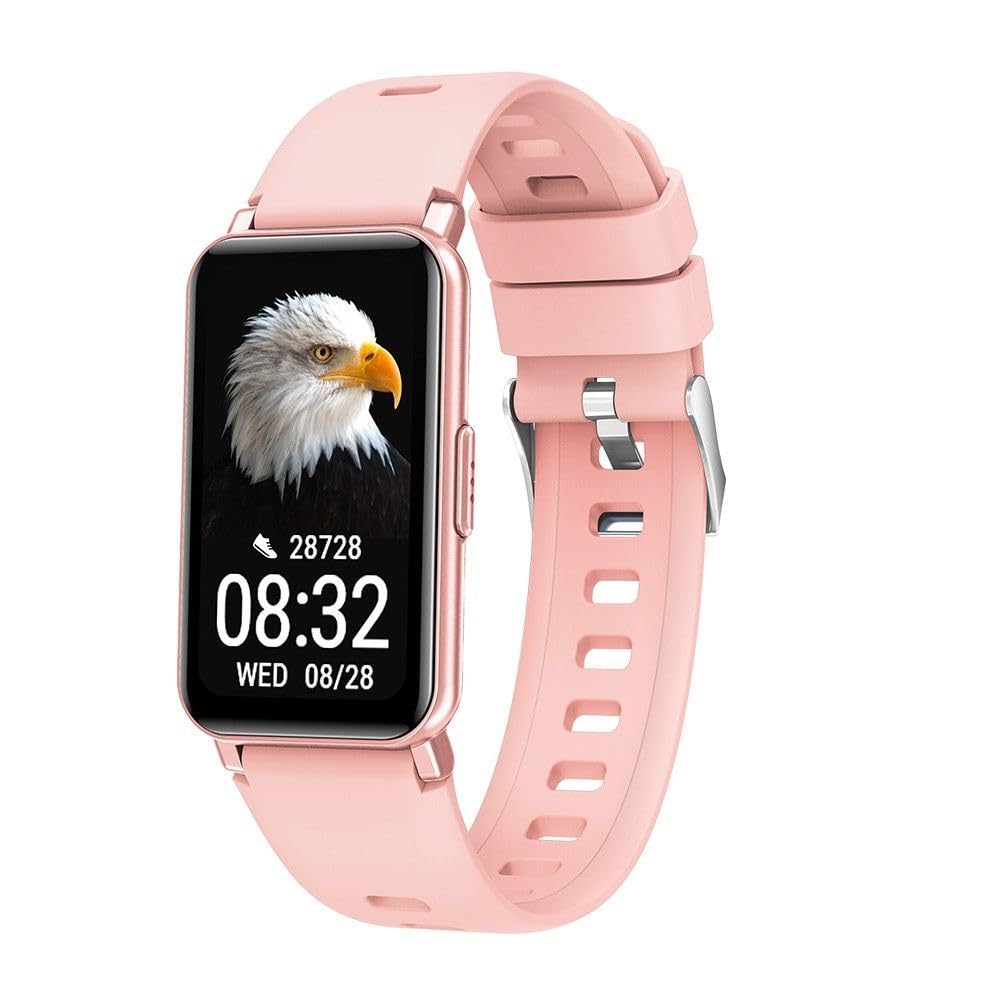
Image 1: Maxcom Smartwatch FW53 Nitro Gold. This image displays the front view of the smartwatch, highlighting its rectangular screen and overall design.
Note: No additional product images or official seller videos were available in the provided data for embedding.
4.1. Komponentai
- Jutiklinis ekranas: For interacting with the user interface.
- Šoninis mygtukas: Typically used for powering on/off, returning to the home screen, or accessing the menu.
- Širdies ritmo jutiklis: Located on the back of the watch, for monitoring heart rate.
- Įkrovimo kontaktai: Located on the back of the watch, for connecting the charging cable.
5. Sąranka
5.1. Išmaniojo laikrodžio įkrovimas
- Connect the charging cable to a USB power adapter (not included) or a computer's USB port.
- Align the magnetic charging pins of the cable with the charging contacts on the back of the smartwatch. The cable will snap into place.
- The watch display will show a charging indicator. Allow the device to charge fully before first use. A full charge typically takes 1-2 hours.
5.2. Įjungimas/išjungimas
- Norėdami įjungti: Press and hold the side button for a few seconds until the Maxcom logo appears.
- Norėdami išjungti: From the home screen, swipe down or navigate to the settings menu, then select the 'Power Off' option. Alternatively, press and hold the side button and select 'Power Off' when prompted.
5.3. Susiejimas su išmaniuoju telefonu
The Maxcom FW53 Nitro connects to your smartphone via Bluetooth using a dedicated companion application.
- Atsisiųskite programą: Ieškokite the official Maxcom smartwatch companion app (refer to the packaging or quick start guide for the exact app name) on the App Store (iOS) or Google Play Store (Android) and install it on your smartphone.
- Įjungti Bluetooth: Įsitikinkite, kad jūsų išmaniajame telefone įjungtas „Bluetooth“.
- Atidarykite programą: Launch the companion app on your smartphone and follow the on-screen instructions to create an account or log in.
- Pridėti įrenginį: Programėlėje eikite į skyrių „Pridėti įrenginį“ arba „Susieti įrenginį“. Programėlė ieškos galimų išmaniųjų laikrodžių.
- Pasirinkite savo išmanųjį laikrodį: Select 'FW53 Nitro' from the list of discovered devices.
- Patvirtinkite susiejimą: A pairing request may appear on both your smartphone and the smartwatch. Confirm the pairing on both devices.
- Užbaigti sąranką: Follow any remaining prompts in the app to complete the setup, including granting necessary permissions for notifications, location, etc.
6. Išmaniojo laikrodžio valdymas
6.1. Pagrindinė navigacija
- Braukite aukštyn/žemyn: Norėdami slinkti per meniu arba pranešimus.
- Braukite kairėn/dešinėn: To switch between different watch faces or quick access widgets.
- Bakstelėkite: Norėdami pasirinkti elementą arba atidaryti programą.
- Side Button Press: A short press usually returns to the home screen or acts as a back button. A long press may access power options or a specific function.
6.2. Pagrindinės savybės
- Pranešimai: Gaukite įspėjimus apie skambučius, žinutes ir programų pranešimus iš susieto išmaniojo telefono.
- Veiklos stebėjimas: Monitors steps taken, distance covered, and calories burned.
- Širdies ritmo stebėjimas: Measures your heart rate throughout the day or on demand.
- Miego stebėjimas: Tracks your sleep patterns, including deep and light sleep stages.
- Sporto režimai: Offers various modes for tracking specific exercises (e.g., running, walking).
- Muzikos valdymas: Valdykite muzikos atkūrimą išmaniajame telefone tiesiai iš laikrodžio.
- Fotoaparato nuotolinis valdymas: Naudokite laikrodį kaip nuotolinį užraktą savo išmaniojo telefono kamerai.
- Oras: Prijungus prie išmaniojo telefono, rodoma dabartinė orų informacija.
6.3. Naudojant pagalbinę programėlę
The companion app on your smartphone is crucial for unlocking the full potential of your Maxcom FW53 Nitro. It allows you to:
- View išsamius veiklos ir sveikatos duomenis.
- Tinkinkite laikrodžio ciferblatus.
- Nustatykite žadintuvus ir priminimus.
- Tvarkyti pranešimų nustatymus.
- Update the smartwatch firmware.
- Configure personal profile informacija.
7. Priežiūra
7.1. Valymas
- Wipe the smartwatch and strap regularly with a soft, damp, nepūkuojantis audinys.
- Nenaudokite stiprių cheminių medžiagų, abrazyvinių valiklių ar tirpiklių.
- Prieš įkrovimą įsitikinkite, kad prietaisas yra sausas.
7.2. Akumuliatoriaus priežiūra
- Venkite dažnai visiškai iškrauti akumuliatorių.
- Reguliariai įkraukite įrenginį, net jei jo nenaudojate, kad palaikytumėte akumuliatoriaus būklę.
- Store the device in a cool, dry place if not used for an extended period.
7.3. Programinės įrangos atnaujinimai
Periodically check the companion app for available software updates. Updates can improve performance, add new features, and fix bugs. Ensure your watch is sufficiently charged before starting an update.
8. Problemų sprendimas
| problema | Galimas sprendimas |
|---|---|
| Išmanusis laikrodis neįsijungia | Ensure the device is fully charged. Press and hold the side button for at least 10 seconds. |
| Nepavyksta susieti su išmaniuoju telefonu | Ensure Bluetooth is enabled on your phone. Restart both the smartwatch and smartphone. Make sure the companion app is installed and running. Forget the device in your phone's Bluetooth settings and try pairing again. |
| Pranešimai negaunami | Check notification permissions in your phone's settings for the companion app. Ensure the app is running in the background. Verify notification settings within the companion app. |
| Netikslūs sveikatos duomenys | Ensure the watch is worn snugly on your wrist, not too tight or too loose. Clean the sensor area on the back of the watch. Ensure your personal information (age, height, weight) is accurate in the companion app. |
| Baterija greitai išsikrauna | Reduce screen brightness. Limit background app refresh. Turn off features like continuous heart rate monitoring if not needed. Ensure no apps are constantly running in the background on the watch. |
8.1. Gamyklinių parametrų atkūrimas
If you encounter persistent issues, a factory reset may resolve them. This will erase all data on your smartwatch and restore it to its original factory settings.
- Navigate to the 'Settings' menu on your smartwatch.
- Look for an option like 'System', 'Reset', or 'Factory Reset'.
- Kai būsite paraginti, patvirtinkite atstatymą.
9. Specifikacijos
| Funkcija | Detalė |
|---|---|
| Modelio pavadinimas | FW53 Nitro |
| Prekės ženklas | Maxcom |
| Ryšys | Bluetooth |
| Suderinami įrenginiai | Išmanusis telefonas |
| Baterijos sudėtis | Ličio polimeras |
| GPS | Via smartphone (uses phone's GPS) |
| Forma | Stačiakampis |
| Ekrano dydis | 0.634 inches (Please note this value is as provided in product data and may refer to a specific measurement unit or be a typo. Actual display size may vary.) |
| Tikslinė auditorija | Adult Mixed |
10. Parama
For further assistance, technical support, or warranty information, please refer to the contact details provided with your purchase or visit the official Maxcom websvetainėje. Išsaugokite pirkimo kvitą kaip pirkimo įrodymą.


