Įvadas
This manual provides comprehensive instructions for the HP 690 Rechargeable Wireless Mouse. It covers product features, setup procedures, operational guidelines, maintenance tips, troubleshooting solutions, and detailed specifications. Please read this manual thoroughly to ensure proper use and optimal performance of your device.

Image: The HP 690 Rechargeable Wireless Mouse being used by an individual working at a computer desk.
Sąranka
1. Pelės įkrovimas
The HP 690 mouse offers versatile charging options: Qi wireless charging or USB-C charging. A full charge provides approximately 4 months of battery life.
- „Qi“ belaidis įkrovimas: Place the mouse on a compatible Qi wireless charging pad. Ensure the mouse is positioned correctly for charging to initiate.
- USB-C įkrovimas: Connect the provided USB-C cable to the mouse's charging port and to a USB power source.

Vaizdas: priekis view of the HP 690 mouse, highlighting the USB-C charging port.
2. Įjungimas/išjungimas
Locate the power switch on the underside of the mouse. Slide the switch to the 'ON' position to power on the device, and to 'OFF' to power it down.

Image: Underside of the HP 690 mouse, showing the ON/OFF power switch and the Qi charging symbol.
3. Prisijungimas prie įrenginių
The HP 690 mouse supports multi-device connectivity via Bluetooth 5.3 and Microsoft Swift Pair.
- „Bluetooth“ susiejimas:
- Įsitikinkite, kad pelė įjungta.
- Kompiuteryje arba įrenginyje eikite į „Bluetooth“ nustatymus.
- Press and hold the Bluetooth pairing button on the mouse (refer to the diagram in the Operating section for button location) until the indicator light flashes, indicating pairing mode.
- Select "HP 690 Mouse" from the list of available Bluetooth devices on your computer/device to complete pairing.
- „Microsoft Swift“ pora:
- For Windows 10/11 devices, ensure Bluetooth is enabled.
- Power on the mouse and bring it close to your computer.
- A notification should appear on your screen prompting you to connect. Follow the on-screen instructions to pair instantly.
Pelės valdymas
1. Mygtukų funkcijos
The HP 690 mouse features 6 programmable buttons and a 4-D tilt wheel for enhanced productivity.

Vaizdas: Viršus view of the HP 690 mouse, illustrating the scroll wheel, left/right click buttons, and central button.

Vaizdas: Šoninė view of the HP 690 mouse, highlighting the two programmable thumb buttons.
- Kairysis/dešinysis spustelėjimas: Standartinės pelės funkcijos.
- Slinkties ratukas: Scroll vertically. The 4-D tilt wheel also allows for horizontal scrolling by tilting it left or right.
- Programuojami mygtukai: The mouse includes additional buttons that can be customized for specific functions or shortcuts using compatible software (e.g., HP Accessory Center).
2. DPI jautrumas
The mouse features a 4000 DPI sensor, providing high sensitivity and precise tracking on virtually any surface. DPI settings can often be adjusted through your operating system's mouse settings or dedicated HP software for finer control over cursor speed.
Priežiūra
1. Valymas
To maintain optimal performance and hygiene, clean your mouse regularly.
- Šiek tiek naudokite minkštą, be pūkelių šluostę dampnuplauti vandeniu arba švelniu valymo tirpalu.
- Avoid harsh chemicals, abrasive cleaners, or spraying liquids directly onto the mouse.
- Clean the optical sensor area on the underside of the mouse periodically to prevent tracking issues.
2. Akumuliatoriaus priežiūra
Norėdami pailginti akumuliatoriaus veikimo laiką:
- Venkite dažnai visiškai iškrauti akumuliatorių.
- Kai ilgesnį laiką nenaudojate pelės, laikykite ją vėsioje, sausoje vietoje.
- If not using the mouse for a long time, power it off to conserve battery.
Trikčių šalinimas
1. Pelė nereaguoja
- Patikrinkite galią: Įsitikinkite, kad pelė įjungta ir jos akumuliatorius pakankamai įkrautas.
- Įkraukite: Connect the mouse via USB-C or place it on a Qi charging pad.
- Iš naujo susiekite „Bluetooth“: Go to your device's Bluetooth settings, remove the HP 690 mouse, and then re-pair it following the instructions in the Setup section.
- Iš naujo paleiskite įrenginį: Sometimes, restarting your computer or device can resolve connectivity issues.
2. Cursor Jumps or Inaccurate Tracking
- Švarus jutiklis: Įsitikinkite, kad pelės apačioje esantis optinis jutiklis yra švarus ir be šiukšlių.
- Paviršiaus patikrinimas: Use the mouse on a clean, non-reflective, and uniform surface. While the mouse tracks on virtually any surface, some highly reflective or uneven surfaces may affect performance.
- DPI nustatymai: Adjust the DPI sensitivity through your operating system's mouse settings.
3. Buttons Not Working
- Programinės įrangos patikrinimas: If programmable buttons are not working as expected, check the HP Accessory Center software for correct configuration.
- Perkraukite: Paleiskite kompiuterį ir pelę iš naujo.
Specifikacijos
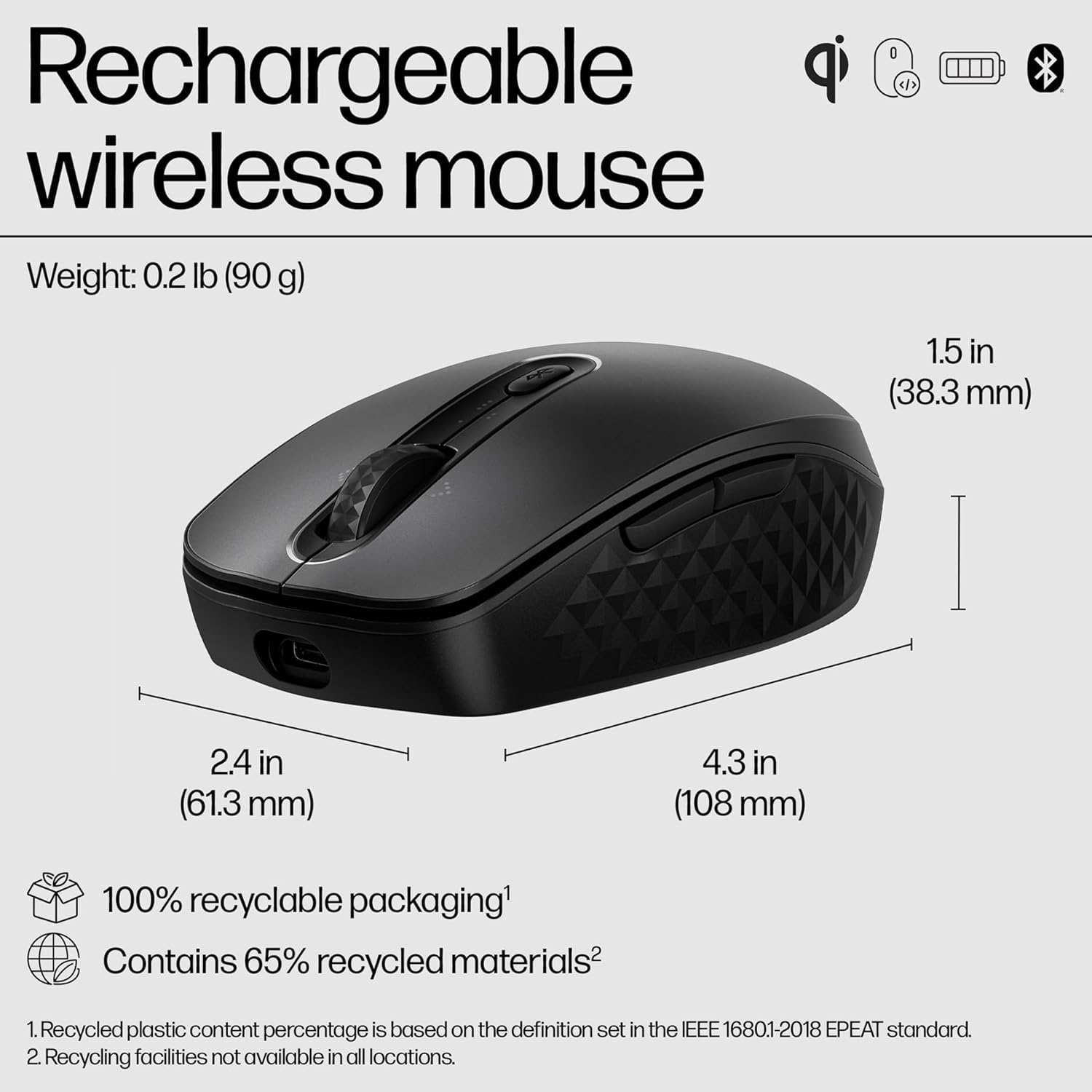
Image: Diagram illustrating the dimensions (4.3 in length, 2.4 in width, 1.5 in height) and environmental features of the HP 690 mouse.
| Funkcija | Detalė |
|---|---|
| Modelio pavadinimas | HP 690 Rechargeable Wireless Mouse |
| Ryšys | Bluetooth 5.3 (Multi-device), Microsoft Swift Pair |
| Įkrovimas | Qi Wireless Charging, USB-C Charging |
| DPI jautrumas | Up to 4000 DPI (Multi-surface tracking) |
| Mygtukai | 6 programuojami mygtukai |
| Slinkties ratukas | 4-D Tilt Wheel |
| Baterijos veikimo laikas | Up to 4 months (approximate) |
| Svoris | 0.2 svaro (90 g) |
| Matmenys (IxPxH) | 4.3 x 2.4 x 1.5 colio (108 x 61.3 x 38.3 mm) |
| Šifravimas | AES 128 bitai |
| Perdirbtos medžiagos | Contains 65% recycled materials |
| Pakuotė | 100% perdirbama pakuotė |
Garantija ir palaikymas
The HP 690 Rechargeable Wireless Mouse is manufactured by HP. For specific warranty details, please refer to the warranty card included with your product or visit the official HP support website. HP provides customer support for product inquiries, technical assistance, and warranty claims.
For further assistance, please visit the official HP support page: www.hp.com/support