Įvadas
The ttec AirBeat Snap True Wireless Bluetooth Earphones are designed to provide a superior audio experience for music and calls. Featuring advanced Bluetooth 5.3 connectivity, touch controls, and a lightweight, sweat-resistant design, these earbuds offer comfort and performance for daily use, gaming, and more.
This manual provides detailed instructions on setting up, operating, maintaining, and troubleshooting your ttec AirBeat Snap earphones. Please read it carefully before use to ensure optimal performance and longevity of your device.
Pakuotės turinys
Pažymėkite langelį prie šių elementų:
- 1 x ttec AirBeat Snap True Wireless TWS Bluetooth Earphones (Left and Right Earbuds)
- 1 x Earphone Charging and Storage Case
- 3 x Sets of Earbud Tips (Sizes: S, M, L)
- 1 x USB-A į USB-C įkrovimo laidas
- 1 x Naudotojo vadovas (šis dokumentas)
Sąranka
1. Pradinis įkrovimas
Prieš pirmą kartą naudodami, visiškai įkraukite ausines ir įkrovimo dėklą.
- Place both earbuds into the charging case. Ensure they are correctly seated; the indicator lights on the earbuds should illuminate.
- Prijunkite USB-C įkrovimo laidą prie dėklo įkrovimo prievado, o kitą galą – prie USB maitinimo šaltinio (pvz., kompiuterio USB prievado, sieninio adapterio).
- The charging indicator on the case will show charging status. A full charge typically takes approximately 1.5 hours.
- Visiškai įkrovę atjunkite įkrovimo kabelį.

Image: ttec AirBeat Snap earbuds placed inside their white charging case, ready for charging or storage.
2. Susiejimas su įrenginiu („Bluetooth 5.3“)
The ttec AirBeat Snap uses Bluetooth 5.3 for a stable and fast wireless connection.
- Open the charging case. The earbuds will automatically enter pairing mode, indicated by flashing lights (if applicable, refer to specific light indicators in product documentation).
- Savo įrenginyje (išmaniajame telefone, planšetiniame kompiuteryje, nešiojamajame kompiuteryje) eikite į „Bluetooth“ nustatymus.
- Įjunkite „Bluetooth“ ir ieškokite galimų įrenginių.
- Select "ttec AirBeat Snap" from the list of found devices.
- Once connected, you will hear a confirmation tone, and the earbud indicator lights will change (e.g., turn off or solid).
„MonoSmart“ technologija: Both earbuds can be used independently. Simply take one earbud out of the case, and it will automatically connect to your paired device. If both are out, they will connect as a stereo pair.

Image: Illustration showing the ttec AirBeat Snap earbuds next to a smartphone with Bluetooth settings open, highlighting Bluetooth 5.3 and MonoSmart Technology for fast and easy connection.
Naudojimo instrukcijos
Palieskite valdiklius
The ttec AirBeat Snap features intuitive touch sensors on each earbud for easy control of music, calls, and voice assistants.
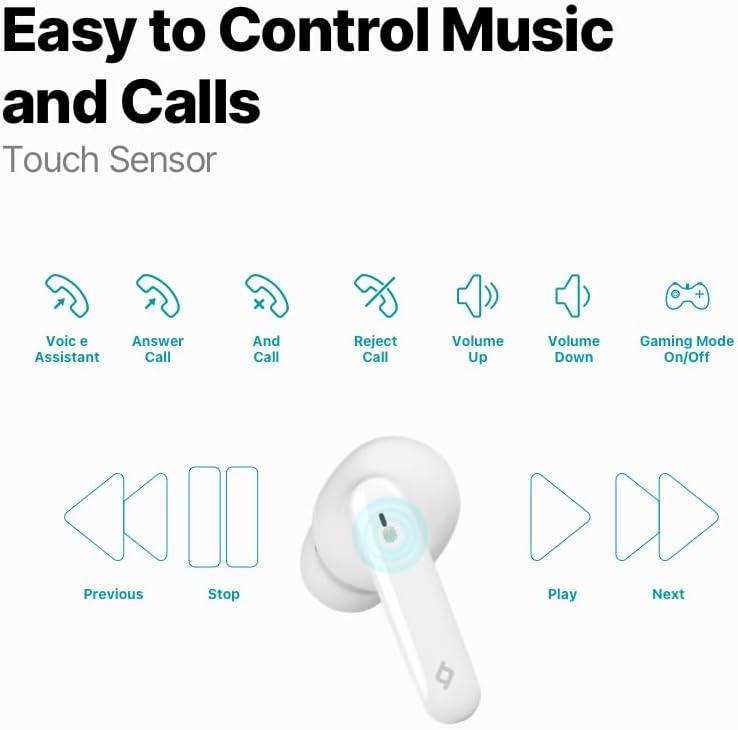
Image: Diagram illustrating the touch control functions for the earbuds, including voice assistant, answer/end/reject call, volume up/down, gaming mode on/off, previous/next track, play/stop.
| Veiksmas | Funkcija |
|---|---|
| Vienas bakstelėjimas (kairėn / dešinėn) | Groti / pristabdyti muziką, atsiliepti / baigti skambutį |
| Dvigubas bakstelėjimas (kairėn) | Ankstesnis takelis |
| Dvigubas bakstelėjimas (dešinėn) | Kitas takelis |
| Trigubas bakstelėjimas (kairėje) | Sumažinti garsumą |
| Trigubas bakstelėjimas (dešinėn) | Padidinti garsumą |
| Ilgas paspaudimas (2 sekundės) | Atmesti skambutį, įjungti balso asistentą |
| Quadruple Tap (Left/Right) | Įjungti / išjungti žaidimų režimą |
Muzikos patirtis
Enjoy superior sound and deep bass for an impressive music experience.

Image: The ttec AirBeat Snap earbuds floating above their open charging case, with sound waves emanating, illustrating superior sound and deep bass.
Gaming Mode (60ms Low Latency)
Activate Gaming Mode for an outstanding gaming and video experience with ultra-low latency of 60ms, ensuring synchronized audio and visuals.

Image: The ttec AirBeat Snap earbuds positioned next to a smartphone displaying a mobile game, emphasizing the 60ms low latency feature for an enhanced gaming experience.
Baterijos veikimo laikas ir įkrovimas
The earbuds provide up to 5 hours of battery life on a single charge. The ultra-compact USB-C charging case extends the total usage time up to 28 hours.
Įkrovimo ir važiavimo funkcija: A quick 15-minute charge provides approximately 1.5 hours of usage.
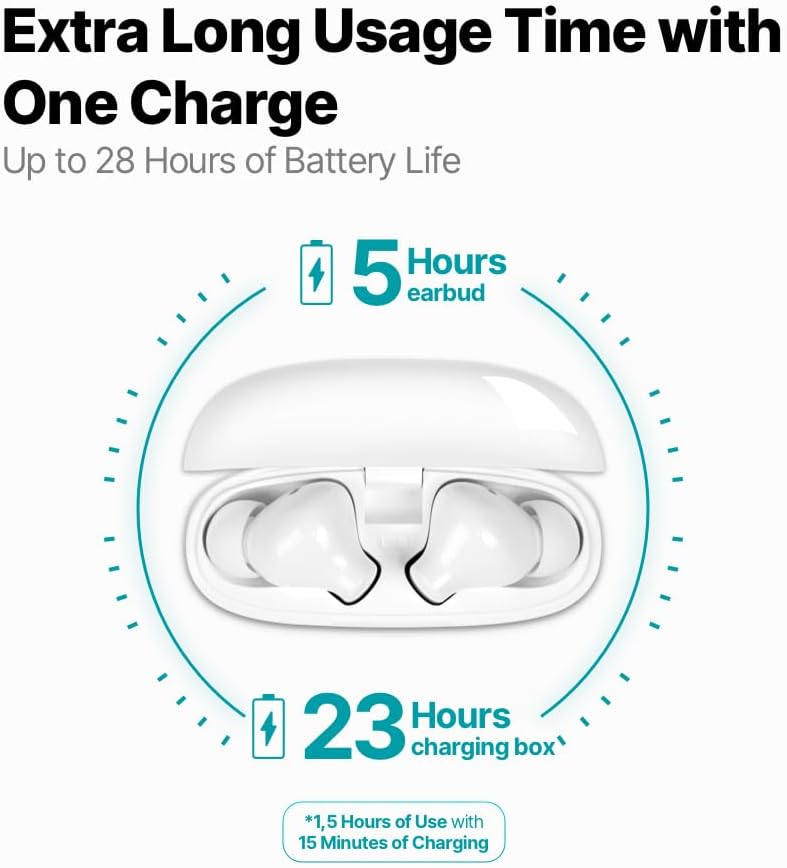
Image: An infographic showing the ttec AirBeat Snap earbuds in their charging case, indicating 5 hours of battery life for the earbuds and an additional 23 hours from the charging case, totaling 28 hours. It also highlights the Charge&Go feature.
Priežiūra
Valymas
- Reguliariai valykite ausines ir įkrovimo dėklą minkštu, sausu, nepūkuotu skudurėliu.
- Nenaudokite abrazyvinių valiklių, alkoholio ar cheminių tirpiklių.
- Švelniai nuvalykite ausų sierą ar nešvarumus nuo ausinių antgalių ir garsiakalbio tinklelio, naudodami mažą, minkštą šepetėlį arba vatos tamponėlį.
- Ensure charging contacts on both earbuds and the case are clean and free of dust.
Sandėliavimas
- Kai nenaudojate, visada laikykite ausines įkrovimo dėkle, kad jos būtų apsaugotos ir įkrautos.
- Prietaisą laikykite vėsioje, sausoje vietoje, toliau nuo tiesioginių saulės spindulių ir ekstremalių temperatūrų.
Water and Sweat Resistance (IPX6 Rated)
The ttec AirBeat Snap earbuds are IPX6 rated, meaning they are resistant to strong jets of water and sweat. This makes them suitable for workouts and outdoor activities.
- Nenardinkite ausinių į vandenį.
- Do not expose the charging case to water, as it is not water-resistant.
- After exposure to sweat or water, wipe the earbuds dry before placing them back into the charging case to prevent damage to the charging contacts.

Image: A person wearing the ttec AirBeat Snap earbuds, demonstrating their sweat and water-resistant design with an IPX6 rating, suitable for active use.
Trikčių šalinimas
| Problema | Galima priežastis / sprendimas |
|---|---|
| Ausinės nesusijungia su įrenginiu. |
|
| Veikia tik viena ausinė. |
|
| Mažas garsumas arba prasta garso kokybė. |
|
| Ausinės neįkraunamos. |
|
| Jutikliniai valdikliai nereaguoja. |
|
Specifikacijos
| Funkcija | Detalė |
|---|---|
| Modelio pavadinimas | AirBeat Snap |
| Produkto modelio numeris | 2 km147 |
| Prekės ženklas | TTEC |
| Ryšio technologija | Belaidis ryšys („Bluetooth 5.3“) |
| Ausinių baterijos veikimo laikas | Iki 5 valandų |
| Įkrovimo dėklas Akumuliatoriaus veikimo laikas | Up to 23 hours (total 28 hours with earbuds) |
| Įkrovimo laikas | Maždaug 1.5 valandos (pilnai įkrauti) |
| Charge&Go Feature | 15 min charge for 1.5 hours use |
| Ausinės svoris | 3.5 gramai (kiekvienas) |
| Įkrovimo dėklo svoris | 30 gramų |
| Ausinių matmenys (ilgis x plotis x aukštis) | 32 x 21 x 2.3 mm |
| Įkrovimo dėklo matmenys (I x P x A) | 57 x 23 x 44 mm |
| Veikimo atstumas | Iki 10 metrų |
| Atsparumo vandeniui lygis | IPX6 (tik ausinėms) |
| Mažos delsos žaidimų režimas | 60 ms |
| Pagrindinės savybės | Touch Control, Lightweight, Microphone Included, Volume Control, Sweat Resistant, MonoSmart Technology |
| Suderinami įrenginiai | Mobile Phone, Laptop, Desktop Computer, Tablet |
| Spalva | Baltas |
| ASIN | B0CQ7YZPFG |
Garantija ir palaikymas
For warranty information and customer support, please refer to the official TTEC websvetainėje arba susisiekite su vietiniu pardavėju. Išsaugokite pirkimo įrodymą, jei prireiktų pateikti garantinį prašymą.
Svarbi pastaba: As per health and hygiene regulations, products that come into direct contact with the human body, such as earphones, can only be returned if their packaging has not been opened, the product has not been tried, damaged, or used.


