Įvadas
Thank you for choosing the RAZEAK Portable 60% Mechanical Gaming Keyboard. This manual provides detailed instructions for the proper setup, operation, and maintenance of your new keyboard. Please read this manual thoroughly before use to ensure optimal performance and longevity of your device.
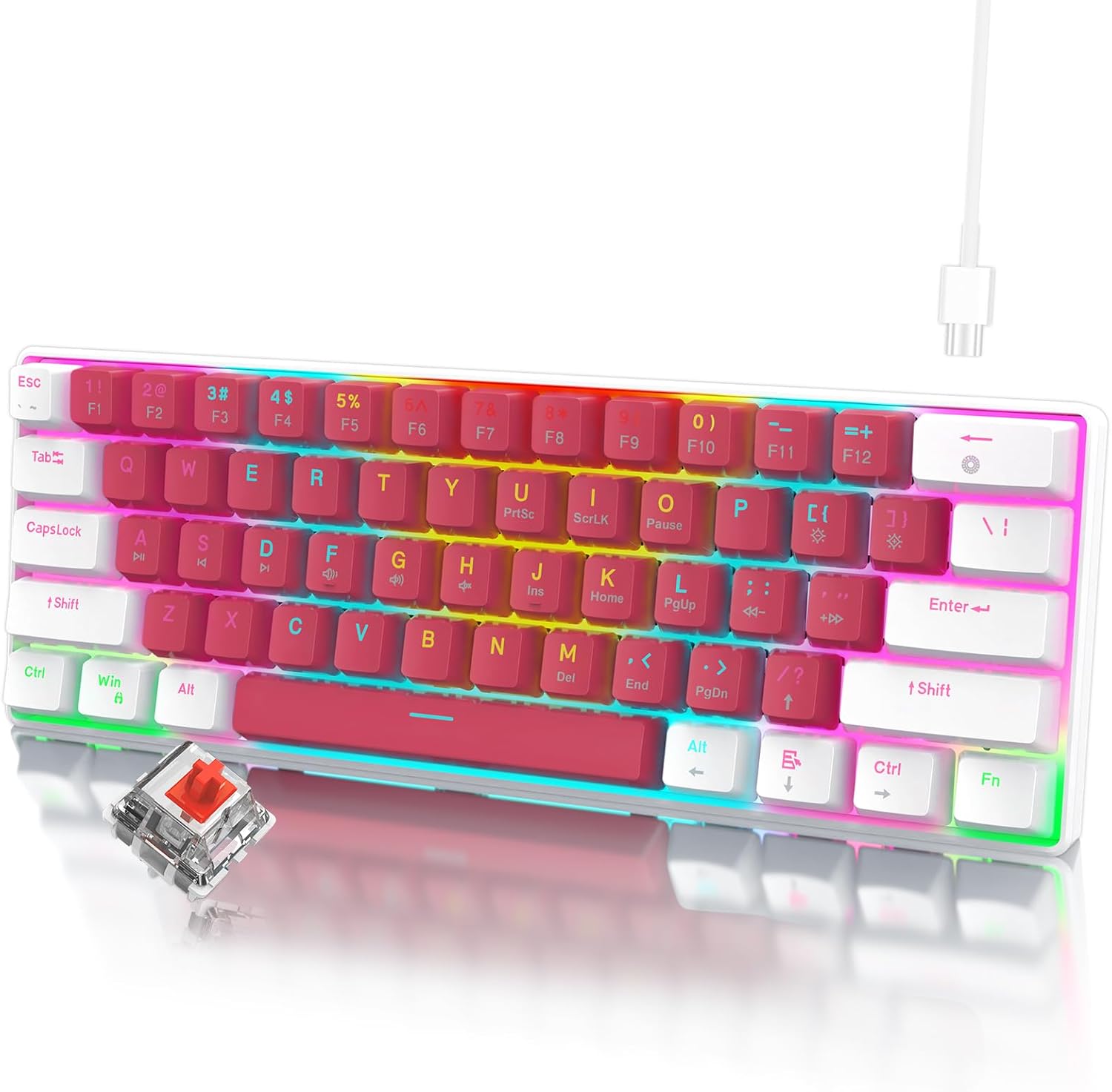
Image: The RAZEAK Portable 60% Mechanical Gaming Keyboard in Pink-White, showcasing its compact design and included USB-C cable. A single red switch is visible in the foreground.
Sąrankos vadovas
1. Pakuotės turinys
Įsitikinkite, kad pakuotėje yra visi daiktai:
- RAZEAK Portable 60% Mechanical Gaming Keyboard
- USB-C kabelis
2. Klaviatūros prijungimas
- Raskite USB-C prievadą klaviatūros gale arba šone.
- Prijunkite vieną pateikto USB-C kabelio galą prie klaviatūros USB-C prievado.
- Connect the other end of the USB-C cable to an available USB port on your computer (Windows PC or Laptop).
- Jūsų operacinė sistema automatiškai atpažins klaviatūrą. Pagrindinėms funkcijoms paprastai nereikia jokių papildomų tvarkyklių.
Naudojimo instrukcijos
Kompaktiškas 60 % išdėstymas
The RAZEAK keyboard features a compact 60% layout with 61 keys, designed to save desk space while retaining full functionality through key combinations. Many standard keys (e.g., F-keys, navigation keys) are accessed via the Function (Fn) key.

Image: A diagram illustrating the 60% ultra-compact 61-key layout of the keyboard, highlighting its space-saving design.
Key Combinations (Fn Key Functions)
To access secondary functions printed on the keycaps, press and hold the Fn key, then press the desired key.
- Fn + 1-0, -, =: Access F1-F12 keys.
- Fn + P, {, }, |, :, ", <, >, ?, /: Access various navigation and editing keys (e.g., Print Screen, Scroll Lock, Pause, Insert, Home, Page Up, Delete, End, Page Down).
- Fn + W, A, S, D: Swap arrow key functions with W, A, S, D for gaming.
- Consult the keycap legends for specific secondary functions.
N klavišo perkėlimas
The keyboard features N-Key Rollover (NKRO), meaning all 61 keys can be pressed simultaneously and registered correctly. This prevents ghosting and ensures precise input, especially beneficial for fast-paced gaming.
Foninio apšvietimo valdymas
The keyboard offers multi-colored LED backlighting with 19 different modes. Use the following key combinations to adjust the lighting:
- Fn + \ |: Cycle through 19 backlight modes.
- Fn + [ {: Sumažinkite foninio apšvietimo ryškumą.
- Fn + ] }: Padidinkite foninio apšvietimo ryškumą.
- Fn + ; :: Decrease backlight speed/animation.
- Fn + ' ": Increase backlight speed/animation.

Vaizdas: Stambus planas view of the keyboard highlighting the backlit key legends and the Red mechanical switches visible beneath the keycaps.
Ergonomiškas dizainas
The keyboard features ergonomic curved keycaps and two adjustable height angles to suit different user preferences and promote comfortable typing during extended use.

Paveikslėlis: Šalutinis profesionalasfile of the RAZEAK keyboard demonstrating its ergonomic high and low key design and adjustable feet for varied typing angles.
Priežiūra
Klaviatūros valymas
Reguliarus valymas padeda išlaikyti klaviatūros išvaizdą ir funkcionalumą.
- Prieš valydami atjunkite klaviatūrą nuo kompiuterio.
- Lengvai naudokite minkštą, nepūkuotą audinį dampKlaviatūros dangtelius ir paviršių nuvalykite vandeniu arba švelniu valymo tirpalu.
- Dulkėms ir šiukšlėms tarp klavišų pašalinti naudokite suslėgtą orą.
- Venkite naudoti stiprias chemines medžiagas, abrazyvinius valiklius ir nepurkškite skysčių tiesiai ant klaviatūros.
Klaviatūros dangtelio priežiūra
The dual-color injection molded keycaps are designed for durability and to prevent legends from fading. If you need to remove keycaps for deeper cleaning or replacement, use a keycap puller to avoid damage.
Trikčių šalinimas
If you encounter issues with your RAZEAK keyboard, refer to the following common solutions:
- Klaviatūra nereaguoja:
- Įsitikinkite, kad USB-C laidas yra tvirtai prijungtas prie klaviatūros ir kompiuterio.
- Pabandykite prijungti klaviatūrą prie kito kompiuterio USB prievado.
- Atjunkite ir vėl prijunkite USB-C laidą.
- Iš naujo paleiskite kompiuterį.
- Backlighting not working or incorrect:
- Check if the backlight brightness is set to maximum using Fn + ] }.
- Perjunkite foninio apšvietimo režimus naudodami Fn + \ | to see if it resolves the issue.
- Neveikia tam tikri klavišai:
- Ensure no debris is lodged under the keycap.
- If using secondary functions, ensure you are pressing the Fn klavišą vienu metu.
Specifikacijos
| Modelio numeris | X44-WTRD-RS_W |
| Gaminio matmenys | 11.5 x 4.02 x 1.57 colio |
| Prekės svoris | 1.39 svaro |
| Gamintojas | WINSTAR TECHNOLOGY INDUSTRIAL LIMITED |
| Suderinami įrenginiai | „Windows“ įrenginiai |
| Ryšio technologija | USB-C |
| Klaviatūros aprašymas | Žaidimų, Mechaniniai |
| Ypatinga funkcija | Portable, Backlit |
| Spalva | Rožinė-balta |
| Foninio apšvietimo spalvų palaikymas | RGB |
| Medžiaga | Plastikiniai |
| Įtraukti komponentai | USB kabelis |
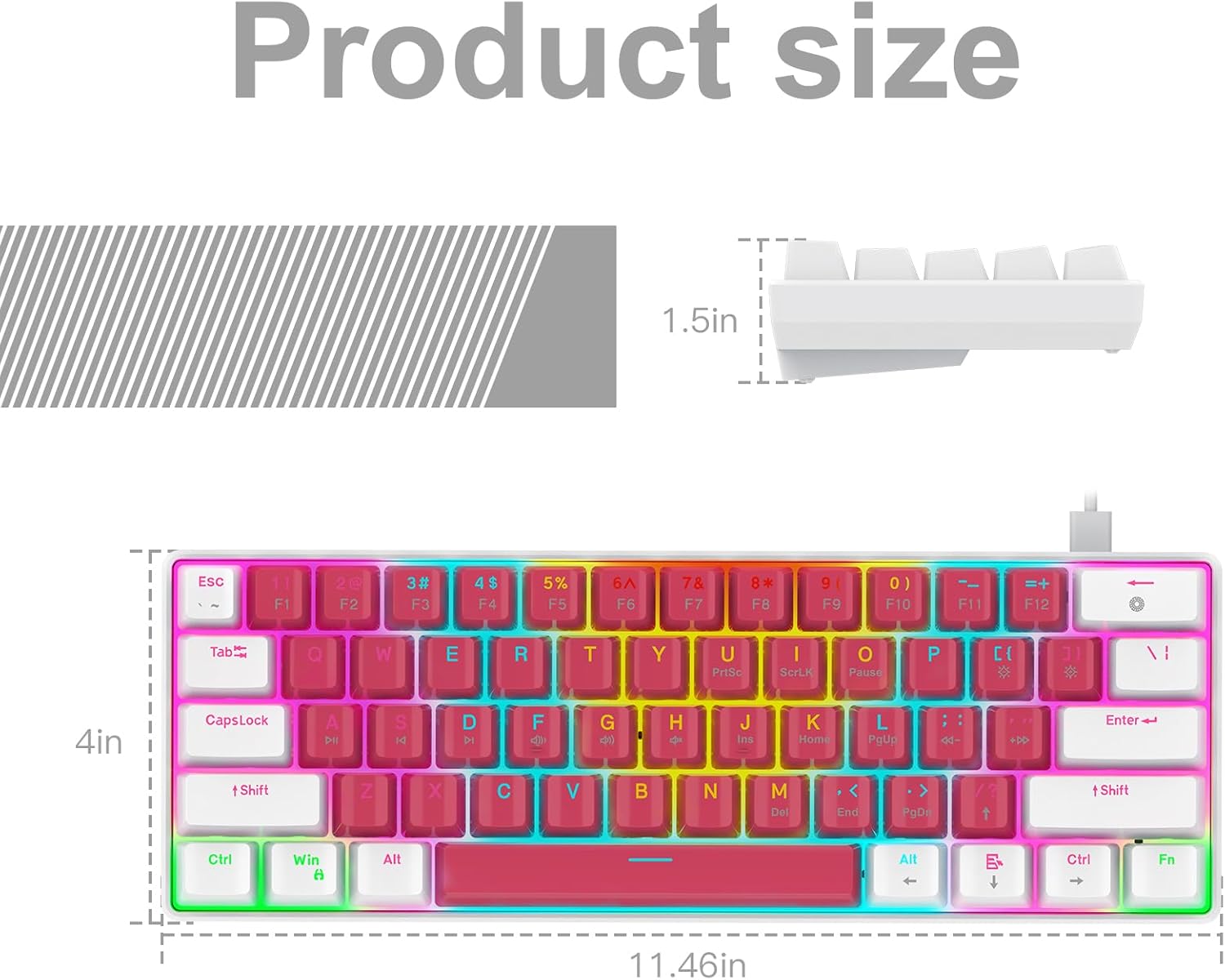
Image: A technical diagram illustrating the product dimensions (length, width, height) of the RAZEAK Portable 60% Mechanical Gaming Keyboard.
Informacija apie garantiją
Specific warranty details for the RAZEAK Portable 60% Mechanical Gaming Keyboard are typically provided with your purchase documentation or can be found on the official RAZEAK websvetainėje. Prašome išsaugoti pirkimo įrodymą garantiniams reikalavimams.
Pagalba klientams
For further assistance, technical support, or inquiries regarding your RAZEAK keyboard, please visit the official RAZEAK store or contact their customer service through the details provided on their websvetainę.
You can visit the RAZEAK store at: RAZEAK Store on Amazon


