1. Įvadas
This manual provides comprehensive instructions for the proper setup, operation, and maintenance of the Sartorius GL2202i-2S Gold Scale. Adhering to these guidelines will ensure accurate and reliable performance of your precision weighing instrument.
2. Saugos informacija
Kad išvengtumėte sužalojimų ir įrenginio pažeidimų, laikykitės šių saugos priemonių:
- Operate the scale only in a stable, level environment free from excessive vibrations, drafts, and extreme temperature fluctuations.
- Do not expose the scale to corrosive chemicals or liquids.
- Ensure the power supply matches the specifications indicated on the device.
- Venkite svarstyklių numetimo ar stiprių smūgių.
- Only qualified personnel should perform repairs or internal adjustments.
3. Produktas baigtasview
The Sartorius GL2202i-2S is a precision gold scale designed for accurate weighing applications. Key components include the weighing pan, digital display, and control panel.
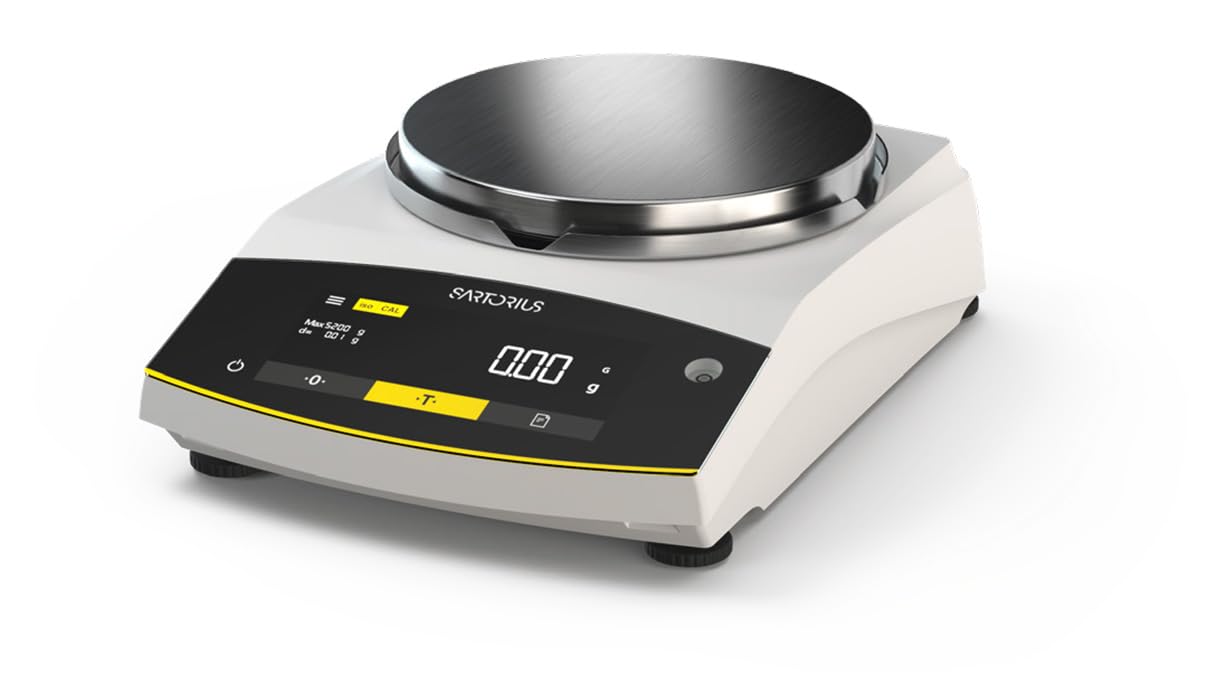
Figure 1: Sartorius GL2202i-2S Gold Scale. This image shows the scale's stainless steel weighing pan, the digital display, and the control buttons for operation.
Pagrindiniai komponentai:
- Svėrimo lėkštė: Nerūdijančio plieno platforma sveriamiems daiktams sudėti.
- Skaitmeninis ekranas: Hybrid display (LED and touch technology) showing weight readings and operational status.
- Valdymo skydelis: Buttons for power, tare, calibration, and menu navigation.
- Išlyginančios pėdos: Adjustable feet to ensure the scale is perfectly level.
4. Sąranka
4.1 Išpakavimas
Carefully remove the scale and all accessories from the packaging. Retain the original packaging for future transport or storage.
4.2 Įdėjimas
Place the scale on a firm, stable, and level surface. Avoid locations subject to:
- Direct sunlight or heat sources.
- Strong air currents (drafts from doors, windows, or air conditioning).
- Vibrations from machinery or heavy traffic.
- Rapid temperature changes.
4.3 Skalės išlyginimas
Adjust the leveling feet located at the bottom of the scale until the air bubble in the level indicator (usually located near the display) is centered. This ensures accurate weighing results.
4.4 Maitinimo jungtis
Connect the provided power adapter to the scale's power input and then to a suitable electrical outlet. Allow the scale to warm up for at least 30 minutes after initial power-on for optimal stability.
5. Naudojimo instrukcijos
5.1 Maitinimo įjungimas/išjungimas
Paspauskite Galia button (often marked with a circle and a vertical line) to turn the scale on or off. The display will show a self-test sequence before settling at zero.
5.2 Pagrindinis svėrimas
- Ensure the display reads 0.00 g before placing any item on the pan.
- Atsargiai padėkite sveriamą daiktą ant svėrimo lėkštės centro.
- Wait for the reading to stabilize. The stable reading will be displayed.
- Remove the item from the pan.
5.3 Taros funkcija
The tare function allows you to weigh items in a container by subtracting the container's weight.
- Padėkite tuščią indą ant svėrimo lėkštės.
- Paspauskite Tare button (often marked with a 'T' or '->0<-'). The display will reset to 0.00 g.
- Įdėkite sveriamą daiktą į indą. Ekrane bus rodomas prekės grynasis svoris.
- Remove both the item and container from the pan.
6. Kalibravimas
The Sartorius GL2202i-2S features an automatic, built-in calibration and adjustment function. Regular calibration ensures the highest level of accuracy. Refer to the on-screen prompts or the scale's specific menu for initiating the automatic calibration process. Ensure the scale is stable and free from any load during calibration.
7. Priežiūra ir valymas
7.1 Valymas
To maintain the scale's performance and appearance:
- Disconnect the scale from the power supply before cleaning.
- Išorinius paviršius nuvalykite minkšta, damp skudurėliu ir švelniu plovikliu.
- Nenaudokite abrazyvinių valiklių, tirpiklių ar stiprių cheminių medžiagų, nes jos gali pažeisti apdailą ar vidinius komponentus.
- Ensure no liquids enter the scale's housing or display area.
- The stainless steel weighing pan can be removed and cleaned separately with appropriate cleaning agents.
7.2 Saugykla
If storing the scale for an extended period, ensure it is clean, dry, and stored in its original packaging or a protective container in a stable environment.
8. Problemų sprendimas
Šiame skyriuje aptariamos dažniausiai pasitaikančios problemos, su kuriomis galite susidurti. Dėl problemų, kurios čia nepaminėtos, kreipkitės į klientų aptarnavimo tarnybą.
| Problema | Galima priežastis | Sprendimas |
|---|---|---|
| Ekrane rodoma „Err“ arba nestabilūs rodmenys. | Scale not level, vibrations, drafts, overload, or internal error. | Check leveling, move to a stable location, ensure no load exceeds capacity, restart the scale. |
| Svarstyklės neįsijungia. | Power cable disconnected, faulty outlet, or power adapter issue. | Verify power cable connection, try a different outlet, check power adapter. |
| Netikslūs rodmenys. | Needs calibration, environmental factors, or dirty pan. | Perform calibration, ensure stable environment, clean weighing pan. |
9. Specifikacijos
- Modelis: GL2202i-2S
- Prekinis ženklas: Sartorijus
- Capacity x Readability: 2200 g x 0.01 g
- Keptuvės dydis: 180 mm (Diameter)
- Svoris: Maždaug 12.00 svaro (5.44 kg)
- Ekrano tipas: Hybrid (LED and Touchscreen)
- Ypatinga funkcija: Automatic, built-in calibration and adjustment function
- Spalva: Baltas
10. Garantija ir palaikymas
For warranty information, technical support, or service inquiries, please refer to the documentation provided with your purchase or contact Sartorius customer service directly. Keep your purchase receipt and model number readily available when contacting support.


