1. Įvadas
This manual provides detailed instructions for setting up, operating, maintaining, and troubleshooting your Beelink S12 Pro Mini PC. Please read this manual thoroughly before using the device to ensure optimal performance and longevity.
The Beelink S12 Pro is a compact and efficient mini PC powered by the Intel 12th Gen Alder Lake-N N100 processor, designed for various applications including office work, home entertainment, and light creative tasks. It features 16GB DDR4 RAM, a 500GB SSD, 4K dual display support, WiFi 6, and Bluetooth 5.2 connectivity.
2. Kas yra dėžutėje
Patikrinkite, ar pakuotėje yra visi reikalingi daiktai:
- 1x Beelink MINIS 12 PRO Mini PC
- 1x HDMI Cable (100cm)
- 1x maitinimo adapteris (12V/3A)
- 1x sieninis laikiklis
- 1x vartotojo vadovas

Figure 2.1: Package Contents of the Beelink S12 Pro Mini PC.
3. Produktas baigtasview
3.1 Išorinės sąsajos
The Beelink S12 Pro features a variety of ports for connectivity. Familiarize yourself with the front and rear panels:

Figure 3.1: Front and Rear Panel Interfaces.
- Priekinis skydelis: RTC Key (CLR CMOS), 2x USB 3.2 Gen2 (10Gbps), 3.5mm Earphone Jack, Power Button, Power Indicator Light.
- Galinis skydas: 2x USB 3.2 Gen2 (10Gbps), 1x LAN (1000Mbps), 2x 4K 60Hz HDMI ports, DC Power Adapter Port, Locking Slot.
3.2 Vidiniai komponentai
The internal structure of the Beelink S12 Pro is designed for efficient performance and cooling.

3.2 pav.: sprogo View of Internal Components.
- CPU: Intel Alder Lake-N N100 Processor.
- RAM: SO-DIMM DDR4 3200MHz.
- Saugykla: M.2 2280 SSD, with additional space for 2.5-inch HDD.
- Aušinimas: CPU silent fan and heat sink.
4. Sąrankos vadovas
4.1 Pradinis prisijungimas
- Connect your monitor(s) to the HDMI ports on the rear panel using the provided HDMI cable or other compatible cables.
- Prijunkite klaviatūrą ir pelę prie galimų USB prievadų.
- Connect the power adapter to the DC port on the rear panel and then plug it into a power outlet.
- Paspauskite maitinimo mygtuką priekiniame skydelyje, kad įjungtumėte mini kompiuterį.
4.2 Fizinis išdėstymas
The compact design allows for versatile placement options:

Figure 4.1: Compact Size and Placement Options.
- Plokščias išdėstymas: Place the mini PC on a flat, stable surface with adequate ventilation.
- Sieninis: Use the included wall-mounted bracket to attach the mini PC to the back of your monitor or a wall, saving desk space.
5. Naudojimo instrukcijos
5.1 Maitinimo įjungimas/išjungimas
- Maitinimas: Paspauskite priekiniame skydelyje esantį maitinimo mygtuką. Užsidegs maitinimo indikatoriaus lemputė.
- Išjungti: Initiate a shutdown from the operating system. Alternatively, press and hold the power button for a few seconds to force a shutdown (not recommended for regular use).
5.2 Auto Power On
The Beelink S12 Pro supports an "Auto Power On" feature. To enable this, you may need to contact Beelink technical support with the barcode at the bottom of your machine for specific instructions or a tutorial file.
5.3 Našumas viršview
The Intel Alder Lake-N N100 processor provides efficient performance for various daily tasks. The system is optimized for stable operation across different applications.
Figure 5.1: Application Performance and CPU Temperature.
6. Saugyklos išplėtimas
The Beelink S12 Pro comes with a 500GB M.2 2280 NVMe/SATA3 SSD. For additional storage, you can expand it:
- The system supports M.2 2280 NVMe/SATA3 SSDs, configurable up to 4TB (not included).
- An additional 2.5-inch 7mm HDD can be installed for further storage expansion.

Figure 6.1: M.2 SSD and DDR4 RAM Installation Area.
Pastaba: Žr. sprogusį view in Section 3.2 for component locations. Professional installation is recommended for storage upgrades.
7. Aušinimo sistema
The mini PC is equipped with an ultra-quiet fan and heat sink to maintain optimal operating temperatures for the CPU.

Figure 7.1: CPU Cooling System.
Ensure the ventilation openings on the mini PC are not obstructed to allow for proper airflow and cooling.
8. Dvigubo ekrano sąranka
The Beelink S12 Pro supports dual 4K display output via its two HDMI 2.0 ports, allowing for an extended workspace.

Figure 8.1: Dual 4K Display Configuration.
Connect two monitors to the HDMI ports on the rear panel. Configure display settings within your operating system to extend or duplicate your desktop.
9. Ryšys
The mini PC offers robust wireless and wired connectivity options:
- „Wi-Fi 6“ (802.11ax): Provides stable and high-speed wireless internet access.
- "Bluetooth 5.2": For connecting wireless peripherals such as keyboards, mice, and headphones.
- 1000Mbps LAN: A Gigabit Ethernet port for reliable wired network connections.

Figure 9.1: Fast Connectivity Options.

Figure 9.2: Multiple Connection Scenarios.
10. Priežiūra
To ensure the longevity and optimal performance of your Beelink S12 Pro Mini PC, follow these maintenance guidelines:
- Laikykite švarų: Regularly clean the exterior of the mini PC with a soft, dry cloth. Ensure ventilation holes are free from dust and debris.
- Programinės įrangos atnaujinimai: Siekiant pagerinti saugumą ir našumą, nuolat atnaujinkite operacinę sistemą ir tvarkykles iki naujausių versijų.
- Tinkamas išjungimas: Always shut down the mini PC properly through the operating system to prevent data corruption.
- Vėdinimas: Ensure the mini PC is placed in a well-ventilated area to prevent overheating.
11. Problemų sprendimas
Čia pateikiami dažniausiai pasitaikančių problemų, su kuriomis galite susidurti, sprendimai:
- Q: What should I do if I find the small PC is defective?
A: Please contact Beelink support first for assistance. - Q: What should I do if I need to update the mini computer?
A: Please contact Beelink support, and they will provide the necessary tutorial. - K: Kaip įvesti BIOS?
A: Press the "Delete" key immediately after booting to enter the BIOS settings. Press "F7" continuously immediately after booting to enter the boot options menu.

Figure 11.1: Frequently Asked Questions.
12. Specifikacijos
| Procesorius | Intel 12th Gen Alder Lake-N N100 (4C/4T, 6M Smart Cache, up to 3.4GHz, 25W TDP) |
| Grafika | „Intel UHD Graphics“ (maks. 750 MHz) |
| RAM | 16GB DDR4 (max 3200MHz, single channel) |
| Sandėliavimas | 500GB SATA3 SSD (Supports M.2 2280 NVMe/SATA3 SSD, configurable to 4TB; supports 2.5-inch 7mm HDD) |
| Operacinė sistema | OS (as per product listing, typically Windows 11) |
| Belaidis ryšys | „WiFi 6“ (802.11ax), „Bluetooth 5.2“ |
| Laidinis ryšys | 1000 Mbps LAN |
| Vaizdo išvestis | 2x HDMI 2.0 (supports 4K@60Hz Dual Display) |
| USB prievadai | 4 USB 3.2 Gen2 (10 Gb/s) |
| Garso prievadas | 3.5 mm ausinių lizdas |
| Matmenys | 4.52 × 4.01 × 1.54 colio |
| Svoris | 1.52 svaro |
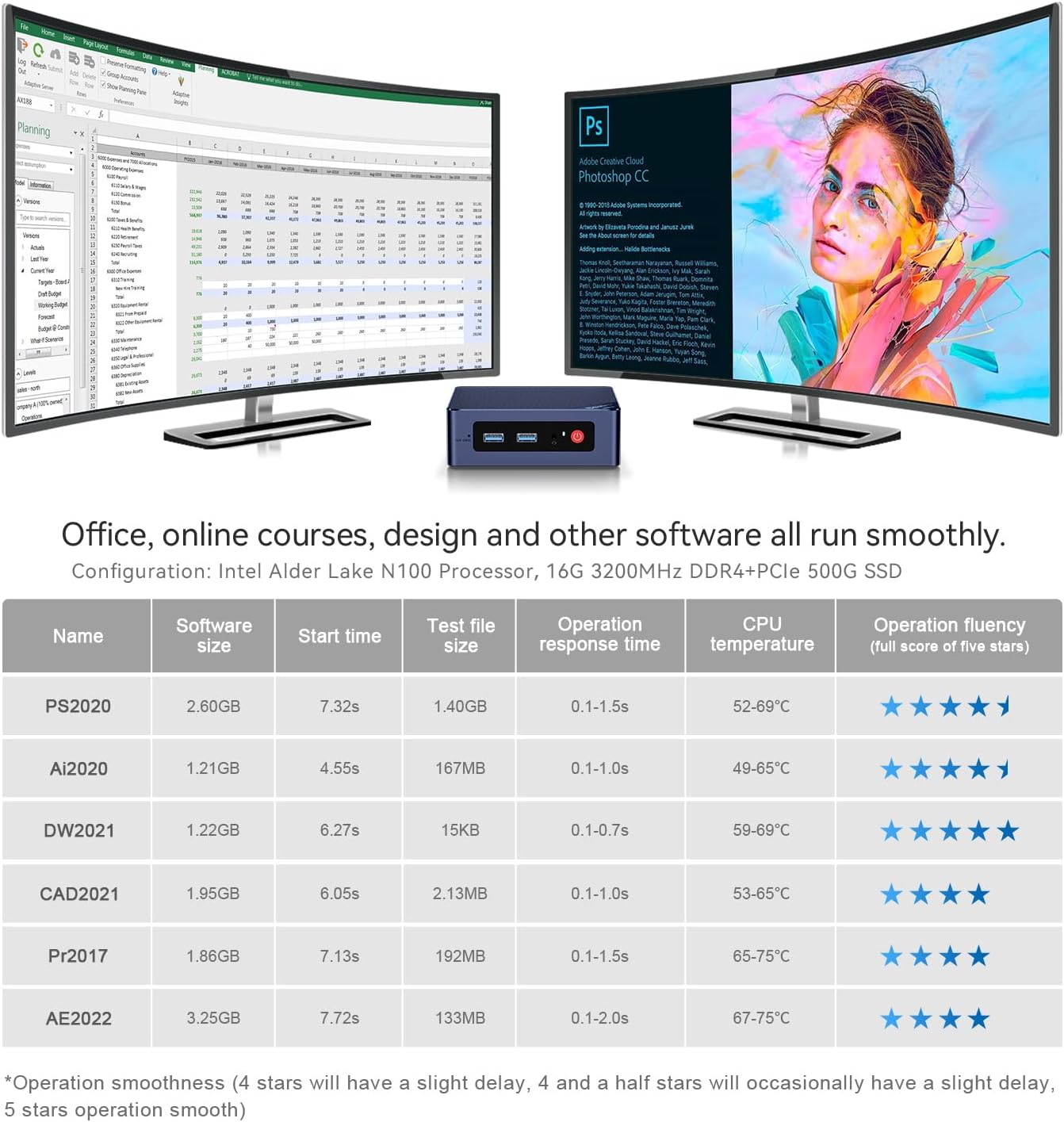
Figure 12.1: Intel Alder Lake-N N100 Processor Details.
13. Garantija ir palaikymas
Beelink provides comprehensive support for your mini PC:
- Techninis palaikymas visą gyvenimą: Pagalba teikiama visą jūsų produkto naudojimo laiką.
- 12 mėnesių garantija: Prekei suteikiama 12 mėnesių garantija.
- Klientų aptarnavimas: 7 Day / 24 hours service is available.
- Pakeitimo politika: Beelink provides new replacements for mini PCs during the warranty period.
For technical support or warranty claims, please contact Beelink customer service. You can typically find contact information through your purchase platform or the official Beelink websvetainę.

Figure 13.1: Beelink Customer Support Information.
14. Produkto vaizdo įrašasview
Watch this detailed introduction to the Beelink S12 Pro Mini PC for a visual guide to its features and capabilities.
Video 14.1: Detailed Introduction of Beelink Minis 12 PRO N100. This video provides a visual overview of the mini PC's design, ports, and key features.


