1. Įvadas
This manual provides detailed instructions for the installation, operation, and maintenance of your THINKWARE Q200 Dash Cam. Please read this manual thoroughly before using the device to ensure proper functionality and safety.
2. Produktas baigtasview
The THINKWARE Q200 is a high-performance 2K QHD dash camera designed to capture clear video evidence and enhance driving safety. Key features include:
- 2K QHD Recording: Captures clear evidence at 30fps with WDR and Super Night Vision 2.0.
- Distortion-Free 125° Wide Angle: Dewarped lens covers more of the road without fisheye effects.
- Smart Parking Surveillance Suite: Automatically records motion or impacts while parked, with Time Lapse or Energy Saving modes.
- Incident Lock & File Vientisumas: Built-in 3-axis G-sensor auto-saves critical footage.
- „Wi-Fi“ programėlės valdymas: Connect via the THINKWARE DASH CAM LINK app for settings adjustment and footage parsisiųsti.
3. Kas yra dėžutėje
Prieš tęsdami montavimą, patikrinkite, ar yra visi komponentai:
- Dash Cam
- 3M Windshield Mount with Spare Tape
- 12V automobilinio įkroviklio laidas
- Laidų laidų kabelis
- Adhesive Cable Holders
- Greitos pradžios vadovas
- CS Information
- 32 GB „MicroSD“ kortelė

Image: All components included in the THINKWARE Q200 Dash Cam package.
4. Sąranka ir diegimas
Proper installation ensures optimal performance and recording coverage. It is recommended to install the dash cam near the center of your windshield, behind the rearview veidrodis, kad neužstotų jūsų view.
4.1 Vaizdo registratoriaus montavimas
- Clean the windshield surface where the dash cam will be mounted.
- Attach the 3M adhesive pad to the windshield mount.
- Securely attach the mount with the dash cam to the chosen location on the windshield.
- Sureguliuokite kameros kampą, kad užtikrintumėte aiškų vaizdą view kelio priekyje.
4.2 Maitinimo jungtis
The Q200 can be powered via the included 12V car charger cable or the hardwiring cable for continuous parking surveillance.
- 12V Car Charger: Plug the cable into your vehicle's cigarette lighter socket and the dash cam's power input.
- Instaliacijos kabelis: For parking mode functionality, connect the hardwiring cable to your vehicle's fuse box. Professional installation is recommended for this method.
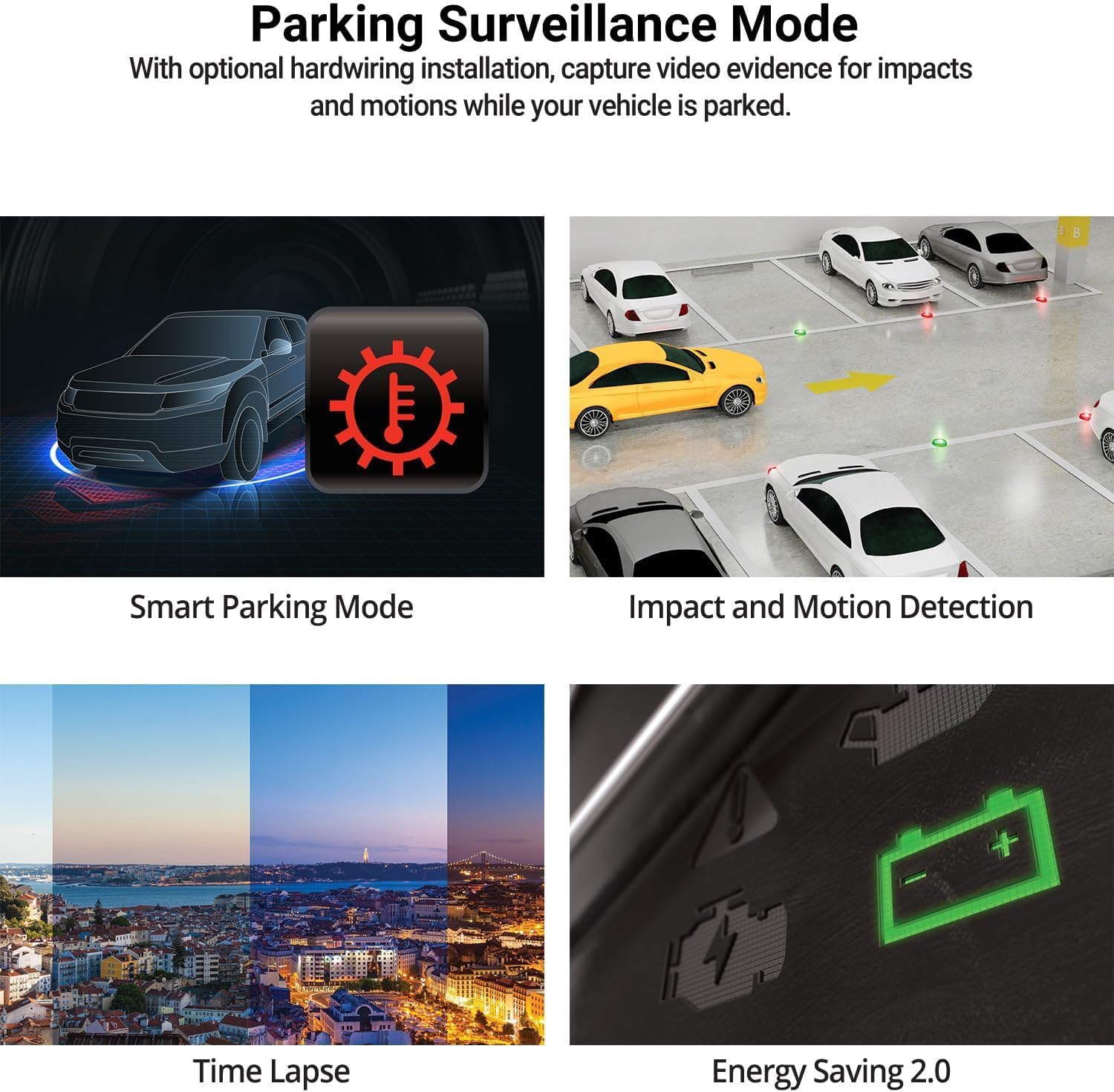
Image: The THINKWARE Q200 Dash Cam installed on a vehicle's windshield.
Vaizdo įrašas: Viršijimasview of the THINKWARE Q200 Dash Cam, demonstrating its features and installation.
5. Naudojimo instrukcijos
5.1 Automatinis įrašymas
The Q200 Dash Cam automatically powers on and begins continuous recording when the vehicle's ignition is turned on. It will power off automatically when the ignition is turned off.
5.2 Įrašymo režimai
- Nepertraukiamas įrašymas: Standard recording while driving.
- Incidento įrašas: Triggered by the built-in G-sensor upon impact, saving a 20-second clip (10 seconds before and 10 seconds after the event) to a protected folder.
- Rankinis įrašymas: Press the REC button to manually initiate an incident recording.
6. Parkavimo stebėjimo režimas
When connected via the hardwiring cable (or optional OBD II cable), the Q200 automatically switches to Parking Surveillance Mode when the ignition is off, providing continuous protection for your parked vehicle.
- Motion & Impact Detection: Records video when motion or impact is detected around the vehicle.
- Laiko tarpas: Records at 2 frames per second to minimize storage space, ideal for prolonged parking.
- Energijos taupymo režimas: Reduces power consumption by recording only when impacts are detected, extending parking surveillance duration.
- Smart Parking Mode: Automatically disables power during high temperatures to prevent overheating and resumes recording seamlessly.

Image: Visual representation of the various parking surveillance features.
7. „Wi-Fi“ programėlės valdymas
The THINKWARE DASH CAM LINK app (available on iOS and Android) allows you to connect to your Q200 Dash Cam via Wi-Fi for convenient control and access to recordings.
- Download the THINKWARE DASH CAM LINK app from your device's app store.
- Įjunkite „Wi-Fi“ savo išmaniajame telefone ir prisijunkite prie vaizdo registratoriaus „Wi-Fi“ tinklo.
- Use the app to adjust settings, view gyvas kvailystage, and download recorded videos directly to your phone.

Image: The THINKWARE DASH CAM LINK app interface on a smartphone.
8. Advanced Driver Assistance System (ADAS) & Safety Camera Alerts
The Q200 features ADAS functions and safety camera alerts to assist drivers and enhance road safety. An optional GPS module is required for full ADAS functionality and safety camera alerts.
- Front Vehicle Departure Warning (FVDW): Alerts when the vehicle in front starts to move.
- Priekinio susidūrimo įspėjimo sistema (FCWS): Warns of potential forward collisions based on speed and distance.
- Eismo juostos išvažiavimo įspėjimo sistema (LDWS): Alerts if the vehicle drifts from its lane.
- Safety Camera Alerts: Provides real-time alerts for speed cameras and red light cameras.

Image: Illustration of ADAS and safety camera alert features.
9. Video Quality Features
The Q200 is equipped with advanced video technology to ensure high-quality recordings in various conditions.
- 2K QHD Recording: Captures video at 2560x1440 resolution at 30 frames per second, providing clear and detailed footage.
- Super Night Vision 2.0: Enhances video brightness and reduces noise in low-light environments for improved night recordings.
- Platus dinaminis diapazonas (WDR): Corrects images for optimal color balance and clarity in challenging lighting conditions, such as strong sunlight or shadows.
- Smart Auto-Exposure (AE): Automatically adjusts exposure to ensure clear footage, especially when facing bright headlights or direct sunlight.
- Dewarping Video Technology: Provides a distortion-free 125-degree wide-angle view, preserving clarity across the entire frame.

Vaizdas: pvzamples of 2K QHD video quality in various lighting conditions.
10. Priežiūra
- „MicroSD“ kortelės valdymas: Regularly format the microSD card to prevent data corruption and ensure optimal recording performance. Replace the card periodically (e.g., every 6-12 months) as they have a limited lifespan.
- Objektyvo valymas: Keep the camera lens clean using a soft, lint-free cloth to ensure clear video recordings.
- Firmware atnaujinimai: Check the THINKWARE website for the latest firmware updates to ensure your dash cam has the most current features and bug fixes.
11. Problemų sprendimas
| Problema | Galimas sprendimas |
|---|---|
| Vaizdo registratorius neįsijungia. | Check the power cable connection to the dash cam and the vehicle's power source. Ensure the vehicle's ignition is on if using the 12V car charger. If hardwired, check fuse connections. |
| Recording is not working. | Ensure a microSD card is inserted and properly formatted. Check if the card is full; if so, format it or replace it. Verify the recording mode settings via the app. |
| „Wi-Fi“ ryšio problemos. | Restart the dash cam and your smartphone. Ensure you are within range of the dash cam's Wi-Fi signal. Re-establish the connection through the THINKWARE DASH CAM LINK app. |
| Prasta vaizdo kokybė. | Clean the camera lens. Ensure the protective film has been removed. Check the video resolution settings in the app. |
12. Specifikacijos
| Funkcija | Detalė |
|---|---|
| Gaminio matmenys | 0.87 x 3.88 x 1.34 colio |
| Prekės svoris | 2.56 uncijos |
| Prekės modelio numeris | TW-Q200CH |
| Ryšio technologijos | Wi-Fi |
| Ypatingos savybės | G jutiklis |
| Kitos ekrano funkcijos | Bevielis |
| Spalva | 1CH Front |
| Gamintojas | Mąstymo priemonė |
| Modelio pavadinimas | Q200 |
| Transporto priemonės paslaugos tipas | Bus, Car, Minivan, RV, Truck |
| Vaizdo įrašymo raiška | 1440p |
| Montavimo tipas | Priekinio stiklo kalnas |
| Laukas View | 125 laipsnių |
13. Garantija ir palaikymas
The THINKWARE Q200 Dash Cam comes with a standard manufacturer's warranty. For specific warranty terms, conditions, and duration, please refer to the warranty information included in your product packaging or visit the official THINKWARE websvetainę.
For technical support, troubleshooting assistance, or service inquiries, please contact THINKWARE customer support through their official channels. Contact information can typically be found in the Quick Start Guide or on the THINKWARE websvetainę.


