1. Įvadas
This manual provides detailed instructions for the safe and effective operation of your AquilaPro KL02100 Laser Measuring Tool. Please read this manual thoroughly before using the device to ensure proper functionality and to prevent potential hazards. This device is designed for accurate distance measurement in various applications.
2. Saugos informacija
WARNING: Laser Radiation. Do not stare into beam. Class II Laser Product.
- The AquilaPro KL02100 emits a visible laser beam with a power output of less than 1mW.
- Avoid direct eye exposure to the laser beam. Never point the laser at people or animals.
- Neardykite ir nemodifikuokite įrenginio. Neleistinos modifikacijos gali sukelti pavojingą lazerio spinduliuotės poveikį.
- Prietaisą laikykite vaikams nepasiekiamoje vietoje.
- Naudokite tik taip, kaip aprašyta šiame vadove.
3. Produktas baigtasview
The AquilaPro KL02100 is a compact and versatile laser distance meter. Familiarize yourself with its components and display.
3.1 Įrenginio komponentai
The device features a durable aluminium casing, an HD display, and intuitive buttons for various functions.

Vaizdas: priekis view of the AquilaPro KL02100 Laser Measuring Tool.
3.2 Display and Button Layout
The device's display provides measurement readings and status indicators. The buttons control power, measurement functions, unit switching, and reference point selection.

Vaizdas: Išsamus view of the AquilaPro KL02100 display and button functions. Labels indicate 'screen', 'Single measurement / Unit switch', 'Addition / subtraction measurement', 'Funtion / Front/rear reference', 'History / Preset value setting', and 'Power / Backlight button'.
4. Sąranka
4.1 Įrenginio įkrovimas
The AquilaPro KL02100 features a built-in Lithium-Ion battery and is USB rechargeable. Connect the device to a standard USB power source using the provided cable. The battery indicator on the display will show charging status.
4.2 Maitinimo įjungimas/išjungimas
- Norėdami įjungti: paspauskite Maitinimo / foninio apšvietimo mygtukas (
 ) trumpai.
 - Norėdami išjungti: paspauskite ir palaikykite Maitinimo / foninio apšvietimo mygtukas for approximately 3 seconds. The device will also automatically power off after a period of inactivity to conserve battery.
5. Naudojimo instrukcijos
5.1 Basic Measurement (Single Measurement)
- Įjunkite įrenginį.
- Nukreipkite lazerio spindulį į taikinio paviršių.
- Paspauskite Single measurement / Unit switch button () once. The measurement will be displayed instantly.
5.2 Nuolatinis matavimas
- Paspauskite ir palaikykite Single measurement / Unit switch button (
 ) for approximately 2 seconds. The device will enter continuous measurement mode, displaying real-time distance updates as you move.
 - Paspauskite Single measurement / Unit switch button again to exit continuous measurement.
5.3 Įrenginių perjungimas
To change the measurement unit (meters, inches, feet), briefly press the Single measurement / Unit switch button () while the device is idle (not actively measuring). The unit will cycle through m, in, ft.
5.4 Benchmark Switching (Front/Rear Datum)
The device allows you to select the measurement reference point: either from the front edge of the device or the rear edge. This is crucial for accurate measurements depending on your placement of the tool.

Image: Illustration of front and rear datum points for measurement. The device can measure from its front edge or its rear edge.
To switch the benchmark, press the Function / Front/rear reference button () briefly. An icon on the display will indicate the currently selected reference point.
5.5 Keli matavimo režimai
The AquilaPro KL02100 supports various measurement functions for different applications.

Image: Visual representation of the different measurement modes available on the device, including single, continuous, area, volume, Pythagorean, and addition/subtraction.
To cycle through measurement modes, press the Function / Front/rear reference button () repeatedly until the desired mode icon appears on the display.
- Ilgio matavimas: Standartinis vienkartinis arba nuolatinis matavimas.
- Ploto matavimas: Norėdami apskaičiuoti plotą, išmatuokite dvi puses (ilgį ir plotį).
- Tūrio matavimas: Measure three sides (length, width, height) to calculate the volume.
- Pythagorean Measurement (Indirect Measurement): Used to calculate inaccessible distances (e.g., height of a building) by measuring two or three other distances. Follow the on-screen prompts for each segment measurement.
- Sudėtis / atimtis: Add or subtract measurements.
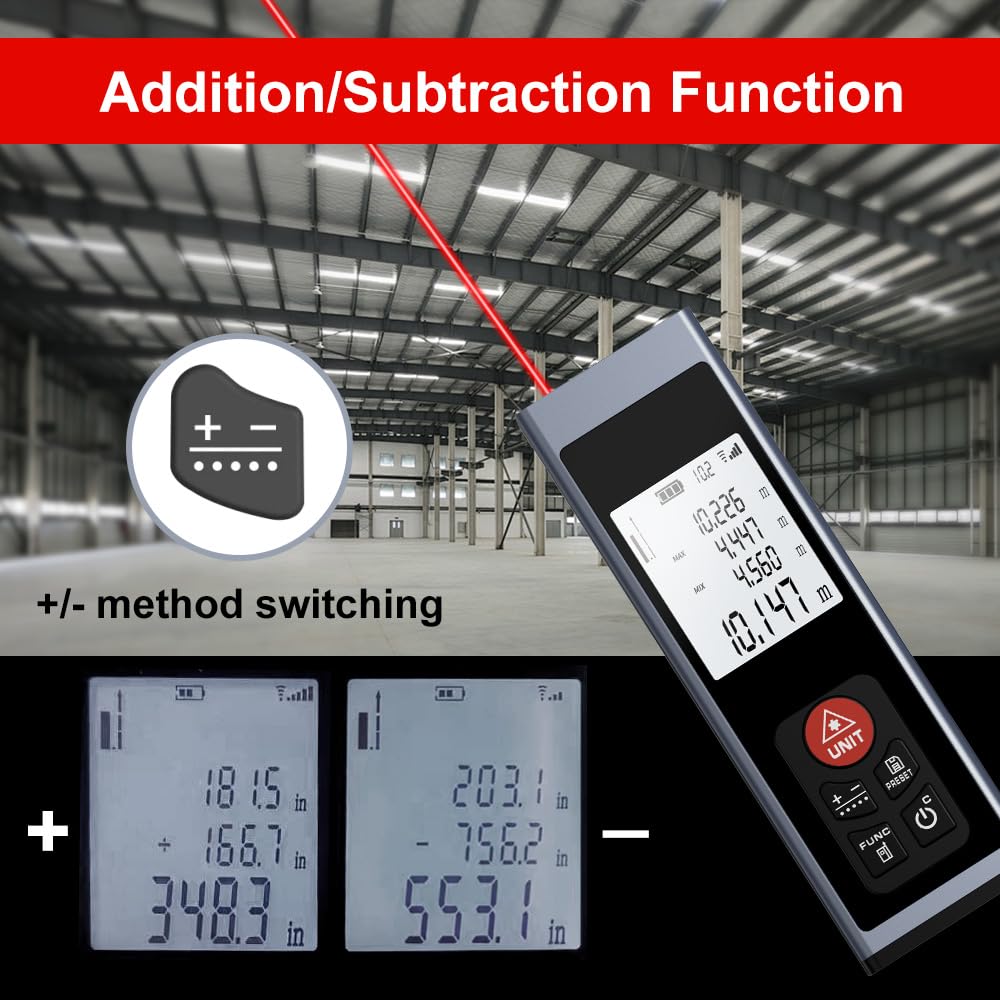
Image: The device display illustrating the addition and subtraction functions, showing how multiple measurements are combined or differentiated.
5.6 Field Measurement
The real-time measurement mode allows for on-the-go calculations from walls and various surfaces as you move, providing dynamic distance updates.

Image: A hand holding the AquilaPro KL02100, demonstrating its use for field measurements with the laser beam active.
6. Priežiūra
- Valymas: Naudokite minkštą, damp Prietaisą valykite šluoste. Nenaudokite abrazyvinių valiklių ar tirpiklių. Kad matavimai būtų tikslūs, ypatingą dėmesį skirkite lazerio lęšio švarai.
- Saugykla: Prietaisą laikykite vėsioje, sausoje vietoje, toliau nuo tiesioginių saulės spindulių ir ekstremalių temperatūrų.
- Baterija: Reguliariai įkraukite bateriją, net jei įrenginys nenaudojamas dažnai, kad palaikytumėte baterijos būklę.
7. Problemų sprendimas
| Problema | Galima priežastis | Sprendimas |
|---|---|---|
| Įrenginys neįsijungia | Žemas akumuliatoriaus lygis; Įrenginio gedimas; | Charge the battery; Contact support if issue persists |
| Netikslūs matavimai | Dirty laser lens; Incorrect benchmark setting; Unstable surface | Clean the laser lens; Verify benchmark (front/rear); Ensure stable measurement surface |
| Lazerio spindulio nesimato | Bright ambient light; Device malfunction | Use in lower light conditions; Contact support |
8. Specifikacijos
- Prekinis ženklas: AquilaPro
- Modelio numeris: KL02100
- Matavimo diapazonas: 328 pėdos (100 m)
- Tikslumas: ±0.078 inch (2mm)
- Vienetai: Meters (m), Inches (in), Feet (ft)
- Lazerio klasė: II klasė, <1 mW
- Baterijos tipas: Ličio jonų (įkraunama per USB)
- Medžiaga: Aliuminis
- Prekės svoris: 25 gramų
- Gaminio matmenys: 28L x 15W x 86H Millimeters
- Atsparumo vandeniui lygis: IP54
- Įtraukti komponentai: Virvelė
9. Garantija ir palaikymas
For warranty information and technical support, please refer to the documentation provided at the point of purchase or contact AquilaPro customer service. Keep your purchase receipt as proof of purchase.