1. Įvadas
Thank you for choosing TTQ Open Ear Headphones, Model CT26. These true wireless sports earbuds are designed to provide a comfortable listening experience while allowing you to remain aware of your surroundings. Featuring Bluetooth 5.3 connectivity, IPX7 waterproofing, and crystal-clear call quality, they are ideal for various activities including running, cycling, workouts, and driving. This manual will guide you through the setup, operation, and maintenance of your new headphones.
2. Pakuotės turinys
Prašome patikrinti, ar pakuotėje yra visi reikalingi daiktai:
- TTQ Open Ear Headphones (Left and Right Earbuds)
- Įkrovimo dėklas
- USB-C įkrovimo laidas
- Vartotojo vadovas

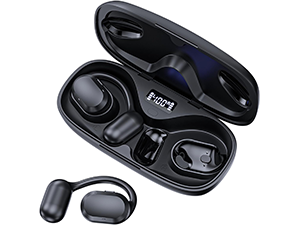
Vaizdas: The TTQ Open Ear Headphones, Model CT26, displayed within their open charging case. The case features an LED digital power display indicating the battery level of both the case and the individual earbuds.
3. Produktas baigtasview
The TTQ CT26 headphones feature an innovative open-ear design with flexible earhooks, ensuring comfort and stability during extended use. This design allows ambient sounds to be heard, enhancing safety in outdoor environments.

Vaizdas: A person wearing the TTQ Open Ear Earbuds, demonstrating how the open-ear design sits comfortably outside the ear canal, allowing for situational awareness.

Vaizdas: Two individuals cycling outdoors, both wearing TTQ Open Ear Headphones. This illustrates the product's suitability for sports and activities where awareness of surroundings is crucial for safety.
4. Sąranka
4.1 Ausinių ir dėklo įkrovimas
Before first use, fully charge the headphones and the charging case. Connect the provided USB-C charging cable to the charging port on the case and a power source. The LED display on the charging case will show the battery percentage, and individual earbud charge indicators will light up during charging.
- A full charge provides up to 8 hours of music playtime or 9 hours of call time for the earbuds.
- Įkrovimo dėklas pailgina bendrą grojimo laiką iki 36 valandų.

Vaizdas: The TTQ charging case with its lid open, showcasing the digital LED display that indicates the battery percentage of the case and the charging status of the earbuds. A USB-C charging port is visible at the front.
4.2 Susiejimas su jūsų įrenginiu
- Įsitikinkite, kad ausinės yra įkrautos.
- Open the charging case. The earbuds will automatically enter pairing mode, indicated by a flashing light (if applicable, refer to product specific light indicators).
- Savo įrenginyje (išmaniajame telefone, planšetiniame kompiuteryje, kompiuteryje) eikite į „Bluetooth“ nustatymus ir įjunkite „Bluetooth“.
- Ieškokite available devices and select "CT26" from the list.
- Prijungus ausines, bus rodomas sėkmingas susiejimas (pvz., balso pranešimas arba nuolat šviečianti lemputė).
Ausinės automatiškai prisijungs prie paskutinio suporuoto įrenginio, kai bus išimtos iš dėklo, jei įrenginyje įjungtas „Bluetooth“.

Vaizdas: A visual representation of Bluetooth 5.3 technology, showing a smartphone's Bluetooth settings screen with 'CT26' listed as a connected device, illustrating the stable and fast connection capability.
5. Naudojimo instrukcijos
The TTQ CT26 headphones feature a physical button for easy control of various functions.
Vaizdas: A diagram illustrating the single button controls on the earbud, detailing actions for pause/play, answer/hang up, rejection, volume adjustment, switching songs, and activating Siri.
5.1 Muzikos atkūrimas
- Leisti / pristabdyti: Press the button once (x1).
- Kita daina: Press the button twice (x2).
- Ankstesnė daina: Press the button three times (x3).
- Garsumo didinimas / sumažinimas: Press and hold the button for 2 seconds (Hold 2s).
5.2 Skambučių valdymas
- Atsiliepti / Baigti skambutį: Press the button once (x1).
- Atmesti skambutį: Press and hold the button for 2 seconds (Hold 2s).
The headphones feature dual-mic noise-cancelling technology for clearer calls by reducing environmental noise.

Vaizdas: A man wearing TTQ Open Ear Headphones while holding a smartphone, illustrating the intelligent noise cancellation feature that boosts human voice and reduces environmental noise for clearer calls.
5.3 Balso padėjėjas
- Įjunkite balso asistentą („Siri“, „Google Assistant“ ir kt.): Press the button three times (x3).
6. Priežiūra
To ensure the longevity and optimal performance of your TTQ Open Ear Headphones, follow these maintenance guidelines:
- Valymas: Reguliariai valykite ausines ir įkrovimo dėklą minkštu, sausu, nepūkuotu skudurėliu. Venkite naudoti abrazyvines medžiagas ar stiprias chemines medžiagas.
- Atsparumas vandeniui: The headphones are IPX7 waterproof, meaning they can withstand submersion in up to 1 meter of water for 30 minutes. They are resistant to sweat and rain, making them suitable for workouts. However, they are not designed for swimming or prolonged submersion. Ensure the charging port is dry before charging.
- Saugykla: Kai nenaudojate, laikykite ausines įkrovimo dėkle, kad apsaugotumėte jas nuo dulkių ir pažeidimų. Laikykite vėsioje, sausoje vietoje, toliau nuo ekstremalių temperatūrų.

Vaizdas: TTQ Open Ear Headphones and their charging case on a wet surface with water splashes, demonstrating their IPX7 waterproof rating, indicating resistance to rain and sweat.
7. Problemų sprendimas
If you encounter issues with your TTQ Open Ear Headphones, please refer to the following common solutions:
- Nėra garso / mažas garsumas:
- Įsitikinkite, kad ausinės yra tinkamai susietos ir prijungtos prie jūsų įrenginio.
- Patikrinkite garsumo lygį tiek ausinėse, tiek prijungtame įrenginyje.
- Įsitikinkite, kad ausinės yra įkrautos.
- Susiejimo problemos:
- Įsitikinkite, kad jūsų įrenginyje įjungtas „Bluetooth“.
- Ensure the headphones are in pairing mode (flashing indicator).
- Išjunkite „Bluetooth“ kituose netoliese esančiuose įrenginiuose, kurie gali bandyti prisijungti.
- Forget/remove "CT26" from your device's Bluetooth list and try pairing again.
- Restart both your device and the headphones (by placing them back in the case and taking them out).
- Įkrovimo problemos:
- Įsitikinkite, kad įkrovimo laidas yra tvirtai prijungtas tiek prie dėklo, tiek prie maitinimo šaltinio.
- Išbandykite kitą USB-C laidą ir maitinimo adapterį.
- Įsitikinkite, kad ausinių ir dėklo įkrovimo kontaktai yra švarūs ir be nešvarumų.
- Pertraukiamas ryšys:
- Ensure your device is within the Bluetooth range (up to 10 meters/33 feet).
- Avoid physical obstructions between the headphones and your device.
- Sumažinkite kitų belaidžių įrenginių keliamus trukdžius.
Jei problema išlieka ir išbandžius šiuos veiksmus, susisiekite su klientų aptarnavimo tarnyba.
8. Specifikacijos
| Funkcija | Specifikacija |
|---|---|
| Modelio pavadinimas | CT26 |
| Ryšio technologija | Belaidis ryšys („Bluetooth“) |
| Belaidžio ryšio technologija | Bluetooth 5.3 |
| Bluetooth diapazonas | 10 metrai (33 pėdos) |
| Atsparumo vandeniui lygis | IPX7 Atsparus vandeniui |
| Ausų išdėstymas | Atidarykite ausį |
| Formos faktorius | Tikras belaidis ryšys |
| Baterijos veikimo laikas (ausinės) | 8 Hours (Music) / 9 Hours (Calls) |
| Bendras žaidimo laikas su įkrovimo dėklu | Iki 36 valandų |
| Garso tvarkyklės tipas | Dinaminis vairuotojas |
| Garso tvarkyklės dydis | 16.2 milimetrų |
| Dažnių diapazonas | 20 Hz–20 000 Hz |
| Triukšmo valdymas | Aktyvus triukšmo slopinimas (skambučiams) |
| Kontrolės metodas | Fizinis mygtukas |
| Įkrovimo prievadas | USB-C |
| Prekės svoris | 7.8 uncijos (0.22 kilogramo) |
| Medžiaga | Plastikiniai |
| UPC | 717977781312 |
9. Pagalba klientams
For any questions, concerns, or if you receive a defective product, please do not hesitate to contact TTQ customer support. We are committed to providing solutions within 24 hours.
Please visit the official TTQ store on Amazon for more information and support resources: TTQ Store


