1. Įvadas
The Mastfuyi FY12DMM is a versatile 2-in-1 device combining a high-resolution thermal imager with a comprehensive digital multimeter. This instrument is designed for professionals and enthusiasts requiring precise measurements and visual thermal analysis in various fields, including electrical, mechanical, construction, and automotive diagnostics. This manual provides essential information for safe and effective operation.
2. Saugos informacija
Always adhere to the following safety precautions to prevent personal injury or damage to the device.
- Prieš naudodami perskaitykite ir supraskite visas instrukcijas.
- Nenaudokite prietaiso, jei jis atrodo pažeistas arba neveikia tinkamai.
- Ensure proper test lead connection before taking any measurements.
- Do not exceed the maximum input ratings for any function.
- Use caution when working with live electrical circuits.
- Laikykite prietaisą sausą ir švarų.
- Only use accessories and replacement parts specified by the manufacturer.
3. Pakuotės turinys
Patikrinkite, ar pakuotėje yra visi reikalingi daiktai:
- 1 x Mastfuyi FY12DMM Thermal Imager Multimeter
- 1 x įkrovimo laidas (USB C tipo)
- 1 x nešiojimo dėklas
- 1 x Naudotojo vadovas (šis dokumentas)
- Bandymo laidai (raudoni ir juodi)
Pastaba: The flexible AC current clamp is not included in the standard package.

4. Įrenginys baigtasview
The Mastfuyi FY12DMM integrates thermal imaging and digital multimeter functionalities into a single, portable unit. Its design focuses on ease of use and comprehensive diagnostic capabilities.

Pagrindiniai komponentai apima:
- 3.98-inch TFT LCD Touch Screen: A full-view display for clear visualization of thermal images, multimeter readings, and intuitive menu navigation.
- Thermal Imager Lens: The optical component responsible for capturing infrared radiation.
- Multimetro įvesties lizdai: Standard ports for connecting test leads for electrical measurements.
- Maitinimo mygtukas: Controls the device's power state.
- Navigation Wheel/Buttons: Provides alternative control for menu selection and parameter adjustments.
- C tipo USB prievadas: Used for charging the internal battery and transferring data to a computer.

5. Sąranka
5.1 Pradinis įkrovimas
Prieš pirmą kartą naudodami, pilnai įkraukite prietaisą.
- Prijunkite pridedamą USB C tipo įkrovimo laidą prie įrenginio įkrovimo prievado.
- Kitą laido galą prijunkite prie standartinio USB maitinimo adapterio (nepridedamas) arba kompiuterio USB prievado.
- The charging indicator will illuminate. Allow the device to charge until the indicator shows a full charge.

5.2 Maitinimo įjungimas/išjungimas
- To power on: Press and hold the power button until the screen illuminates.
- To power off: Press and hold the power button until the shutdown prompt appears, then confirm.
6. Terminio vaizdo kameros valdymas
6.1 Pagrindinis terminis vaizdavimas
Upon powering on, the device typically defaults to thermal imaging mode, displaying a real-time thermal image with temperature readings.
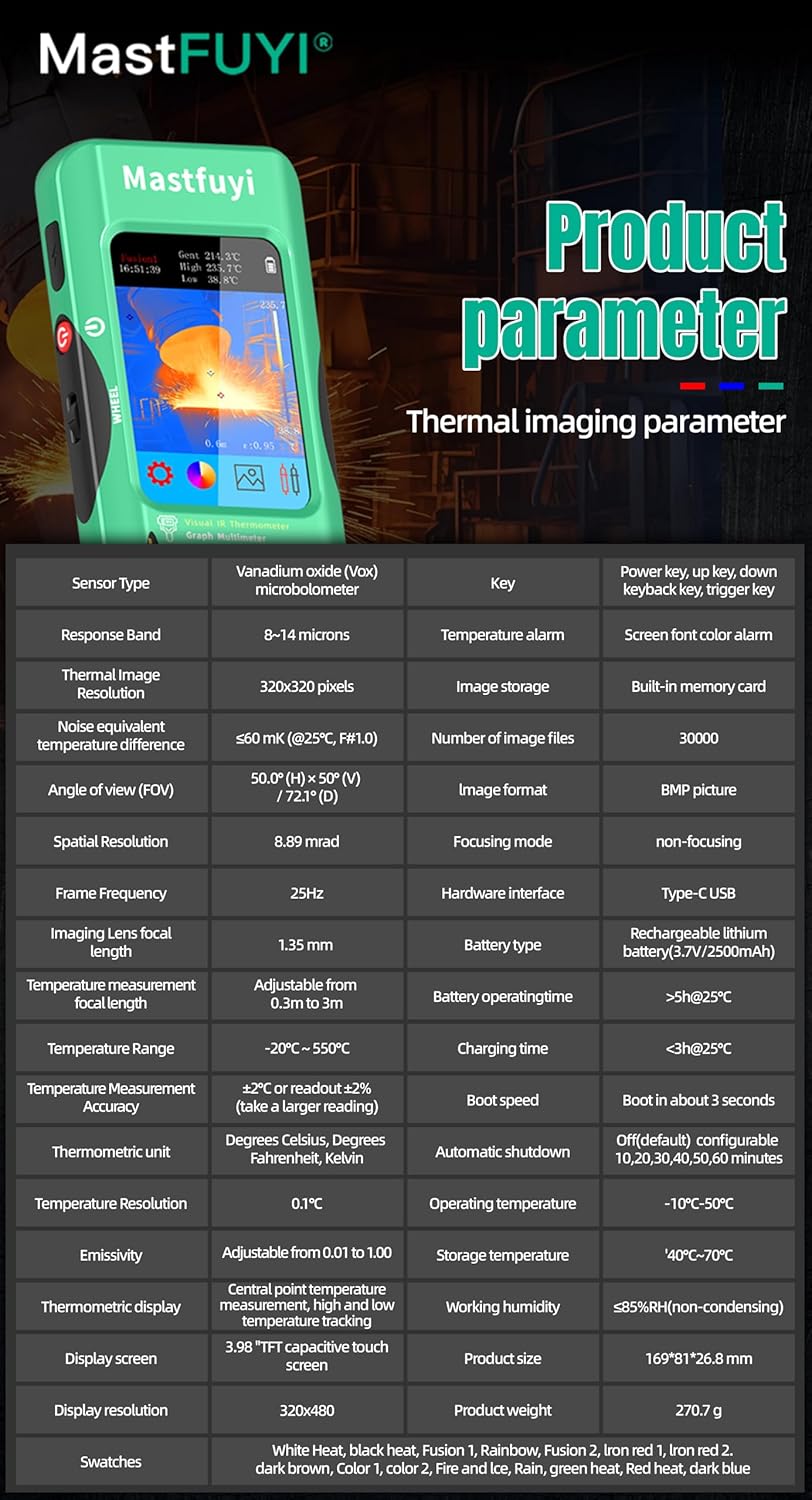
- Temperatūros diapazonas: Measures temperatures from -20℃ to 550℃ (-4℉ to 1022℉).
- IR skiriamoji geba: Features a 320 x 320 pixel infrared resolution for clear and detailed thermal images.
- Atnaujinimo dažnis: Operates at 25Hz, providing a smooth, real-time thermal video feed.
- Terminis jautrumas (NETD): With a sensitivity of less than 60mk, the device can detect subtle temperature differences.
The device can perform microscopic detection at a component level, though a macro lens is not included as a standard accessory. If detailed close-up thermal imaging is required, a corresponding macro lens package would need to be acquired separately.

6.2 Terminės paletės
The device offers 15 distinct thermal palettes to enhance the visualization of temperature differences. Selecting the appropriate palette can significantly improve the clarity of thermal patterns for specific applications.
- Access palette options via the touchscreen menu or navigation controls.
- Experiment with palettes like Iron Red, Rainbow, White Hot, and Black Hot to find the most suitable display for your inspection.
6.3 Emisijos reguliavimas
Accurate temperature measurements depend on correct emissivity settings. The emissivity value (adjustable from 0.01 to 1.0) should match the material surface being measured.
- Locate the emissivity setting in the thermal imaging menu.
- Consult standard emissivity tables for common materials or adjust the value to achieve the most accurate readings for your specific target.
6.4 Aukštos ir žemos temperatūros signalizacija
The intelligent alarm function allows you to set custom temperature thresholds. The device will trigger immediate audible and visual alerts if temperatures exceed or fall below these predefined safety ranges.
- Access the alarm settings through the thermal imaging interface.
- Configure the upper and lower temperature limits to suit your monitoring requirements.
7. Multimetro valdymas
The FY12DMM includes a 20,000-count digital multimeter for precise electrical measurements.
7.1 Bandymo laidų prijungimas
- Insert the red test lead into the "VΩmA" input jack.
- Įkiškite juodą bandymo laidą į „COM“ (bendrą) įvesties lizdą.
- For AC current measurements with an optional clamp, refer to the clamp's instructions.
7.2 Matavimo funkcijos
Use the touchscreen or navigation to select the desired measurement function. The device supports auto-ranging for most functions.
- DC ttage: Iki 1000 V.
- AC ttage: Iki 750 V.
- Atsparumas: Iki 200 MΩ.
- Talpa: Iki 99.999 mF.
- Diodo testas: Checks diode functionality.
- Tęstinumo testas: Audible indication for continuity.
- Flexible AC Current: Up to 2000A (requires optional clamp).
- Temperatūra: -20℃ to 1300℃ (-4℉ to 2372℉) using a K-type thermocouple (not included).
Įrenginyje yra Laikykis function to freeze the current reading and Diapazonas measurement modes for manual range selection if desired.
8. Duomenų valdymas
8.1 Vaizdų saugykla
The FY12DMM has a built-in memory card capable of storing up to 30,000 images in BMP format.
- To save a thermal image, press the designated capture button on the screen.
- Images are automatically saved to the internal memory.

8.2 Exporting Data
Stored images and recorded waveform data can be exported to a computer for further analysis.
- Connect the device to a computer using the USB Type-C cable.
- Įrenginys turėtų būti rodomas kaip išimama atminties priemonė.
- Copy the desired BMP image files or data logs to your computer.
9. Priežiūra
9.1 Valymas
- Nuvalykite įrenginio išorę minkšta,amp audinys. Nenaudokite abrazyvinių valiklių ar tirpiklių.
- Gently clean the thermal imager lens with a lens cleaning cloth.
- Prieš valydami įsitikinkite, kad prietaisas yra išjungtas ir atjungtas nuo bet kokio maitinimo šaltinio.
9.2 Akumuliatoriaus priežiūra
- Reguliariai įkraukite akumuliatorių, net jei įrenginys nėra dažnai naudojamas, kad palaikytumėte jo būklę.
- Avoid storing the device in extreme temperatures.
10. Problemų sprendimas
| Problema | Galima priežastis | Sprendimas |
|---|---|---|
| Įrenginys neįsijungia. | Žemas arba išsikrovęs akumuliatorius. | Charge the device fully using the supplied USB Type-C cable. |
| Netikslūs temperatūros rodmenys. | Incorrect emissivity setting; dirty lens. | Adjust emissivity for the target material; clean the thermal imager lens. |
| Multimeter readings are unstable or incorrect. | Poor test lead connection; incorrect function selected. | Ensure test leads are securely connected; verify the correct measurement function is selected. |
| Cannot transfer data to computer. | Faulty USB cable; incorrect connection mode. | Try a different USB Type-C cable; ensure the device is properly connected and recognized by the computer. |
11. Specifikacijos
11.1 Infrared Camera Specifications
| Funkcija | Specifikacija |
|---|---|
| Ekrano dydis | 3.98 colio TFT LCD |
| IR skiriamoji geba | 320 x 320 pikselių |
| Ekrano raiška | 320 x 480 pikselių |
| Kampas View (FOV) | 50.0° (aukštis) x 50.0° (vertikalus) / 72.1° (gylis) |
| Erdvinė skiriamoji geba (IFOV) | 8.89 mrad |
| Temperatūros diapazonas | Nuo -20 ℃ iki 550 ℃ (nuo -4 ℉ iki 1022 ℉) |
| Terminis jautrumas / NETD | Less than 60mk |
| Atnaujinimo dažnis | 25 Hz |
| Atstumo nustatymai | 0.3–3 metrai |
| Spinduliuotė | 0.01 - 1.0 (adjustable) |
| Thermal Palettes | 15 |
| Number of Storage Images | 19,000 (internal memory) |
11.2 Skaitmeninio multimetro specifikacijos
| Funkcija | Diapazonas | Rezoliucija | Tikslumas |
|---|---|---|---|
| MAX ekranas | 20000 skaičiavimų | ||
| DC ttage | 20mV/200mV/2V/20V/200V/1000V | Nuo 0.001mV iki 0.1V | ±(0.05 % + 3) iki ±(0.5 % + 3) |
| AC ttage | 20mV/200mV/2V/20V/200V/750V | Nuo 0.001mV iki 0.1V | ±(0.1 % + 3) iki ±(0.5 % + 3) |
| Flexible AC Current | 200A/2000A | 0.1A/1A | ± (1.0 %+5) |
| Atsparumas | 200Ω iki 200MΩ | 0.01Ω iki 0.01MΩ | ±(0.2 % + 3) iki ±(5 % + 5) |
| Talpa | 999.99nF iki 99.999mF | 0.01nF iki 0.001mF | ±(2 % + 5) iki ±(5 % + 20) |
| Temperatūra | -20℃~1300℃/-4℉-2372℉ | 1 ℃ / 1 ℉ | ± (2 %+5) |
| Diodas | Taip | ||
| Tęstinumas | Taip | ||

11.3 Bendrosios specifikacijos
- Galia: 2500mAh rechargeable battery (built-in)
- Dydis: 169 x 81 x 26.8 mm
- Svoris: 270g
- Operating System Languages: English, Spanish, German, French, Italian, Japanese, Chinese (selectable)

12. Garantija ir palaikymas
For warranty information and technical support, please refer to the warranty card included with your product or visit the official Mastfuyi websvetainę.
Visit the Mastfuyi Store on Amazon daugiau produktų ir palaikymo išteklių.