Įvadas
Welcome to the Kuephom Portable CD Player Boombox. This versatile device offers multiple audio playback options including CD, MP3, FM radio, Bluetooth, USB, and TF card support. Designed for both home and portable use, it features stereo speakers and a rechargeable battery for extended listening enjoyment. Please read this manual thoroughly to ensure proper operation and care of your new device.
Svarbi saugos informacija
- Įspėjimas: Nelaikykite šio prietaiso nuo lietaus ar drėgmės.
- Atsargiai: To prevent electric shock, do not open the casing. Visus techninės priežiūros darbus patikėkite kvalifikuotiems darbuotojams.
- Nestatykite įrenginio šalia šilumos šaltinių, tokių kaip radiatoriai, šildytuvai, viryklės ar kiti šilumą skleidžiantys prietaisai.
- Naudokite tik gamintojo nurodytus priedus/priedus.
- Saugokite, kad maitinimo laidas nebūtų užeinamas ar užspaudžiamas, ypač prie kištukų, patogių talpyklų ir vietų, kur jie išeina iš prietaiso.
- Atjunkite šį prietaisą iš elektros lizdo žaibuojant arba kai jis nenaudojamas ilgą laiką.
- Neužblokuokite jokių ventiliacijos angų. Montuokite pagal gamintojo instrukcijas.
- Įrenginiui veikiant, užtikrinkite tinkamą vėdinimą.
- Nekiškite į įrenginį pašalinių daiktų.
- Saugokite įrenginį nuo stiprių magnetinių laukų.
- Tinkamai išmeskite baterijas laikydamiesi vietinių taisyklių.
Pakuotės turinys
Prašome patikrinti, ar yra visi daiktai:
- Kuephom Portable CD Player Boombox (Model W15)
- USB įkrovimo laidas
- Maitinimo adapteris
- Vartotojo vadovas
Produktas baigtasview
Familiarize yourself with the main components and controls of your CD player boombox.

1 pav.: priekis View - This image displays the main unit with its top-loading CD compartment open, revealing a CD. The front panel features control buttons for playback (play/pause, skip), a mode button, an LCD screen showing track time, and a large rotary volume knob. Two speaker grilles are visible at the bottom.

2 pav.: galinis View - The rear of the boombox is shown, highlighting the extendable FM antenna. Below the antenna, from left to right, are the USB port, TF (Micro SD) card slot, DC 5V IN power input, and a headphone jack. The speaker grilles are also visible from this angle.
Valdikliai ir prievadai:
- Paleidimo / pauzės mygtukas (►▮▮): Paspauskite, norėdami paleisti arba pristabdyti garso atkūrimą.
- Previous/Rewind Button (◀◀): Press to go to the previous track or rewind the current track.
- Next/Fast Forward Button (►►): Press to go to the next track or fast forward the current track.
- Režimo mygtukas (M): Press to switch between CD, FM Radio, Bluetooth, USB, and TF card modes.
- Repeat/Random Button (↺): Press to cycle through repeat modes (repeat one, repeat all) or enable random playback (shuffle).
- Volume Knob (MIN-MAX): Rotate to adjust the volume level. Also serves as the power on/off switch.
- LCD ekranas: Rodo dabartinį režimą, takelio numerį, laiką ir FM dažnį.
- CD skyrius: Top-loading tray for inserting audio CDs.
- FM antena: Extendable antenna for improved FM radio reception.
- USB prievadas: For playing MP3/WMA fileiš USB atmintinės (iki 32 GB).
- TF kortelės lizdas: For playing MP3/WMA files from a TF (Micro SD) card (up to 32GB).
- DC 5V IN Port: Power input for charging the internal battery or operating the unit via the included power adapter.
- Headphone Jack (🎧): Privačiam klausymuisi su laidinėmis ausinėmis.
Sąranka
1. Įrenginio maitinimas
Your Kuephom CD player boombox comes with a built-in rechargeable Lithium Ion battery. Before first use, it is recommended to fully charge the battery.
- Connect the provided USB charging cable to the DC 5V IN port on the back of the unit.
- Connect the other end of the USB cable to the power adapter, and plug the adapter into a standard wall outlet.
- The LCD display will indicate charging status. Charging typically takes 3-4 hours for a full charge.
- Alternatively, the unit can be powered directly from the wall adapter without battery charge.

3 pav.: Įkrovimo parinktys - This image illustrates the versatility of charging the boombox. It can be charged using a standard wall charger, a car charger (via a USB car adapter, not included), or a portable power bank, making it convenient for both indoor and outdoor use.
2. Įjungimas/Išjungimas
To turn the unit on, rotate the Volume Knob clockwise from the MIN position. To turn off, rotate the Volume Knob counter-clockwise to the MIN position until it clicks.
Veikimo režimai
Paspauskite Režimas (M) button repeatedly to cycle through the available playback modes: CD, FM Radio, Bluetooth, USB, and TF Card.

Figure 4: 5 Play Modes - This graphic highlights the five primary playback modes of the Kuephom boombox: CD Player, Bluetooth, FM Radio, TF Card, and USB Input, emphasizing its multi-functional capabilities.
1. CD grojimas
- Atidarykite CD skyriaus dangtelį švelniai jį pakeldami.
- Place an audio CD or MP3 CD onto the spindle, label side up.
- Tvirtai uždarykite CD skyriaus dangtelį.
- Paspauskite Režimas (M) mygtuką, kol LCD ekrane pasirodys „CD“.
- Kompaktinis diskas pradės groti automatiškai. Jei ne, paspauskite Leisti / Pauzė (►▮▮) mygtuką.
- Naudokite Ankstesnis (◀◀) ir Next (►►) mygtukai, norėdami praleisti takelius.
- Paspauskite ir palaikykite Ankstesnis (◀◀) or Next (►►) buttons to fast forward or rewind.
- Paspauskite Repeat/Random (↺) button to cycle through repeat modes (Repeat One, Repeat All) or enable random (shuffle) playback.
2. „Bluetooth“ atkūrimas
- Paspauskite Režimas (M) button until "BT" appears on the LCD display. The unit will enter Bluetooth pairing mode, indicated by a flashing "BT".
- On your Bluetooth-enabled device (e.g., smartphone, tablet), turn on Bluetooth and search for available devices.
- Select "Kuephom W15" from the list of devices.
- Once paired, "BT" will stop flashing and remain solid. You can now play audio from your device through the boombox.
- Use the playback controls on your connected device or the boombox's Leisti / Pauzė (►▮▮), Ankstesnis (◀◀), ir Next (►►) mygtukai, skirti valdyti atkūrimą.

Figure 5: CD Player & Bluetooth Speaker Functionality - This image demonstrates the dual functionality of the device, showing it first as a standalone CD player and then as a Bluetooth speaker, with a smartphone successfully paired to it. This highlights its versatility for different audio sources.
3. FM radijo veikimas
- Ištieskite FM anteną įrenginio gale, kad būtų užtikrintas optimalus priėmimas.
- Paspauskite Režimas (M) mygtuką, kol LCD ekrane pasirodys „FM“.
- Norėdami automatiškai nuskaityti ir išsaugoti stotis: paspauskite ir palaikykite Leisti / Pauzė (►▮▮) button. The unit will automatically scan for available FM stations and save them as presets (up to 30 stations).
- To tune to a saved preset station: Use the Ankstesnis (◀◀) ir Next (►►) buttons to navigate through the saved presets.
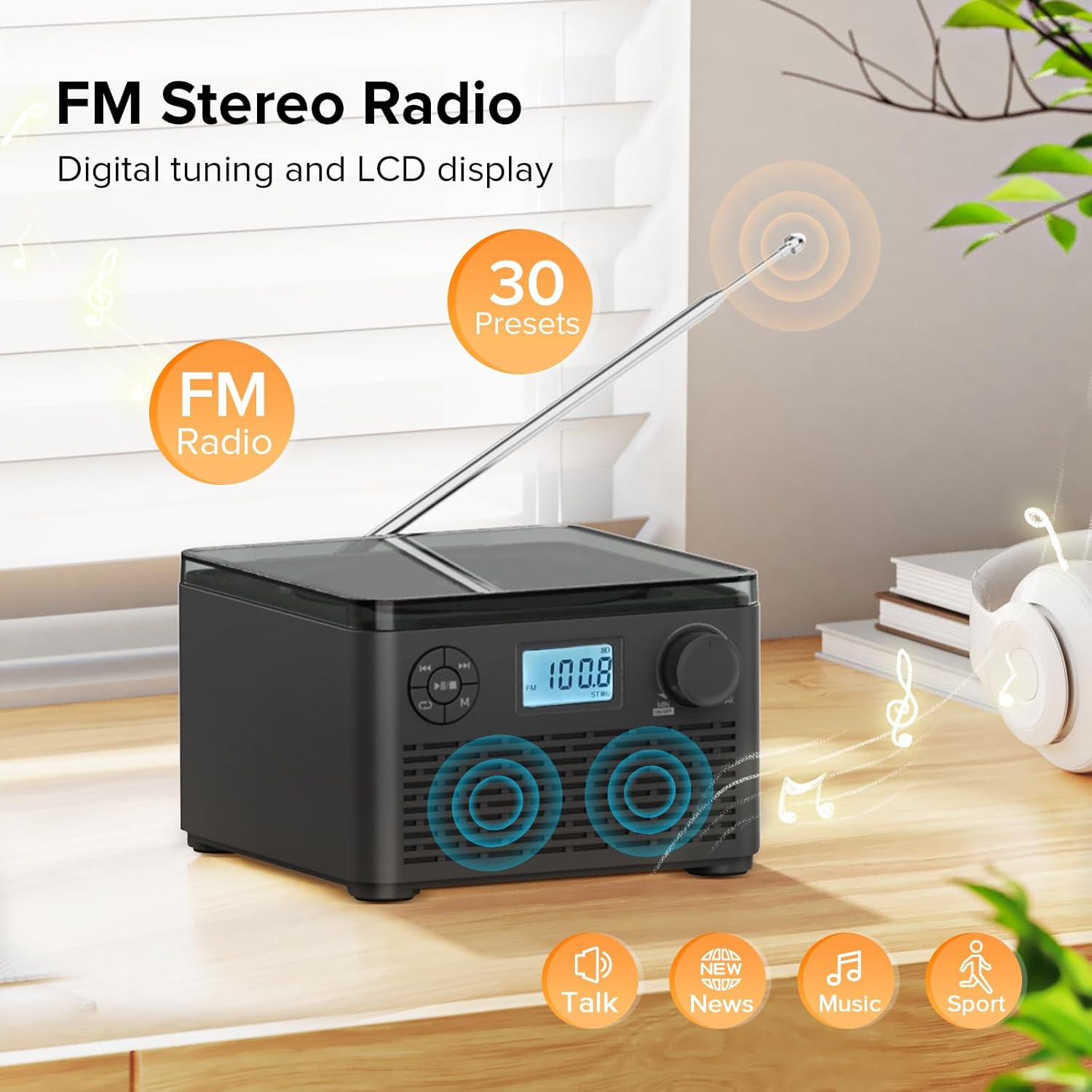
Figure 6: FM Stereo Radio - This image focuses on the FM radio feature, showing the digital display tuned to a frequency and indicating the availability of 30 presets. The extendable antenna is also visible, emphasizing its radio capabilities.
4. USB/TF kortelių atkūrimas
The unit supports MP3 and WMA audio formats from USB flash drives and TF (Micro SD) cards up to 32GB.
- Insert a USB flash drive into the USB port or a TF card into the TF card slot on the back of the unit. Ensure the antenna is moved out of the way if necessary.
- Paspauskite Režimas (M) button until "USB" or "TF" appears on the LCD display.
- Įrenginys automatiškai aptiks ir pradės groti garsą fileiš įdėto atminties įrenginio.
- Naudokite Leisti / Pauzė (►▮▮), Ankstesnis (◀◀), ir Next (►►) mygtukai, skirti valdyti atkūrimą.
- Paspauskite Repeat/Random (↺) button to cycle through repeat modes or enable random playback.
5. Ausinių naudojimas
For private listening, connect standard 3.5mm headphones to the headphone jack on the back of the unit. The internal speakers will automatically mute when headphones are connected.
Priežiūra ir priežiūra
- Valymas: Išorinį įrenginio paviršių valykite minkštu, sausu skudurėliu. Nenaudokite abrazyvinių valiklių ar tirpiklių.
- CD priežiūra: Kompaktinius diskus imkite už kraštų. Laikykite juos švarius ir nesubraižytus. Kompaktinius diskus valykite minkštu, nepūkuotu skudurėliu nuo centro į išorę.
- Saugykla: Kai prietaisas ilgesnį laiką nenaudojamas, laikykite jį vėsioje, sausoje vietoje, apsaugotoje nuo tiesioginių saulės spindulių ir ekstremalių temperatūrų.
- Akumuliatoriaus priežiūra: To prolong battery life, avoid fully discharging the battery frequently. Recharge the unit regularly, even if not in constant use.
Trikčių šalinimas
| Problema | Galima priežastis | Sprendimas |
|---|---|---|
| Įrenginys neįsijungia. | Baterija išsikrovusi arba maitinimo adapteris netinkamai prijungtas. | Ensure the volume knob is rotated clockwise to turn on. Connect the power adapter and charge the unit. |
| CD is skipping or not playing. | Kompaktinis diskas yra nešvarus, subraižytas arba neteisingai įdėtas. | Clean the CD with a soft cloth. Ensure the CD is placed correctly in the compartment. Try a different CD. |
| Prastas FM radijo priėmimas. | Antena neištiesta arba signalas silpnas. | Fully extend the FM antenna. Try repositioning the unit for better signal. |
| „Bluetooth“ įrenginio nepavyksta susieti. | Įrenginys nėra susiejimo režime arba yra per toli. | Ensure the unit is in "BT" mode and flashing. Move your Bluetooth device closer to the boombox. Disconnect other Bluetooth devices. |
| USB/TF kortelė neatpažinta. | Nepalaikoma file format or card capacity. | Užtikrinti files are MP3 or WMA format. Check that the card capacity is 32GB or less. Reinsert the card/drive. |
Specifikacijos
- Modelis: W15
- Prekinis ženklas: Kuefomas
- Gaminio matmenys (I x P x A): 6.3 x 6.3 x 4.2 colio
- Prekės svoris: 1.9 svaro
- Maitinimo įvestis: DC 5V
- Baterija: 1 ličio jonų baterija (pridedama)
- Baterijos grojimo laikas: 6-10 hours (approx., varies with usage)
- Palaikomi disko formatai: CD, CD-R, CD-RW, MP3 CD
- Supported USB/TF Card Formats: MP3, WMA (up to 32GB)
- FM radijo dažnių diapazonas: 87.5–108 MHz
- Garsiakalbio tipas: Integruoti stereo garsiakalbiai
- Ausinių lizdas: 3.5 mm
Garantija ir palaikymas
Kuephom products are designed and manufactured to the highest quality standards. For any questions, technical support, or warranty claims, please contact Kuephom customer service through the retailer where you purchased the product or visit the official Kuephom websvetainėje, kur rasite daugiau informacijos.
Prašome išsaugoti pirkimo įrodymą garantijos tikslais.


