1. Įvadas
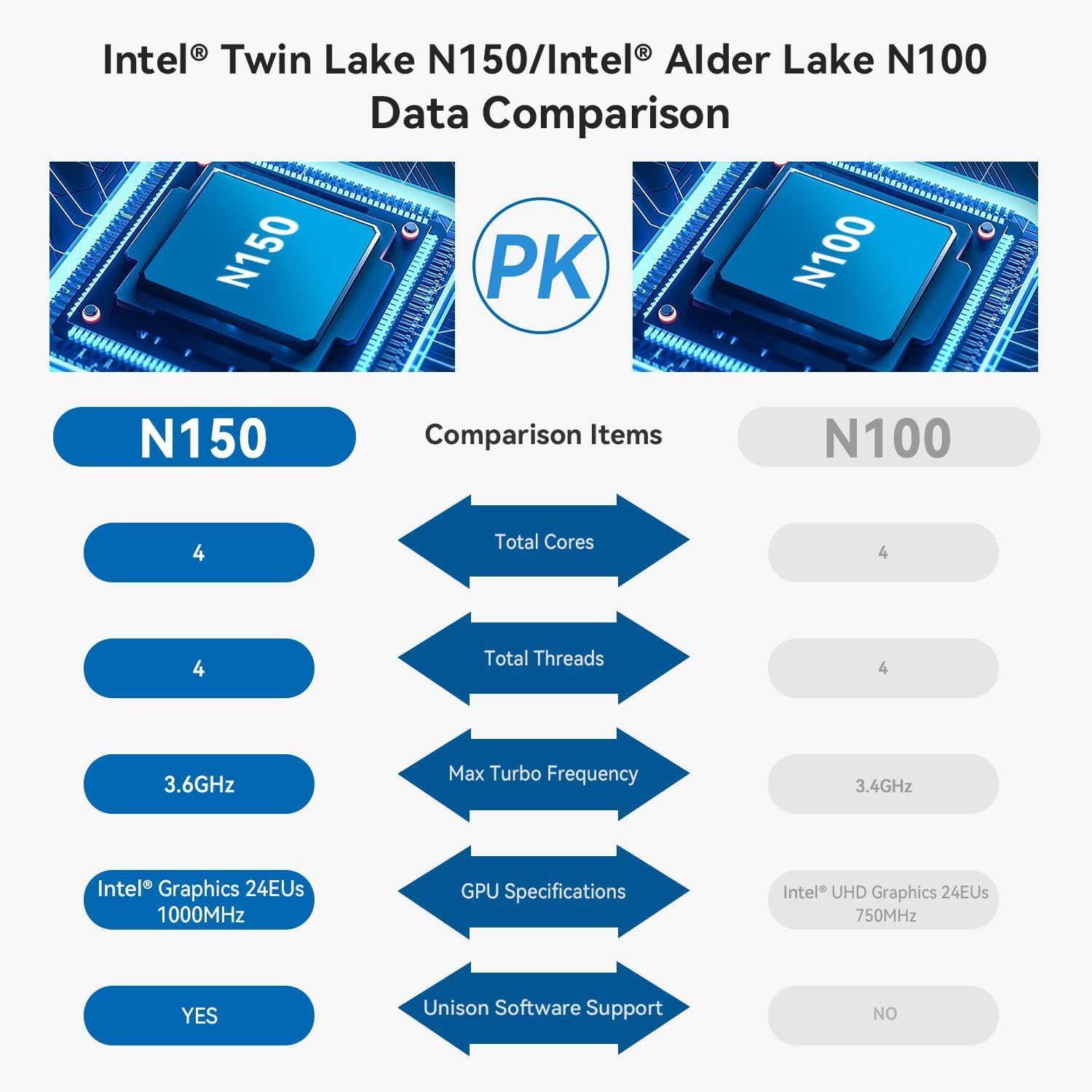
The TRIGKEY Key Mini N150 is a compact and efficient mini PC designed for various computing tasks, including office work, 4K video playback, web browsing, and educational use. It features an Intel Alder Lake N150 processor, DDR5 memory, and SSD storage, offering stable performance in a small form factor.
2. Kas yra dėžutėje
Patikrinkite, ar pakuotėje yra visi reikalingi daiktai:
- 1 x TRIGKEY mini kompiuteris
- 1x maitinimo adapteris
- 1x HDMI laidas
- 1 x Vartotojo vadovas

This image displays the contents of the TRIGKEY Key Mini N150 package, including the mini PC unit, power adapter, HDMI cable, and the user manual.
3. Produktas baigtasview
3.1. Išorinės funkcijos ir prievadai
The Key Mini N150 features a sleek and compact design, making it suitable for various environments. The front and rear panels provide essential connectivity options.

This image illustrates the front and rear interfaces of the mini PC. The front includes a power button, USB-C (data), and USB 3.2 ports. The rear panel features DC IN, two HDMI ports, multiple USB 3.2 ports, a 3.5mm audio jack, a CLR CMOS button, and a 2.5G LAN port.
3.2. Vidiniai komponentai
The mini PC is equipped with an Intel Twin Lake N150 Processor, 16GB DDR5 4800MHz RAM, and a 500GB SSD. It supports dual M.2 PCIe 3.0 SSDs for expanded storage.

Šis paveikslėlis pateikia vidinį vaizdą view of the mini PC, highlighting the DDR5 SODIMM memory module and the two M.2 SSD slots, one M.2 PCIe 3.0 x4 and one M.2 PCIe 3.0 x1.
3.3. Aušinimo sistema
An innovative airflow design with a dust filter ensures stable operation and quiet performance by efficiently dissipating heat.

This image shows the underside of the mini PC, illustrating the new airflow design with a visible cooling fan and dust filter, designed for stable and quiet operation.
3.4. Produkto vaizdo įrašasview
This official TRIGKEY video provides a visual overview of the Key Mini N150, showcasing its compact design, internal components, and key features like the Intel Twin Lake N150 processor and DDR5 memory.
4. Sąrankos instrukcijos
4.1. Išorinių įrenginių prijungimas
- Prijungti monitorių(-ius): Use the provided HDMI cable to connect your monitor(s) to the HDMI ports on the rear of the mini PC. The device supports dual 4K@60Hz displays.
- Prijunkite klaviatūrą ir pelę: Plug your USB keyboard and mouse into any available USB 3.2 ports.
- Prisijungimas prie tinklo (neprivaloma): Laidiniam ryšiui prijunkite eterneto laidą prie 2.5 G LAN prievado. Belaidžiam ryšiui įsitikinkite, kad jūsų „Wi-Fi“ tinklas pasiekiamas pradinės sąrankos metu.
4.2. Įjungimas
- Prijunkite maitinimo adapterį: Plug the power adapter into the DC IN port on the rear of the mini PC, then connect it to a power outlet.
- Maitinimas: Press the power button located on the front panel of the mini PC. The power indicator light will illuminate.
4.3. Initial Operating System Setup
Upon first boot, the operating system (WOS) will guide you through the initial setup process. Follow the on-screen instructions to configure language, region, network, and user accounts.
5. Naudojimo instrukcijos
5.1. Pagrindinė operacija
- Maitinimo įjungimas/išjungimas: Press the power button to turn on the PC. To turn off, use the operating system's shutdown function. A short press of the power button can put the PC to sleep.
- Paleisti iš naujo: Naudokite operacinės sistemos paleidimo iš naujo funkciją.
5.2. Dvigubo ekrano sąranka
The Key Mini N150 supports connecting two monitors simultaneously via its two HDMI ports for extended desktop or mirrored display modes. Configure display settings within your operating system.
5.3. Tinklo ryšys
- Wired (2.5G LAN): Connect an Ethernet cable to the LAN port for high-speed internet access.
- Belaidis ryšys („Wi-Fi 6“): The integrated Intel AX101 Wi-Fi 6 module provides fast and stable wireless connectivity. Access Wi-Fi settings in your operating system to connect to available networks.
5.4. „Bluetooth“ įrenginiai
The mini PC includes Bluetooth 5.2 for connecting wireless peripherals such as keyboards, mice, headphones, and speakers. Pair devices through the Bluetooth settings in your operating system.
5.5. Intel Unison App Integration
Utilize the Intel Unison App to seamlessly connect your PC with mobile devices. This allows for features such as viewnuotraukų galerijų kūrimas, perkėlimas files, extending your PC screen to a tablet, making/receiving phone calls, and managing notifications.
This image illustrates the capabilities of the Intel Unison App, enabling users to connect their PC and mobile devices for features like photo viewangl. file transfer, screen extension, calls, and notifications.
6. Specifikacijos
| Funkcija | Specifikacija |
|---|---|
| Procesorius | „Intel Alder Lake N150“ (4C/4T, iki 3.6 GHz) |
| Grafikos koprocesorius | „Intel Graphics 24EU“ 1000 MHz dažniu |
| RAM | 16GB DDR5 4800MHz |
| Sandėliavimas | 500GB SSD (supports dual M.2 PCIe 3.0 SSDs) |
| Maksimali ekrano skiriamoji geba | 3840 x 2160 pikselių (4K) |
| Ekrano išvestis | 2 x HDMI (Max 4K 60Hz) |
| Belaidis ryšys | „WiFi 6“ („Intel AX101“), „Bluetooth 5.2“ |
| LAN | 2.5 Gbps Ethernet |
| USB prievadai | 4 x USB 3.2 (10 Gbps), 1 x USB-C (duomenys 10 Gbps) |
| Garso lizdas | 1 x 3.5 mm garso lizdas |
| Operacinė sistema | WOS |
| Prekės svoris | 1.81 svaro |
| Matmenys | 6.06 x 5.98 x 3.03 colio |
| Spalva | Juoda |
7. Priežiūra
7.1. Valymas
To maintain optimal performance and longevity, regularly clean the exterior of the mini PC with a soft, dry cloth. Ensure the ventilation openings are free from dust and obstructions. Do not use liquid cleaners directly on the device.
7.2. Saugyklos išplėtimas
The Key Mini N150 supports dual M.2 PCIe 3.0 SSDs. To expand storage, you can install an additional M.2 2280 SSD in the available slot. Refer to the detailed instructions for opening the chassis and installing components if you are comfortable with hardware modifications. It is recommended to back up data before any hardware changes.
7.3. Programinės įrangos atnaujinimai
Regularly update your operating system and drivers to ensure system stability, security, and optimal performance. Check for updates through your operating system's settings.
8. Problemų sprendimas
8.1. Nėra elektros
- Įsitikinkite, kad maitinimo adapteris yra tvirtai prijungtas tiek prie mini kompiuterio, tiek prie veikiančio maitinimo lizdo.
- Patikrinkite, ar maitinimo lizdas veikia, prijungdami prie jo kitą įrenginį.
- Išbandykite kitą maitinimo adapterį, jei yra ir jis suderinamas.
8.2. Nėra vaizdo išvesties
- Check that the HDMI cable is securely connected to both the mini PC and the monitor.
- Įsitikinkite, kad monitorius įjungtas ir nustatytas tinkamas įvesties šaltinis (HDMI 1, HDMI 2 ir kt.).
- Jei įmanoma, išbandykite su kitu HDMI kabeliu arba monitoriumi.
8.3. Tinklo ryšio problemos
- Laidinis: Patikrinkite Ethernet kabelio jungtį. Įsitikinkite, kad maršrutizatorius / modemas veikia tinkamai.
- Belaidis ryšys: Įsitikinkite, kad operacinėje sistemoje įjungtas „Wi-Fi“. Patikrinkite, ar pasirinktas teisingas „Wi-Fi“ tinklas ir ar teisingai įvestas slaptažodis. Paleiskite maršrutizatorių / modemą iš naujo.
8.4. System Unresponsive / Boot Issues
- Perform a hard shutdown by pressing and holding the power button for 5-10 seconds. Then restart the PC.
- CLR CMOS: If experiencing persistent boot issues or BIOS configuration problems, locate the CLR CMOS button on the rear panel. With the PC powered off and disconnected from power, press this button (often requires a paperclip) to reset BIOS settings to default. Reconnect power and attempt to boot.
9. Garantija ir palaikymas
„TRIGKEY“ teikia išsamią savo produktų paramą:
- Garantija: 1 metų garantija be rūpesčių.
- Techninė pagalba: Techninė pagalba visą gyvenimą.
- Klientų aptarnavimas: 24 valandų klientų aptarnavimas.
For any questions or assistance, please contact TRIGKEY customer service. Refer to the official TRIGKEY websvetainė, kurioje rasite naujausią kontaktinę informaciją.


