1. Įvadas
Ačiū, kad pirkoteasing the Lisowod Mini Projector. This compact and powerful device is designed to provide a vivid 1080P FHD viewing experience with advanced features like automatic keystone correction and electric focus. Its portable design, complete with a convenient strap, makes it ideal for travel and various entertainment needs. This manual will guide you through the setup, operation, and maintenance of your new projector.
2. Svarbi saugos informacija
- Saugokite projektorių nuo lietaus ar drėgmės, kad išvengtumėte gaisro ar elektros smūgio.
- Užtikrinkite tinkamą vėdinimą. Neužblokuokite ventiliacijos angų.
- Naudokite tik prie projektorijaus pridėtą maitinimo adapterį.
- Venkite žiūrėti tiesiai į projektoriaus objektyvą, kai lamp įjungtas, nes ryški šviesa gali pažeisti akis.
- Projektorių laikykite atokiau nuo šilumos šaltinių ir tiesioginių saulės spindulių.
- Nebandykite patys ardyti ar taisyti projektoriaus. Visus techninės priežiūros darbus patikėkite kvalifikuotiems specialistams.
3. Pakuotės turinys
Atidžiai patikrinkite pakuotės turinį. Jei trūksta kokių nors daiktų arba jie pažeisti, susisiekite su pardavėju.
- Lisowod Mini Projector (L01Pro)
- Maitinimo adapteris
- HDMI kabelis
- Nuotolinio valdymo pultas
- Vartotojo vadovas
4. Produktas baigtasview
Projektoriaus komponentai

4.1 paveikslas: Priekyje view of the Lisowod Mini Projector, showcasing its compact design, lens, and key features like 1080P FHD, Auto Keystone, Electric Focus, 2.4+5G Wi-Fi, and Bluetooth connectivity.
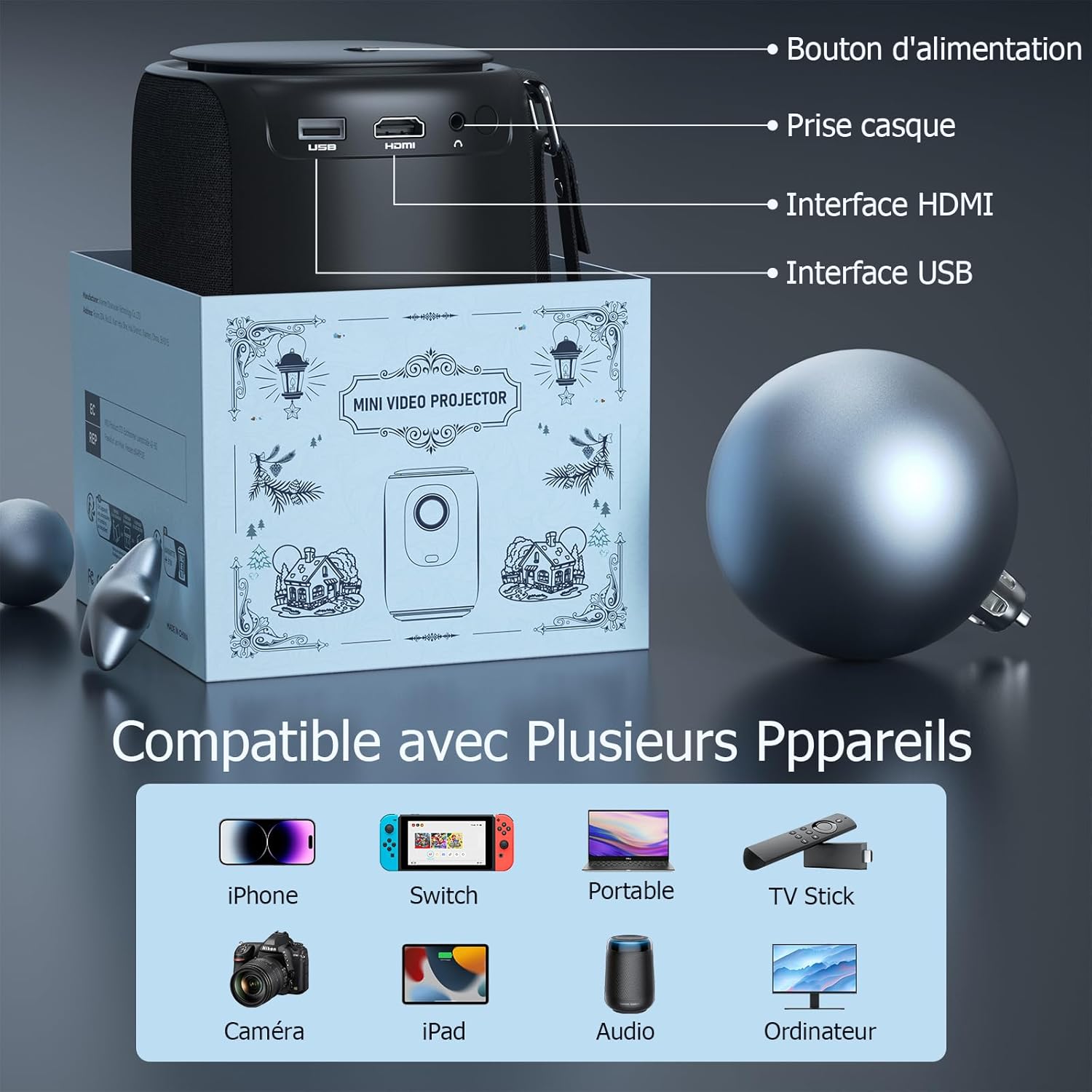
4.2 paveikslas: Galinis view of the projector, indicating the power button, headphone jack, HDMI interface, and USB interface for various connections.
Pagrindinės savybės
- 1080P FHD Display: Delivers vivid and immersive images.
- Automatic Keystone Correction (±50°): Automatically corrects distorted images vertically for a perfect rectangular display.
- Elektrinis fokusavimas: Achieve clear images quickly with a single click on the remote control, eliminating manual adjustments.
- Dviejų dažnių „Wi-Fi“ (2.4 G + 5 G): Provides smoother and lower latency connectivity for streaming and gaming.
- Bidirectional Bluetooth & Integrated Stereo Speakers: Can be used as a Bluetooth speaker and offers Hi-Fi sound effects.
- Portable Strap Design: Convenient for carrying the projector during travel.
5. Sąrankos vadovas
5.1 Įjungimas
- Prijunkite maitinimo adapterį prie projektoriaus maitinimo įvesties prievado.
- Įkiškite maitinimo adapterį į sieninį lizdą.
- Paspauskite maitinimo mygtuką ant projektoriaus arba nuotolinio valdymo pulto, kad jį įjungtumėte.
5.2 Pradinis išdėstymas
Place the projector on a stable, flat surface. Ensure there is adequate space around the projector for ventilation.
5.3 Adjusting Focus and Keystone
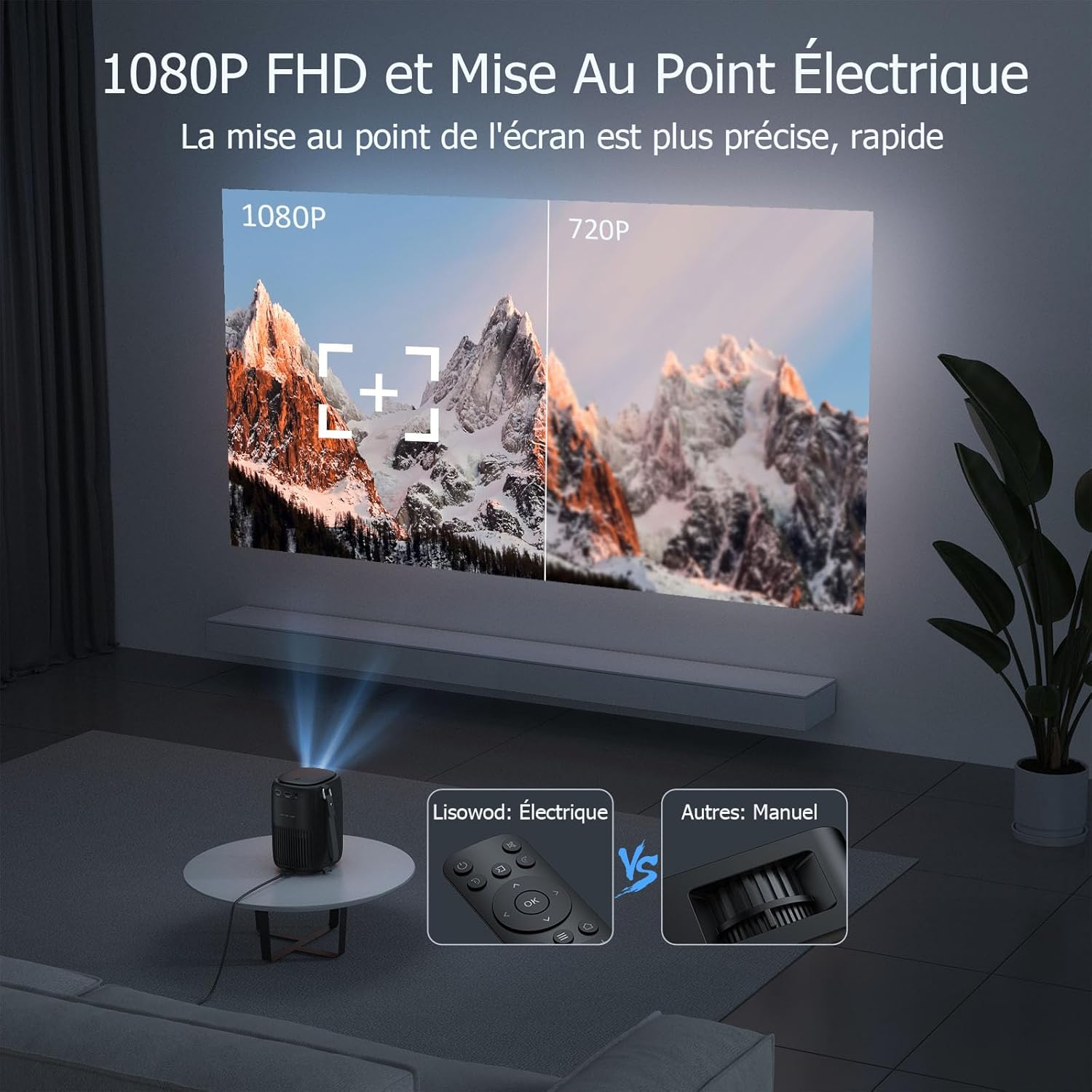
5.1 paveikslas: Illustrates the precision of 1080P FHD and the ease of electric focus compared to manual focus.

5.2 paveikslas: Demonstrates the automatic keystone correction feature, which adjusts the image shape automatically.
- Elektrinis fokusavimas: Use the remote control to adjust the focus. The built-in high-precision infrared sensor allows for quick and clear image acquisition with a single click.
- Automatinė trapų korekcija: The projector features automatic keystone correction, which automatically adjusts the image vertically (up and down) if the projector is not perfectly aligned with the screen.
6. Naudojimo instrukcijos
6.1 Įrenginių prijungimas
The projector is compatible with a variety of devices:
6.1 paveikslas: The projector supports connections with various devices including iPhone, Switch, Laptops, TV Sticks, Cameras, iPads, Audio devices, and Computers.
- HDMI: Connect laptops, game consoles, TV sticks, or other media players using the provided HDMI cable.
- USB: Įkiškite USB atmintinę, kad galėtumėte leisti mediją files tiesiogiai.
- Išmanusis telefonas / planšetinis kompiuteris: Connect your smartphone or tablet for screen mirroring (specific adapter or app may be required, refer to device instructions).
- Garso išvestis: Connect external speakers or headphones via the headphone jack for enhanced audio.
6.2 „Wi-Fi“ ryšys

6.2 paveikslas: Demonstrates the advantage of 2.4G+5G Wi-Fi for smoother and lower latency performance.
- Navigate to the Wi-Fi settings in the projector's menu.
- Select your desired Wi-Fi network (supports both 2.4GHz and 5GHz).
- Įveskite slaptažodį ir prisijunkite.
6.3 „Bluetooth“ garsas

6.3 paveikslas: Highlights the projector's bidirectional Bluetooth and integrated stereo speakers, allowing it to function as a Bluetooth speaker.
- Eikite į „Bluetooth“ nustatymus projektoriaus meniu.
- Įjunkite Bluetooth ir ieškokite galimų įrenginių.
- Select your Bluetooth speaker or headphones to pair.
6.4 Using Streaming Services (Netflix, Amazon Prime, etc.)
Due to copyright restrictions, direct casting or HDMI connection from a phone/tablet for services like Netflix, Amazon Prime, etc., may not display video (only audio). To enjoy videos from these platforms, you must connect a dedicated TV stick (e.g., Amazon Fire TV Stick, Google Chromecast) to the projector's HDMI port.
7. Priežiūra ir priežiūra
- Objektyvo valymas: Naudokite minkštą, nepūkuotą šluostę, specialiai skirtą optiniams lęšiams. Nenaudokite abrazyvinių valiklių ar tirpiklių.
- Projektoriaus korpuso valymas: Wipe the surface with a soft, dry cloth. For stubborn stains, use a slightly damp skudurėliu ir tada gerai išdžiovinkite.
- Vėdinimas: Ensure the ventilation openings are clear of dust and debris. Use a soft brush or compressed air to gently clean them.
- Saugykla: When not in use for extended periods, store the projector in a cool, dry place, preferably in its original packaging or a protective case.
8. Problemų sprendimas
| Problema | Galima priežastis | Sprendimas |
|---|---|---|
| Vaizdas nerodomas | Power cable not connected; Input source incorrect; Device not powered on. | Patikrinkite maitinimo jungtį; Pasirinkite tinkamą įvesties šaltinį (HDMI, USB); Įsitikinkite, kad prijungtas įrenginys įjungtas. |
| Vaizdas neryškus | Nenustatytas fokusavimas; projektorius per toli/per arti ekrano. | Use the remote control to adjust electric focus; Adjust projection distance. |
| Vaizdas iškraipytas (trapecijos formos) | Projektorius nėra statmenas ekranui. | The projector has automatic keystone correction. Ensure it's on a stable surface. If manual adjustment is needed, check menu settings. |
| Nėra garso | Volume too low; Muted; External audio device not connected properly; Source device audio settings. | Increase volume; Unmute; Check external speaker connection; Adjust audio output on source device. |
| Cannot play Netflix/Amazon Prime Video | Copyright restrictions on direct casting/HDMI from phone/tablet. | Connect a dedicated TV stick (e.g., Amazon Fire TV Stick, Google Chromecast) to the projector's HDMI port. |
| Nuotolinio valdymo pultas neveikia | Baterijos išsikrovusios/išsikrovusios; kliūtis tarp nuotolinio valdymo pulto ir projektoriaus. | Replace batteries; Remove any obstructions; Point remote directly at the projector's IR receiver. |
9. Techninės specifikacijos
| Funkcija | Specifikacija |
|---|---|
| Prekės ženklas | Lisowod |
| Modelio numeris | L01Pro |
| Maksimali ekrano skiriamoji geba | 1920 x 1080 (1080P FHD) |
| Ryšio technologija | HDMI, USB, Wi-Fi (2.4G+5G), Bluetooth |
| Ekrano tipas | LCD |
| Vaizdo kontrasto santykis | 20000:1 |
| Ryškumas | 158 liumenų |
| Formos faktorius | Nešiojami |
| Montavimo tipas | Stalo laikiklis |
| Įtraukti komponentai | Adapter, HDMI Cable, Remote Control |
| Suderinami įrenginiai | Laptop, Game Console, Smartphone, Other Media Players, Speaker |
10. Garantija ir palaikymas
Your Lisowod Mini Projector is covered by a standard manufacturer's warranty. Please refer to the warranty card included in your package for specific terms and conditions, including the warranty period and coverage details.
For technical support, troubleshooting assistance, or warranty claims, please contact Lisowod customer service through the retailer where you purchased the product or visit the official Lisowod websvetainė kontaktinei informacijai.
Please have your model number (L01Pro) and purchase information ready when contacting support.


