1. Įvadas
This manual provides detailed instructions for the proper use and maintenance of your BAOFENG UV-18H Two-Way Radio. Please read this manual thoroughly before operating the device to ensure safe and efficient use. Keep this manual for future reference.
2. Produktas baigtasview
The BAOFENG UV-18H is a versatile 6-band two-way radio equipped with GPS, NOAA weather alerts, USB-C charging, and wireless frequency copy capabilities. It features a 1.77-inch LCD screen for clear display of information.
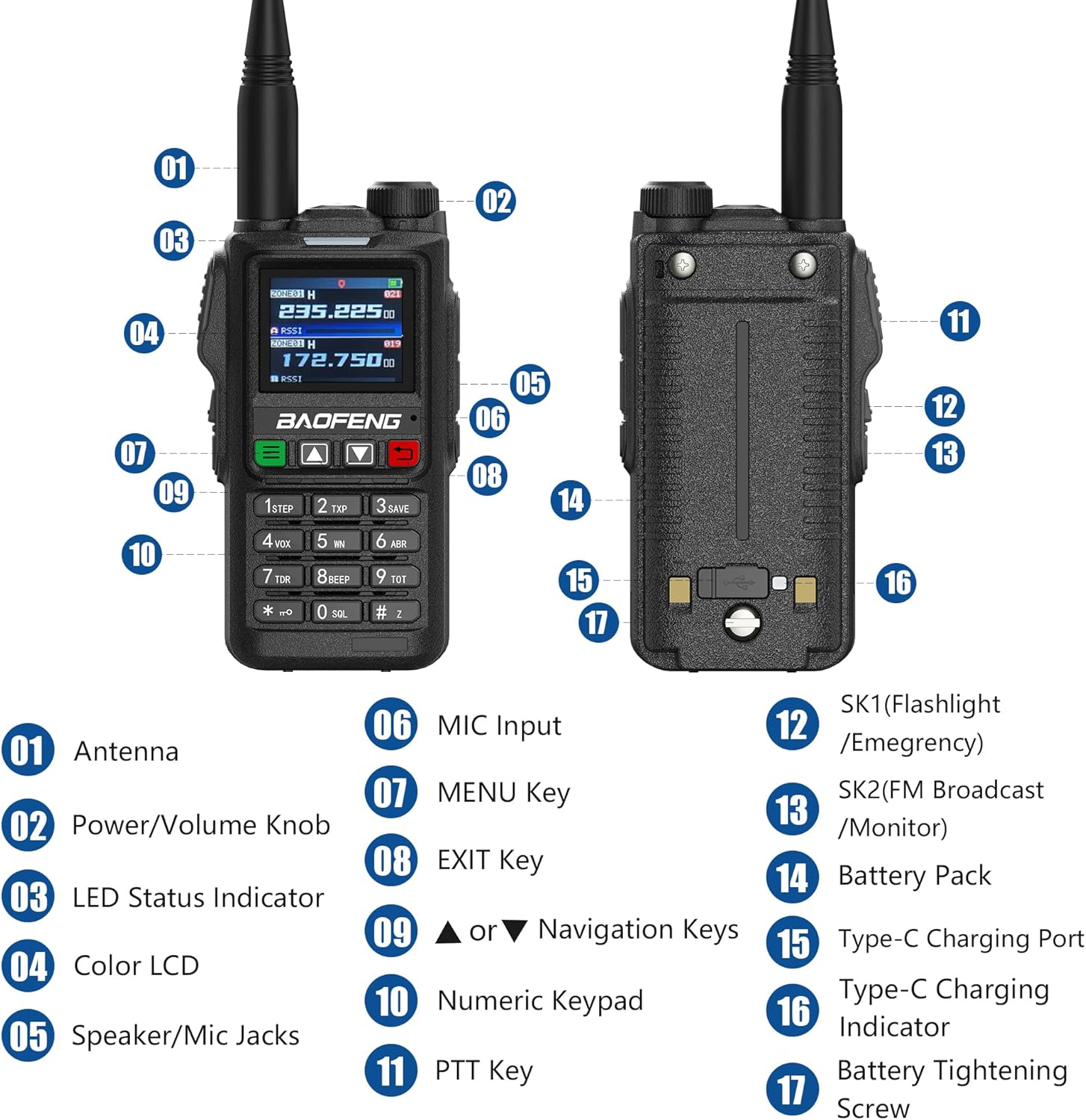
Figure 2.1: BAOFENG UV-18H Radio Components
This diagram illustrates the key components of the UV-18H radio. Numbered labels indicate: 01 antena, 02 Power/Volume Knob, 03 LED būsenos indikatorius, 04 spalvų LCD, 05 Speaker/Mic Jacks, 06 MIC įvestis, 07 MENIU mygtukas, 08 EXIT Key, 09 Navigation Keys (Up/Down), 10 Skaitmeninė klaviatūra, 11 PTT Key, 12 SK1 (Flashlight/Emergency), 13 SK2 (FM Broadcast/Monitor), 14 baterijų paketas, 15 tipo C įkrovimo prievadas, 16 Type-C Charging Indicator, 17 Battery Tightening Screw.
3. Pakuotės turinys
Patikrinkite, ar pakuotėje yra visi reikalingi daiktai:
- Nešiojamasis radijas UV-18H
- USB-C kabelis
- Ausinės
- Didelio pelno antena
- 1800 mAh didelės talpos baterija
- Diržo segtukas
- Baterijos įkroviklis (dokas ir JAV adapteris)
- Rankinis dirželis
- Vartotojo vadovas
- 771 antena
4. Sąranka
4.1 Akumuliatoriaus įdėjimas
- Sulygiuokite akumuliatorių bloką su radijo imtuvo gale esančiais grioveliais.
- Stumkite akumuliatorių bloką aukštyn, kol jis spragtelėdamas užsifiksuos vietoje.
- Ensure the battery tightening screw (17 in Figure 2.1) is securely fastened.
4.2 Antenos pritvirtinimas
- Anteną įsukite pagal laikrodžio rodyklę į radijo viršuje esančią jungtį, kol pirštais ją priveržsite. Neperveržkite.
4.3 Akumuliatoriaus įkrovimas
The UV-18H radio can be charged using the provided charging dock or directly via a USB-C cable.

4.1 pav.: Įkrovimo parinktys
The radio supports multiple charging methods including the base charger, direct Type-C charging, USB charging via a wall adapter, computer charging, power bank charging, and car charger options.
Įkrovimo stotelės naudojimas:
- Connect the AC adapter to the charging dock and plug it into a power outlet.
- Place the radio (with battery installed) into the charging dock.
- The charging indicator light on the dock will illuminate to show charging status.
Naudojant tiesioginį USB-C įkrovimą:
- Connect the USB-C cable to the Type-C Charging Port (15 in Figure 2.1) on the radio.
- Connect the other end of the USB-C cable to a compatible USB power source (e.g., power bank, PC, car charger, USB wall adapter).
- The Type-C Charging Indicator (16 in Figure 2.1) will show the charging status.
5. Pagrindinė operacija
5.1 Įjungimas / išjungimas ir garsumo valdymas
- Maitinimas: Rotate the Power/Volume Knob (02 in Figure 2.1) clockwise until a click is heard.
- Išjungti: Rotate the Power/Volume Knob (02 in Figure 2.1) counter-clockwise until a click is heard.
- Garso reguliavimas: Rotate the Power/Volume Knob (02 in Figure 2.1) clockwise to increase volume and counter-clockwise to decrease volume.
5.2 Kanalo pasirinkimas
- Use the Navigation Keys (09 in Figure 2.1) to scroll through available channels.
- Alternatively, use the Numeric Keypad (10 in Figure 2.1) to directly input a channel number.
5.3 Perdavimas ir priėmimas
- Perduoti: Press and hold the PTT Key (11 in Figure 2.1) on the side of the radio. Speak clearly into the microphone. Release the PTT key to stop transmitting.
- Norėdami gauti: Ensure the PTT key is not pressed. The radio will automatically receive signals on the selected channel.
6. Išplėstinės funkcijos
6.1 GPS funkcionalumas
The UV-18H includes GPS functionality, displaying a simple compass on the screen to indicate location. This feature does not require an APRS cable. For detailed operation steps, refer to the manufacturer's video tutorials or support resources.

Figure 6.1: GPS Display
The radio's screen shows location information, aiding in coordination. The GPS feature provides timely location data.
6.2 NOAA orų įspėjimai
The radio is equipped with NOAA weather alert capabilities, allowing users to receive important weather broadcasts and alerts to stay informed about changing conditions.

Figure 6.2: NOAA Weather Alerts
The radio provides access to NOAA weather alerts, enhancing safety by delivering timely weather information.
6.3 Belaidžio kopijavimo dažnis
The wireless copy frequency function allows for easy alignment of frequencies between two UV-18H radios without complex manual settings. Simply press the designated key to initiate the frequency alignment operation.

Figure 6.3: Wireless Frequency Copy
This feature enables quick and simple frequency alignment between two radios, streamlining setup.
6.4 Skenerio funkcija
The UV-18H includes a scanner function with VFO scan range settings. It supports three scan recovery methods, channel scanning, CTC/DCS scanning, and allows for the addition and removal of scan channels.
6.5 DTMF (dvitonis daugiadažnis)
DTMF functionality enables various calling options, including individual calls, group calls, and all calls, enhancing communication flexibility within a network of compatible radios.

Figure 6.4: DTMF Calling Options
DTMF allows for targeted communication, facilitating individual, group, or broadcast calls.
6.6 AM/FM Multi-band Function
The radio supports AM/FM multi-band reception, allowing users to listen to broadcast radio in addition to two-way communication frequencies.
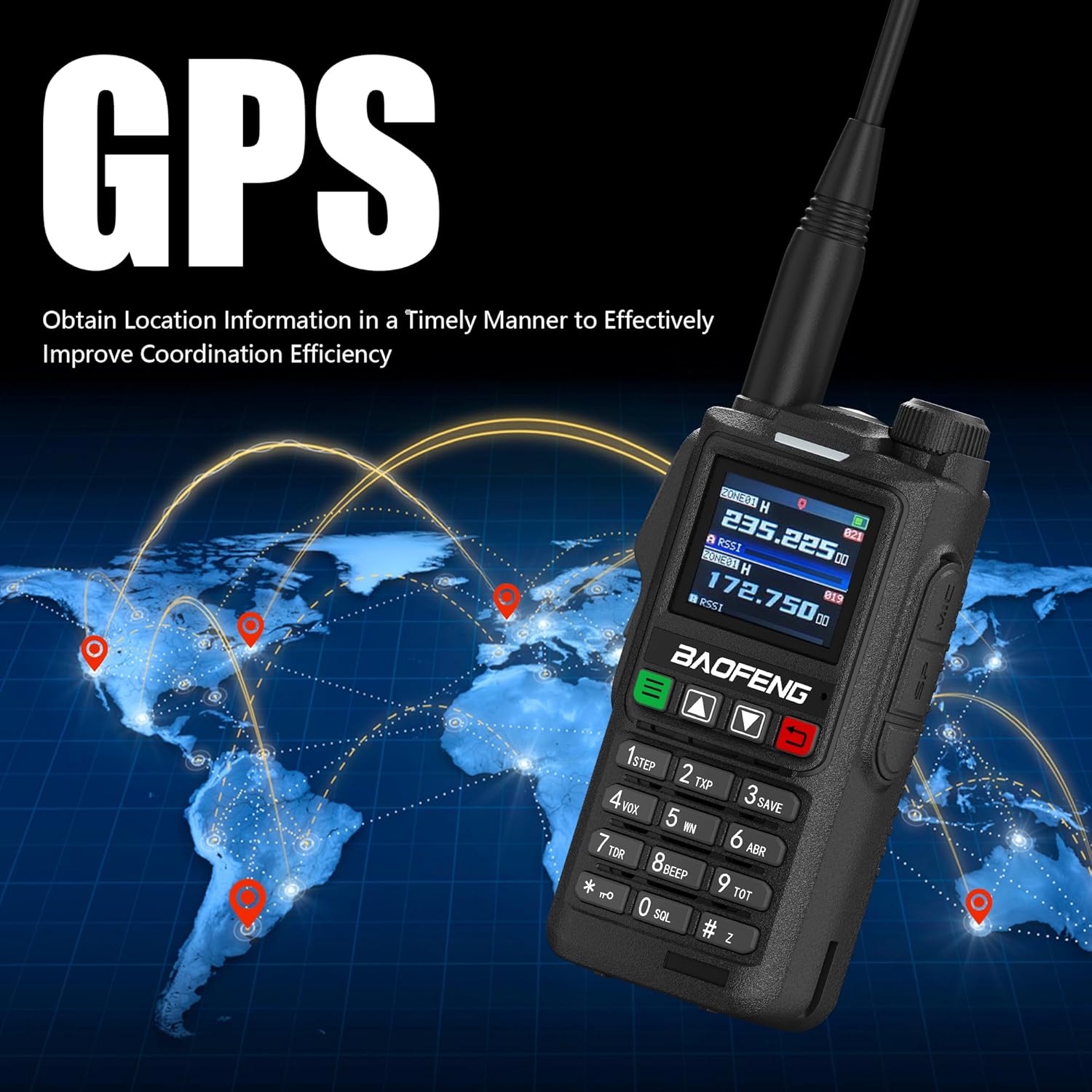
Figure 6.5: AM/FM Multi-band Function
The radio's multi-band capability includes AM/FM reception for broader utility.
7. Priežiūra
7.1 Valymas
- Radijo išorę nuvalykite minkšta,amp audinys. Nenaudokite stiprių cheminių medžiagų ar abrazyvinių valiklių.
- Prieš valydami, įsitikinkite, kad radijo imtuvas yra išjungtas ir atjungtas nuo bet kokio įkrovimo šaltinio.
7.2 Akumuliatoriaus priežiūra
- Kad pailgintumėte akumuliatoriaus tarnavimo laiką, venkite jo dažnai visiškai iškrauti.
- Kai radijo imtuvą ir bateriją ilgesnį laiką nenaudojate, laikykite jį vėsioje, sausoje vietoje.
- Nelaikykite baterijos nuo ekstremalių temperatūrų arba tiesioginių saulės spindulių.
8. Problemų sprendimas
| Problema | Galima priežastis | Sprendimas |
|---|---|---|
| Radijas neįsijungia | Baterija išsikrovė arba netinkamai įdėta | Įkraukite akumuliatorių arba įsitikinkite, kad jis tinkamai įdėtas. |
| Negalima perduoti ar priimti | Incorrect frequency/channel, antenna not attached, or PTT not pressed/released | Verify channel settings, attach antenna securely, ensure PTT is used correctly. |
| Prasta garso kokybė | Weak signal, incorrect volume, or interference | Move to an area with better signal, adjust volume, check for sources of interference. |
| GPS not showing location | Poor satellite reception | Pereikite į atvirą lauko erdvę su skaidria view dangaus. |
9. Specifikacijos
| Funkcija | Detalė |
|---|---|
| Prekės ženklas | BAOFENGAS |
| Modelis | UV-18H |
| Kanalų skaičius | 999 |
| Ypatingos savybės | 1.77 colio ekranas, GPS, NOAA, šešių dažnių diapazonai, USB-C įkrovimas |
| Dažnių diapazonas | 144–148 MHz, 420–450 MHz |
| Maksimalus pokalbio diapazonas | 6 mylių |
| ttage | 7.4 volto (DC) |
| Atsparumo vandeniui lygis | Neatsparus vandeniui |
| Baterijų skaičius | 1 ličio jonų baterija (pridedama) |
| Prekės svoris | 25.04 uncijos |
10. Garantija ir palaikymas
Specific warranty details for the BAOFENG UV-18H radio are not provided in the product information. For warranty claims, technical support, or further assistance, please contact the retailer or manufacturer directly. Keep your purchase receipt as proof of purchase.