1. Įvadas
The LTC Nimbleback NB831 is a versatile 75% mechanical keyboard designed for various computing environments. It offers multiple connectivity options, customizable features, and a compact layout. This manual provides detailed instructions for setting up, operating, and maintaining your keyboard.

1.1 vaizdas: Baigtaview of the LTC Nimbleback NB831 Mechanical Keyboard.
2. Pakuotės turinys
Patikrinkite, ar pakuotėje yra visi reikalingi daiktai:
- LTC Nimbleback NB831 Mechanical Keyboard
- Klaviatūros traukiklis
- USB laidas (USB-A–USB-C)
- Naudotojo vadovo kortelė
- Replacement Switches (4 pieces)

Image 2.1: Contents included in the LTC Nimbleback NB831 package, featuring the keyboard, USB cable, keycap/switch puller, and extra switches.
3. Sąranka
3.1 Ryšio režimai
The NB831 supports three connection modes:
- 2.4 GHz belaidis ryšys: Use the included USB dongle for a stable wireless connection.
- "Bluetooth 5.0": Pair with up to three Bluetooth-enabled devices.
- USB-C laidinis: Connect directly via the USB-C cable for a wired connection and simultaneous charging.

Image 3.1: Visual representation of the three connectivity modes: 2.4GHz wireless, Bluetooth 5.0, and USB-C wired.
3.2 Operacinės sistemos suderinamumas
The NB831 keyboard is compatible with Windows (Win7, Win8, Win10, Win11), iOS, and macOS operating systems. Use the following key combinations to switch between modes:
- „Windows“ režimas: Paspauskite fn + A
- macOS Mode: Paspauskite Fn + S

Image 3.2: Illustration of switching between Windows and macOS modes using Fn key combinations.
3.3 Fiziniai koregavimai
The keyboard features 2-level adjustable feet for ergonomic typing angles. The USB dongle can be stored in a dedicated magnetic socket on the underside of the keyboard when not in use. The USB-C cable can be routed through three different channels (left, center, right) for neat cable management.

Image 3.3: Details of the keyboard's underside, showing 2-level feet, 3-side cable routing, and the magnetic dongle socket.
4. Naudojimo instrukcijos
4.1 Volume Control Knob
The integrated volume knob allows for quick audio adjustments:
- Sukti pagal laikrodžio rodyklę: Padidinti garsumą.
- Sukti prieš laikrodžio rodyklę: Sumažinti garsumą.
- Paspauskite: Nutildyti / įjungti garsą.
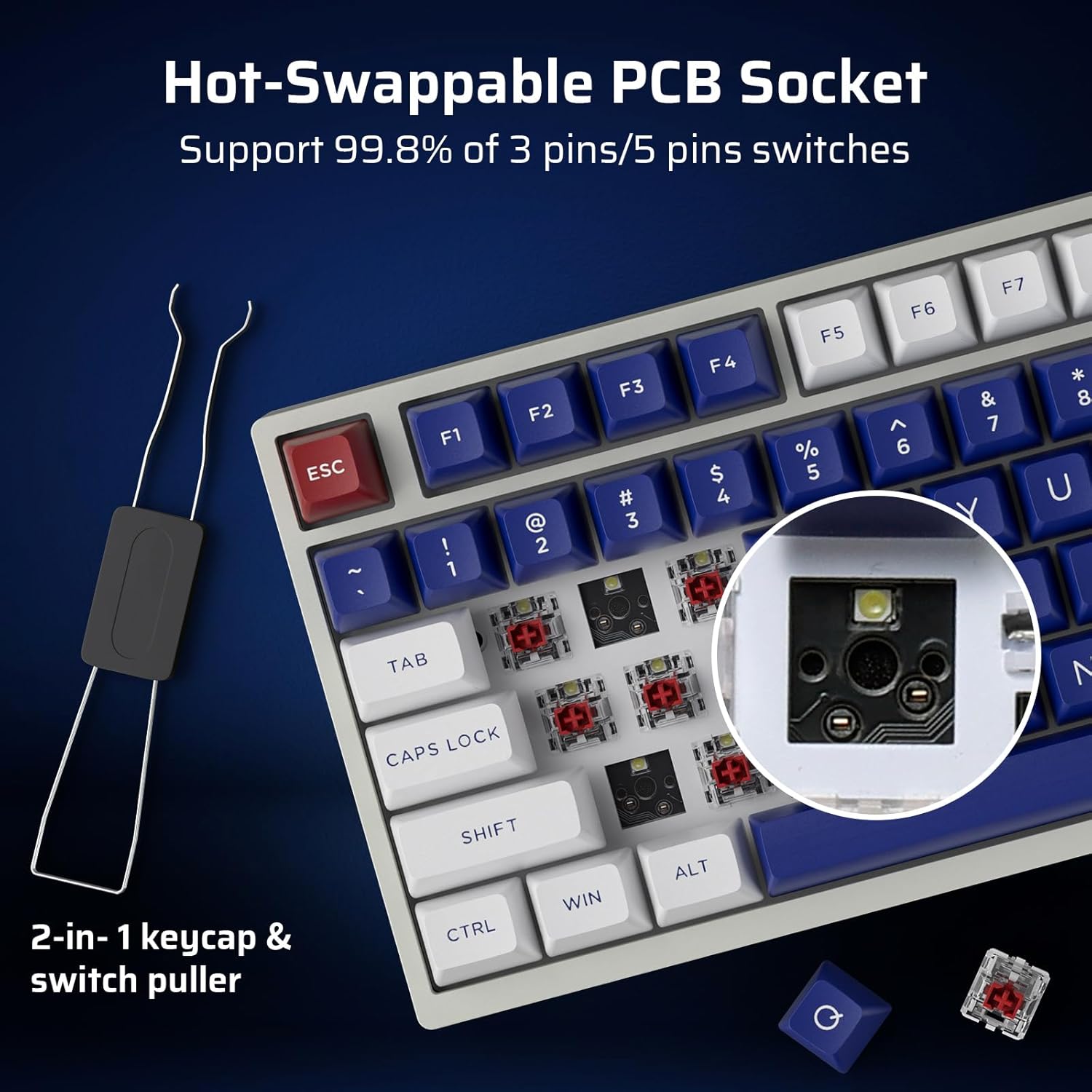
Image 4.1: Demonstrates the functionality of the convenient volume knob for adjusting audio levels and muting.
4.2 RGB apšvietimas
The keyboard features 18 dynamic RGB lighting modes. Control them using the following key combinations:
- Foninio apšvietimo režimų perjungimas: Paspauskite Fn + ↑ (Rodyklė aukštyn)
- Perjungti foninio apšvietimo spalvas: Paspauskite Fn + ↓ (Rodyklė žemyn)
- Foninio apšvietimo greitis +: Paspauskite Fn + → (Rodyklė dešinėn)
- Foninio apšvietimo greitis -: Paspauskite Fn + ← (Rodyklė kairėn)
- Foninis apšvietimas įjungtas/išjungtas: Paspauskite Fn + \
- Restore Factory Mode: Ilgai paspauskite Fn + tarpas
4.3 Karštuoju būdu keičiami jungikliai
The NB831 features a hot-swappable PCB, allowing you to change mechanical switches without soldering. It supports both 3-pin and 5-pin MX-style switches (e.g., Gateron, Kailh). Use the included 2-in-1 keycap and switch puller for easy removal and installation.

4.2 paveikslėlis: Stambus planas view of the hot-swappable PCB socket, demonstrating compatibility with different switch types.
4.4 Profesionalios programinės įrangos palaikymas
Utilize the dedicated LTC software to customize your keyboard experience. The software allows you to:
- Remap key combinations.
- Assign macros for complex commands.
- Tinkinkite RGB apšvietimo efektus ir spalvas.

Image 4.3: Screenshot of the LTC Pro Software interface, showing options for key remapping, macro assignment, and RGB customization.
4.1 vaizdo įrašas: išsamus aprašymasview of the LTC Nimbleback NB831 keyboard, including a demonstration of its software features and customization options.
5. Priežiūra
5.1 Valymas
To maintain optimal performance and appearance, regularly clean your keyboard. Use a soft, dry cloth to wipe the surface. For deeper cleaning, remove keycaps using the provided keycap puller and use compressed air to clear debris from between switches. The PBT keycaps are oil-resistant, making them easier to clean.
5.2 Jungiklio ir klaviatūros dangtelio keitimas
Leverage the hot-swappable design to replace switches or keycaps. Use the included 2-in-1 tool to carefully remove keycaps first, then switches. Ensure new switches are aligned correctly before pressing them into the PCB to avoid bending pins.
5.3 Garsas Dampening
The keyboard is designed with dual layers of sound-damping foam to minimize hollow sounds and reduce noise, contributing to a satisfying typing experience.

Image 5.1: Diagram illustrating the two-layer silencing foam structure within the keyboard, designed to reduce hollow sounds and noise.
6. Problemų sprendimas
- Klaviatūra nereaguoja: Ensure the keyboard is charged and properly connected (wired, 2.4GHz dongle, or Bluetooth paired). Try switching between connectivity modes.
- „Bluetooth“ susiejimo problemos: Ensure the keyboard is in Bluetooth mode and discoverable. Remove previous pairings on your device and try re-pairing.
- RGB apšvietimas neveikia: Check if the backlight is turned on using Fn + \. If issues persist, try restoring factory settings with Fn + tarpas (ilgai paspauskite).
- Programinė įranga neaptinka klaviatūros: Ensure the keyboard is connected via USB-C wired mode when using the software. Check for software updates.
- Baterijos veikimo laikas: susirūpinimas dėl veikimo laiko: Check the battery level by pressing Fn + Backspace. Ensure the keyboard is fully charged.
7. Specifikacijos
| Funkcija | Detalė |
|---|---|
| Gaminio matmenys | 12.64 x 5.24 x 1.65 colio |
| Prekės svoris | 2.57 svaro |
| Gamintojas | LTC |
| Prekės modelio numeris | NB831 |
| Baterijos | Reikalingos 2 ličio jonų baterijos (pridedamos) |
| Ryšio technologija | Bluetooth, RF (2.4GHz), USB-C |
| Klaviatūros aprašymas | Mechanical, 75% Layout (81-Keys) |
| Ypatinga funkcija | Programmable Keys, Rechargeable, Volume Roller, Hot-Swappable |
| Klaviatūros apšvietimas | RGB |
7.1 Informacija apie akumuliatorių
The keyboard is equipped with a 4000mAh battery, providing up to 12 hours of continuous use with RGB backlight and up to 80 hours without. To check the battery level, press Fn + Backspace.

Image 7.1: Visual guide for checking the battery level using the Fn + Backspace key combination.
8. Garantija ir palaikymas
For warranty information, technical support, or customer service inquiries, please refer to the official LTC websvetainėje arba susisiekite su pardavėju. Išsaugokite pirkimo kvitą garantiniams reikalavimams.


