Įvadas
Ačiū, kad pirkoteasing the SHARP XL-B530 Micro Component System. This system is designed to provide high-quality audio playback from various sources, including Bluetooth wireless streaming, CD, USB, AM/FM radio, and auxiliary input. This manual provides detailed instructions for setting up, operating, and maintaining your new audio system to ensure optimal performance and longevity.
Svarbi saugos informacija
- Prieš naudodami atidžiai perskaitykite visas instrukcijas.
- Išsaugokite šį vadovą ateityje.
- Saugokite įrenginį nuo lietaus ar drėgmės.
- Užtikrinkite tinkamą vėdinimą aplink įrenginį. Neužblokuokite ventiliacijos angų.
- Nestatykite įrenginio šalia šilumos šaltinių, tokių kaip radiatoriai, šildytuvai, viryklės ar kiti prietaisai (įskaitant ampkeltuvai), kurie gamina šilumą.
- Saugokite maitinimo laidą, kad ant jo neužeitų ar nesuspaustų.
- Naudokite tik gamintojo nurodytus priedus/priedus.
- Atjunkite šį įrenginį žaibuojant arba kai nenaudojate ilgą laiką.
- Visus techninės priežiūros darbus patikėkite kvalifikuotam techninės priežiūros personalui.
Pakuotės turinys
Patikrinkite, ar jūsų pakuotėje yra visi šie daiktai:
- Main Unit (Micro Component System)
- Garsiakalbių blokai (x2)
- Nuotolinio valdymo pultas
- Maitinimo laidas
- FM antena
- AM kilpos antena
- Vartotojo vadovas (šis dokumentas)
Produktas baigtasview
Familiarize yourself with the components and controls of your SHARP XL-B530 system.
Main Unit and Speakers

Apskritai view of the SHARP XL-B530 Micro Component System, including the main unit, two speakers, and the remote control.
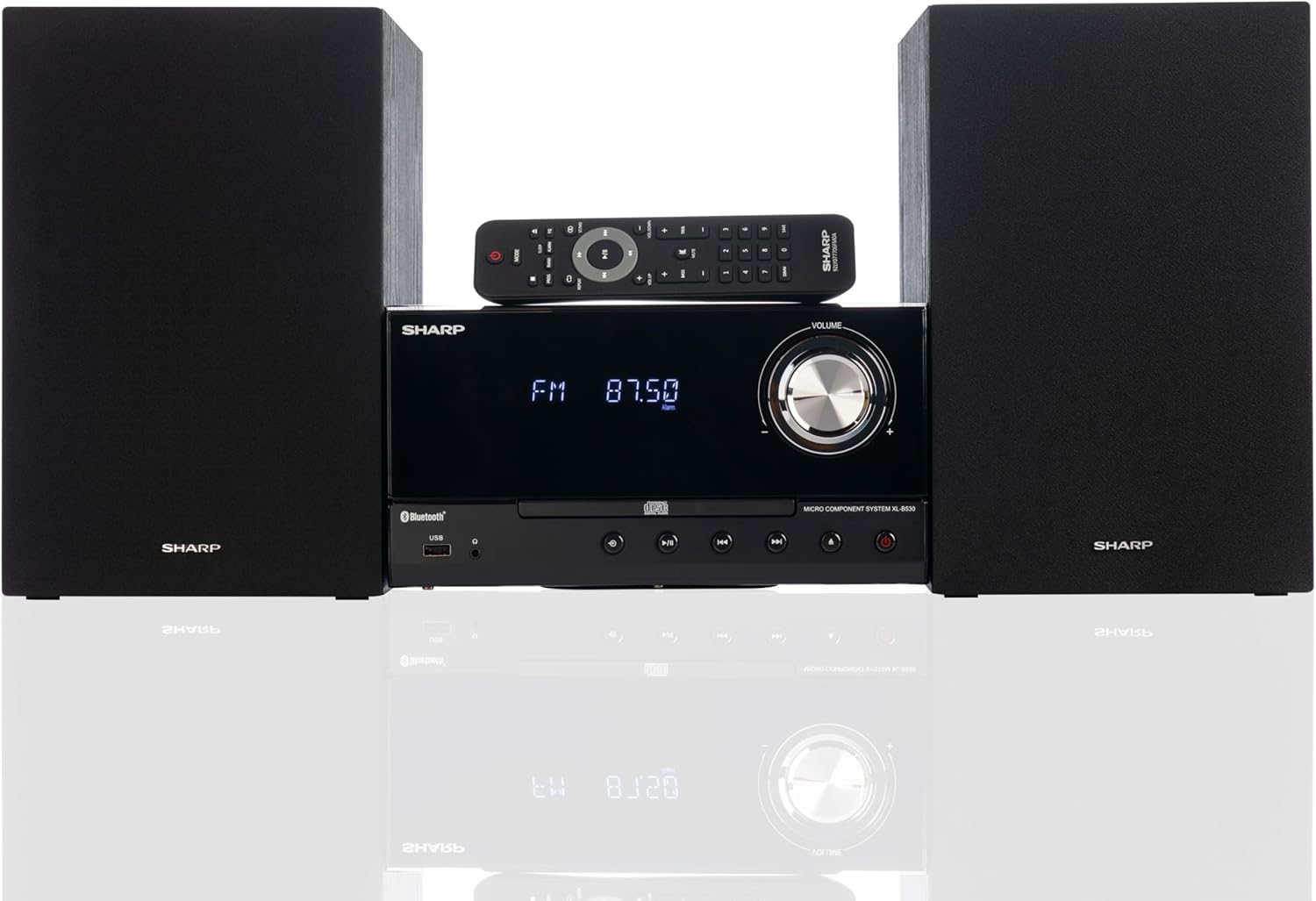
Front panel of the main unit, showing the LCD display, volume knob, CD tray, and control buttons.
Galinio skydelio jungtys

The rear panel of the main unit, featuring speaker terminals, FM antenna input, AM antenna input, and auxiliary input ports.
Nuotolinio valdymo pultas
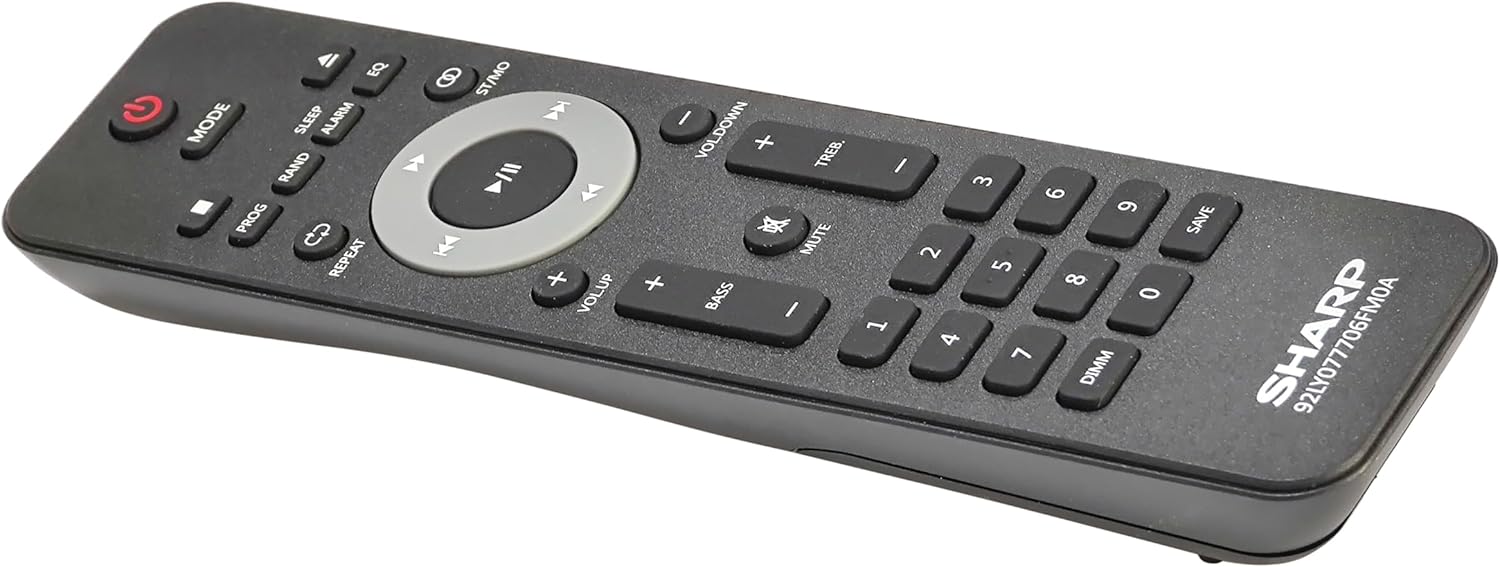
Išsamus view of the remote control, showing various function buttons for power, mode, playback, volume, and sound adjustments.
Sąranka
Follow these steps to set up your micro component system.
1. Garsiakalbio prijungimas
- Nustatykite kairiojo ir dešiniojo garsiakalbių laidus.
- Connect the red (+) wire from each speaker to the red (+) terminal on the main unit's rear panel.
- Connect the black (-) wire from each speaker to the black (-) terminal on the main unit's rear panel.
- Ensure a secure connection for both speakers.
2. Antenos jungtis
- FM antena: Connect the supplied FM wire antenna to the FM antenna jack on the rear panel. Extend the wire fully for best reception.
- AM antena: Assemble the AM loop antenna and connect its wires to the AM antenna terminals on the rear panel. Rotate the antenna for optimal AM reception.
3. Maitinimo prijungimas
- Ensure all other connections are made.
- Prijunkite maitinimo laidą prie AC IN lizdo pagrindinio įrenginio gale.
- Insert the other end of the power cord into a wall outlet.
Naudojimo instrukcijos
This section details how to use the various functions of your SHARP XL-B530 system.
Maitinimo įjungimas/išjungimas
- Paspauskite GALIA pagrindinio įrenginio arba nuotolinio valdymo pulto mygtuką, kad įjungtumėte arba išjungtumėte sistemą.
Šaltinio pasirinkimas
- Paspauskite REŽIMAS button on the main unit or remote control repeatedly to cycle through available sources: CD, Bluetooth, USB, FM, AM, AUX.
CD atkūrimas
- Paspauskite REŽIMAS button to select 'CD' mode.
- Paspauskite ATIDARYTI/UŽDARYTI mygtuką, kad atidarytumėte CD dėklą.
- Place a CD (CD/MP3/WMA/CD-R/CD-RW) with the label side up into the tray.
- Paspauskite ATIDARYTI/UŽDARYTI Dar kartą paspauskite mygtuką, kad uždarytumėte dėklą. Atkūrimas prasidės automatiškai.
- Naudokite PALEISTI / PAUZĖ, STOP, PRALEISTI (forward/backward), and PAIEŠKA valdymo mygtukai.
"Bluetooth" poravimas
- Paspauskite REŽIMAS button to select 'Bluetooth' mode. The display will show 'BT' and flash, indicating it's ready for pairing.
- „Bluetooth“ įrenginyje (išmaniajame telefone, planšetiniame kompiuteryje ir kt.) įjunkite „Bluetooth“ ir ieškokite galimų įrenginių.
- Select 'SHARP XL-B530' from the list.
- Once paired, the display will stop flashing and show 'BT CONNECTED'. You can now stream audio from your device.
USB atkūrimas
- Įkiškite USB atmintinę į priekiniame skydelyje esantį USB prievadą.
- Paspauskite REŽIMAS button to select 'USB' mode.
- Sistema automatiškai aptiks ir pradės leisti suderinamą garso įrašą files (MP3/WMA).
- Use playback controls similar to CD mode.
AM/FM radijas

The SHARP XL-B530 system displaying an FM radio frequency, highlighting its digital tuner capabilities.
- Paspauskite REŽIMAS button to select 'FM' or 'AM' mode.
- Automatinis nuskaitymas: Paspauskite ir palaikykite PALEISTI / PAUZĖ button to automatically scan and save available stations.
- Rankinis derinimas: Naudokite PRALEISTI mygtukais, kad rankiniu būdu nustatytumėte norimus dažnius.
- Iš anksto nustatytos stotys: Use the number buttons on the remote to directly select saved preset stations.
Volume and Sound Adjustment

A close-up of one of the SHARP XL-B530 speakers, illustrating the adjustable bass and treble sound output.
- Apimtis: Pasukite TOMAS pagrindinio įrenginio rankenėlę arba naudokite VOL + / VOL- nuotolinio valdymo pulto mygtukai.
- Žemieji / aukštieji dažniai: Naudokite BASS+ / BASS- ir TREB+ / TREB- buttons on the remote control to adjust sound characteristics.
- Garsumas: Paspauskite TIKSLUMAS button on the remote to enhance bass and treble at low volumes.
- EQ: Paspauskite EQ button on the remote to cycle through preset equalizer modes.
Priežiūra
Proper care will ensure the longevity of your system.
- Valymas: Use a soft, dry cloth to clean the exterior of the unit. For stubborn stains, dampŠluostę lengvai nuplaukite vandeniu. Nenaudokite abrazyvinių valiklių ar tirpiklių.
- CD priežiūra: Kompaktinius diskus imkite už kraštų. Nešvarius kompaktinius diskus valykite minkštu, nepūkuotu skudurėliu, šluostydami nuo centro į išorę.
- Vėdinimas: Įsitikinkite, kad ventiliacijos angos nėra užblokuotos dulkėmis ar šiukšlėmis.
- Saugykla: Jei įrenginį ilgesnį laiką sandėliuosite, atjunkite jį nuo elektros lizdo ir laikykite vėsioje, sausoje vietoje.
Trikčių šalinimas
If you encounter issues with your system, refer to the following common problems and solutions.
| Problema | Galima priežastis | Sprendimas |
|---|---|---|
| Nėra galios | Maitinimo laidas neprijungtas; Maitinimo lizdas neaktyvus | Įsitikinkite, kad maitinimo laidas yra tvirtai prijungtas; Pabandykite kitą lizdą |
| Nėra garso | Volume too low; Speakers not connected; Incorrect source selected | Padidinkite garsumą; patikrinkite garsiakalbių jungtis; pasirinkite tinkamą įvesties šaltinį |
| CD negroja | CD inserted incorrectly; CD is dirty or scratched; Incorrect mode | Insert CD correctly (label side up); Clean or replace CD; Select CD mode |
| „Bluetooth“ nesusieja | Bluetooth mode not selected; Device too far; Device already paired to another unit | Select Bluetooth mode; Move device closer; Disconnect from other devices and try again |
| Prastas radijo priėmimas | Antenna not connected or positioned poorly; Interference | Connect and adjust antenna position; Move unit away from other electronic devices |
| Nuotolinio valdymo pultas neveikia | Batteries are dead or inserted incorrectly; Obstruction between remote and unit | Replace batteries, check polarity; Remove any obstructions; Ensure remote is pointed at the unit's sensor |
Specifikacijos
| Funkcija | Specifikacija |
|---|---|
| Modelio numeris | XL-B530(BK) |
| Išėjimo galia | Maks. 200 W (100 W RMS) |
| Ryšys | Bluetooth, USB, Aux Input |
| Disko suderinamumas | CD, CD-R/RW, MP3, WMA |
| Derintuvas | AM/FM Stereo Digital Tuner (50 station presets) |
| Garsiakalbio tipas | Stereo |
| Gaminio matmenys (I x P x A) | 25 x 11 x 9.6 colio |
| Prekės svoris | 18 svaro |
| Spalva | Juodasis ąžuolas |
Garantija ir palaikymas
For warranty information and technical support, please refer to the warranty card included with your product or visit the official SHARP websvetainėje. Išsaugokite pirkimo kvitą kaip pirkimo įrodymą bet kokiems garantiniams prašymams.
For further assistance, you may contact SHARP customer service through their official channels.


