Įvadas
Thank you for choosing the Nexus Bendz Prostate Edition Bendable Vibrating Prostate Massager. This manual provides essential information for the safe and effective use, maintenance, and troubleshooting of your device. Please read it thoroughly before first use and retain it for future reference.
The Nexus Bendz Prostate Edition is designed for customized pleasure, featuring a bendable, rippled design with dual-density silicone. It offers 6 vibrating functions for the shaft and 6 for the base, providing 48 combinations of pleasure. The device includes a slimline remote control for convenient operation, and both the massager and remote are rechargeable and fully waterproof/submersible.
Saugos informacija
- Prieš kiekvieną naudojimą ir po jo visada kruopščiai išvalykite prietaisą.
- Use only water-based lubricants with this product. Oil-based lubricants can damage silicone.
- Do not use if the device appears damaged or if the silicone is torn.
- Nedelsdami nutraukite naudojimą, jei jaučiate diskomfortą ar skausmą.
- Laikyti vaikams nepasiekiamoje vietoje.
- Consult a healthcare professional if you have any pre-existing medical conditions or concerns.
Pakuotės turinys
- 1 x Nexus Bendz Prostate Edition Massager
- 1 x Slimline Remote Control
- 1x USB įkrovimo laidas
- 1 x Naudotojo vadovas (šis dokumentas)
Sąranka
Charging the Device and Remote
Before first use, fully charge both the Nexus Bendz Prostate Edition massager and its remote control.
- Locate the charging ports on both the massager and the remote. These are typically small, recessed magnetic contact points.
- Connect the provided USB charging cable to the charging points on the device and remote.
- Kitą USB kabelio galą prijunkite prie standartinio USB maitinimo adapterio (nepridedamas) arba kompiuterio USB prievado.
- The indicator light on the device and remote will illuminate during charging and turn off or change color when fully charged. Charging typically takes 2-3 hours.
- Visiškai įkrovus, atjunkite įkrovimo kabelį.
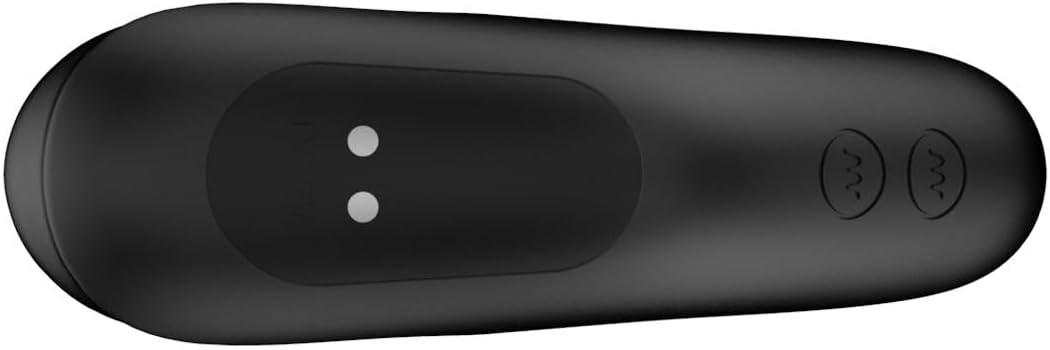
1 paveikslas: Apačia view of the massager, highlighting the magnetic charging points. Ensure these points are clean and dry before charging.

2 paveikslas: The slimline remote control, showing the power button and vibration control buttons. The charging port is typically on the underside or end.
Naudojimo instrukcijos
Maitinimo įjungimas/išjungimas
- To power on the massager: Press and hold the power button on the massager for 2-3 seconds until it vibrates briefly.
- To power on the remote: Press and hold the power button on the remote for 2-3 seconds.
- To power off both: Press and hold the power button on either the massager or the remote for 2-3 seconds until the vibrations stop.
Nuotolinio valdymo pulto naudojimas
The remote control allows for convenient operation of the massager from up to 8 meters away.
- Ensure both the massager and remote are powered on.
- The remote has separate buttons for controlling the shaft vibrations and the base vibrations.
- Press the respective vibration buttons to cycle through the 6 shaft vibration modes and 6 base vibration modes.
- Experiment with different combinations to find your preferred setting from the 48 available pleasure combinations.
Taikymas
Apply a generous amount of water-based lubricant to the massager before insertion. The bendable design allows the device to conform to your body for optimal comfort and targeted stimulation of the prostate and perineum.

3 paveikslas: The Nexus Bendz Prostate Edition massager. Note the bendable shaft and the rippled texture on the base designed for perineum stimulation.

4 paveikslas: Šoninė view demonstrating the ergonomic shape and bendable nature of the massager, designed for comfortable use.
Priežiūra ir priežiūra
Valymas
Proper cleaning is essential for hygiene and to prolong the life of your device.
- Always clean the massager immediately after each use.
- Wash the device thoroughly with warm water and a mild, toy-safe soap.
- Kruopščiai nuplaukite, kad pašalintumėte visus muilo likučius.
- Prieš sandėliavimą nusausinkite nepūkuota šluoste arba leiskite visiškai išdžiūti ore.
- The device is waterproof/submersible, allowing for easy cleaning under running water.
Sandėliavimas
Store the massager and remote in a clean, dry, and cool place, away from direct sunlight and extreme temperatures. Keep them separate from other toys made of different materials to prevent material degradation.
Trikčių šalinimas
| Problema | Galima priežastis | Sprendimas |
|---|---|---|
| Įrenginys neįsijungia. | Baterija išsikrovusi. | Pilnai įkraukite įrenginį naudodami pateiktą USB laidą. |
| Nuotolinio valdymo pultas nevaldo įrenginio. | Remote battery is depleted; Device is off; Out of range. | Charge the remote; Ensure device is powered on; Move remote closer to the device (within 8 meters). |
| Vibracija silpna arba nepastovi. | Žema akumuliatoriaus įkrova; įrenginio gedimas. | Recharge the device. If problem persists after charging, contact customer support. |
| Įrenginys neįkraunamas. | Charging cable not properly connected; Faulty cable/adapter; Dirty charging points. | Ensure cable is securely connected; Try a different USB port or adapter; Clean charging points with a dry cloth. |
Specifikacijos
- Modelio numeris: 87909
- Prekinis ženklas: Nexus
- Spalva: Juoda
- Medžiaga: Luxury Silicone
- Matmenys (P x P x A): 7.09 x 7.09 x 1.97 colio
- Svoris: 10.16 uncijos
- Vibration Functions: 6 shaft modes, 6 base modes (48 combinations)
- Valdymas: Device button and Slimline Remote Control
- Nuotolinis diapazonas: Iki 8 metrų
- Maitinimo šaltinis: Įkraunamas (pridedamas USB laidas)
- Atsparus vandeniui: Yes, submersible
Garantija ir palaikymas
For warranty information or technical support, please refer to the official Nexus websvetainėje arba susisiekite su pardavėju. Išsaugokite pirkimo įrodymą, jei prireiktų garantijos.
Gamintojas: Nexus
Pirmą kartą pasiekiama data: 8 m. vasario 2024 d


