1. Saugos informacija
Please read and understand all safety information and operating instructions before using this instrument. Failure to follow these instructions could result in electric shock, fire, or serious injury.
- Bendra sauga: Always use the correct function and range for measurements. Do not exceed the maximum input values specified for each range.
- Asmeninės apsaugos priemonės: Always wear appropriate personal protective equipment (PPE), such as safety glasses and insulated gloves, when working with electrical circuits.
- Įtampos grandinės: Never touch live circuits with bare hands or uninsulated tools. Assume all circuits are live until proven otherwise.
- Zondo jungtis: Connect the common (COM) test lead first, then the live test lead. Disconnect the live test lead first, then the common test lead.
- Baterijos patikrinimas: Replace batteries immediately when the low battery indicator appears to ensure accurate readings and proper operation.
- Aplinkos sąlygos: Do not use the device in wet environments or in the presence of explosive gases or dust.
- Žalos patikrinimas: Before each use, inspect the device and test leads for any damage. Do not use if damaged.
- Nekontaktinis ttage testeris: The NCV function is for indication only. Always verify voltage presence or absence with a contact method before working on circuits.
2. Produktas baigtasview
The KAIWEETS HT118A Digital Multimeter and HT100s Non-Contact Voltage Tester are versatile tools designed for electrical measurements and safety checks. The HT118A multimeter offers a wide range of functions for professional and home use, while the HT100s provides a convenient and safe way to detect AC voltage be tiesioginio kontakto.

2.1 paveikslas: KAIWEETS HT118A skaitmeninis multimetras ir HT100s bekontaktis tūrio matuoklistage Tester. This image displays both the digital multimeter on the left and the non-contact voltage tester on the right, showcasing their overall design and key features.
2.1. KAIWEETS HT118A Digital Multimeter Features
- Tikroji RMS (TRMS): Pateikia tikslius nesinusoidinių bangų formų rodmenis.
- 6000 skaitmenų ekranas: High-resolution display for precise measurements.
- Automatinis diapazonas: Automatically selects the correct measurement range, simplifying operation.
- Plačios matavimo galimybės: Priemonės AC/DC Voltage (up to 600V), AC/DC Current (up to 10A), Resistance (up to 60 MOhms), Capacitance, Frequency, Duty Cycle, Temperature, Diode, and Continuity.
- LED Lightning Jacks: Flashing LED lights on the input jacks guide correct test lead placement.
- Didelis LCD ekranas su apšvietimu: 2.9-inch HTN backlit screen for easy readability in various lighting conditions.
- Duomenų laikymas (HOLD): Užfiksuoja rodomą rodmenį.
- Didžiausia/mažiausia (MAKS/MIN): Records the highest and lowest readings.

2.2 paveikslas: KAIWEETS HT118A Multimeter Functions and Battery Compartment. This image highlights the various measurement functions available on the multimeter's rotary dial and shows the rear battery compartment.
2.2. KAIWEETS HT100s Non-Contact Voltage Tester Features
- Nekontaktinis AC ttage aptikimas (NCV): Aptinka AC ttage be fizinio kontakto.
- Dviejų diapazonų jautrumas: Detects standard (70-1000V AC) and low voltage (12-1000V AC) for diverse applications.
- Live/Null Wire Detection: Automatically identifies live or neutral wires.
- Vaizdiniai ir garsiniai signalai: Provides sound and light indications for voltage presence and intensity.
- Lūžio taško testas: Useful for identifying breaks in insulated wires.
- Integruotas LED žibintuvėlis: Assists in working in dimly lit areas.
3. Sąranka
3.1. Akumuliatoriaus įdėjimas
Both the HT118A Multimeter and HT100s Voltage Tester require batteries for operation.
- Įsitikinkite, kad įrenginys išjungtas.
- Suraskite baterijų skyriaus dangtelį įrenginio gale.
- Baterijų skyriui atidaryti naudokite atsuktuvą (jei reikia).
- Įdėkite reikiamas baterijas, laikydamiesi teisingo poliškumo (+/-).
- Saugiai uždarykite akumuliatoriaus skyriaus dangtelį.
3.2. Test Lead Connection (HT118A Multimeter)
Daugumai matavimų bandymo laidai prijungiami taip:
- Įkiškite juodą bandymo laidą į „COM“ (bendrąjį) lizdą.
- Insert the red test lead into the "VΩmA" jack for voltage, varžos ir mažų srovių matavimai.
- For current measurements up to 10A, insert the red test lead into the "10A" jack.

3.1 paveikslas: KAIWEETS HT118A Multimeter LED Lightning Jacks. This image shows the multimeter's input jacks with LED lights, which illuminate to guide the user to the correct probe connection point for the selected function.
4. Naudojimo instrukcijos
4.1. KAIWEETS HT118A Digital Multimeter Operation
Turn the rotary dial to select the desired measurement function. The multimeter features auto-ranging, which automatically selects the appropriate measurement range.

4.1 paveikslas: KAIWEETS HT118A Multimeter 2.9-inch Backlit Screen. This image displays the multimeter's large, backlit LCD screen showing a measurement, emphasizing its readability and dual reading capability.
4.1.1. ttagMatavimas (AC/DC)
- Set the rotary dial to the "V~" (AC Voltage) arba „V-“ (nuolatinė tūriotage) padėtis.
- Connect the black test lead to the "COM" jack and the red test lead to the "VΩmA" jack.
- Atsargiai palieskite bandymo zondus grandinės taškuose, kuriuose yra tūriotage is to be measured (in parallel with the load).
- Perskaitykite ttage reikšmė ekrane.
4.1.2. Srovės matavimas (AC/DC)
Atsargiai: Always connect the multimeter in series with the circuit when measuring current. Never connect it in parallel with a voltage šaltinis.
- Set the rotary dial to the "A~" (AC Current) or "A-" (DC Current) position. For small currents, use the "mA" or "μA" range.
- Connect the black test lead to the "COM" jack. Connect the red test lead to the "10A" jack for currents up to 10A, or to the "VΩmA" jack for mA/μA measurements.
- Open the circuit where current is to be measured and connect the test probes in series.
- Nuskaitykite dabartinę vertę ekrane.
4.1.3. Atsparumo matavimas
Atsargiai: Ensure the circuit is de-energized before measuring resistance. Disconnect power to the component being tested.
- Set the rotary dial to the "Ω" (Resistance) position.
- Connect the black test lead to "COM" and the red test lead to "VΩmA".
- Prilieskite bandymo zondus prie matuojamo komponento.
- Perskaitykite pasipriešinimo vertę ekrane.
4.1.4. Tęstinumo testas
- Set the rotary dial to the "Continuity" position (often shared with Diode/Resistance).
- Connect the black test lead to "COM" and the red test lead to "VΩmA".
- Prilieskite bandymo zondus prie dviejų grandinės arba komponento taškų.
- If continuity exists (low resistance), the multimeter will emit an audible beep.
4.1.5. Diodų testas
- Set the rotary dial to the "Diode" position (often shared with Continuity/Resistance).
- Connect the black test lead to "COM" and the red test lead to "VΩmA".
- Raudoną zondą prilieskite prie diodo anodo, o juodą zondą – prie katodo.
- Ekrane bus rodomas garsumas pirmyntage kritimas. Apkeiskite zondus; nutrūkusios grandinės (OL) rodmuo rodo gerą diodą.
4.1.6. Talpos matavimas
Atsargiai: Discharge capacitors before testing to prevent damage to the multimeter.
- Set the rotary dial to the "Capacitance" position.
- Connect the black test lead to "COM" and the red test lead to "VΩmA".
- Palieskite bandymo zondus prie kondensatoriaus gnybtų.
- Ekrane perskaitykite talpos vertę.
4.1.7. Dažnio ir darbo ciklo matavimas
- Set the rotary dial to the "Hz%" (Frequency/Duty Cycle) position.
- Connect the black test lead to "COM" and the red test lead to "VΩmA".
- Prijunkite bandymo zondus prie signalo šaltinio.
- Read the frequency (Hz) or duty cycle (%) on the display. Use the "FUNC" button to switch between modes if necessary.
4.1.8. Temperatūros matavimas
The HT118A supports temperature measurement using a K-Type thermocouple.
- Set the rotary dial to the "°C/°F" (Temperature) position.
- Connect the K-Type thermocouple to the appropriate input jacks (usually marked for temperature).
- Termoelemento antgalį uždėkite ant objekto, kurio temperatūrą reikia matuoti, arba šalia jo.
- Nuskaitykite temperatūros vertę ekrane.

4.2 paveikslas: KAIWEETS HT118A Multimeter Temperature Measurement. This image illustrates the multimeter measuring the temperature of a liquid using the included K-Type thermocouple.
4.2. KAIWEETS HT100s Non-Contact Voltage Tester Operation
The HT100s allows for quick and safe detection of AC voltage be tiesioginio kontakto.
4.2.1. Basic NCV Detection
- Press the power button to turn on the HT100s.
- Place the tip of the tester near a terminal strip, outlet, or insulated wire.
- Jei AC ttage is detected, the tip will glow red, and the tester will emit an audible beep. The frequency of the beep and the percentage value on the screen will increase with stronger voltage signalus.

4.3 paveikslas: KAIWEETS HT100s NCV Tester in use on an outlet. This image shows the non-contact voltage tester being used to detect voltage in an electrical outlet, with the tip glowing red.
4.2.2. Sensitivity Adjustment (Dual Range)
The HT100s offers two sensitivity modes:
- High Sensitivity Mode (12-1000V AC): Suitable for detecting lower voltages, such as those in doorbells, thermostats, or irrigation wiring.
- Low Sensitivity Mode (70-1000V AC): Standard mode for detecting higher voltages in typical household wiring.
Press the "S" button to switch between high and low sensitivity modes. The display will indicate the current mode.
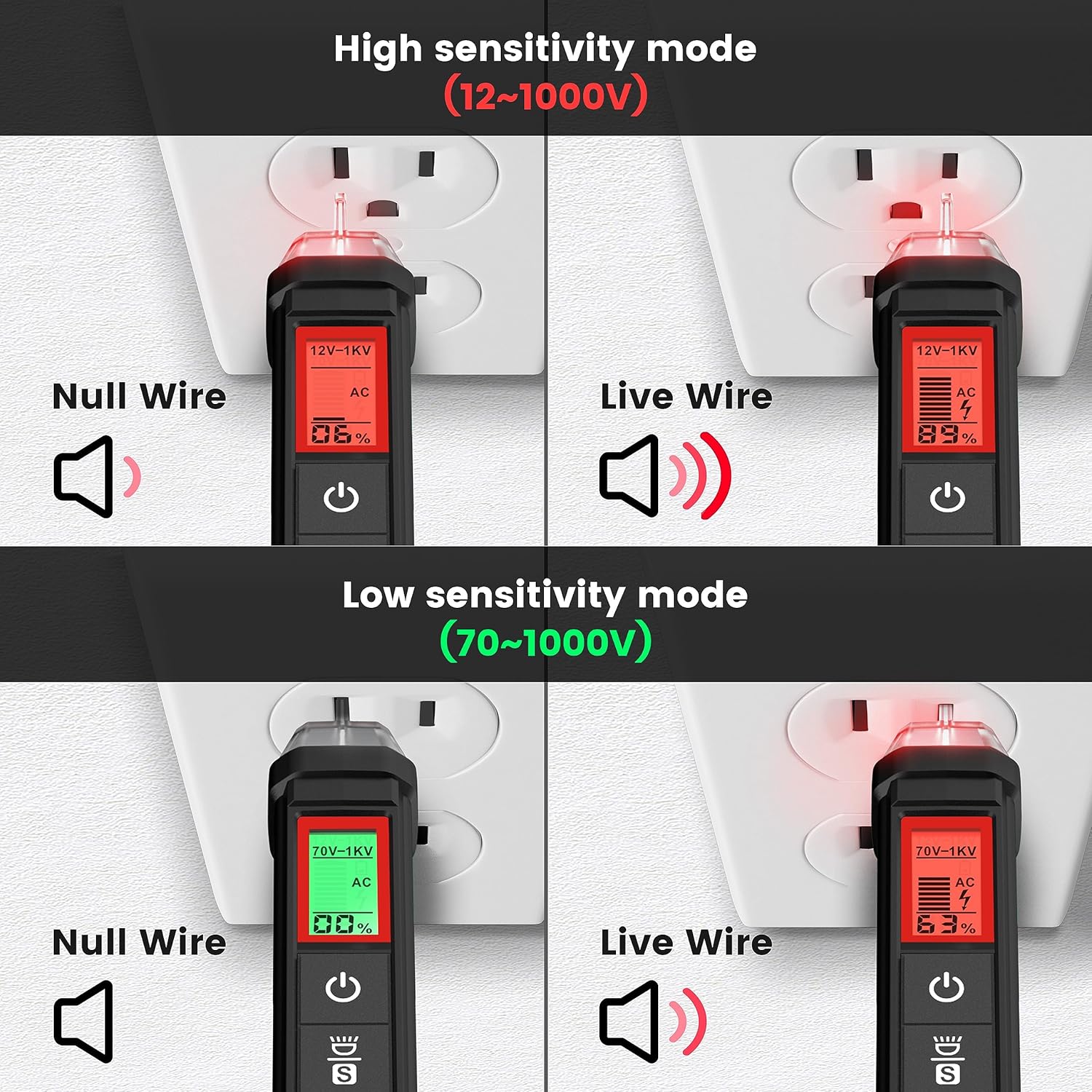
4.4 paveikslas: KAIWEETS HT100s NCV Tester High and Low Sensitivity Modes. This image demonstrates the difference in detection for null and live wires under both high (12-1000V) and low (70-1000V) sensitivity settings.
4.2.3. Live/Null Wire Detection
Nustačius ttage, the screen will display red for a live wire (high voltage) and green for a null (neutral) wire (low voltage). This provides a quick visual indication of wire status.
4.2.4. Breakpoint Test
To perform a breakpoint test, run the NCV tester along an insulated wire. The tester will indicate voltage up to the point of a break in the wire, where the signal will cease.

4.5 paveikslas: KAIWEETS HT100s NCV Tester Breakpoint Test. This image shows the NCV tester being used to identify a break in an insulated electrical cable by detecting the presence or absence of voltage along its length.
4.2.5. LED žibintuvėlis
Press the flashlight button to activate the integrated LED flashlight, useful for illuminating work areas in low-light conditions.

4.6 paveikslas: KAIWEETS HT100s NCV Tester with LED Flashlight. This image shows the NCV tester's tip illuminating a dark electrical panel with its built-in LED flashlight.
5. Priežiūra
5.1. Valymas
Nuvalykite įrenginį su skelbimuamp šluoste ir švelniu plovikliu. Nenaudokite abrazyvinių valiklių ar tirpiklių. Prieš padėdami prietaisą saugoti arba naudodami kitą kartą, įsitikinkite, kad jis visiškai sausas.
5.2. Baterijos keitimas
When the low battery indicator appears on the display, replace the batteries immediately to maintain measurement accuracy. Refer to Section 3.1 for battery installation instructions.
5.3. Sandėliavimas
If the device is not used for an extended period, remove the batteries to prevent leakage. Store the device in a cool, dry place, away from direct sunlight and extreme temperatures.
6. Problemų sprendimas
- Įrenginys neįsijungia: Patikrinkite baterijų įdėjimą ir įsitikinkite, kad jos nėra išsikrovusios. Jei reikia, pakeiskite.
- Netikslūs rodmenys: Ensure test leads are properly connected. Check battery level. Verify the correct function and range are selected.
- Nenustatytas NCV: Ensure the device is powered on. Check sensitivity settings (high/low). Ensure the tip is close enough to the voltage šaltinis.
- Tęstinumo bandymas nepypsi: Ensure the circuit is de-energized. Check for actual continuity in the component.
7. Specifikacijos
| Funkcija | Specifikacija |
|---|---|
| Prekės ženklas | KAIWEETS |
| Modelis | HT118A (Multimeter), HT100s (Voltage Testeris) |
| Ekranas | 6000 Counts, 2.9" HTN Backlit LCD |
| AC/DC ttage | Iki 600V |
| AC / DC srovė | Iki 10A |
| Atsparumas | Iki 60 MΩ |
| Talpa | Taip |
| Dažnis / darbo ciklas | Taip |
| Temperatūra | Yes (K-Type Thermocouple) |
| Tęstinumo testas | Yes (with audible beep) |
| Diodo testas | Taip |
| NCV aptikimo diapazonas | 12-1000V AC / 70-1000V AC (Dual Range) |
| Maitinimo šaltinis | Maitinamas baterijomis |
| Saugos įvertinimas | CAT III 600V (HT118A) |
8. Garantija ir palaikymas
KAIWEETS products are designed for reliability and performance. For warranty information, technical support, or service inquiries, please refer to the official KAIWEETS websvetainėje arba susisiekite tiesiogiai su jų klientų aptarnavimo tarnyba. Išsaugokite pirkimo kvitą kaip pirkimo įrodymą garantijos pretenzijoms.
Jei reikia daugiau pagalbos, apsilankykite: www.kaiweets.com


