„Muse M-980 BT“ belaidės „Bluetooth“ kolonėlės naudotojo vadovas
Model: M-980 BT
Įvadas
The Muse M-980 BT is a powerful and portable wireless Bluetooth speaker designed to deliver high-quality audio with vibrant LED lighting. Featuring 300W output, IPX6 water resistance, and over 10 hours of music playback, it's perfect for various environments. This manual provides detailed instructions on how to set up, operate, and maintain your speaker, ensuring you get the most out of its features.
Svarbi saugos informacija
- Prieš naudodami gaminį, atidžiai perskaitykite šias instrukcijas.
- Išsaugokite šį vadovą ateityje.
- Nelaikykite garsiakalbio ekstremalioje temperatūroje, drėgmėje ar tiesioginiuose saulės spinduliuose.
- Do not immerse the speaker in water, despite its IPX6 rating. IPX6 protects against strong water jets, not submersion.
- Įkrovimui naudokite tik pridedamą maitinimo laidą.
- Nebandykite išardyti ar modifikuoti garsiakalbio.
- Laikyti vaikams nepasiekiamoje vietoje.
- Užtikrinkite tinkamą vėdinimą eksploatavimo metu.
Pakuotės turinys
Patikrinkite, ar jūsų pakuotėje yra visi toliau išvardyti daiktai:
- Muse M-980 BT Wireless Bluetooth Speaker
- Maitinimo kabelis
- USB-C įkrovimo laidas
- Aux-In kabelis
- Vartotojo vadovas (šis dokumentas)
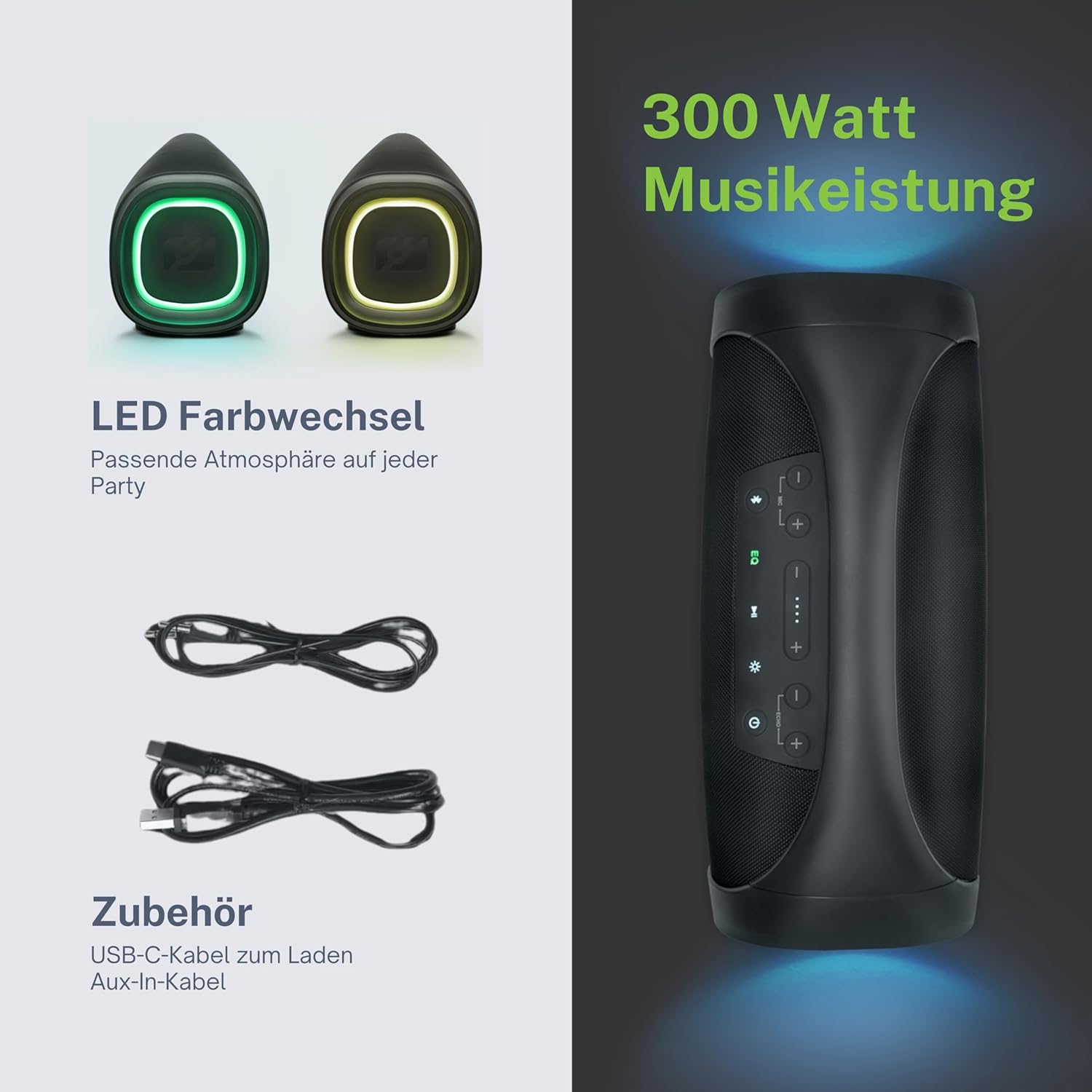
Produktas baigtasview
Familiarize yourself with the various parts and controls of your Muse M-980 BT speaker.


Valdymo skydelis
The top panel of the speaker features various buttons for controlling playback, volume, and other functions:
- Maitinimo mygtukas: Paspauskite ir palaikykite, kad įjungtumėte arba išjungtumėte garsiakalbį.
- Bluetooth mygtukas: Paspauskite, kad įjungtumėte Bluetooth poravimo režimą.
- EQ mygtukas: Adjust equalization settings (Bass/Treble).
- Garsumo didinimo / mažinimo mygtukai: Padidinkite arba sumažinkite garsumą.
- Atkūrimo / pristabdymo mygtukas: Valdykite garso atkūrimą.
- Šviesos režimo mygtukas: Cycle through different LED light modes.
Ports and Inputs
- USB-C įkrovimo prievadas: Skirta garsiakalbio vidinei baterijai įkrauti.
- USB prievadas: MP3 grojimui files iš USB atmintinės.
- AUX įvestis: Prijunkite išorinius garso įrenginius naudodami 3.5 mm garso kabelį.
- Microphone Jacks (x2): Prijunkite mikrofonus karaoke arba viešajam kreipimuisi.
Sąranka
Garsiakalbio įkrovimas
Before first use, fully charge the speaker. Connect the provided USB-C charging cable to the speaker's USB-C port and the other end to a suitable USB power adapter (not included) or a computer's USB port. The battery indicator display will show the charging status. A full charge provides over 10 hours of music playback.
Maitinimo įjungimas/išjungimas
Paspauskite ir palaikykite Maitinimo mygtukas on the top panel for a few seconds to turn the speaker on. You will hear an audible prompt. To turn off, press and hold the Maitinimo mygtukas vėl.
Naudojimo instrukcijos
Bluetooth ryšys
- Turn on the Muse M-980 BT speaker. It will automatically enter Bluetooth pairing mode, indicated by a flashing Bluetooth indicator light.
- Mobiliajame įrenginyje (išmaniajame telefone, planšetiniame kompiuteryje, kompiuteryje) įjunkite „Bluetooth“ ir ieškokite galimų įrenginių.
- Select "M-980 BT" from the list of devices.
- Prisijungus, „Bluetooth“ indikatoriaus lemputė ims šviesti nepertraukiamai ir išgirsite patvirtinimo garsą.
- Dabar galite leisti garsą iš savo įrenginio per garsiakalbį.
AUX įvesties režimas
Norėdami leisti garsą iš įrenginio be „Bluetooth“, naudokite AUX įvestį:
- Connect one end of the 3.5mm Aux-In cable to the AUX port on the speaker.
- Kitą laido galą prijunkite prie išorinio įrenginio ausinių lizdo arba garso išvesties.
- Garsiakalbis automatiškai persijungs į AUX režimą arba gali tekti paspausti režimo mygtuką (jei yra).
- Valdykite atkūrimą ir garsumą prijungto įrenginio arba garsiakalbio valdikliais.
USB atkūrimas
The speaker supports playing MP3 audio filetiesiai iš USB atmintinės:
- Įdėkite USB atmintinę su MP3 fileį garsiakalbio USB prievadą.
- Garsiakalbis automatiškai aptiks USB atmintinę ir pradės leisti garsą files.
- Use the speaker's playback controls (Play/Pause, Next/Previous) to manage your music.
Mikrofonų naudojimas
The Muse M-980 BT features two microphone jacks for karaoke or public speaking:
- Connect your microphones (not included) to the MIC 1 and/or MIC 2 jacks.
- Adjust the microphone volume using the dedicated controls on the speaker (if available, or through main volume).
- Ensure the main volume of the speaker is set to a comfortable level.
LED šviesos režimai
The speaker features dynamic LED lights that enhance your listening experience:
- Paspauskite Šviesos režimo mygtukas to cycle through various pre-set lighting effects and colors.
- Press the button repeatedly to find your preferred light show.
Stereo Pairing (TWS)
You can pair two Muse M-980 BT speakers together for a true wireless stereo experience:
- Įsitikinkite, kad abu garsiakalbiai įjungti ir neprijungti prie jokio „Bluetooth“ įrenginio.
- On one speaker (this will be the primary speaker), press and hold the Bluetooth button until you hear a specific pairing tone.
- The two speakers will automatically connect to each other. Once connected, the primary speaker's Bluetooth indicator will flash slowly, and the secondary speaker's will be solid.
- Now, connect your mobile device to the primary speaker via Bluetooth as described in the "Bluetooth Connection" section.
- Garsas dabar bus grojamas stereo režimu per abu garsiakalbius.
Žemųjų ir aukštųjų dažnių reguliavimas
Naudokite EQ mygtukas on the control panel to adjust the bass and treble levels to suit your audio preference.
Priežiūra
Valymas
Wipe the speaker with a soft, dry cloth. Do not use abrasive cleaners, waxes, or solvents. Ensure all ports are dry before charging or connecting devices.
Sandėliavimas
When not in use for extended periods, store the speaker in a cool, dry place away from direct sunlight and extreme temperatures. It is recommended to charge the battery at least once every three months to maintain its lifespan.
Trikčių šalinimas
| Problema | Galima priežastis | Sprendimas |
|---|---|---|
| Garsiakalbis neįsijungia. | Baterija išsikrovusi. | Įkraukite garsiakalbį naudodami pateiktą USB-C laidą. |
| Nėra garso. | Garsumas per mažas arba nutildytas. Neteisingas įvesties režimas. | Increase volume on both the speaker and the connected device. Ensure the correct input mode (Bluetooth, AUX, USB) is selected. |
| „Bluetooth“ ryšys nepavyksta. | Garsiakalbis neįjungtas susiejimo režimu. Įrenginys per toli. Trukdžiai. | Ensure speaker is in pairing mode. Move device closer to speaker. Turn off other Bluetooth devices. Forget "M-980 BT" on your device and re-pair. |
| Garso iškraipymas. | Volume too high. Audio source quality. | Sumažinkite garsumą. Išbandykite kitą garso šaltinį arba file. Adjust EQ settings. |
| Neveikia LED lemputės. | Light mode off or malfunction. | Press the Light Mode Button to activate or cycle through modes. If issue persists, contact support. |
Specifikacijos
| Modelio pavadinimas | M-980 BT |
| Modelio numeris | 322950 |
| Išėjimo galia | 300 vatų |
| Ryšio technologija | Bluetooth, USB, AUX |
| Baterijos veikimo laikas | Iki 10 valandų |
| Atsparumas vandeniui | IPX6 (atsparus purslams) |
| Matmenys (I x P x A) | 49.54 x 20.4 x 27.28 cm (19.5 x 8.0 x 10.7 colio) |
| Svoris | 5.02 kilogramų (11.07 svarai) |
| Spalva | Juoda |
| Medžiaga | Plastikas arba guma |

Garantija ir palaikymas
Your Muse M-980 BT speaker comes with a limited warranty. Please refer to the warranty card included in your package for specific terms and conditions. For technical support, troubleshooting assistance, or warranty claims, please contact Muse customer service through their official websvetainę arba perkant pateiktą kontaktinę informaciją.
For the latest information and support, visit the official MUSE websvetainė: www.muse-europe.com


