1. Svarbios saugos instrukcijos
Prieš naudodami šį prietaisą, atidžiai perskaitykite visas instrukcijas ir išsaugokite jas ateičiai. Nesilaikant šių instrukcijų, gali kilti elektros smūgis, gaisras arba sunkūs sužalojimai.
- Įsitikinkite, kad ttagAnt etiketės nurodyta įtampa atitinka jūsų elektros tinklo įtampątage.
- Nemerkite ventiliatoriaus, kištuko ar laido į vandenį ar kitus skysčius.
- Prieš valydami, surinkdami ar išardydami dalis, visada atjunkite ventiliatorių nuo elektros lizdo.
- Keep the fan out of reach of children and supervise children when the fan is in use.
- Nenaudokite ventiliatoriaus su pažeistu laidu ar kištuku, taip pat po to, kai ventiliatorius sugedo, buvo numestas ar kitaip pažeistas.
- Avoid placing the fan near curtains or other objects that could be drawn into the fan.
- Nekiškite pirštų ar kitų daiktų pro groteles, kai ventiliatorius veikia.
- Use the fan only for its intended household purpose as described in this manual.
2. Produktas baigtasview
The Mistral MFD310 Tower Fan is designed to provide efficient cooling with convenient features for your home or office. Key features include multiple speed settings, a timer, and an oscillation function.
Produkto savybės:
- 3 Speeds Setting: Choose between High, Medium, and Low for customized airflow.
- 2 valandų laikmatis: Set the fan to automatically turn off after a specified duration.
- Virpesių funkcija: Paskirsto orą platesniame plote, kad pagerėtų jo cirkuliacija.
- Integral Carry Handle: Kad būtų lengviau pernešti.
- Nuimamas pagrindas: Simplifies assembly and storage.
Produktas Views:
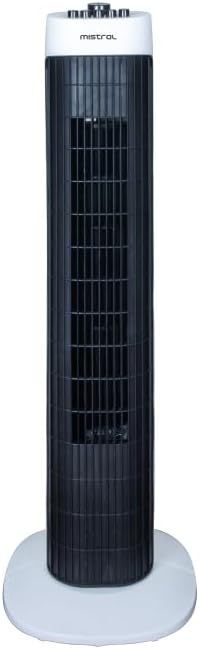
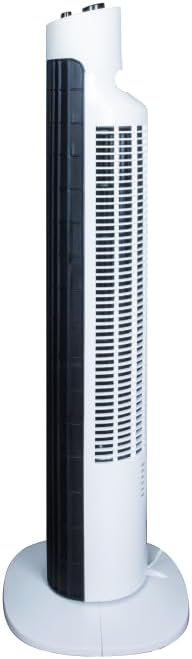
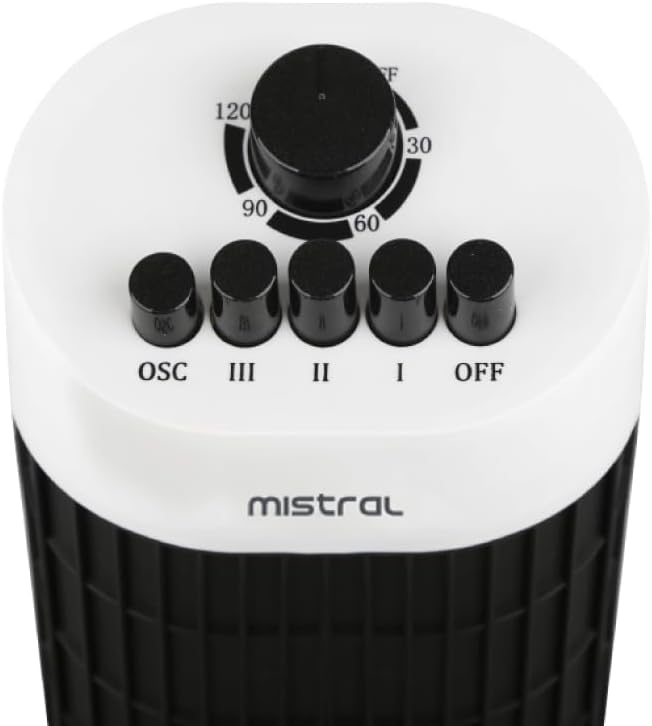
3. Surinkimas ir sąranka
The Mistral MFD310 Tower Fan requires minimal assembly, primarily involving the attachment of its detachable base.
Surinkimo žingsniai:
- Atsargiai išimkite visus komponentus iš pakuotės.
- Place the fan body upright.
- Align the detachable base with the bottom of the fan body. Ensure the notches or guides on the base match those on the fan.
- Secure the base to the fan body. This typically involves twisting the base or using screws provided (check packaging for specific fasteners).
- Ensure the base is firmly attached and the fan is stable before proceeding.
Vieta:
Place the assembled fan on a firm, level surface. Ensure there is adequate space around the fan for proper air circulation and oscillation.
Maitinimo jungtis:
Prijunkite maitinimo laidą į standartinį elektros lizdą. Įsitikinkite, kad lizdo įtampa atitinkatage requirements of the fan.
4. Naudojimo instrukcijos
The control panel is located on the top of the fan (refer to Figure 3 for visual reference).
Power and Speed Settings:
- Norėdami įjungti ventiliatorių ON, press one of the speed buttons: Aš (žemas), II (vidutinė), arba III (Aukštas).
- To adjust the fan speed, press the desired speed button.
- Norėdami įjungti ventiliatorių IŠJUNGTA, paspauskite IŠJUNGTA mygtuką.
Virpesių funkcija:
- To activate the oscillation function, press the OSC button. The fan head will begin to rotate from side to side.
- To stop oscillation, press the OSC button again. The fan will stop oscillating and remain in its current direction.
Laikmačio funkcija:
- The fan features a 2-hour timer. To set the timer, rotate the timer dial clockwise to the desired duration (30, 60, 90, or 120 minutes).
- The fan will operate for the set duration and then automatically turn off.
- To cancel the timer, rotate the dial back to the 'OFF' position.
5. Priežiūra ir valymas
Regular cleaning and maintenance will help ensure the longevity and optimal performance of your tower fan.
Valymo instrukcijos:
- Prieš valydami, visada atjunkite ventiliatorių nuo elektros lizdo.
- Naudokite minkštą, damp cloth to wipe the exterior surfaces of the fan. Do not use abrasive cleaners, waxes, or polishes as these may damage the finish.
- For dust accumulation on the air intake or output grilles, use a vacuum cleaner with a brush attachment or a soft brush to gently remove dust.
- Įsitikinkite, kad į ventiliatoriaus vidines dalis nepatenka vanduo ar skysčiai.
- Prieš vėl įjungdami ir paleisdami ventiliatorių, leiskite jam visiškai išdžiūti.
Saugykla:
Jei ventiliatorius ilgesnį laiką nenaudojamas, jį laikykite vėsioje, sausoje vietoje, geriausia originalioje pakuotėje, kad apsaugotumėte jį nuo dulkių ir pažeidimų.
6. Problemų sprendimas
If you encounter issues with your Mistral MFD310 Tower Fan, refer to the following troubleshooting guide:
| Problema | Galima priežastis | Sprendimas |
|---|---|---|
| Ventiliatorius neįsijungia. | Nėra maitinimo. Ventiliatorius netinkamai prijungtas. Timer is active and has expired. | Patikrinkite, ar veikia maitinimo lizdas. Įsitikinkite, kad maitinimo kištukas iki galo įkištas į elektros lizdą. Patikrinkite laikmačio nustatymus ir, jei reikia, nustatykite juos iš naujo. |
| Silpnas arba jo visai nėra oro srauto. | Oro įsiurbimo / išleidimo grotelės yra užblokuotos. Ventiliatoriaus greitis nustatytas per mažas. | Clean any dust or obstructions from the grilles. Padidinkite ventiliatoriaus greičio nustatymą. |
| Ventiliatorius skleidžia neįprastą triukšmą. | Ventiliatorius nėra ant lygaus paviršiaus. Kliūtis ventiliatoriaus viduje. | Padėkite ventiliatorių ant lygaus, stabilaus paviršiaus. Unplug the fan and carefully check for any foreign objects. Do not attempt to disassemble the fan. |
| Osciliacija neveikia. | Osciliacijos funkcija neaktyvuota. | Press the 'OSC' button to activate oscillation. |
Jei problema išlieka ir išbandžius šiuos sprendimus, susisiekite su klientų aptarnavimo tarnyba.
7. Specifikacijos
| Prekės ženklas | MISTRAL |
| Modelis | MFD310 |
| Prekės svoris | 2.9 kilogramo |
| Gaminio matmenys | 24.6D x 24.5W x 78.3H centimetrai |
| Maitinimo šaltinis | Su laidu elektra |
| Ypatingos savybės | Timer, Oscillation |
| Kambario tipas | Bedroom, Dorm Room, Living Room |
| Montavimo tipas | Grindų kalnas |
| Įtraukti komponentai | Laidas |
| Reikalingas surinkimas | Taip |
| Vienetų skaičius | 1 |
| Reikalingos baterijos | Nr |
8. Garantija ir palaikymas
For warranty information, please refer to the documentation included with your purchase or visit the official MISTRAL websvetainėje. Išsaugokite pirkimo įrodymą garantiniams reikalavimams.
If you require further assistance or have questions not covered in this manual, please contact MISTRAL customer support through their official channels.


