1. Įvadas
The STRONG Leap-S3+ Google TV Box is a powerful media streaming adapter designed to enhance your entertainment experience. It provides easy access to applications, games, and streaming services via Google Play, transforming your television into a comprehensive entertainment hub. This device supports advanced audio and video technologies, ensuring a high-quality viewklausymosi patirtis.
2. Pakuotės turinys
Patikrinkite, ar pakuotėje yra visi reikalingi daiktai:
- STRONG Leap-S3+ Android TV Box
- Remote Control (with 2 AA batteries included)
- Maitinimo adapteris (DC 12V / 1A)
- HDMI kabelis
- Vartotojo vadovas (šis dokumentas)

Image: The retail packaging of the STRONG Leap-S3+ Android TV Box, showing the device, remote control, and branding.
3. Sąrankos vadovas
- Prijungimas prie televizoriaus: Connect one end of the HDMI cable to the HDMI port on the STRONG Leap-S3+ box and the other end to an available HDMI input on your television.
- Prijunkite maitinimą: Plug the power adapter into the DC 12V/1A port on the box and then into a power outlet.
- Tinklo ryšys (neprivaloma): For a wired connection, connect an Ethernet cable from your router to the LAN port on the box. For Wi-Fi, you will configure this during the initial setup on screen.
- Įdėkite baterijas: Open the battery compartment of the remote control and insert the two AA batteries, ensuring correct polarity.
- Maitinimas: Turn on your television and select the correct HDMI input source using your TV remote. The STRONG Leap-S3+ box should power on automatically.
- Pradiniai nustatymai: Follow the on-screen instructions to complete the initial setup, including language selection, Wi-Fi connection (if not using Ethernet), and Google account login. Manual setup is recommended if automatic setup via Google Home encounters issues.

Image: Rear panel of the device illustrating the various connection ports including S/PDIF, HDMI, LAN, DC power input, and USB.
4. Naudojimo instrukcijos
4.1. Nuotolinio valdymo funkcijos
The included remote control allows navigation through the Google TV interface. Key functions include:
- Naršymo skydelis: Norėdami naršyti meniu ir pasirinkti elementus, naudokite krypties mygtukus.
- Gerai mygtukas: Patvirtina pasirinkimus.
- Atgal mygtukas: Grįžta į ankstesnį ekraną.
- Namų mygtukas: Grąžinama į „Google TV“ pagrindinį ekraną.
- „Google“ asistento mygtukas: Activates voice control for searching content or controlling the device.
- Garsumo mygtukai: Reguliuoja garso garsumą.
- Specialūs programėlių mygtukai: Greita prieiga prie populiarių transliacijos paslaugų, tokių kaip „Netflix“, „YouTube“, „Disney+“ ir „Prime Video“.

Image: The remote control demonstrating the Google Assistant voice command feature, with a TV screen displaying search results.
4.2. Accessing Streaming Services and Apps
Once connected to the internet and logged into your Google account, you can access a wide range of content:
- „Google Play“ parduotuvė: Download and install additional applications and games.
- Iš anksto įdiegtos programos: Utilize dedicated buttons or navigate to pre-installed apps like Netflix, YouTube, Disney+, and Prime Video.
- Įtaisytasis „Chromecast“: Cast content directly from your mobile phone or other compatible devices to your TV screen.

Image: A smartphone screen mirroring content to a large television, demonstrating the Chromecast built-in feature.

Image: A television screen showing the Google TV interface with icons for various streaming applications, alongside the STRONG Leap-S3+ box and remote.
5. Pagrindinės savybės
- 4K UHD raiška: Supports Ultra High Definition (UHD) 2160p resolution for crisp and detailed visuals.
- Dolby Vision: Provides enhanced HDR (High Dynamic Range) for superior brightness, contrast, and color accuracy.
- Dolby Atmos: Delivers immersive, multi-dimensional audio that moves around you, creating a realistic sound experience.
- Įtaisytasis „Chromecast“: Seamlessly cast movies, shows, photos, and more from your mobile device to your TV.
- „Google“ padėjėjas: Use voice commands via the remote control to search for content, control playback, and manage smart home devices.
- Platus ryšys: Includes S/PDIF, HDMI, USB 2.0, LAN/Internet, Wi-Fi, and Bluetooth for versatile device connections and data transfer.

Image: Visual representation of 4K UHD 2160p resolution, highlighting fine detail.

Image: The Dolby Vision logo, indicating enhanced visual quality.

Image: The Dolby Atmos logo, representing immersive audio technology.
6. Priežiūra
- Valymas: Įrenginį valykite minkštu, sausu skudurėliu. Nenaudokite skystų valiklių ar abrazyvinių medžiagų.
- Vėdinimas: Įsitikinkite, kad prietaisas yra gerai vėdinamoje vietoje, kad jis neperkaistų. Neužblokuokite ventiliacijos angų.
- Programinės įrangos atnaujinimai: The device may receive automatic software updates. Ensure it is connected to the internet to receive these updates, which can improve performance and add new features.
- Saugykla: Kai ilgesnį laiką nenaudojate, atjunkite maitinimo adapterį ir laikykite įrenginį vėsioje, sausoje vietoje.
7. Problemų sprendimas
| Problema | Galima priežastis | Sprendimas |
|---|---|---|
| Nėra maitinimo / Įrenginys neįsijungia | Maitinimo adapteris neprijungtas arba sugedęs. | Ensure the power adapter is securely connected to the device and a working power outlet. Check if the outlet is functional. |
| Nėra vaizdo televizoriuje | Televizoriuje pasirinkta neteisinga HDMI įvestis; HDMI kabelis atsilaisvinęs arba sugedęs. | Verify your TV is set to the correct HDMI input. Check HDMI cable connections at both ends. Try a different HDMI port or cable. |
| Nėra garso | TV volume muted or too low; audio settings incorrect. | Increase TV volume. Check audio output settings on the STRONG Leap-S3+ box. Ensure Dolby Atmos is correctly configured if used. |
| Nuotolinio valdymo pultas neveikia | Baterijos išsikrovusios arba neteisingai įdėtos; nuotolinio valdymo pultas nesuporuotas. | Replace batteries, ensuring correct polarity. Re-pair the remote control with the device if necessary (refer to on-screen instructions during initial setup or device settings). |
| Lėtas veikimas arba užstrigimas | Poor internet connection; too many apps running in background; insufficient storage. | Check your internet connection speed. Close unused applications. Clear cache or uninstall unnecessary apps to free up storage. Restart the device. |
| Automatic setup via Google Home fails | Connectivity issues or software glitch. | Proceed with manual setup directly on the TV screen using the remote control. This often resolves such issues. |
8. Specifikacijos
| Funkcija | Detalė |
|---|---|
| Prekės ženklas | Stiprus |
| Modelio pavadinimas | LEAP-S3 plus |
| Spalva | Baltas |
| Produkto tipas | Box form factor |
| Ryšio technologija | „Bluetooth“, Ethernet, HDMI, USB, „Wi-Fi“ |
| Jungties tipas | HDMI |
| Ypatingos savybės | 4K UHD, Chromecast, Browser |
| Rezoliucija | 4K (2160p) |
| Palaikomos interneto paslaugos | Apple TV, Disney, Free Sat/Free View, Freesat/Freeview, Google TV, Magenta TV, Browser, Netflix, Prime Video, RTL, Wow, YouTube |
| Valdiklio tipas | Nuotolinio valdymo pultas |
| Suderinami įrenginiai | Smartphone, Television, Screen |
| Maitinimo šaltinis | DC 12V/1A |
| Matmenys (apytiksliai) | 9.6 cm x 9.6 cm x 2.3 cm (from image) |
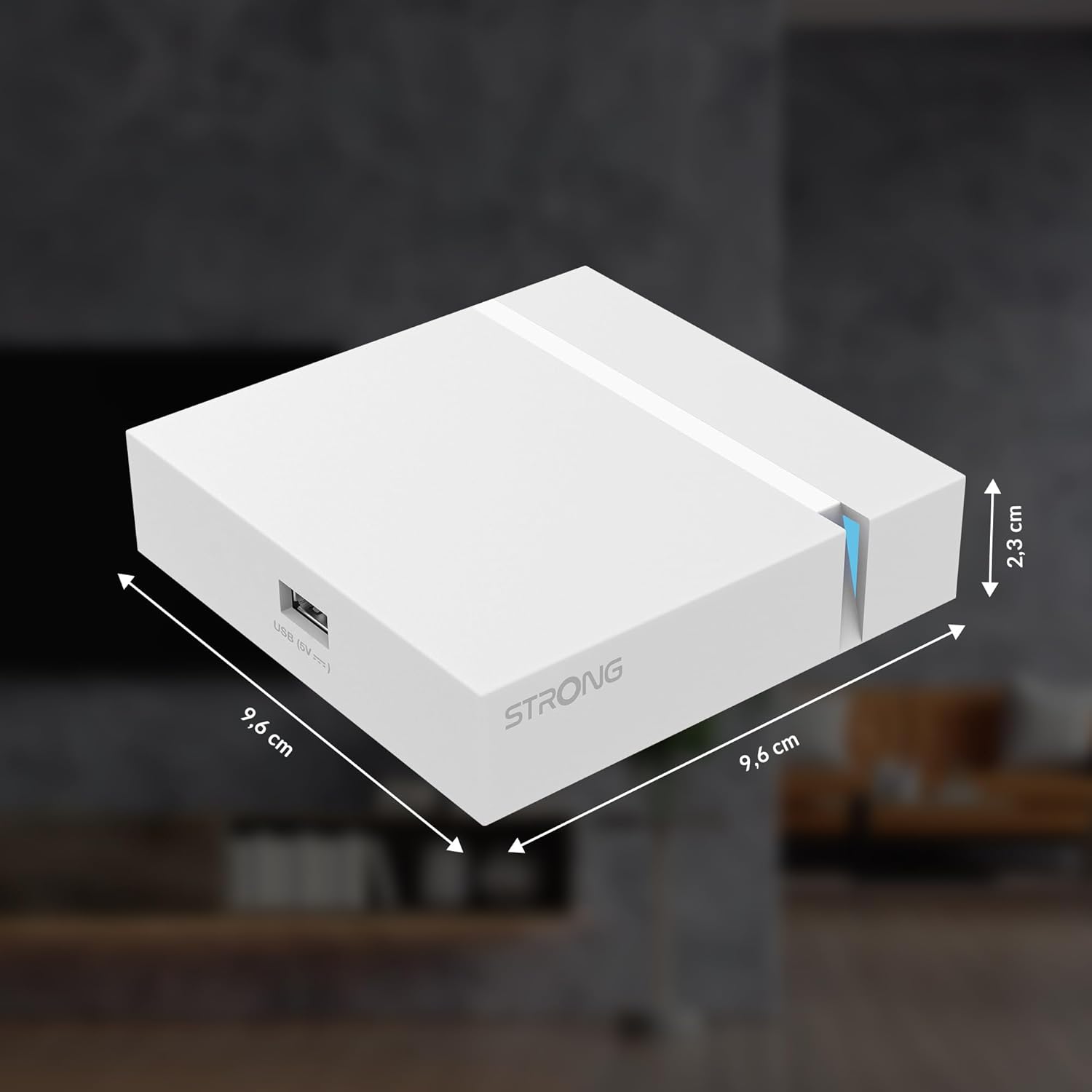
Image: The physical dimensions of the STRONG Leap-S3+ Android TV Box.
9. Garantija ir palaikymas
For warranty information and technical support, please refer to the documentation provided with your purchase or visit the official Strong website. Information regarding spare parts availability and software update guarantees is not available in this manual.


