Įvadas
Ačiū, kad pirkoteasing the PUREMIC S3 Portable Bluetooth Karaoke Machine. This manual provides detailed instructions for setting up, operating, and maintaining your device. Please read this manual thoroughly before use to ensure proper function and to maximize your enjoyment of the product.
Kas yra dėžutėje
Patikrinkite, ar pakuotėje yra visi reikalingi daiktai:
- „Bluetooth“ garsiakalbis x 1
- UHF Wireless Microphone x 2
- Leather Bag x 1
- Speaker Charger x 1
- Microphone Charger x 1
- Vartotojo vadovas x 1

Image: All components included in the PUREMIC S3 package.
Produktas baigtasview ir Savybės
The PUREMIC S3 is a portable karaoke system designed for high-quality audio and versatile use. Key features include:
- Įtraukiantis garsas: Equipped with a 5.25-inch woofer and two 1-inch tweeters for clear, powerful sound.
- Belaidžiai mikrofonai: Two UHF wireless microphones for singing.
- Voice Elimination: One-touch vocal elimination feature on microphones.
- Garso efektai: Eight entertainment sound effects (Children, Monster, K.T.V., etc.).
- Ilgai veikianti baterija: Built-in 10,000 mAh rechargeable battery providing up to 8 hours of playtime for the speaker and 10 hours for microphones.
- Energijos taupymas: Automatic power-down after 15 minutes of inactivity.
- Universalus ryšys: Bluetooth 5.0, AUX input, USB port for playback and recording.
- Dinaminis apšvietimas: Six adjustable lighting modes with 128 LED colors that synchronize with music.
- Perkeliamumas: Lightweight, compact design with a swivel handle and included leather carrying bag.
- Atsparumas vandeniui: IPX4 rated for splash resistance.
- NFC ryšys: Quick pairing with Android devices via NFC.
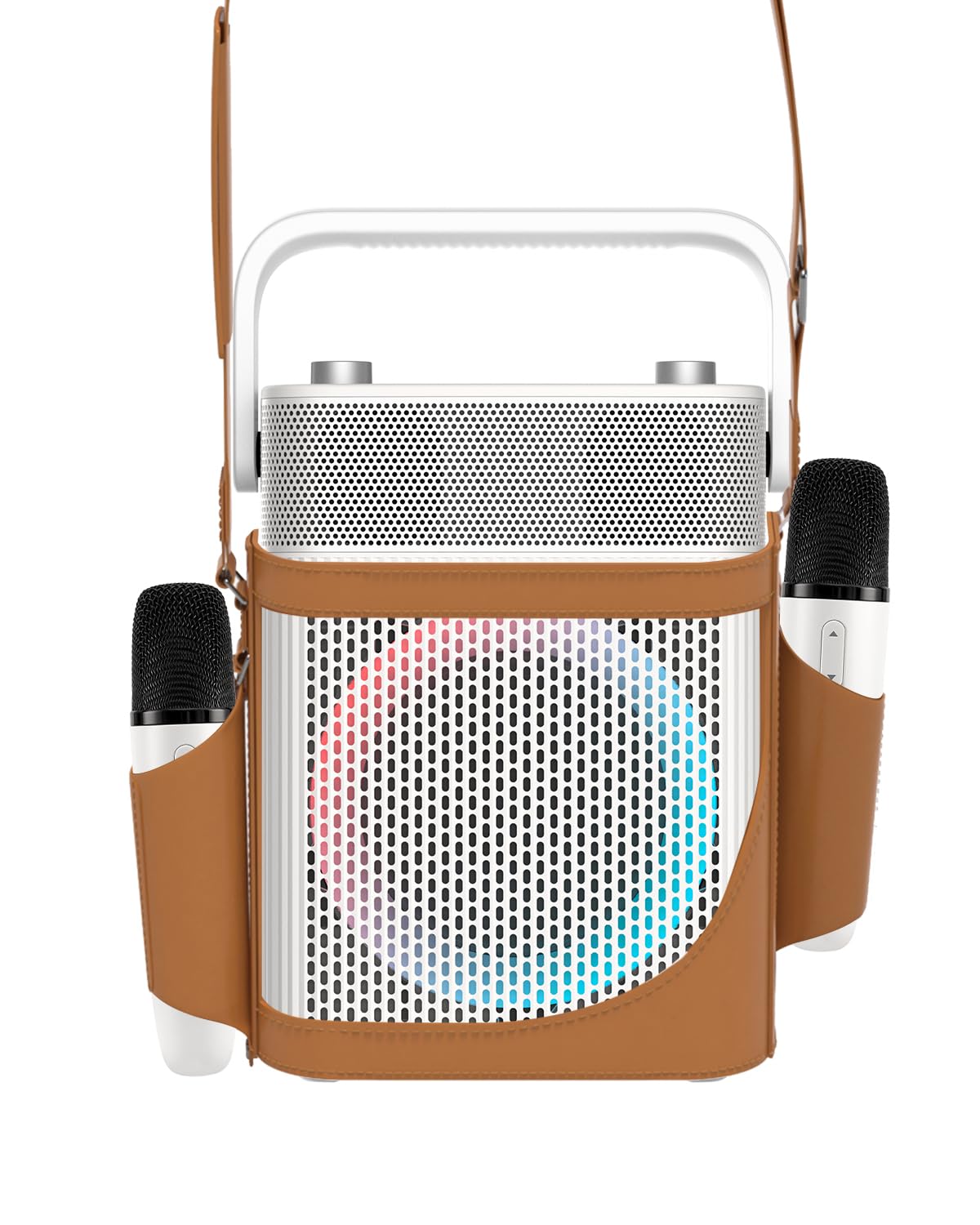
Vaizdas: priekis view of the PUREMIC S3 Karaoke Machine, highlighting its design and LED lights.
Sąrankos vadovas
1. Įrenginio įkrovimas
Before first use, fully charge the speaker and microphones.
- Pranešėjas: Connect the speaker charger to the "Charge Port" on the back of the speaker. The charging indicator will show progress.
- Mikrofonai: Place the UHF wireless microphones into their dedicated charging holders on top of the speaker. The microphones will begin charging automatically.

Image: Close-up of the speaker's rear panel, indicating the Charge Port, Aux-in Port, and USB Port.
2. Įjungimas/išjungimas
- Pranešėjas: Press and hold the Power On/Off button on the control panel until the device powers on or off.
- Mikrofonai: Press and hold the power button on each microphone to turn them on or off. They will automatically pair with the speaker when both are powered on.
Naudojimo instrukcijos
1. „Bluetooth“ ryšys
- Turn on the PUREMIC S3 speaker.
- Paspauskite BT button on the speaker's control panel to enter Bluetooth pairing mode. The Bluetooth indicator will flash.
- On your device (smartphone, tablet, TV, computer), enable Bluetooth and search for "PUREMIC S3".
- Select "PUREMIC S3" from the list of available devices to pair. A confirmation sound will indicate a successful connection.
NFC susiejimas (tik „Android“ įrenginiuose): For quick pairing, ensure NFC is enabled on your Android smartphone. Tap your phone gently against the NFC area on the speaker's control panel. Your phone will prompt you to connect to the PUREMIC S3.

Image: Demonstrates NFC pairing with an Android phone on the PUREMIC S3 speaker.
2. AUX įvestis
To connect devices via AUX cable:
- Connect one end of a 3.5mm AUX cable (not included) to the AUX-in port on the back of the PUREMIC S3.
- Connect the other end to the audio output jack of your device (e.g., TV, MP3 player).
- Garsiakalbis automatiškai persijungs į AUX režimą.

Image: PUREMIC S3 connected to a TV via AUX, showing karaoke lyrics on screen.
3. USB atkūrimas ir įrašymas
Insert a USB drive into the USB port on the back of the speaker for music playback or to record your performance.
- Atkūrimas: The speaker will automatically detect and play audio files iš USB atmintinės.
- Įrašas: Paspauskite REC button on the control panel to start recording. Press it again to stop recording. Recordings will be saved to the USB drive.
4. Mikrofono funkcijos
The wireless microphones offer several features:
- Volume/Echo: Use the dedicated knob on the speaker to adjust microphone volume and echo effect.
- Vocal Elimination: Press the designated button on the microphone for one-touch vocal elimination from music tracks.
- Garso efektai: The microphones feature 8 different sound effects (Children, Monster, Male, Female, Original, Concert, Live, K.T.V.). Cycle through these effects using the microphone's controls.

Image: Visual representation of the 8 sound effects available on the PUREMIC S3 microphones.
5. Garsiakalbio valdikliai
The speaker's control panel includes:
- Maitinimo įjungimas/išjungimas: Paspauskite ir palaikykite, kad įjungtumėte/išjungtumėte.
- Volume/Echo Knob: Rotate to adjust overall volume and microphone echo.
- BT mygtukas: Įjungia „Bluetooth“ susiejimo režimą.
- BASS mygtukas: Toggles bass sound enhancement.
- Pauzės mygtukas: Pauses/resumes playback.
- REC mygtukas: Initiates/stops recording to USB.
- Šviesos efekto mygtukas: Perjungia 6 skirtingus apšvietimo režimus.
- Pre/Next Song Knob: Rotate to skip tracks.

Vaizdas: Išsamus view of the speaker's control panel, showing all buttons and their functions.
6. TWS susiejimas (tikras belaidis stereofoninis garsas)
If you have two PUREMIC S3 speakers, you can pair them for a true wireless stereo experience:
- Įsitikinkite, kad abu garsiakalbiai įjungti ir neprijungti prie jokio „Bluetooth“ įrenginio.
- On one speaker, press and hold the Bluetooth button until you hear a pairing tone.
- Repeat this step on the second speaker.
- The speakers will automatically connect to each other. Once paired, connect your device to one of the speakers via Bluetooth.

Image: Two PUREMIC S3 speakers set up for TWS, providing double stereo sound in a room.
Priežiūra
- Valymas: Garsiakalbį ir mikrofonus valykite minkštu, sausu skudurėliu. Nenaudokite abrazyvinių valiklių ar tirpiklių.
- Saugykla: Laikykite prietaisą vėsioje, sausoje vietoje, apsaugotoje nuo tiesioginių saulės spindulių ir ekstremalių temperatūrų.
- Akumuliatoriaus priežiūra: To prolong battery life, fully charge the device before long periods of storage and recharge it every 3 months.
- Atsparumas vandeniui: The speaker is IPX4 rated, meaning it is resistant to splashes. Do not submerge the device in water. Ensure all ports are securely covered when exposed to moisture.
Trikčių šalinimas
| Problema | Galima priežastis | Sprendimas |
|---|---|---|
| Nėra galios | Baterija išsikrovusi. | Charge the speaker and microphones using the provided chargers. |
| Nepavyksta prisijungti per Bluetooth | Bluetooth is not enabled on your device or speaker is not in pairing mode. Device is too far. | Ensure Bluetooth is active on your device. Press the BT button on the speaker. Move device closer to the speaker. |
| Nėra garso iš mikrofonų | Microphones are off or not paired. Microphone volume is too low. | Turn on microphones. Ensure they are charged. Adjust microphone volume knob on the speaker. |
| Garso iškraipymas | Volume is too high. Microphone is too close to the speaker. | Reduce the volume. Increase distance between microphone and speaker. |
| USB atkūrimas neveikia | USB drive not formatted correctly or unsupported file tipai. | Ensure USB drive is formatted to FAT32. Use supported audio formats (e.g., MP3). |
Specifikacijos
| Funkcija | Detalė |
|---|---|
| Modelio numeris | S3 |
| Prekės svoris | 8.82 svaro |
| Gaminio matmenys | 5.91 x 7.72 x 10.2 colio |
| Baterijos tipas | 1 ličio jonų baterija (reikalinga) |
| Baterijos talpa | 10,000 mAh (garsiakalbis) |
| Žaidimo laikas | Up to 8 hours (Speaker), Up to 10 hours (Microphones) |
| Suderinami įrenginiai | Smartphones, Televisions, iPads, Tablets, Computers |
| Jungties tipas | 3.5 mm Jack (AUX), USB |
| Pranešėjų skaičius | 3 (1x 5.25-inch woofer, 2x 1-inch tweeters) |
| Išėjimo vattage | 300 vatų |
| Maitinimo šaltinis | Maitinamas baterijomis |
| ttage | 5 volto (DC) |
| Atsparumas vandeniui | IPX4 |
| Ypatinga funkcija | Light Up Speaker, NFC |
Garantija ir palaikymas
For warranty information and technical support, please refer to the warranty card included in your package or contact PUREMIC customer service through their official websvetainę arba mažmenininką, iš kurio buvo pirktas produktas.
Palaikymas internetu: Visit the PUREMIC Store on Amazon for additional product information and support resources: PUREMIC Store


