1. Įvadas
This manual provides detailed instructions for the installation, operation, and maintenance of your Naifay Android Car Stereo. Please read this manual thoroughly before using the product to ensure proper function and safety. Keep this manual for future reference.
2. Produkto suderinamumas
This Naifay Android Car Stereo is specifically designed for Honda CRV models manufactured between 2007 and 2011.
- Suderinami modeliai: Honda CRV 2007, 2008, 2009, 2010, 2011.
- Svarbi pastaba: Šis vienetas yra nesuderinamas with Honda EX Series models. It also does not support vehicles equipped with premium sound systems (e.g., J.B.L or B.O.S.E) or existing large navigation screens.
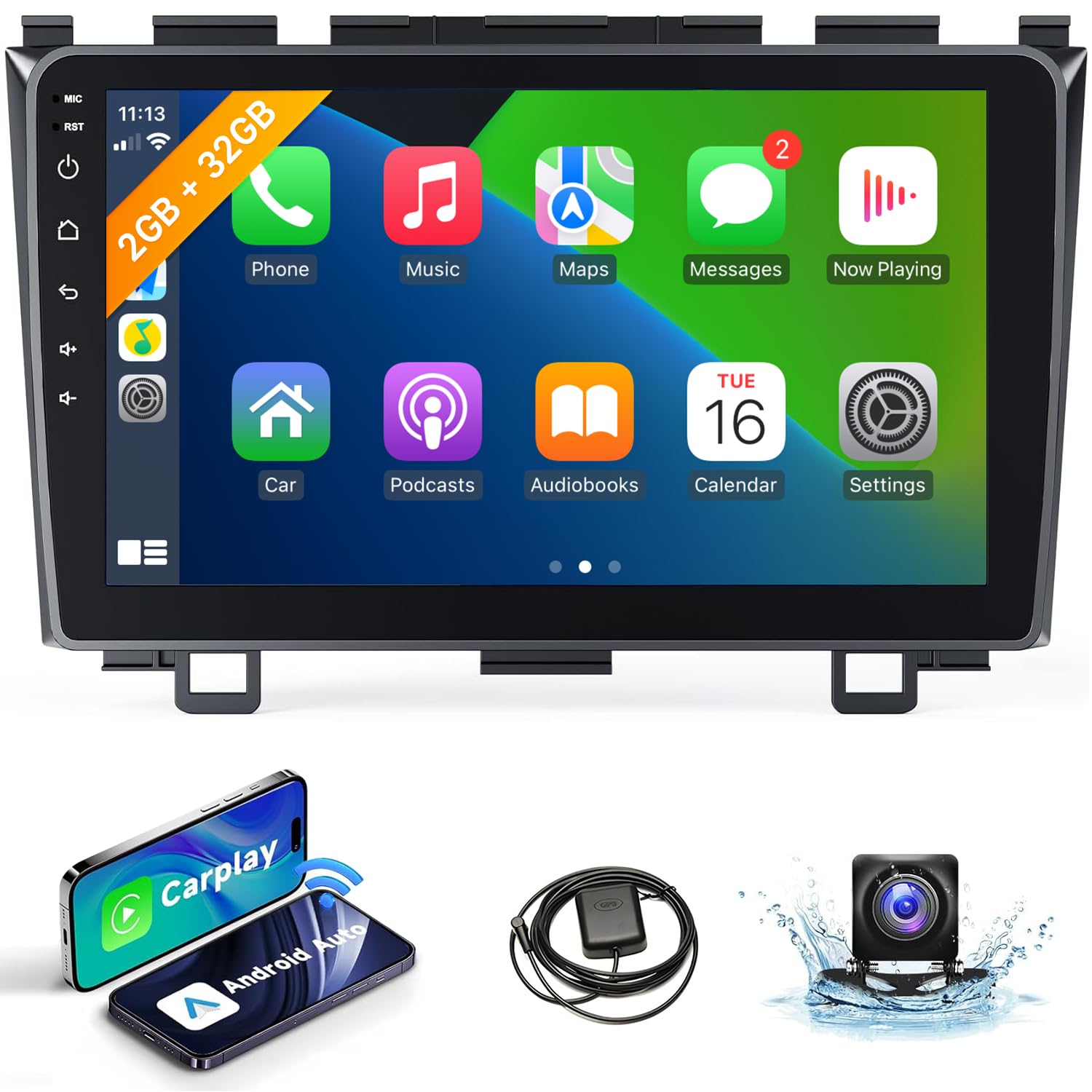
Image: The Naifay Android Car Stereo seamlessly integrated into a Honda CRV dashboard. The image also illustrates different original Honda CRV radio configurations, indicating which are compatible and which are not.
3. Pakuotės turinys
Prieš tęsdami montavimą, patikrinkite, ar pakuotėje yra visi reikalingi daiktai:
- Naifay Android Car Stereo Unit (9-inch touchscreen)
- Maitinimo laidas
- RCA kabelis
- USB kabeliai (2)
- GPS antena
- Galinės kameros įvesties kabelis
- Atsarginė kamera
- Vartotojo vadovas (šis dokumentas)

Image: A visual representation of the car stereo unit, its dimensions, rear ports, and all accessories included in the package.
4. Sąranka ir diegimas
Installation of the car stereo involves electrical wiring and dashboard disassembly. Professional installation is recommended. Ensure the vehicle's battery is disconnected before starting installation.
4.1 Laidų jungtys
- Maitinimo jungtis: Connect the red and yellow wires to the positive side of the 12V power supply. Connect the black wire to the negative power supply.
- Svarbu: Use only the provided power cables. Do not attempt to directly insert the original car plug into the new unit.
- Atvirkštinė įvestis: Connect the reverse input cable to the vehicle's reverse light signal for automatic camera display.
- GPS antena: GPS anteną montuokite vietoje, kur nėra šviesos. view dangaus, paprastai ant prietaisų skydelio arba po priekiniu stiklu.
- USB kabeliai: Prijunkite pridėtus USB laidus, skirtus išoriniams įrenginiams prijungti.
- RCA kabeliai: Connect RCA cables for audio/video input/output as needed (e.g., external ampžemų dažnių garsiakalbis).
4.2 Dashboard Integration
The stereo unit is designed to fit the Honda CRV 2007-2011 dashboard without requiring additional dash kits. Carefully remove the original stereo and install the new unit, ensuring all connections are secure and routing cables properly to avoid interference.

Image: The Naifay Android Car Stereo successfully installed in a Honda CRV dashboard, demonstrating a clean and integrated appearance.
5. Naudojimo instrukcijos
The Naifay Android Car Stereo offers a range of features for an enhanced driving experience.
5.1 belaidis „CarPlay“ ir „Android Auto“
Connect your smartphone wirelessly to access navigation, music, calls, and messages directly on the stereo screen.
- Ryšys: Pair your phone via Bluetooth and enable Wi-Fi. The system will prompt you to connect to CarPlay or Android Auto.
- Valdymas balsu: Use Siri (for CarPlay) or Google Assistant (for Android Auto) for hands-free operation.

Image: The user interface for Wireless CarPlay and Android Auto, demonstrating access to phone functions and voice commands.
5.2 GPS navigacija ir „Wi-Fi“ ryšys
Utilize built-in GPS for navigation and connect to Wi-Fi for online features.
- GPS: The unit supports both online and offline navigation maps. Download offline maps for use without an internet connection.
- WiFi: Connect to a mobile hotspot or Wi-Fi network to access online maps, stream media, and download apps from the Play Store.

Image: The car stereo displaying GPS navigation with route information and a separate screen showing online video streaming via Wi-Fi.
5.3 „Bluetooth“ ir FM radijas
Enjoy hands-free communication and your favorite radio stations.
- "Bluetooth 5.1": Pair your phone for hands-free calling and audio streaming. The unit includes a built-in microphone and supports an external microphone via the RCA cable.
- FM radijas: Tune into FM radio stations. The unit supports unlimited preset stations.

Image: The car stereo displaying the FM radio tuner and a Bluetooth dial-up screen for making calls.
5.4 MirrorLink & Split Screen
Extend your phone's display and multitask efficiently.
- Veidrodinė nuoroda: Wirelessly mirror your iOS device screen. Android devices support both wireless and wired MirrorLink.
- Padalintas ekranas: The Android 12 system allows you to run two applications simultaneously, such as navigation and music playback.

Image: Demonstrations of MirrorLink displaying a phone screen, the backup camera view, steering wheel control configuration, and two apps running side-by-side in split-screen mode.
5.5 Vairo valdymas (SWC)
Integrate with your vehicle's existing steering wheel controls for convenience.
- Konfigūracija: After correct wiring, access the 'Steering Learn' function in the system settings to map your steering wheel buttons to the stereo's functions.
5.6 Galinio vaizdo kamera
Enhance safety with the included AHD rear view fotoaparatas.
- Automatinis ekranas: The screen automatically switches to the rear view vaizdas, kai transporto priemonė važiuoja atbuline pavara.
- Savybės: The camera offers a 170-degree ultra-wide angle and a waterproof design.
6. Priežiūra
To ensure the longevity and optimal performance of your Naifay Android Car Stereo, follow these maintenance guidelines:
- Valymas: Jutiklinį ekraną ir įrenginio išorę valykite minkšta, sausa šluoste. Venkite abrazyvinių valiklių ar tirpiklių.
- Programinės įrangos atnaujinimai: Periodically check for available software updates to improve performance and add new features. Connect to Wi-Fi and navigate to system settings for updates.
- Temperatūra: Saugokite įrenginį nuo ekstremalių temperatūrų.
- Galia: Ensure the vehicle's electrical system is stable. Voltage over 12V may damage the unit.
7. Problemų sprendimas
Prieš kreipdamiesi į palaikymo tarnybą, peržiūrėkite toliau pateiktas dažniausiai pasitaikančias problemas ir jų sprendimus.
| Problema | Galima priežastis | Sprendimas |
|---|---|---|
| Nėra galios | Neteisingas laidų pajungimas; Perdegęs saugiklis; Atsilaisvinusi jungtis. | Check power cable connections (red/yellow to positive, black to negative). Inspect vehicle's fuse box and the unit's fuse. Ensure all connections are secure. |
| Nėra garso | Speaker wires disconnected; Volume too low; Mute enabled; Incorrect audio settings. | Verify speaker wire connections. Increase volume. Check if mute is active. Adjust audio output settings in the system menu. |
| „CarPlay“ / „Android Auto“ neprisijungia | Bluetooth/Wi-Fi off on phone; Incorrect pairing; Phone software issue. | Ensure Bluetooth and Wi-Fi are enabled on your phone. Forget and re-pair the device. Restart both phone and stereo unit. |
| GPS signalas prarastas / netikslus | GPS antenna obstructed or improperly installed; Poor satellite reception. | Įsitikinkite, kad GPS antena turi laisvą view of the sky. Check antenna connection. Move to an open area for better signal. |
| Galinio vaizdo kamera nerodoma | Reverse input wire disconnected; Camera power issue; Faulty camera. | Check the reverse input cable connection to the vehicle's reverse light. Verify camera power supply. Test camera if possible. |
| Įrenginys užstringa arba reaguoja lėtai | Too many apps running; Software glitch; Insufficient memory. | Close unnecessary applications. Restart the unit. Perform a factory reset if the issue persists (note: this will erase all data). |
8. Specifikacijos
- Operacinė sistema: Android 12
- CPU: 4 branduolių
- Atmintis: 2 GB RAM + 32 GB ROM
- Ekrano dydis: 9 colių
- Ekrano skiriamoji geba: 1024 x 600
- Ryšys: Wireless CarPlay, Wireless Android Auto, Bluetooth 5.1, Wi-Fi, USB
- Navigacija: Built-in GPS (supports online/offline maps)
- Ypatingos savybės: MirrorLink (Wireless for iOS, Wireless/Wired for Android), Split Screen, FM Radio, Steering Wheel Control (SWC), AHD Backup Camera Input
- Galia ttage: 12 V (DC)
- Gaminio matmenys: 9.64 x 1.57 x 5.98 colio (apytiksliai 24.5 x 4 x 15.2 cm)
- Prekės svoris: 2.72 svaro (apie 1.23 kg)
9. Garantija ir palaikymas
Naifay provides comprehensive support for your product.
- Garantija: The product includes a 12-month warranty for quality issues, effective from the date of purchase.
- Grąžinimai: A 60-day no-worry return policy is available.
- Techninė pagalba: Lifetime technical support is provided. For assistance with installation, troubleshooting, or any other inquiries, please contact Naifay customer service.
- Susisiekite: Refer to your purchase documentation or the seller's platform for specific contact information.


