Įvadas
The UBPET F10 Automatic Cat Feeder is designed to provide fresh, portion-controlled meals for your pets throughout the day. Featuring advanced semiconductor cooling technology, it ensures wet food remains fresh for up to 24 hours. With programmable feeding schedules and multiple meal compartments, this feeder supports healthy eating habits for cats and small to medium-sized dogs, offering convenience and peace of mind for pet owners.
Saugos informacija
- Įsitikinkite, kad lesyklėlė pastatyta ant stabilaus, lygaus paviršiaus, kad ji neapvirstų.
- Do not immerse the main base unit in water. The base is not washable; only wipe it with a dry cloth.
- Keep the power cord away from pet chewing to prevent damage and electrical hazards.
- Do not place heavy objects on top of the feeder.
- Supervise your pet during initial use to ensure they adapt to the feeder.
- Do not store wet food in the feeder for more than 24 hours.
Pakuotės turinys
- UBPET F10 Automatic Wet Food Feeder
- Maitinimo adapteris
- Vartotojo vadovas
Produktas baigtasview
The UBPET F10 features a sleek design with a 5-meal food tray and an integrated control panel. Its semiconductor cooling system ensures food freshness, while pet-friendly design elements enhance safety and ease of use.

Figure 1: UBPET F10 Automatic Cat Feeder, top view uždarytu dangčiu.
Pagrindiniai komponentai:
- Pagrindinis blokas: Houses the cooling system and electronic controls.
- 5-Meal Food Tray: Features five isolated portions for different meal types or times. Each grid has a maximum capacity of 300g (290ml).
- Valdymo skydelis: Located under the top cover, with an LCD screen and buttons for setting time, schedule, and cooling modes.
- Semiconductor Cooling Chip: Provides continuous refrigeration to keep wet food fresh.
- Secure Locking Snap: Prevents pets from opening the feeder.
- Paslėpti mygtukai: Prevents accidental tampering by pets.
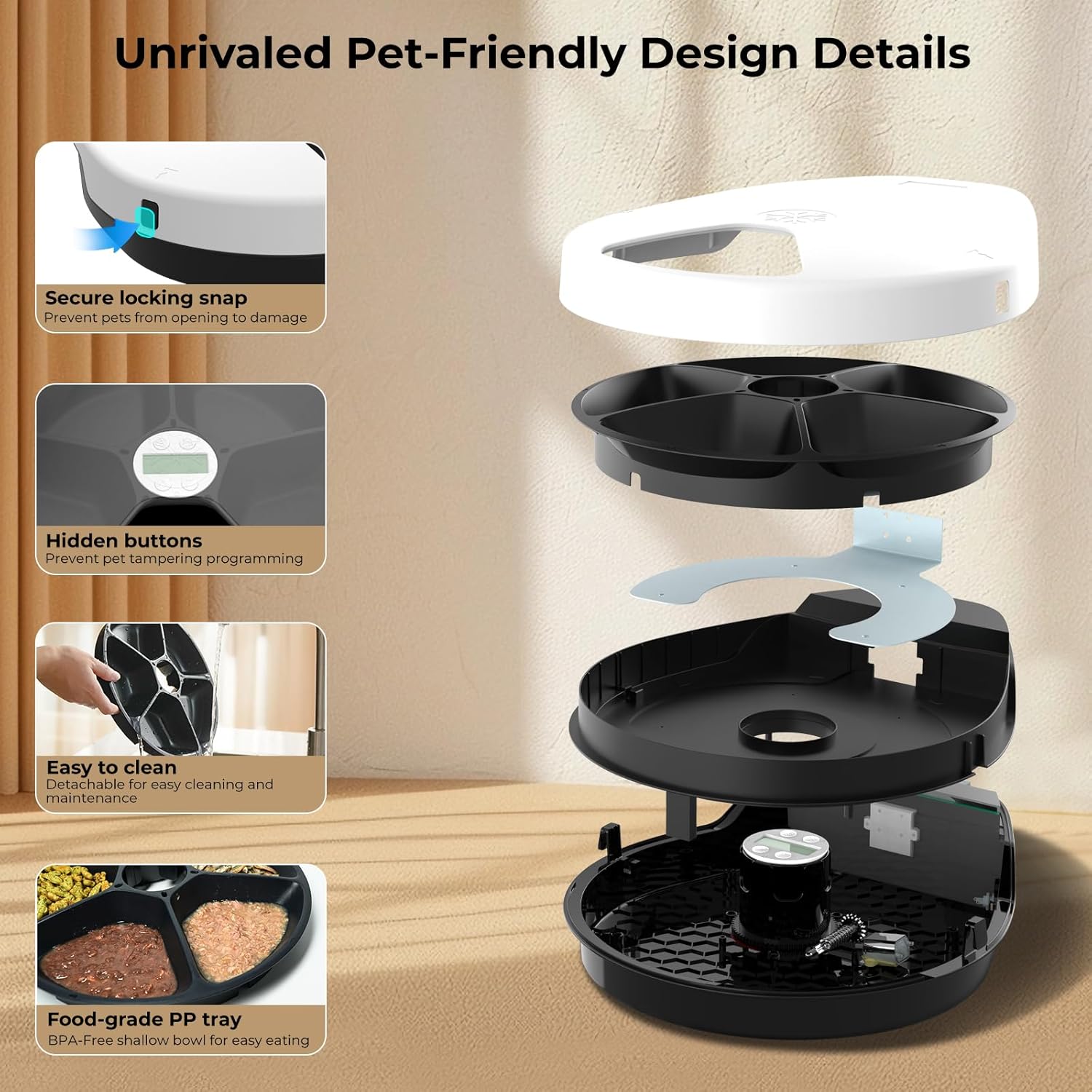
2 pav.: sprogo view of the UBPET F10 feeder, highlighting its detachable parts and hidden control panel.

Figure 3: Illustration of the unique semiconductor refrigerating technology, which eliminates the need for ice packs.
Sąranka
Follow these steps to set up your UBPET F10 Automatic Cat Feeder for the first time.
- Išpakuoti: Atsargiai išimkite visus komponentus iš pakuotės.
- Vieta: Place the feeder on a flat, stable surface, at least 4 inches (10cm) away from any walls to ensure proper ventilation for the cooling system.
- Prijunkite maitinimą: Plug the power adapter into the feeder's power port and then into a wall outlet. The display will light up.
- Užpildykite maisto padėklą: Open the top cover by pressing the side buckles. Fill the five compartments with your pet's desired wet or dry food.
- Uždaryti viršelį: Securely close the top cover, ensuring the buckles snap into place.
1 vaizdo įrašas: Bendroji informacijaview of the UBPET F10 automatic wet food cat feeder, including initial setup and features.
Naudojimo instrukcijos
The UBPET F10 allows for precise control over feeding times and cooling settings.
1. Setting the Time and Feeding Schedule:
The feeder supports 1 instant feeding and up to 4 scheduled feedings per day. The display shows the current time and programmed meal times.

Figure 4: Close-up of the UBPET F10's LCD screen and control buttons for setting time and cooling modes.
- Prieigos valdymo skydas: Open the top cover to reveal the control panel and LCD screen.
- Nustatyti dabartinį laiką: Long press the 'Settings' button (gear icon) until the hour display flashes. Use the 'Up' (▲) and 'Down' (▼) buttons to adjust the hour. Press 'Settings' again to move to minutes and adjust.
- Programos maitinimo laikas: After setting the current time, press 'Settings' to cycle through meal time settings (1 to 4). For each meal, adjust the hour and minutes using the 'Up' (▲) and 'Down' (▼) buttons. The feeder will automatically rotate to the next available food compartment at the set time.
- Instant Feed: To dispense food immediately, short press the 'Power/Cooling' button (snowflake icon). This will rotate the tray to the next available portion.

Figure 5: Visual representation of the 24-hour feeding schedule, showing a cat eating from the feeder at different times.
2. Adjusting Cooling Modes:
The UBPET F10 offers 3 temperature settings to keep food fresh, suitable for various environmental temperatures.
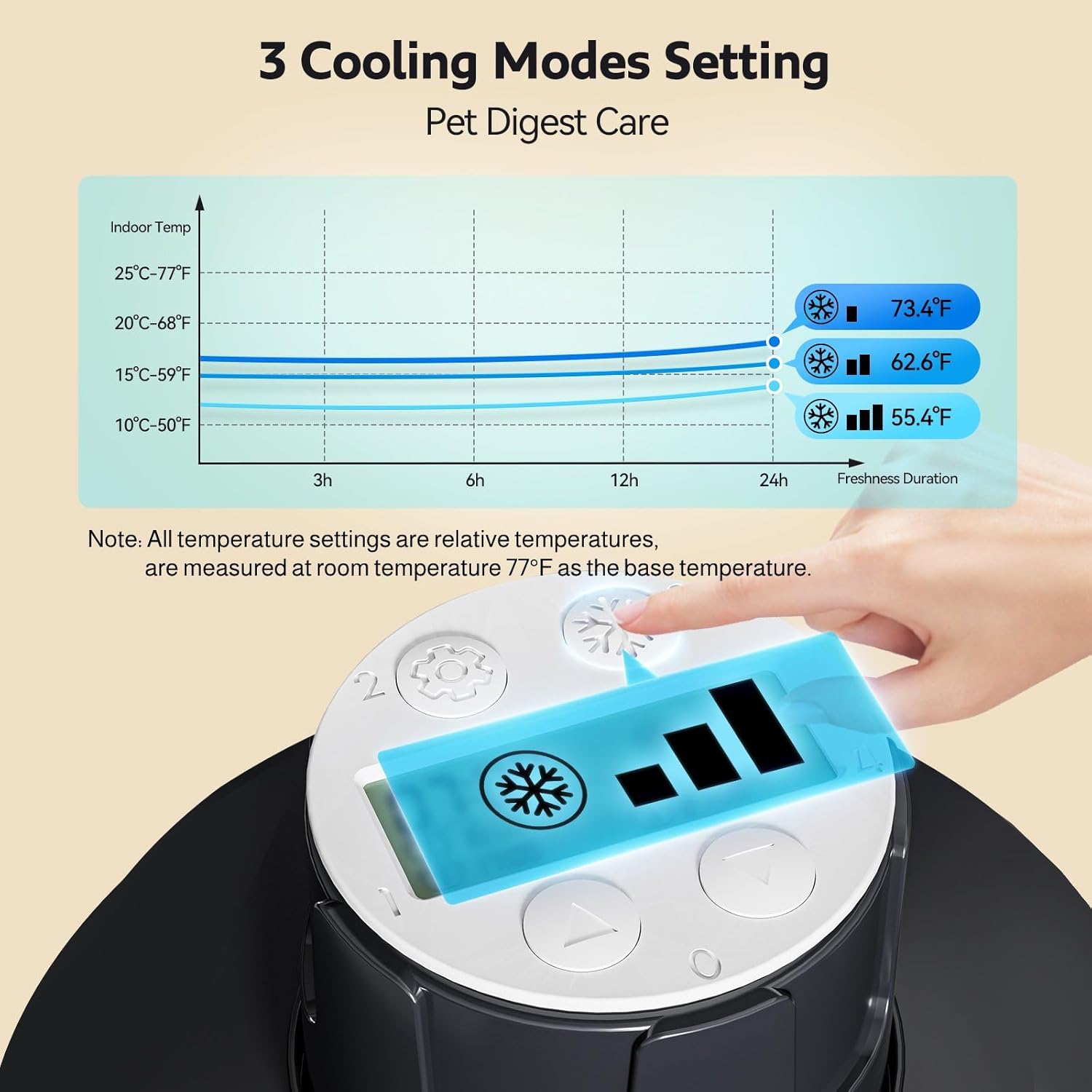
Figure 6: Graph illustrating the three cooling modes (Level 1, 2, 3) and their corresponding temperature ranges relative to room temperature.
- Įjungti aušinimą: Long press the 'Power/Cooling' button (snowflake icon) for about 3 seconds to turn the cooling function on or off.
- Change Cooling Level: Short press the 'Power/Cooling' button (snowflake icon) to cycle through the 3 cooling levels (indicated by bars on the display). Choose the level appropriate for your environment and food type.
Video 2: Detailed instructions on how to use and program the UBPET F10 Cat feeder, including setting meal times and cooling modes.
Priežiūra
Reguliarus valymas užtikrina higieną ir prailgina lesyklėlės tarnavimo laiką.
- Unplug Feeder: Prieš valydami visada atjunkite maitinimo laidą.
- Remove Food Tray: Open the top cover and lift out the 5-meal food tray.
- Clean Food Tray: The food tray is made of food-grade BPA-free ABS material and can be rinsed under running water or placed in the dishwasher for thorough cleaning. Please clean the meal plate regularly to prevent bacteria buildup.
- Švarus bazinis blokas: The main base unit is not washable. Wipe the interior and exterior of the base with a dry cloth. Due to the cooling function, water droplets may form inside; this is normal. Ensure to wipe off any water left inside and outside the base in time.
- Surinkti iš naujo: Once all parts are dry, place the food tray back into the base unit and close the top cover securely.

Figure 7: Visual guide demonstrating the simple cleaning process of the detachable food tray.
Video 3: Step-by-step guide on how to properly clean the UBPET F10 Cat feeder.
Trikčių šalinimas
If you encounter any issues with your UBPET F10 feeder, please refer to the common problems and solutions below.
| Problema | Galima priežastis | Sprendimas |
|---|---|---|
| Feeder does not turn on. | Power adapter not connected properly or power outage. | Ensure the power adapter is securely plugged into both the feeder and the wall outlet. Check the power source. |
| Tray does not rotate at scheduled time. | Incorrect time setting, food stuck, or tray not properly seated. | Verify the current time and meal schedule settings. Check for any obstructions in the food compartments or under the tray. Ensure the tray is correctly placed. |
| Neveikia aušinimo funkcija. | Cooling mode not activated or incorrect setting. | Long press the 'Power/Cooling' button to activate cooling. Short press to cycle through cooling levels. Ensure proper ventilation around the feeder. |
| Feeder makes noise when rotating. | Normalaus veikimo garsas. | A low noise level (<40dB) is normal during operation and should not scare pets. |
| Pet is tampsu nustatymais. | Buttons are accessible to curious pets. | The feeder features hidden buttons under the top cover to prevent accidental changes. Ensure the lid is securely closed. |
For issues not listed above or if problems persist, please contact UBPET customer support.
Specifikacijos
| Funkcija | Detalė |
|---|---|
| Produkto modelis | F10 |
| Prekės ženklas | UBPET |
| Matmenys (IxPxH) | 14.17 x 11.8 x 3.54 colio |
| Prekės svoris | 3.08 svaro |
| Medžiaga | Polypropylene (BPA-free ABS for food tray) |
| Maisto padėklo talpa | 5 grids, max 300g (290ml) per grid |
| Aušinimo technologija | Semiconductor Refrigeration (3 temperature settings) |
| Maitinimo grafikas | 1 instant feed + 4 programmable timed feedings |
| Maitinimo režimas | Power direct charging |
| Triukšmo lygis | <40dB |
| Tikslinės rūšys | Cat, Dog (small to medium breeds), dieting pets, elderly pets |
Garantija ir palaikymas
UBPET provides a limited warranty for the F10 Automatic Cat Feeder. For detailed warranty information, product support, or any inquiries, please refer to the contact information provided in your product packaging or visit the official UBPET websvetainė. Mūsų klientų aptarnavimo komanda pasirengusi atsakyti į visus jūsų klausimus ar išsakyti savo abejones.


