1. Įvadas
Thank you for choosing the Mecer 23.8 Inch Full HD LED Monitor. This manual provides essential information for setting up, operating, and maintaining your monitor. Please read it thoroughly before use to ensure proper functionality and longevity of your device.
This monitor features a 23.8-inch Full HD (1920 x 1080) display, offering crisp and clear visuals. It incorporates TFT LED panel technology for energy efficiency and vibrant colors, with a 16:9 aspect ratio suitable for widescreen viewing. Connectivity options include VGA and HDMI, making it compatible with various devices. Built-in speakers provide basic audio, and wide 178° viewing angles ensure comfortable use. With a 2ms response time, it is suitable for general computing and multimedia consumption.
2. Saugos informacija
- Maitinimo šaltinis: Naudokite tik prie monitoriaus pridėtą maitinimo adapterį. Įsitikinkite, kad maitinimo lizdas yra tinkamai įžemintas.
- Vėdinimas: Neužblokuokite ventiliacijos angų. Palikite pakankamai vietos aplink monitorių tinkamam oro cirkuliavimui ir neperkaitimui.
- Vieta: Pastatykite monitorių ant stabilaus, lygaus paviršiaus. Venkite jo tiesioginiuose saulės spinduliuose, šalia šilumos šaltinių arba aplinkoje, kurioje yra daug dulkių ar drėgmės.
- Valymas: Disconnect the power cord before cleaning. Use a soft, dry cloth for the screen and a slightly damp cloth for the casing. Venkite naudoti abrazyvinius valiklius ar tirpiklius.
- Skysčio ekspozicija: Keep liquids away from the monitor. If liquid enters the monitor, disconnect power immediately and contact qualified service personnel.
- Išardymas: Nebandykite patys ardyti ar taisyti monitoriaus. Visus techninės priežiūros darbus patikėkite kvalifikuotiems techninės priežiūros specialistams.
3. Pakuotės turinys
Patikrinkite pakuotės turinį, kad įsitikintumėte, jog yra visi reikalingi daiktai:
- Mecer 23.8 Inch LED Monitor
- Monitoriaus stovas (pagrindas ir kaklelis)
- Maitinimo adapteris ir laidas
- HDMI kabelis
- VGA laidas
- Vartotojo vadovas (šis dokumentas)
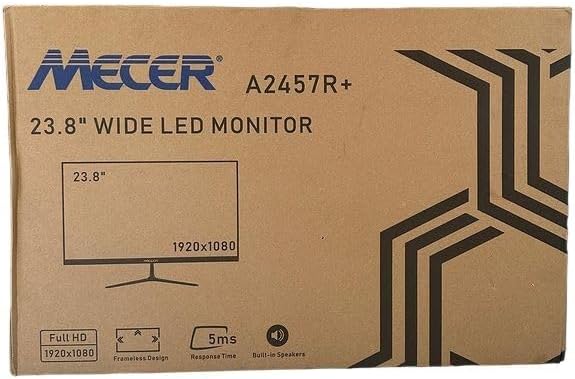
3.1 vaizdas: The monitor packaging box, indicating the model A2457R+ and key features like 23.8" display, Full HD 1920x1080 resolution, frameless design, 5ms response time, and built-in speakers.
4. Sąranka
4.1. Monitoriaus stovo surinkimas
- Atsargiai išimkite monitoriaus ir stovo komponentus iš pakuotės.
- Pritvirtinkite stovo kaklelį prie monitoriaus skydelio, sulygiuodami skirtukus ir tvirtai paspausdami, kol jis užsifiksuos vietoje.
- Attach the stand base to the stand neck, securing it with the provided screw (usually hand-tightened).
- Surinktą monitorių padėkite ant stabilaus, lygaus paviršiaus.

4.1 vaizdas: Priekyje view of the Mecer 23.8 Inch LED Monitor with its stand assembled, ready for connection.
4.2. Prisijungimas prie kompiuterio
Monitorius palaiko tiek HDMI, tiek VGA jungtis. Pasirinkite tinkamą kabelį savo kompiuteriui.
- HDMI jungtis: Connect one end of the HDMI cable to the HDMI port on your computer's graphics card and the other end to the HDMI port on the monitor. HDMI transmits both video and audio signals.
- VGA jungtis: Connect one end of the VGA cable to the VGA port on your computer's graphics card and the other end to the VGA port on the monitor. VGA transmits only video signals.

4.2 vaizdas: Galinis view of the Mecer 23.8 Inch LED Monitor, showing the input ports including HDMI and VGA, as well as the power input.
4.3. Maitinimo prijungimas
- Connect the power adapter cable to the DC IN port on the back of the monitor.
- Įkiškite maitinimo adapterį į sieninį lizdą.
5. Naudojimo instrukcijos
5.1. Įjungimas/išjungimas
Press the power button, typically located on the bottom right side or rear of the monitor, to turn the monitor on or off. The power indicator light will illuminate when the monitor is on.
5.2. Įvesties šaltinio pasirinkimas
If you have multiple devices connected, you may need to manually select the input source. Use the monitor's control buttons (usually located near the power button) to navigate to the input selection menu and choose between HDMI or VGA.
5.3. Ekrano ekrano (OSD) meniu
The OSD menu allows you to adjust various display settings. Use the monitor's control buttons to:
- Prisijunkite prie OSD meniu.
- Navigate through menu options (e.g., Brightness, Contrast, Color Settings, Input Source).
- Koreguokite reikšmes arba pasirinkite parinktis.
- Išeikite iš OSD meniu.
Įprasti reguliuojami nustatymai apima:
- Ryškumas / kontrastas: Sureguliuokite bendrą šviesumą ir skirtumą tarp šviesių ir tamsių sričių.
- Spalvų nustatymai: Adjust color temperature, RGB values, or select preset color modes.
- Kraštinių santykis: Change between 16:9, 4:3, or other available options.
- Garsas: Adjust volume for the built-in speakers.
5.4. Integruoti garsiakalbiai
The monitor includes built-in speakers for basic audio output. If using an HDMI connection, audio will be transmitted automatically. For VGA connections, ensure your computer's audio output is configured correctly. Adjust the volume through the OSD menu or your computer's operating system.
6. Priežiūra
6.1. Monitoriaus valymas
- Prieš valydami visada atjunkite monitorių nuo maitinimo lizdo.
- Ekranas: Švelniai nuvalykite ekraną minkštu, nepūkuotu skudurėliu. Jei dėmės sunkiai įveikiamos, švelniai nuvalykiteampen the cloth with water or a specialized screen cleaner (ensure it's alcohol-free and ammonia-free) and wipe carefully. Do not spray liquid directly onto the screen.
- Casing: Monitorių nuvalykite minkštu, sausu skudurėliu.asing. Jei reikia, šiek tiek damp galima naudoti šluostę, po to – sausą šluostę.
6.2. Sandėliavimas
Jei monitorių ilgesnį laiką sandėliuosite, atjunkite visus laidus, supakuokite jį į originalią pakuotę (jei yra) ir laikykite vėsioje, sausoje vietoje, toliau nuo tiesioginių saulės spindulių ir ekstremalių temperatūrų.
7. Problemų sprendimas
Jei kyla problemų dėl monitoriaus, žr. šias dažniausiai pasitaikančias problemas ir sprendimus:
- Nėra galios:
- Įsitikinkite, kad maitinimo laidas yra tvirtai prijungtas prie monitoriaus ir sieninio lizdo.
- Patikrinkite, ar maitinimo lizdas veikia, prijungdami prie jo kitą įrenginį.
- Patikrinkite, ar maitinimo adapteris veikia tinkamai.
- Nėra signalo:
- Įsitikinkite, kad vaizdo kabelis (HDMI arba VGA) yra tvirtai prijungtas prie monitoriaus ir kompiuterio.
- Patikrinkite, ar monitoriuje pasirinktas teisingas įvesties šaltinis (per OSD meniu).
- Check if your computer is powered on and outputting a video signal.
- Jei įmanoma, išbandykite kitą vaizdo kabelį.
- Vaizdas neryškus arba iškraipytas:
- Įsitikinkite, kad kompiuterio ekrano nustatymuose monitoriaus skiriamoji geba nustatyta į pradinę (1920 x 1080).
- Adjust the monitor's OSD settings for brightness, contrast, and sharpness.
- For VGA connections, use the 'Auto Adjust' function in the OSD menu if available.
- Nėra garso iš integruotų garsiakalbių:
- Įsitikinkite, kad monitoriaus garsumas nėra išjungtas arba nustatytas per mažas OSD meniu.
- Patikrinkite kompiuterio garso išvesties nustatymus ir įsitikinkite, kad monitorius pasirinktas kaip atkūrimo įrenginys.
- If using VGA, ensure your computer's audio is routed to an external speaker system, as VGA does not carry audio.
8. Specifikacijos
| Funkcija | Specifikacija |
|---|---|
| Prekės ženklas | Mecer |
| Modelio numeris | A2457R+ |
| Ekrano dydis | 23.8 colių |
| Rezoliucija | 1920 x 1080 pikselių (Full HD) |
| Ekrano tipas | LED (TFT LED Panel) |
| Krašto santykis | 16:9 |
| Reagavimo laikas | 2 milisekundės |
| Atnaujinimo dažnis | 75 Hz |
| Viewing kampai | 178° horizontaliai / 178° vertikaliai |
| Ryšys | 1x HDMI, 1x VGA |
| Integruoti garsiakalbiai | Taip |
| Spalva | Juoda |
| Gaminio matmenys (D x P x A) | 560D x 42W x 410H millimetres |
| Ypatingos savybės | High performance intelligent multi-frequency scanning, Micro Computer digital technology control, no radiation, no glare, Comply with VESA DPMS international power saving regulation, Support DDC 1/2B and Windows PNP Plug and Play |
9. Garantija ir palaikymas
This Mecer monitor comes with a 1 metų ribota garantija nuo pirkimo datos. Prašome išsaugoti pirkimo įrodymą garantiniams reikalavimams.
For technical support, service, or warranty inquiries, please contact your retailer or the authorized Mecer service center in your region. Do not attempt to repair the product yourself, as this may void your warranty.


