1. Įvadas
Thank you for choosing the virtavo Indoor WiFi Security Camera. This manual provides essential information for setting up, operating, and maintaining your camera to ensure optimal performance and home security. Please read this manual thoroughly before using the product and keep it for future reference.
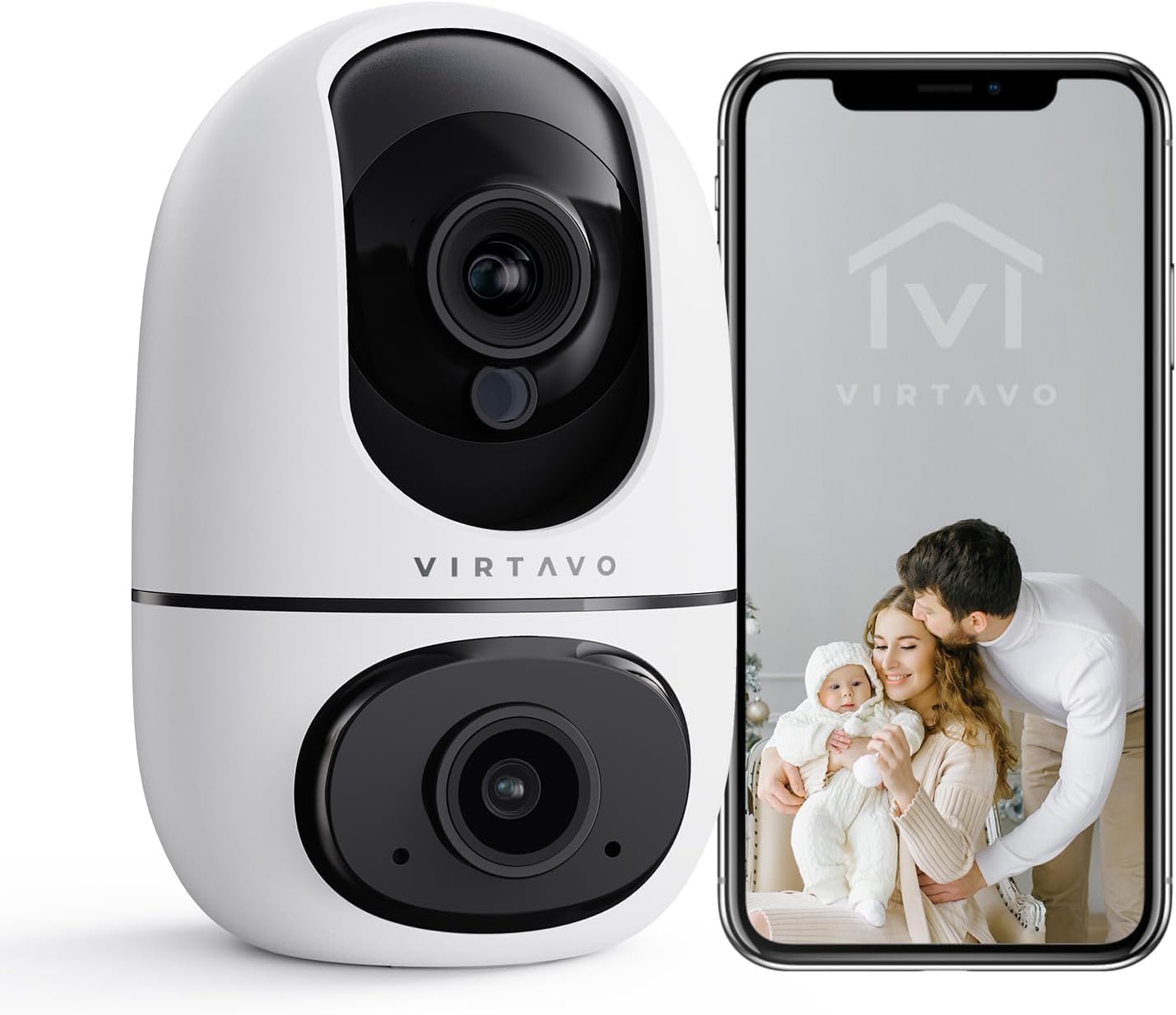
The virtavo Indoor WiFi Security Camera, shown alongside a smartphone displaying its live view, is designed for comprehensive indoor surveillance, offering peace of mind for your home, baby, or pets.
2. Pakuotės turinys
Išpakuodami patikrinkite pakuotės turinį. Jei trūksta kokių nors daiktų arba jie pažeisti, susisiekite su klientų aptarnavimo tarnyba.
- virtavo Indoor WiFi Security Camera (Model XD1-V124)
- Maitinimo adapteris
- USB maitinimo laidas
- Tvirtinimo priedai (varžtai, sieniniai kištukai)
- Vartotojo vadovas (šis dokumentas)
3. Produktas baigtasview
The virtavo Indoor WiFi Security Camera features a dual-lens design, providing enhanced monitoring capabilities. It supports 1080p resolution, pan and tilt functionality for 360-degree coverage, two-way audio, and advanced detection features.

This image highlights the key features of the virtavo camera, including its dual-lens design, 2.4GHz WiFi connectivity, 1080p resolution, extensive pan and tilt range, two-way audio, AI detection, motion tracking, night vision, and video storage capabilities.
Pagrindinės funkcijos:
- Dvigubo objektyvo dizainas: For comprehensive monitoring.
- 1080p Full HD raiška: Pateikia aiškų ir detalų vaizdo įrašą.
- 360° pasukimas ir pakreipimas: Siūlo platų viewing angle for complete room coverage.
- Dvipusis garsas: Communicate with family or pets remotely.
- AI Detection & Motion Tracking: Intelligently identifies and follows movement.
- Naktinis matymas: Clear visibility even in low light or complete darkness.
- 2.4 GHz „Wi-Fi“ ryšys: Stable wireless connection.
- Vietinė ir debesies saugykla: Options for video recording.
4. Sąranka
4.1 Įjungimas
- Prijunkite USB maitinimo laidą prie fotoaparato maitinimo prievado.
- Įjunkite maitinimo adapterį į standartinį elektros lizdą.
- The camera will power on and initiate its self-check sequence. Wait for the indicator light to flash, indicating it's ready for connection.
4.2 Programėlės diegimas ir paskyros sukūrimas
- Download the official virtavo app from your smartphone's app store (iOS App Store or Google Play Store).
- Atidarykite programėlę ir vykdykite ekrane pateikiamus nurodymus, kad sukurtumėte naują paskyrą arba prisijunkite, jei jau turite.
4.3 Connecting the Camera to WiFi
- In the virtavo app, tap the "+" icon to add a new device.
- Pasirinkite „Apsaugos kamera“ arba konkretų modelį, jei būsite paraginti.
- Follow the in-app instructions to connect the camera to your 2.4GHz WiFi network. This typically involves scanning a QR code generated by the app with the camera's lens or entering your WiFi password.
- Once connected, the camera's indicator light will turn solid, and you will hear a confirmation sound.
4.4 Kameros montavimas (pasirinktinai)
The camera can be placed on a flat surface (tabletop mounting) or mounted to a wall or ceiling using the provided accessories.
- Stalviršio išdėstymas: Simply place the camera on a stable, flat surface within range of your WiFi network and a power outlet.
- Tvirtinimas prie sienos / lubų:
- Choose a suitable location, ensuring a clear view and access to power.
- Use the mounting template (if provided) or mark the screw holes on the desired surface.
- Drill pilot holes and insert wall plugs if mounting on drywall or masonry.
- Secure the mounting bracket (if applicable) with screws.
- Attach the camera to the mounting bracket, ensuring it is securely locked in place.
5. Fotoaparato valdymas
5.1 Tiesiogiai View ir panoraminio/pakreipimo valdymas
Open the virtavo app and select your camera to access the live view. Use the on-screen controls to pan (horizontal) and tilt (vertical) the camera lens to adjust the viewing kampas.

The virtavo camera supports dual-view monitoring, allowing you to see multiple camera feeds or different perspectives from the dual-lens on a single screen for an enhanced split-screen experience.
5.2 Dvipusis garsas
Tiesioginio transliavimo metu palieskite mikrofono piktogramą view to speak through the camera's speaker. Tap the speaker icon to listen to audio from the camera's surroundings.
5.3 Judesio aptikimas ir įspėjimai
Enable motion detection in the app settings to receive instant alerts on your smartphone when movement is detected. You can adjust sensitivity levels and set specific activity zones to reduce false alarms.

This feature allows users to define specific activity zones within the camera's view, ensuring that alerts are only triggered by motion in designated areas, reducing unnecessary notifications.
5.4 Naktinis matymas
The camera automatically switches to night vision mode in low-light conditions. It features powerful starlight color night vision for clear images even in complete darkness.

The image demonstrates the superior clarity of the virtavo camera's Starlight Color Night Vision, providing detailed and visible footage even in very low light or complete darkness, compared to a traditional camera.
5.5 Skaitmeninis mastelis
Pinch to zoom on the live view to digitally magnify the image up to 8 times, allowing for closer inspection of details.

This visual illustrates the 8X digital zoom capability of the camera, allowing users to zoom in on specific areas of interest within the live feed for clearer and more detailed viewing.
5.6 Kelių vartotojų bendrinimas
Share access to your camera's live feed and recordings with family members or trusted individuals through the app. Each user can have their own account and access permissions.

The multi-user sharing feature enables you to securely share your camera's feed with family members, allowing everyone to monitor the home together for enhanced safety and convenience.
5.7 Preset Positions
Save specific camera angles as preset positions for quick navigation. This allows you to instantly move the camera to a predefined view vienu bakstelėjimu.

This image illustrates the "My Collections" feature, which allows users to save and quickly recall specific camera positions (presets) within the app, making it easy to monitor different areas of a room.
6. Priežiūra
- Valymas: Švelniai nuvalykite fotoaparato objektyvą ir korpusą minkštu, sausu skudurėliu. Nenaudokite stiprių cheminių medžiagų ar abrazyvinių valiklių.
- Firmware atnaujinimai: Regularly check the virtavo app for available firmware updates. Keeping your camera's firmware up-to-date ensures optimal performance, security, and access to new features.
- Tinklo stabilumas: Ensure your WiFi network is stable and strong where the camera is located to prevent connectivity issues.
7. Problemų sprendimas
| Problema | Galima priežastis | Sprendimas |
|---|---|---|
| Kamera neprisijungusi / Nepavyksta prisijungti prie „Wi-Fi“ | Weak WiFi signal, incorrect WiFi password, camera too far from router, 5GHz WiFi network. | Ensure camera is within 2.4GHz WiFi range. Verify WiFi password. Restart camera and router. Re-add camera in the app. |
| Nėra judesio aptikimo įspėjimų | Motion detection disabled, sensitivity too low, activity zones not set correctly, app notifications off. | Enable motion detection in app. Adjust sensitivity. Configure activity zones. Check phone notification settings for the app. |
| Prasta vaizdo kokybė | Nepakankamas pralaidumas, nešvarus objektyvas, prastas apšvietimas. | Ensure stable internet connection. Clean the camera lens. Verify night vision is active in low light. |
| Neveikia dvipusis garsas | Microphone/speaker muted in app, app permissions not granted. | Check audio settings in the app. Grant microphone permissions to the app in your phone settings. |
8. Specifikacijos
| Funkcija | Detalė |
|---|---|
| Modelio numeris | XD1-V124 |
| Vaizdo raiška | 1080p „Full HD“ |
| Ryšys | 2.4 GHz Wi-Fi |
| Panardinimo / pakreipimo diapazonas | 350° Horizontal, 70° Vertical (approx.) |
| Garsas | Dvipusis garsas |
| Naktinis matymas | Infrared, Starlight Color Night Vision |
| Ypatingos savybės | AI Detection, Motion Tracking, Digital Zoom (8X), Multi-User Sharing, Preset Positions, Activity Zones |
| Maitinimo šaltinis | Electric Cable (10 Watts) |
| Matmenys (I x P x A) | 14.3 x 6.6 x 11.91 cm (apytiksliai) |
| Svoris | 158.76 gramo (apytiksliai) |
| Medžiaga | Plastikiniai |
| Naudojimas viduje / lauke | Vidinis |
| Suderinami įrenginiai | Smartphone, Tablet (Android) |
9. Garantija ir palaikymas
9.1 Informacija apie garantiją
The virtavo Indoor WiFi Security Camera comes with a standard manufacturer's warranty. Please refer to the product packaging or the official virtavo webKonkrečias garantijos sąlygas ir nuostatas rasite svetainėje. Išsaugokite pirkimo kvitą kaip pirkimo įrodymą garantijos pretenzijoms.
9.2 Pagalba klientams
For technical assistance, troubleshooting, or warranty inquiries, please contact virtavo customer support through the following channels:
- El. paštas: Refer to the virtavo official webpalaikymo el. pašto adreso svetainė.
- Websvetainė: Visit the official virtavo webDUK, pagalbos straipsnių ir kontaktinių formų svetainė.
- Pagalba programėlėje: Some issues can be resolved directly through the support section within the virtavo mobile application.
Please have your model number (XD1-V124) and purchase details ready when contacting support.


