Įvadas
Thank you for choosing the AOC 27B3HA2 27-inch Full HD LED Monitor. This manual provides essential information for the safe and efficient use of your new monitor. Please read it thoroughly before installation and operation, and keep it for future reference.
The AOC 27B3HA2 features a 27-inch Full HD (1920 x 1080) IPS panel, offering wide viewing angles and vibrant colors. It includes a 100Hz refresh rate and 1ms MPRT response time for smooth visuals, Adaptive Sync technology, and eye-care features like Flicker-Free and Low Blue Light modes to enhance user comfort during extended use.

1 pav.: priekis view of the AOC 27B3HA2 monitor highlighting its 27-inch size, 100Hz refresh rate, Full HD resolution, Adaptive Sync, IPS panel, and 1ms MPRT response time.
Saugos informacija
- Maitinimo šaltinis: Naudokite tik prie monitoriaus pridėtą maitinimo adapterį. Įsitikinkite, kad maitinimo lizdas yra tinkamai įžemintas.
- Vieta: Place the monitor on a stable, flat surface. Avoid direct sunlight, heat sources, or excessive dust. Ensure adequate ventilation around the monitor.
- Drėgmė: Do not expose the monitor to rain or moisture. Do not place objects filled with liquids on the monitor.
- Valymas: Prieš valydami atjunkite maitinimo laidą. Naudokite minkštą, sausą šluostę. Nenaudokite skystų ar aerozolinių valiklių.
- Vėdinimas: Neuždenkite vėdinimo angų.
- Aptarnavimas: Nebandykite patys atlikti monitoriaus techninės priežiūros. Visus techninės priežiūros darbus patikėkite kvalifikuotiems techninės priežiūros specialistams.
Pakuotės turinys
Patikrinkite, ar pakuotėje yra visi daiktai. Jei trūksta kokių nors daiktų arba jie pažeisti, susisiekite su pardavėju.
- AOC 27B3HA2 Monitor
- Monitoriaus stovas (pagrindas ir kaklelis)
- Maitinimo kabelis
- HDMI kabelis
- Greito sąrankos vadovas
- Garantijos kortelė
Sąranka
1. Monitoriaus stovo surinkimas
- Atsargiai padėkite monitorių ekranu žemyn ant minkšto, švaraus paviršiaus, kad nesubraižytumėte.
- Pritvirtinkite stovo kaklelį prie monitoriaus galo, sulygiuodami skirtukus ir stumdami, kol jis užsifiksuos vietoje.
- Pritvirtinkite stovo pagrindą prie stovo kaklelio. Pritvirtinkite jį varžtu, esančiu pagrindo apačioje.

2 pav.: galinis view monitoriaus, kuriame rodomas stovo tvirtinimo taškas.
2. Jungiamieji kabeliai
Ensure the monitor and your computer are turned off before making any connections.
- Maitinimo jungtis: Prijunkite maitinimo laidą prie monitoriaus maitinimo įvesties, o tada – prie įžeminto elektros lizdo.
- Vaizdo jungtis (HDMI): Connect one end of the HDMI cable to the HDMI port on your computer's graphics card and the other end to the HDMI 1.4 port on the monitor.
- Video Connection (VGA): Alternatively, connect one end of the VGA cable to the VGA port on your computer and the other end to the VGA port on the monitor.
- Garso įvestis: If using VGA for video and you want audio through the monitor's speakers, connect an audio cable from your computer's audio output to the Audio In port on the monitor.
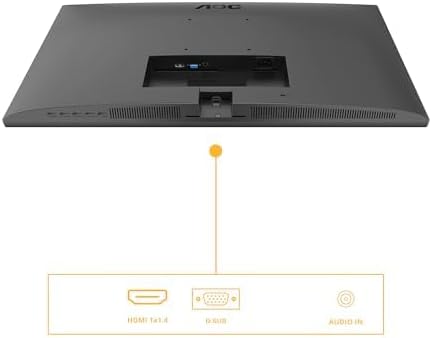
Figure 3: Diagram illustrating the available input ports on the monitor: HDMI 1.4, VGA (D-SUB), and Audio In.
3. Įjungimas
- Įjunkite kompiuterį.
- Paspauskite monitoriaus maitinimo mygtuką. Maitinimo indikatoriaus lemputė turėtų užsidegti.
- The monitor should automatically detect the active input signal. If not, you may need to manually select the input source using the OSD menu.
Monitoriaus valdymas
Ekrano ekrano (OSD) meniu
The OSD menu allows you to adjust various monitor settings. The control buttons are typically located on the bottom or back of the monitor.
- Paspauskite Meniu mygtuką, kad atidarytumėte OSD meniu.
- Naudokite naršymo mygtukus (Aukštyn/Žemyn or Kairė/dešinė) to browse through menu options.
- Paspauskite Pasirinkite/Gerai button to enter a sub-menu or confirm a setting.
- Paspauskite Išeiti button to go back to the previous menu or exit the OSD.
Pagrindiniai OSD nustatymai
- Šviesumas: Adjust brightness, contrast, and gamma settings.
- Vaizdo sąranka: Fine-tune image position, clock, and phase (primarily for VGA input).
- Spalvų nustatymas: Select color temperature, user color, or preset modes.
- OSD sąranka: Koreguokite OSD kalbą, padėtį ir skaidrumą.
- Papildomai: Select input source (HDMI, VGA), reset settings, or view informacija.
- Žaidimo nustatymas: Enable or disable Adaptive Sync, adjust response time (Overdrive), and other gaming-related features.
- Žema mėlyna šviesa: Activate this mode to reduce blue light emission for eye comfort.
- Be mirgėjimo: This technology is always active to minimize screen flickering and reduce eye strain.
Priežiūra
Monitoriaus valymas
- Prieš valydami visada atjunkite monitorių nuo maitinimo lizdo.
- Šiek tiek naudokite minkštą, be pūkelių šluostę dampnuplaukite vandeniu arba švelniu, neabrazyviniu ekrano valikliu.
- Nepurkškite valiklio tiesiai ant ekrano. Pirmiausia užtepkite jį ant šluostės.
- Švelniai nuvalykite ekraną, kad pašalintumėte dulkes ir dėmes.
- Monitoriui casing, naudokite minkštą, sausą šluostę. Venkite stiprių cheminių medžiagų.
Sandėliavimas
If you need to store the monitor for an extended period, disconnect all cables, disassemble the stand if necessary, and pack it in its original packaging or a suitable protective box. Store in a cool, dry place.
Trikčių šalinimas
| Problema | Galimas sprendimas |
|---|---|
| Ekrane nėra vaizdo |
|
| Pranešimas „Nėra signalo“ |
|
| Vaizdas neryškus arba iškraipytas |
|
| Iš garsiakalbių nėra garso |
|
Specifikacijos
| Funkcija | Aprašymas |
|---|---|
| Modelio numeris | 27B3HA2 |
| Ekrano dydis | 27 colių (68.6 cm) |
| Skydelio tipas | IPS |
| Rezoliucija | 1920 x 1080 (Full HD) |
| Krašto santykis | 16:9 |
| Atnaujinimo dažnis | 100 Hz |
| Reagavimo laikas | 1 ms MPRT |
| Ryškumas | 250 cd/m² |
| Vaizdo įrašų įėjimai | 1x HDMI 1.4, 1x VGA (D-SUB) |
| Garso įvestis | Taip |
| Ypatingos savybės | Adaptive Sync, Flicker-Free, Low Blue Light |
| Gaminio matmenys (su stovu) | 9.06 x 24.41 x 18.11 colio |
| Prekės svoris (su stovu) | 11.66 svaro |
| Gamintojas | AOC |
| EPREL registracijos numeris | 1859411 |
For detailed product information and energy labeling, please refer to the official EPREL database:
 View EPREL produkto informacijos lapas
Figure 4: EPREL QR code and link for detailed product information.
Garantija ir palaikymas
AOC monitors are manufactured to the highest quality standards. For information regarding your product's warranty, please refer to the warranty card included in your package or visit the official AOC websvetainę.
For technical support or customer service, please contact AOC directly:
- Tiekėjas: AOC International (Europe) BV
- Adresas: Prins Bernhardplein 200 1097 JB Amsterdam, Netherlands
- Klientų aptarnavimo el. paštas: kevin.yang@tpv-tech.com
- Klientų aptarnavimo telefonas: +31 (0) 20 504 6962
- Oficialus Websvetainė: https://eu.aoc.com
Please have your monitor's model number (27B3HA2) and serial number ready when contacting support.


