1. Įvadas
Ačiū, kad pirkoteasing the Thermalright TL-M12 120mm ARGB CPU Fan. This fan is designed to provide efficient cooling and vibrant ARGB lighting for your computer system. Please read this manual carefully before installation and use to ensure proper operation and longevity of your product.

Image: Thermalright TL-M12 120mm ARGB Fan highlighting its infinite mirror effect, balanced airflow, low noise S-FDB bearing, and addressable RGB support.
2. Produkto ypatybės
- Didelio našumo aušinimas: Automatic speed control via 4-pin PWM interface, adjusting fan speed based on motherboard temperature.
- Unique ARGB Mirror Lighting Effect: Features a well-designed ARGB infinite frame structure on the side and ARGB lines around the front, creating positive and measured surface ARGB lighting effects with multiple colorful options.
- Patvari konstrukcija: Made from industrial-grade PBT+PC material for strength and stability.
- S-FDB Bearing: Equipped with a high-durability magnetic assist Fluid Dynamic Bearing (S-FDB) for low-friction, low-noise operation, and a long service life.
- Vibracijos absorbcija: Soft-touch rubber pads are pre-installed on each corner of the fan to reduce noise and vibration.
- Universalus pritaikymas: Can be used as a case fan, with CPU air coolers, or with CPU water coolers to enhance overall system cooling.

Image: Infinity mirror lighting trims located on both sides of the fan frame for unique aesthetics.

Image: High-quality PBT+PC material construction and pre-installed silicone rubber pads for noise and vibration damping.

Image: Detail of the S-FDB (Fluid Dynamic Bearing) for long-lasting, low-noise operation.

Image: The TL-M12 fan used in case airflow, air coolers, and water cooling radiators.
3. Pakuotės turinys
The Thermalright TL-M12 fan package includes:
- 1 x TL-M12 CPU Fan
- Tvirtinimo varžtai
4. Saugos informacija
- Prieš diegdami ar atlikdami techninę priežiūrą, įsitikinkite, kad jūsų kompiuterinė sistema yra išjungta ir atjungta nuo elektros tinklo.
- Atsargiai elkitės su komponentais, kad nepažeistumėte.
- Do not attempt to disassemble the fan bearing as it is maintenance-free.
- Laikyti vaikams nepasiekiamoje vietoje.
- Do not connect more than 5 ARGB fans of the same specification in series to a single header to prevent overloading.
5. Sąranka ir diegimas
Follow these steps to install your Thermalright TL-M12 fan:
- Ventiliatoriaus montavimas: Use the included screws to securely install the fan onto your computer case, CPU cooler, or water cooling radiator. Ensure the fan is oriented correctly for desired airflow (intake or exhaust).
Video: Installation tutorial for the TL-M12 CPU fan series, demonstrating how to install the fan on a case using screws.
- Connect PWM for Fan Speed Control: Connect the 4-pin PWM fan cable from the TL-M12 fan to an available 4-pin fan header on your motherboard. This allows for automatic speed control based on system temperature.
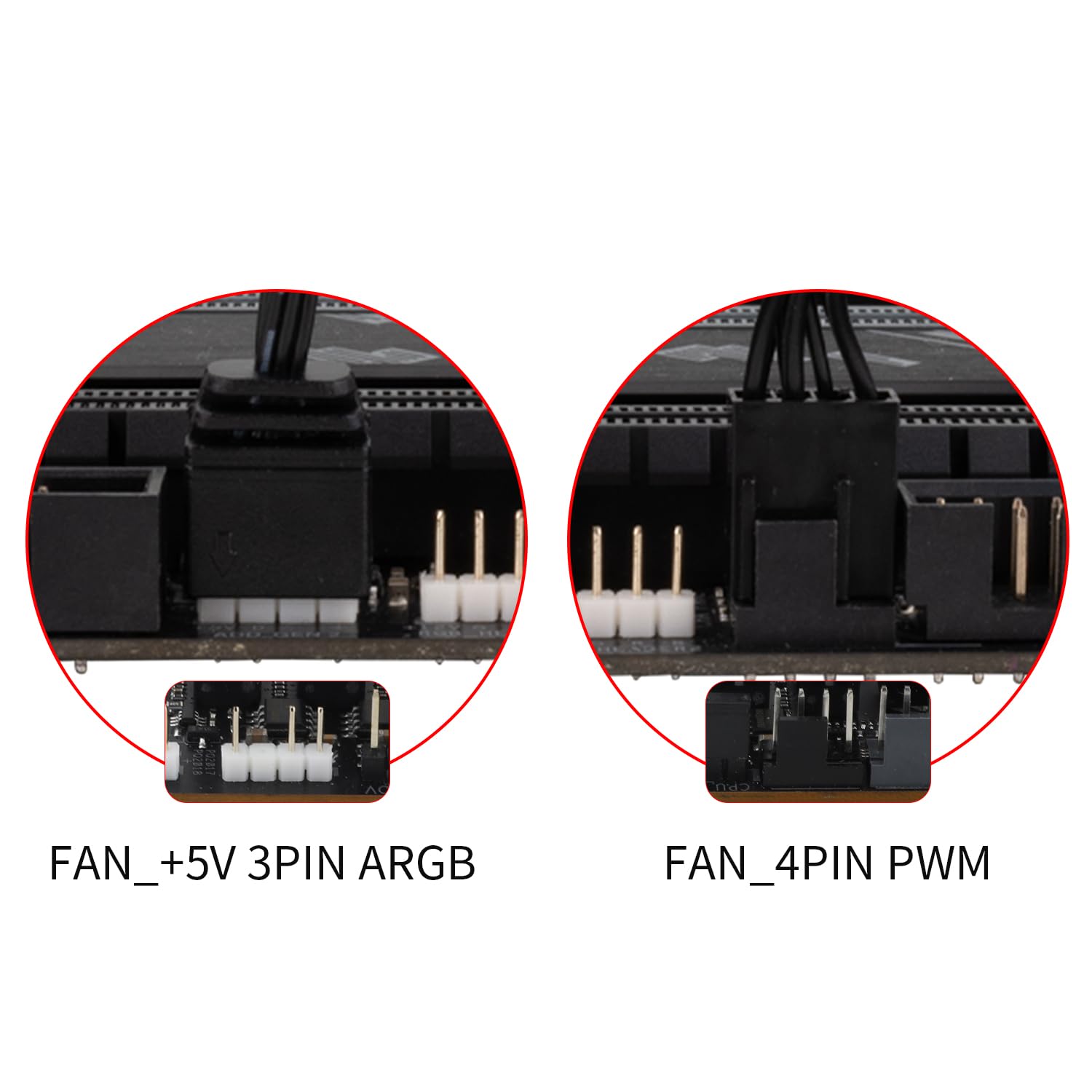
Image: Motherboard headers for fan and ARGB connections. Connect the 4-pin PWM cable to the FAN_4PIN PWM header.

Image: Diagram illustrating PWM and ARGB header connections for fan speed and lighting effect synchronization. Up to three fans can be connected to one motherboard fan socket for PWM signal sync.
- Connect ARGB for Lighting Effects: Connect the ARGB lighting cable from the TL-M12 fan to a compatible 3-pin +5V ARGB header on your motherboard. Ensure the arrows on the connectors align before plugging them in. This enables control over the fan's lighting effects.
Image: Motherboard headers for fan and ARGB connections. Connect the ARGB cable to the FAN_+5V 3PIN ARGB header.
Image: Diagram illustrating PWM and ARGB header connections for fan speed and lighting effect synchronization. Connect 3-pin ARGB headers to sync ARGB lighting effect.
- Kabelių valdymas: Route cables neatly to avoid interference with other components and to maintain good airflow within the case.
6. Naudojimo instrukcijos
Once installed and connected, the Thermalright TL-M12 fan operates as follows:
- Automatinis greičio valdymas: The fan's speed is automatically regulated by your motherboard via the 4-pin PWM connection, adjusting to the CPU or system temperature to optimize cooling performance and noise levels.
- ARGB apšvietimo valdymas: The ARGB lighting effects can be controlled through your motherboard's compatible ARGB software (if available) or a dedicated ARGB controller (not included). This allows for customization of colors, patterns, and synchronization with other ARGB components.
- Oro srautas: The 7-blade design outputs a rated 47.6 CFM at 1500 RPM, providing effective airflow for cooling.
7. Priežiūra
To ensure optimal performance and longevity of your fan:
- Valymas: Periodiškai valykite ventiliatoriaus mentes ir rėmą, kad pašalintumėte susikaupusias dulkes. Naudokite minkštą šepetėlį arba suslėgtą orą. Prieš valydami įsitikinkite, kad ventiliatorius yra išjungtas ir atjungtas nuo elektros tinklo.
- Guolis: The S-FDB (Fluid Dynamic Bearing) is designed to be maintenance-free. Do not attempt to disassemble the fan or lubricate the bearing.
- Kabelio apžiūra: Retkarčiais patikrinkite ventiliatoriaus ir ARGB laidus, ar nėra susidėvėjimo ar pažeidimų požymių.
8. Problemų sprendimas
If you encounter issues with your Thermalright TL-M12 fan, refer to the following common problems and solutions:
- Ventiliatorius nesisuka:
- Patikrinkite, ar 4 kontaktų PWM kabelis yra tvirtai prijungtas prie pagrindinės plokštės ventiliatoriaus lizdo.
- Ensure the motherboard fan header is enabled in the BIOS/UEFI settings.
- Verify that the system is receiving power.
- ARGB apšvietimas neveikia:
- Check if the 3-pin +5V ARGB cable is securely connected to the motherboard ARGB header.
- Ensure the ARGB header is enabled in your motherboard's software or BIOS/UEFI.
- Confirm that the arrows on the ARGB connectors are correctly aligned.
- Avoid connecting more than 5 ARGB fans in series to a single header.
- Per didelis triukšmas / vibracija:
- Įsitikinkite, kad ventiliatorius yra tvirtai pritvirtintas ir varžtai priveržti.
- Patikrinkite, ar ventiliatoriaus mentes neliečia jokių laidų ar kliūčių.
- Verify that the rubber pads are properly seated on the fan corners.
- Prastas aušinimo našumas:
- Check the fan's orientation to ensure it's pushing air in the desired direction (e.g., into the case for intake, out for exhaust).
- Clean any dust buildup on the fan blades or heatsink fins.
- Ensure proper airflow within the computer case.
9. Specifikacijos
| Funkcija | Specifikacija |
|---|---|
| Modelis | TL-M12 |
| Gaminio matmenys | 4.72 colio ilgio x 0.98 colio pločio x 4.72 colio aukščio (120 mm x 25 mm x 120 mm) |
| Prekės ženklas | Thermalright |
| Maitinimo jungties tipas | 4-Pin PWM |
| ttage | 12 volto (DC) |
| Vattage | 1.8 vatų |
| Aušinimo būdas | Oras |
| Suderinami įrenginiai | Darbalaukis |
| Triukšmo lygis | 23.2 decibelų |
| Medžiaga | Plastic (PBT+PC) |
| Maksimalus sukimosi greitis | 1500 aps./min |
| Oro srauto talpa | 47.6 kubinių pėdų per minutę (CFM) |
| Guolio tipas | S-FDB (sklaidinis dinaminis guolis) |
| Apšvietimas | Addressable RGB (ARGB) with Infinite Mirror Effect |
10. Garantija ir palaikymas
Thermalright products are manufactured to the highest quality standards. For warranty information, technical support, or customer service, please refer to the official Thermalright websvetainėje arba susisiekite su vietiniu pardavėju. Išsaugokite pirkimo kvitą, jei prireiktų pateikti pretenziją dėl garantijos.


