1. Įvadas
This manual provides detailed instructions for the operation and maintenance of your PECSU G5 32GB MP3 Player. Please read this manual thoroughly before using the device to ensure proper functionality and to maximize your user experience. The PECSU G5 is an Android-based music player designed for versatile media consumption, featuring parental controls, extensive app support, and robust connectivity.
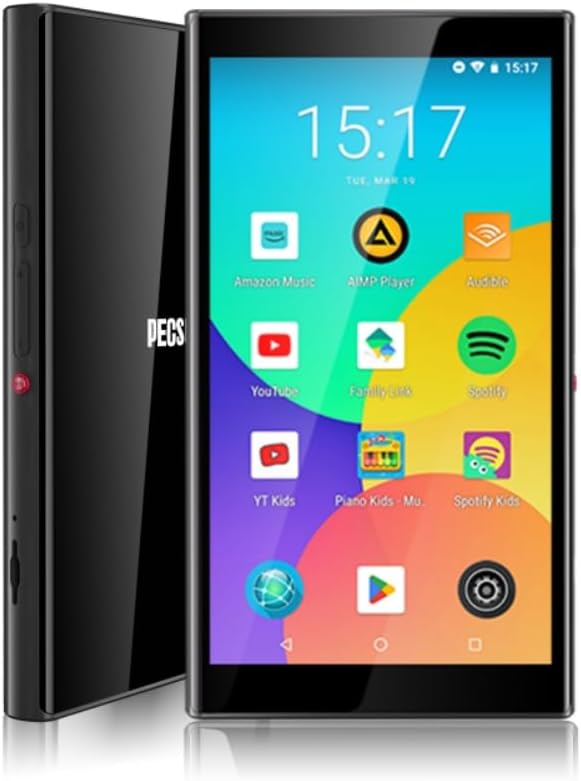
1.1 paveikslas: Priekinė ir šoninė dalys view of the PECSU G5 MP3 Player, displaying its user interface with various application icons.
2. Kas yra dėžutėje
Patikrinkite, ar pakuotėje yra visi reikalingi daiktai:
- 1 × PECSU G5 Music Player
- 1 × Vartotojo vadovas
- 1 × Extra Screen Protector
- 1 × C tipo įkrovimo laidas
3. Produktas baigtasview
3.1 Fizinės savybės

Image 3.1: A diagram illustrating the dimensions (5.24" height, 2.89" width, 0.47" thickness) and button layout of the PECSU G5. Labels indicate the On/Off button, Volume Up/Down, Recording Key, TF Card Port, Type-C Port, and 3.5mm Port.
The PECSU G5 features a sleek design with a 5-inch full touch screen. Key physical components include:
- Įjungimo/išjungimo mygtukas: Located on the side for powering the device on or off.
- Garsumo mygtukai: Separate buttons for increasing ir mažėjaasing tūrio.
- Recording Key: A dedicated button for one-touch voice recording.
- TF kortelės prievadas: Slot for inserting a Micro SD card to expand storage.
- C tipo prievadas: Įkrovimui ir duomenų perdavimui.
- 3.5 mm garso lizdas: Laidinių ausinių prijungimui.
3.2 Pagrindinės savybės
- Tėvų kontrolė: Pre-installed Family Link application allows monitoring, setting usage times, and disabling apps. All app downloads require parental permission.
- Operacinė sistema: Android 8.1 system with an Octa-core 64-bit MTK chipset.
- „Google Play“ parduotuvė: Pre-installed for downloading popular music, video, and reading applications such as Spotify, YouTube, Amazon Music, Audible, and Libby.
- Ekranas: 5-inch HD IPS full touchscreen with 1080P video playback (720*1280 PX resolution).
- Ryšys: Bluetooth 5.0 for stable connections to speakers, earphones, and car audio systems. Dual-band Wi-Fi (2.4G & 5G) for fast data transfer and online streaming.
- Baterija: Built-in 3000mAh LCO Battery, providing approximately 15 hours of continuous music playback or 6 hours of video playback.
- Saugykla: 32GB internal ROM and 3GB RAM, expandable up to 1TB via Micro SD card (FAT32 format).
- Garso kokybė: Supports HiFi lossless music playback.
- Diktofonas: One-touch recording function.

Image 3.2: The PECSU G5 screen highlighting its 5-inch 1080P HD IPS display, emphasizing fast response, 720x1280 pixel resolution, and wider viewkampų.

Image 3.3: The PECSU G5 displaying its storage capabilities, including 3GB RAM, 32GB ROM, and support for up to 1TB TF Card expansion.

Image 3.4: An illustration of the PECSU G5's 3000mAh LCO battery, indicating up to 5 hours of video playback and up to 15 hours of music playback.

Image 3.5: A visual representation of the PECSU G5's 2-Way Bluetooth 5.0 feature, showing connections to headphones/earbuds, a portable speaker, and car audio systems.
4. Sąranka
4.1 Įrenginio įkrovimas
- Connect the provided Type-C charging cable to the device's Type-C port.
- Kitą laido galą prijunkite prie suderinamo USB maitinimo adapterio (nepridedamas) arba kompiuterio USB prievado.
- The device will indicate charging status on the screen. A full charge typically takes 2-3 hours.
4.2 Įjungimas / išjungimas
- Norėdami įjungti: Press and hold the On/Off button located on the side of the device until the screen illuminates.
- Norėdami išjungti: Press and hold the On/Off button until a power menu appears on the screen. Select "Power off" and confirm.
- Norėdami paleisti iš naujo: From the power menu, select "Restart."
4.3 Pradinė konfigūracija
Upon first power-on, you will be guided through an initial setup process:
- Pasirinkite norimą kalbą.
- Connect to a Wi-Fi network to enable internet access and app downloads.
- Sign in with your Google account. This is necessary for accessing the Google Play Store and utilizing parental controls.
- Vykdykite ekrane pateikiamus nurodymus, kad užbaigtumėte sąranką.
4.4 Micro SD kortelės įdėjimas
To expand the device's storage:
- Locate the TF Card Port on the side of the device (refer to Image 3.1).
- Gently insert a Micro SD card (up to 1TB, FAT32 format recommended) into the slot until it clicks into place.
- The device will detect the new storage. You may need to format the card if prompted.
5. Naudojimo instrukcijos
5.1 Navigacija
The PECSU G5 features a full touchscreen interface. Use standard Android gestures:
- Bakstelėkite: Norėdami pasirinkti elementą arba atidaryti programėlę.
- Perbraukimas: Norėdami slinkti per sąrašus arba perjungti ekranus.
- Žnybtelėjimas, norint priartinti: In supported applications like image galleries or web naršyklių.
5.2 Prisijungimas prie „Wi-Fi“.
- Eikite į Nustatymai > Tinklas ir internetas > Wi-Fi.
- Perjungti „Wi-Fi“ On.
- Iš sąrašo pasirinkite norimą tinklą ir, jei reikia, įveskite slaptažodį.
5.3 Bluetooth poravimas
- Eikite į Nustatymai > Prijungti įrenginiai > Bluetooth.
- Perjungti Bluetooth On.
- Įsitikinkite, kad jūsų „Bluetooth“ priedas veikia susiejimo režimu.
- Bakstelėkite Suporuokite naują įrenginį ir iš sąrašo pasirinkite savo priedą.
5.4 Using Google Play Store
The Google Play Store allows you to download and install a wide variety of applications.

Image 5.1: The PECSU G5 screen displaying the Google Play Store icon prominently, surrounded by various popular app icons like Spotify, YouTube, and Amazon Music, indicating broad app compatibility.
- Bakstelėkite Play parduotuvė piktogramą pagrindiniame ekrane.
- Ieškokite desired apps (e.g., Spotify, Pandora, Amazon Music, Libby, Audible).
- Bakstelėkite Įdiegti norėdami atsisiųsti ir įdiegti programą.
5.5 Tėvų kontrolė („Family Link“)
The PECSU G5 is designed with parental controls via the pre-installed Family Link app.

Image 5.2: The PECSU G5 screen showing the Family Link parental control interface, with options for daily limits, downtime, and blocked apps. The image also depicts a child sleeping with the device nearby, suggesting its use for controlled media consumption.
- Ensure Family Link is set up on both the PECSU G5 (for children) and your personal smartphone (for parents).
- From your parent device, you can:
- Monitor app usage and screen time.
- Set daily usage limits and device downtime.
- Block specific applications.
- App downloads from the Play Store will require parental approval.
5.6 Muzikos ir vaizdo įrašų atkūrimas
- Use pre-installed music/video players or download your preferred apps from the Google Play Store.
- The device supports HiFi lossless audio formats and 1080P video playback.
5.7 Balso įrašymas
Norėdami naudoti balso įrašymo funkciją:
- Paspauskite skirtą Įrašymo raktas on the side of the device (refer to Image 3.1).
- Alternatively, open the pre-installed Diktofonas taikymas.
- Norėdami pradėti, pristabdyti ir išsaugoti įrašus, vykdykite ekrane pateikiamus nurodymus.
5.8 File Perdavimas
Galite perkelti files to and from the PECSU G5 using the Type-C cable or wirelessly.
- Per USB kabelį: Connect the device to a computer using the Type-C cable. On the device, select "File transfer" when prompted. The device will appear as a removable drive on your computer.
- Belaidis perdavimas: Utilize pre-installed file sharing apps or download third-party apps from the Play Store for wireless file valdymas.
6. Priežiūra
6.1 Valymas
- Prietaiso ekranui ir korpusui valyti naudokite minkštą, nepūkuotą šluostę.
- Avoid using harsh chemicals or abrasive materials, as they may damage the screen or finish.
6.2 Akumuliatoriaus priežiūra
- Norėdami pailginti baterijos veikimo laiką, venkite įrenginio laikymo ekstremaliose temperatūrose.
- Do not allow the battery to fully discharge frequently. Charge the device when the battery level is low.
- Jei prietaisas nebus naudojamas ilgesnį laiką, prieš sandėliavimą įkraukite jį maždaug iki 50 %.
6.3 Programinės įrangos naujiniai
- Reguliariai tikrinkite, ar yra sistemos atnaujinimų, kad užtikrintumėte optimalų našumą ir saugumą.
- Eikite į Nustatymai > Sistema > Sistemos atnaujinimas , kad patikrintumėte, ar yra atnaujinimų, ir įdiegtumėte juos.
7. Problemų sprendimas
If you encounter issues with your PECSU G5, refer to the following common problems and solutions:
| Problema | Galimas sprendimas |
|---|---|
| Įrenginys neįsijungia | Ensure the device is charged. Connect to a power source and try again. If unresponsive, press and hold the power button for 10-15 seconds to force a restart. |
| Įrenginys užstringa arba nereaguoja | Press and hold the power button for 10-15 seconds to force a restart. If the issue persists, consider performing a factory reset (backup data first). |
| No sound from speaker or headphones | Check the volume level. Ensure headphones are properly connected or Bluetooth device is paired and connected. Test with different headphones or speakers. |
| Baterija greitai išsikrauna | Reduce screen brightness. Close unused background applications. Disable Wi-Fi and Bluetooth when not in use. Check for power-intensive apps. |
| Cannot connect to Wi-Fi or Bluetooth | Ensure Wi-Fi/Bluetooth is enabled in settings. Restart the device and your router/Bluetooth accessory. Verify network password. |
| App download issues from Play Store | Check Wi-Fi connection. Ensure sufficient storage space. Verify parental permissions if Family Link is active. Clear Play Store cache and data in settings. |
8. Specifikacijos
| Funkcija | Detalė |
|---|---|
| Modelio pavadinimas | G5 |
| Prekės ženklas | PECSU |
| Operacinė sistema | Android 8.1 |
| Procesorius | Octa-core 64-bit MTK chipset |
| Vidinė atmintis (ROM) | 32 GB |
| RAM | 3 GB |
| Išplečiama saugykla | Up to 1 TB (Micro SD, Micro SDHC, Micro SDXC, FAT32 format) |
| Ekrano dydis | 5 colių |
| Ekrano raiška | 1080P HD IPS (720*1280 PX) |
| Ryšys | Bluetooth 5.0, Dual-band Wi-Fi (2.4G & 5G) |
| Baterija | 3000mAh LCO Lithium Polymer |
| Baterijos veikimo laikas (muzika) | Approx. 15 hours (Lab. Data) |
| Baterijos veikimo laikas (vaizdo įrašas) | Approx. 6 hours (Lab. Data) |
| Įkrovimo laikas | 2-3 valandas |
| Gaminio matmenys | 0.47 x 2.83 x 5.2 colio (12 x 72 x 133 mm) |
| Prekės svoris | 6.5 uncijos |
| Ypatingos savybės | Metal & Glass Back, One-Key Recording, Parental Controls, Split-screen Mode, App Store Support |
9. Garantija ir palaikymas
The PECSU G5 MP3 Player is covered by a manufacturer's warranty. For specific warranty terms and conditions, please refer to the documentation included with your purchase or contact PECSU customer support.
For technical assistance, troubleshooting, or warranty claims, please contact PECSU customer support through the retailer where the product was purchased or visit the official PECSU websvetainė kontaktinei informacijai.


