1. Įvadas
The BOBLOV F5 Body Camera is a compact and versatile recording device designed for various applications, including law enforcement, personal security, and outdoor activities. It features 4K video resolution, 5-megapixel Sony IMX335 sensors, Electronic Image Stabilization (EIS), and Wi-Fi connectivity for seamless operation and data management.
2. Pakuotės turinys
Patikrinkite, ar pakuotėje yra visi toliau išvardyti daiktai:
- BOBLOV F5 Body Camera
- Vartotojo vadovas
- Mounting Bracket
- USB kabelis
- Kortelių skaitytuvas

Image: The BOBLOV F5 Body Camera package contents, showing the camera, user manual, various mounting brackets, a USB cable, and a card reader.
3. Produktas baigtasview
The F5 Body Camera is designed for ease of use with a minimalist interface. It features a wide-angle lens and essential controls for recording and power.

Image: The BOBLOV F5 Body Camera held in a hand, alongside a USB adapter and the camera mounted on a blue bicycle helmet, illustrating its compact size and versatility.

Image: Detailed side and front views of the BOBLOV F5 Body Camera, showcasing its integrated clip for attachment and a separate USB adapter.
3.1 Pagrindinės savybės
- 4K vaizdo raiška: Įrašo aiškų vaizdo įrašątage.
- 5 megapikselių jutiklis: Equipped with a Sony IMX335 sensor for enhanced image quality.
- 145-Degree Wide Lens: Suteikia platų lauką view.
- Elektroninis vaizdo stabilizavimas (EIS): Reduces video shake for smoother recordings.
- „Wi-Fi“ ryšys: Allows connection to a smartphone for preview ir file valdymas.
- USB-C prievadas: For fast data transfer and charging.
- Kompaktiškas dizainas: Small and lightweight for easy portability and discreet use.
4. Sąranka
4.1 Akumuliatoriaus įkrovimas
Before first use, fully charge the camera's internal 800mAh Lithium Polymer battery. Connect the camera to a power source using the provided USB-C cable. A full charge typically takes approximately 2 hours.

Image: The BOBLOV F5 Body Camera being charged via its USB-C port, with labels indicating a usage time of 1.5-2 hours for 4K recording, 2-2.5 hours for 1080P recording, and a charging time of 2 hours.
4.2 Atminties kortelės įdėjimas
The BOBLOV F5 Body Camera requires a Micro SD card (not included) for storing recordings. It supports cards up to 128GB. Insert the Micro SD card into the designated slot on the camera until it clicks into place.
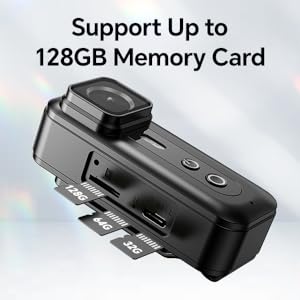
Image: A close-up of the BOBLOV F5 Body Camera's side, showing the Micro SD card slot and indicating support for memory cards up to 128GB.
4.3 Fotoaparato montavimas
The camera comes with a rear clip and a helmet bracket for versatile mounting options. Attach the desired accessory to the camera and secure it to your clothing, backpack, or helmet.

Image: Two scenarios demonstrating the use of the BOBLOV F5 Body Camera: one showing it clipped to a person's shirt for discreet recording, and another showing it mounted on a helmet for capturing activities like cycling.
5. Naudojimo instrukcijos
5.1 Įjungimas / išjungimas ir įrašymas
To power on the camera and begin recording, press the designated power/record button. The camera is designed for quick activation to capture urgent situations. Refer to the specific button layout in the user manual for detailed instructions.
5.2 Video Recording Duration
The F5 Body Camera can record approximately 150 minutes of footage at 1080P resolution or 120 minutes at 4K resolution on a full charge.
5.3 Elektroninis vaizdo stabilizavimas (EIS)
The camera features advanced EIS technology to minimize video shake, resulting in smoother and more stable footage, especially during movement.

Image: A side-by-side comparison illustrating the effectiveness of EIS. The left panel shows a clear, stable view of a road with EIS enabled, while the right panel shows a blurred, shaky view with EIS disabled.
5.4 „Wi-Fi“ ryšys ir programėlių naudojimas
The F5 camera can connect to your smartphone via Wi-Fi for live preview, atkūrimas ir file management. Download the dedicated app (e.g., 'RoadCam' or similar, as specified in the included manual) to your smartphone. Ensure the camera is within 3 meters of your phone for a stable connection.
- Turn on Wi-Fi on the camera.
- Connect your smartphone to the camera's Wi-Fi network.
- Open the app to access camera functions.
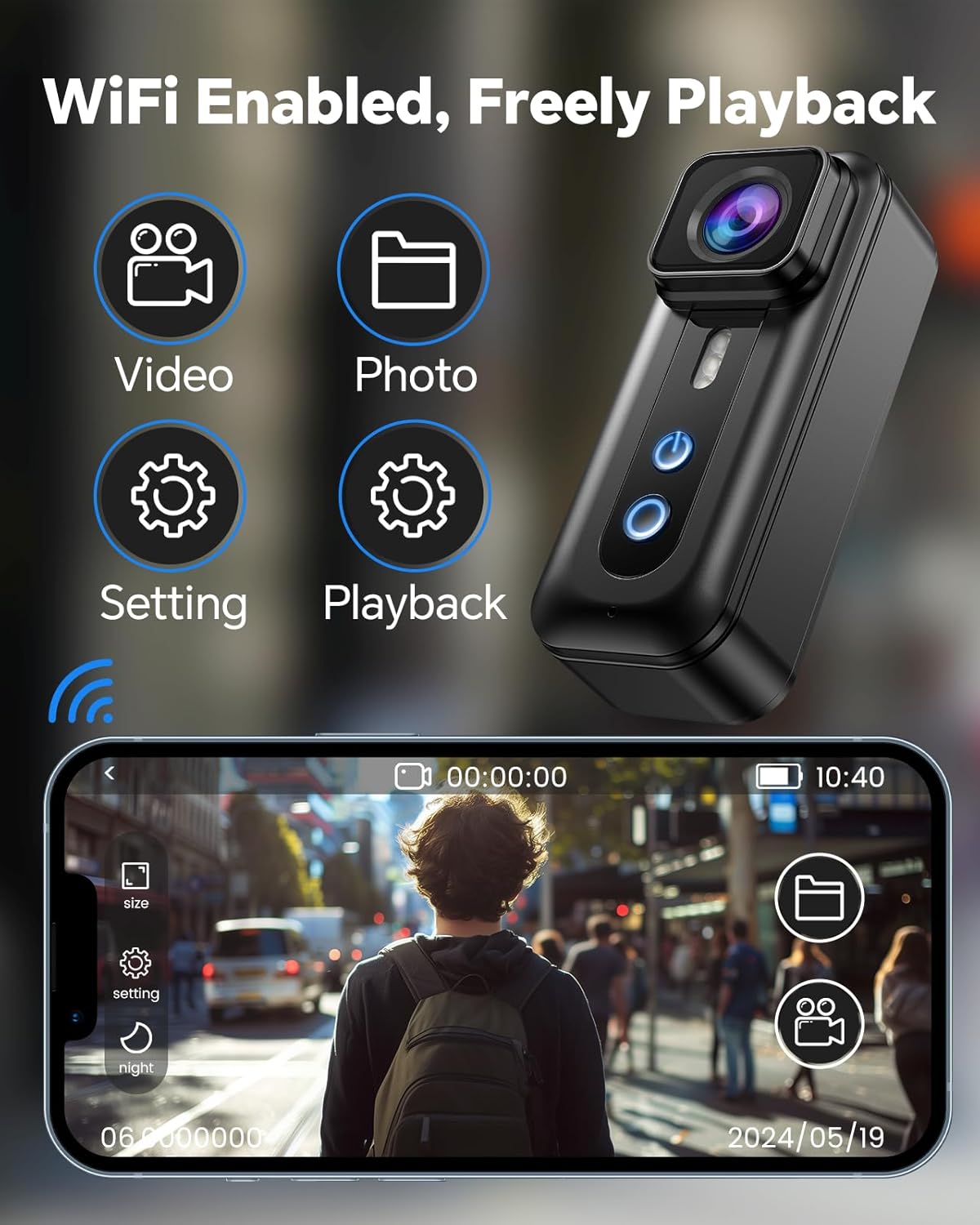
Image: The BOBLOV F5 Body Camera with Wi-Fi icons, positioned next to a smartphone displaying the camera's mobile application interface, which allows for video preview, photo capture, settings adjustment, and playback.
5.5 Duomenų perdavimas
Files can be transferred from the camera to a computer using two methods:
- Tiesioginis USB jungtis: Connect the camera to your PC using the USB-C cable. Ensure the camera is powered on.
- Naudojant kortelių skaitytuvą: Remove the Micro SD card from the camera and insert it into the provided card reader, then connect the card reader to your computer.

Image: A two-panel image showing file transfer options. The top panel depicts the camera connected directly to a laptop via USB-C. The bottom panel shows a Micro SD card inserted into a card reader, which is then connected to a laptop.
6. Priežiūra
- Valymas: Fotoaparato korpusą valykite minkšta, sausa šluoste. Objektyvui valyti naudokite specializuotą objektyvo valymo šluostę ir tirpalą.
- Saugykla: Fotoaparatą laikykite vėsioje, sausoje vietoje, toliau nuo tiesioginių saulės spindulių ir ekstremalių temperatūrų.
- Akumuliatoriaus priežiūra: Norėdami pailginti baterijos veikimo laiką, venkite jos dažnai visiškai iškrauti. Reguliariai įkraukite fotoaparatą, net jei jo ilgą laiką nenaudojate.
7. Problemų sprendimas
- Kamera neįsijungia: Įsitikinkite, kad akumuliatorius įkrautas. Prijunkite prie maitinimo šaltinio ir bandykite dar kartą.
- Įrašymo problemos: Check if a Micro SD card is properly inserted and has sufficient free space. Format the card if necessary (this will erase all data).
- „Wi-Fi“ ryšio problemos: Ensure the camera and smartphone are within the 3-meter range. Restart both devices and try reconnecting.
- Shaky video: Verify that the EIS function is enabled in the camera settings (if applicable via app or direct controls).
- Fileneperduodama: Ensure the camera is powered on when connected via USB. Try using the provided card reader.
8. Specifikacijos
| Funkcija | Detalė |
|---|---|
| Prekės ženklas | BOBLOV |
| Modelio pavadinimas | F5 (02US-CP1A0264US) |
| Nuotraukų jutiklių technologija | CMOS |
| Vaizdo įrašymo raiška | 4K |
| Veiksminga nejudančioji raiška | 5 MP |
| „Flash“ atminties tipas | „Micro SD“ (iki 128 GB) |
| Vaizdo įrašymo formatas | MOV |
| Ryšio technologija | USB, Wi-Fi |
| Vaizdo kameros tipas | Vaizdo kamera |
| Objektyvo tipas | Wide Angle (145 degrees) |
| Baterijos tipas | 1 ličio polimeras (pridedamas) |
| Baterijos talpa | 800 mAh |
| Usage Time (1080P) | apytiksliai 2-2.5 valandos |
| Usage Time (4K) | apytiksliai 1.5-2 valandos |
| Įkrovimo laikas | apytiksliai 2 valandas |
9. Garantija ir palaikymas
BOBLOV provides 24 months of product coverage for registered users. For technical assistance or warranty claims, please contact BOBLOV customer support. They offer quick responses within 24 hours and lifetime technical support.
Refer to the official BOBLOV webNaujausią pagalbos informaciją rasite svetainėje arba kontaktinėje informacijoje, pateiktoje jūsų produkto pakuotėje.


