Įvadas
Thank you for choosing the WOLFANG WT02 Solar Trail Camera. This advanced wildlife camera is designed for capturing high-quality photos and videos of wildlife, monitoring property, or for general outdoor surveillance. Featuring 4K video resolution, 48MP image capture, integrated solar power, and robust IP66 waterproofing, the WT02 offers reliable performance in various environmental conditions. This manual provides detailed instructions for setup, operation, maintenance, and troubleshooting to ensure you get the most out of your camera.

Image: WOLFANG WT02 Solar Trail Camera banner highlighting 4K 48MP and integrated solar.
Saugos informacija
- Do not expose the camera to extreme temperatures or direct sunlight for prolonged periods when not in use.
- Ensure all covers and latches are securely closed to maintain the IP66 waterproof rating.
- Naudokite tik rekomenduojamo tipo baterijas (AA) ir įdiegimo metu užtikrinkite teisingą poliškumą.
- Laikykite fotoaparatą atokiau nuo stiprių magnetinių laukų.
- Nebandykite ardyti ar modifikuoti kameros. Tai panaikins garantiją.
- Atsakingai utilizuokite baterijas ir elektroninius komponentus pagal vietinius reikalavimus.
Pakuotės turinys
Atidarius pakuotę, patikrinkite jos turinį, kad įsitikintumėte, jog joje yra visi reikalingi daiktai:
- 1 x WOLFANG WT02 Trail Camera
- 1 x 32GB Micro SD Card (pre-installed)
- 1 x tvirtinimo dirželis
- 1 x Reguliuojamas tvirtinimo laikiklis
- 1x USB laidas
- Sraigtai ir sieniniai kištukai
- Vartotojo vadovas

Image: All components included in the WOLFANG WT02 Trail Camera package, including the camera, mounting accessories, USB cable, and user manual.
Produktas baigtasview
The WOLFANG WT02 Trail Camera features a robust design with integrated solar charging capabilities. Key components include:
- Saulės skydas: Located on top for continuous charging of the built-in battery.
- Kameros objektyvas: High-resolution lens for capturing 4K video and 48MP images.
- Infraraudonųjų spindulių šviesos diodai: 26pcs 850nm infrared LEDs for clear night vision up to 65ft.
- PIR judesio jutiklis: Detects movement to trigger recording.
- LCD ekranas: For menu navigation and viewužfiksuotos medijos naudojimas.
- Valdymo mygtukai: Skirta naršyti fotoaparato nustatymuose.
- Baterijų skyrius: For optional 4x AA batteries (not included) for auxiliary power.
- SD kortelės lizdas: Supports Micro SD cards up to 128GB.
- USB prievadas: Skirta prijungti prie kompiuterio arba išorinio maitinimo šaltinio.

Paveikslėlis: Detalus priekis view of the WOLFANG WT02 Solar Trail Camera, showing the lens, infrared LEDs, motion sensor, and solar panel.
Sąranka
1. Fotoaparato maitinimo įjungimas
The WT02 camera features a built-in 2500mAh rechargeable battery powered by the integrated solar panel. For optimal performance, especially in low temperatures or during initial setup, it is recommended to charge the solar power before use.
- Saulės įkrovimas: Place the camera in direct sunlight to allow the solar panel to charge the internal battery.
- Auxiliary AA Batteries: For extended operation or in low-light conditions, you can install 4 AA batteries (not included) in the battery compartment. These act as auxiliary power.

Image: Illustration showing the solar panel charging the built-in 2500mAh battery and the option for 4x AA backup batteries.
2. Micro SD kortelės įdėjimas
A 32GB Micro SD card is included and pre-installed in the card slot. The camera supports Micro SD cards up to 128GB.
- Open the camera's side latch to access the internal compartment.
- Raskite Micro SD kortelės lizdą.
- If replacing, gently push the existing card until it clicks and ejects. Insert the new Micro SD card with the gold contacts facing down until it clicks into place.
- Saugiai uždarykite skyrių.

Vaizdas: Stambus planas view of the WOLFANG WT02 camera's side, showing the Micro SD card slot and USB port for easy access.
3. Kameros montavimas
The WT02 can be mounted using the included strap or the adjustable mounting bracket.
- Dirželio tvirtinimas: Thread the provided strap through the slots on the back of the camera and secure it around a tree or pole.
- Laikiklio montavimas: Use the adjustable mounting bracket and screws to attach the camera to a wall or flat surface. This allows for precise angle adjustment.
Position the camera at a height that allows for optimal detection of subjects and ensures the solar panel receives sufficient sunlight.
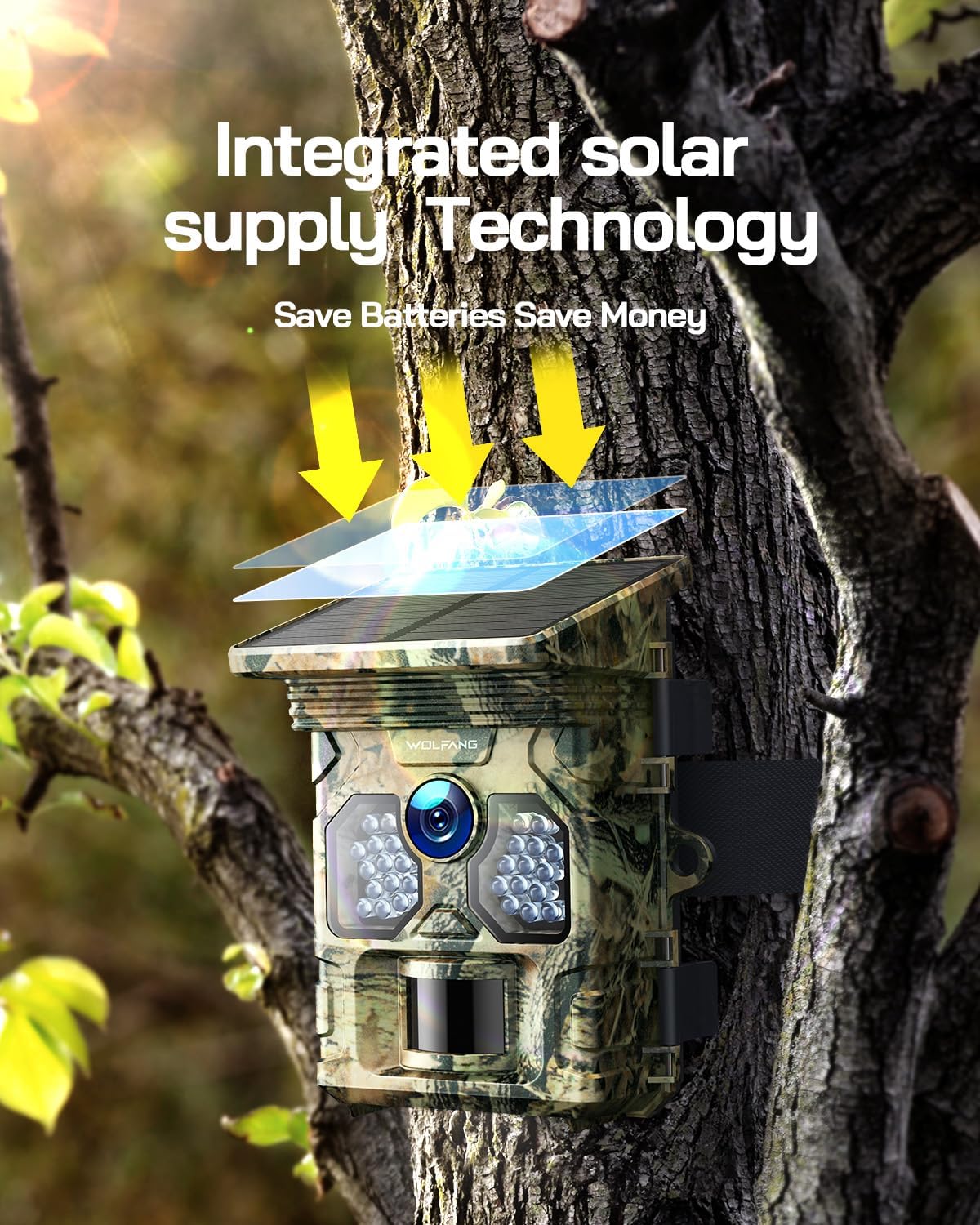
Image: The WOLFANG WT02 Trail Camera mounted on a tree, illustrating its integrated solar supply technology in action.
Fotoaparato valdymas
1. Power On/Off and Menu Navigation
To power on the camera, slide the mode switch to the "ON" position. The LCD screen will illuminate. Use the navigation buttons (Up, Down, Left, Right, OK, Menu) to browse through settings and options.

Paveikslėlis: Vidinis view of the WOLFANG WT02 camera, showing the LCD screen and control buttons for intuitive setup and navigation.
2. Setting Photo and Video Modes
Access the menu to configure various settings:
- Režimas: Pasirinkite režimą „Nuotrauka“, „Vaizdo įrašas“ arba „Nuotrauka + vaizdo įrašas“.
- Nuotraukos raiška: Choose from various resolutions up to 48MP. Higher resolution results in larger file dydžiai.
- Vaizdo įrašo raiška: Select from resolutions up to 4K at 30fps.
- PIR jautrumas: Adjust the sensitivity of the motion sensor (Low, Medium, High) based on the environment to avoid false triggers.
- Suveikimo intervalas: Nustatykite vėlavimą tarp iš eilės einančių trigerių.
- Laiko tarpas: Sukonfigūruokite kamerą fotografuoti nustatytais intervalais, neatsižvelgiant į judesį.
- Data ir laikas: Norėdami tiksliai nustatyti laiką, nustatykite teisingą datą ir laikąamps on your media.

Image: Visual representation of the WOLFANG WT02's ability to capture 4K video and 48MP photos.

Image: Depiction of the WOLFANG WT02's ultra-fast 0.1-second trigger speed, capturing a running fox.
3. Naktinio matymo režimas
The WT02 automatically switches to night vision mode in low-light conditions, utilizing its 26pcs 850nm infrared LEDs to capture clear black and white images and videos without disturbing wildlife.

Image: A close-up of the camera's infrared LEDs, illustrating its superb night vision capabilities with a panther's eyes in the background.

Image: Comparison showing the clarity and detail of night vision captured by the WT02, contrasting with insufficient light and overexposure.
4. ViewUžfiksuota medija
Jūs galite view photos and videos directly on the camera's LCD screen by switching to "Playback" mode. Alternatively, remove the Micro SD card and insert it into a computer's card reader, or connect the camera directly to a computer using the USB cable to access the files.
Priežiūra
- Valymas: Use a soft, dry cloth to clean the camera lens and solar panel. For stubborn dirt, a slightly damp Galima naudoti šluostę, tačiau įsitikinkite, kad į fotoaparatą nepatenka drėgmės.
- Akumuliatoriaus priežiūra: If using AA batteries, replace them when the low battery indicator appears. For the built-in rechargeable battery, ensure the solar panel is regularly exposed to sunlight.
- Hidroizoliacija: Always ensure the camera's latches and seals are clean and properly closed to maintain its IP66 waterproof rating.
- Saugykla: When storing the camera for extended periods, remove any auxiliary AA batteries and ensure the built-in battery is partially charged. Store in a cool, dry place.

Image: The WOLFANG WT02 camera mounted on a tree in the rain, demonstrating its IP66 super waterproof capability.
Trikčių šalinimas
| Problema | Galima priežastis | Sprendimas |
|---|---|---|
| Kamera neįsijungia. | Low battery; incorrect battery installation; faulty SD card. | Ensure solar panel is charged or install fresh AA batteries with correct polarity. Check if SD card is properly inserted or try a different card. |
| Nėra užfiksuotų nuotraukų / vaizdo įrašų. | PIR sensitivity too low; SD card full or corrupted; camera in wrong mode. | Increase PIR sensitivity. Format or replace SD card. Ensure camera is in Photo, Video, or Photo+Video mode. |
| Prasta naktinio matymo kokybė. | Infrared LEDs obstructed; low battery. | Clear any obstructions from the front of the camera. Ensure sufficient battery power. |
| False triggers. | PIR sensitivity too high; camera facing moving branches or heat sources. | Decrease PIR sensitivity. Reposition camera to avoid unwanted motion sources. |
Specifikacijos
| Funkcija | Detalė |
|---|---|
| Prekės ženklas | VOLFANGAS |
| Modelis | WT02 |
| Nuotraukų raiška | Iki 48 MP |
| Vaizdo raiška | 4K@30FPS |
| Trigerio greitis | 0.1 sekundžių |
| Naktinio matymo diapazonas | Up to 65ft (20m) with 26pcs 850nm IR LEDs |
| Atsparumo vandeniui įvertinimas | IP66 |
| Sandėliavimas | Micro SD card, up to 128GB (32GB included) |
| Maitinimo šaltinis | Built-in 2500mAh rechargeable battery (solar charged), supports 4x AA batteries (not included) |
| Darbinė temperatūra | -4°F iki 140°F (nuo -20°C iki 60°C) |
| Ryšys | USB |

Image: Four common applications for the WOLFANG WT02 Trail Camera: hunting, farm security, wildlife monitoring, and home security.
Garantija ir klientų aptarnavimas
WOLFANG provides a 2-year warranty for the WT02 Solar Trail Camera. If you encounter any issues or have questions regarding your product, please contact our customer service team.
Klientų aptarnavimo el. paštas: support.vc@wolfang.co
Please include your model number (WT02) and a detailed description of your issue when contacting support for faster assistance.


