1. Įvadas
Ačiū, kad pirkoteasing the TOPTECH STAR-115 Portable Bluetooth Speaker. This powerful speaker is designed to deliver blazing sound with a vibrant flame light show, perfect for home use, outdoor gatherings, and parties. Please read this manual carefully before operating the device to ensure proper use and to maximize its performance and lifespan.
2. Saugos informacija
- Saugokite garsiakalbį nuo vandens ar per didelės drėgmės. Šis gaminys nėra atsparus vandeniui.
- Nestatykite garsiakalbio šalia šilumos šaltinių, tokių kaip radiatoriai, šildytuvai, viryklės ar kiti prietaisai (įskaitant ampkeltuvai), kurie gamina šilumą.
- Naudokite tik gamintojo nurodytus priedus/priedus.
- Atjunkite garsiakalbį nuo elektros tinklo žaibuojant arba kai jis ilgą laiką nenaudojamas.
- Neužblokuokite jokių ventiliacijos angų. Montuokite pagal gamintojo instrukcijas.
- Saugokite maitinimo laidą, kad ant jo neužeitų ar nesuspaustų, ypač prie kištukų, patogių lizdų ir toje vietoje, kur jie išeina iš aparato.
- Visus techninės priežiūros darbus patikėkite kvalifikuotam techninės priežiūros personalui. Techninė priežiūra reikalinga, kai aparatas buvo kaip nors pažeistas, pvz., pažeistas maitinimo laidas arba kištukas, į aparatą išsiliejo skystis ar įkrito daiktai, aparatas buvo paveiktas lietaus ar drėgmės, neveikia normaliai. , arba buvo numestas.
3. Pakuotės turinys
Pažymėkite langelį prie šių elementų:
- STAR-115 Portable Bluetooth Speaker
- Nuotolinio valdymo pultas
- Laidinis mikrofonas
- Maitinimo adapteris
- Vartotojo vadovas (šis dokumentas)
- Garantijos kortelė
4. Produktas baigtasview
Familiarize yourself with the various parts of your STAR-115 speaker.

Priekyje view of the STAR-115 speaker, showcasing its 15-inch woofer and vibrant multi-color flame light display.
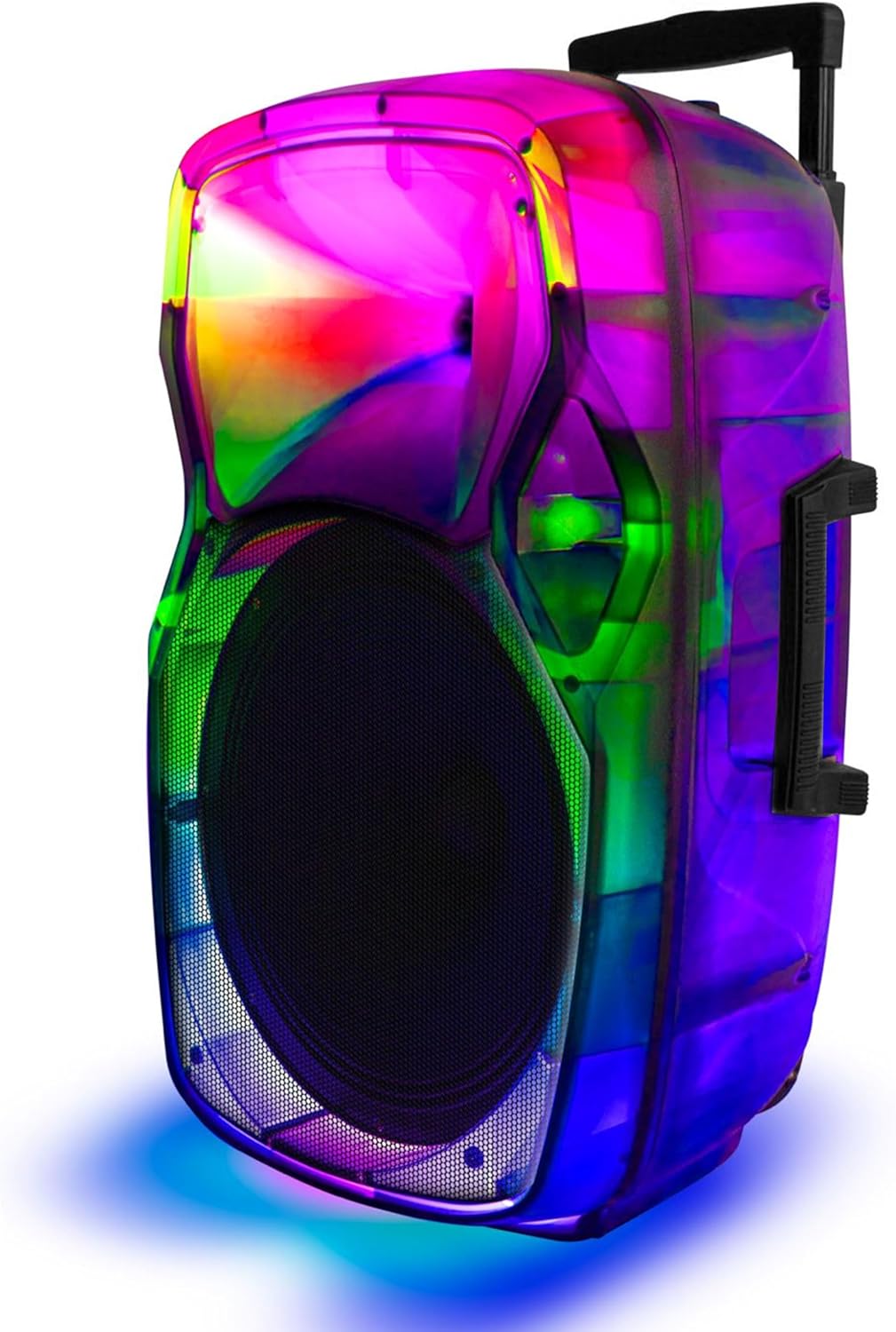
Šoninė view of the STAR-115 speaker, highlighting its integrated handle and wheels for easy portability.
Valdymo skydelis (viršuje / gale)
- Maitinimo mygtukas: Įjungia / išjungia garsiakalbį.
- Režimo mygtukas: Switches between Bluetooth, FM Radio, AUX, USB, and TF Card modes.
- Garsumo valdymas: Reguliuoja pagrindinį garsumą.
- Mikrofono įvestis: Laidinio mikrofono prijungimui.
- USB prievadas: USB atmintinėms.
- TF kortelės lizdas: For TF (MicroSD) cards.
- AUX įvestis: Skirta išoriniams garso įrenginiams prijungti per 3.5 mm laidą.
- Šviesos režimo mygtukas: Controls the flame light effects.
- Ankstesnio / kito takelio mygtukai: Navigates through tracks in media playback modes.
- Atkūrimo / pristabdymo mygtukas: Valdo atkūrimą.
5. Sąranka
5.1 Garsiakalbio įkrovimas
Before first use, fully charge the speaker. Connect the provided power adapter to the speaker's charging port and plug it into a standard wall outlet. The charging indicator light will show the charging status (e.g., red for charging, off or green for fully charged).

The speaker features a reliable battery for extended playback. Ensure it is fully charged before use.
A full charge provides approximately 6 hours of battery life, depending on usage and volume levels.
5.2 Įjungimas / išjungimas
Paspauskite ir palaikykite Maitinimo mygtukas valdymo skydelyje, kad įjungtumėte arba išjungtumėte garsiakalbį.
6. Naudojimo instrukcijos
6.1 Bluetooth ryšys
The STAR-115 speaker is compatible with Bluetooth-enabled devices for wireless audio streaming.
- Įjunkite garsiakalbį. Jis automatiškai įsijungs „Bluetooth“ susiejimo režimu, ką parodys mirksintis LED indikatorius.
- Mobiliajame įrenginyje (išmaniajame telefone, planšetiniame kompiuteryje ir kt.) įjunkite „Bluetooth“ ir ieškokite galimų įrenginių.
- Select "STAR-115" from the list of devices.
- Once connected, the speaker will emit a confirmation sound, and the LED light will stop flashing.

Quick and easy connection via Bluetooth, USB, TF card, AUX, or FM Radio.
6.2 USB/TF kortelių atkūrimas
Insert a USB flash drive or TF (MicroSD) card into the respective port. The speaker will automatically switch to USB/TF mode and begin playing audio files (MP3, WAV, etc.) from the storage device.
- Use the Previous/Next Track buttons to navigate.
- Norėdami valdyti atkūrimą, paspauskite mygtuką „Paleisti / pristabdyti“.
6.3 AUX įvestis
Connect an external audio device (e.g., MP3 player, laptop) to the speaker's AUX input using a 3.5mm audio cable. The speaker will automatically switch to AUX mode. Control playback from your connected device.
6.4 FM radijas
Paspauskite Režimo mygtukas to switch to FM Radio mode. The speaker will automatically scan and save available radio stations. Use the Previous/Next Track buttons to switch between saved stations.
6.5 Mikrofono naudojimas
Connect the wired microphone to the Microphone Input port. Adjust the microphone volume using the dedicated knob on the control panel (if available) or the master volume.
6.6 Flame Light Operation
The STAR-115 features a multi-color flame light show. Press the Šviesos režimo mygtukas to activate or change the lighting effects. Press again to cycle through different patterns or turn off the lights.

One click activation of multi-color disco lights adds extra excitement to your gathering.
6.7 Tikrojo belaidžio stereo (TWS) susiejimas
For an unparalleled stereo sound experience, you can pair two STAR-115 speakers together.
- Įsitikinkite, kad abu garsiakalbiai įjungti ir neprijungti prie jokio „Bluetooth“ įrenginio.
- On one speaker (this will be the primary speaker), press and hold the TWS button (refer to control panel diagram if available, or try the Mode button for 3 seconds if no dedicated TWS button).
- Pagrindinis garsiakalbis ieškos antrinio garsiakalbio. Prijungus abu garsiakalbiai skleis patvirtinimo garsą.
- Dabar prijunkite mobilųjį įrenginį prie pagrindinio garsiakalbio per „Bluetooth“, kaip aprašyta 6.1 skyriuje. Garsas bus grojamas per abu garsiakalbius stereo režimu.

Pair two speakers to get true wireless stereo sound, creating a harmonious and immersive sound environment.
6.8 Nuotolinio valdymo pulto naudojimas
The included remote control allows for convenient operation from a distance. Functions include power on/off, mode selection, volume control, track navigation, play/pause, and light control.
7. Priežiūra
7.1 Valymas
Wipe the speaker's exterior with a soft, dry cloth. Do not use abrasive cleaners, waxes, or solvents as they may damage the finish. Avoid spraying liquids directly onto the speaker.
7.2 Saugykla
When not in use for extended periods, store the speaker in a cool, dry place away from direct sunlight and extreme temperatures. It is recommended to charge the battery periodically (e.g., every 3 months) to maintain its health.
8. Problemų sprendimas
| Problema | Galima priežastis | Sprendimas |
|---|---|---|
| Garsiakalbis neįsijungia. | Baterija išsikrovusi. | Prijunkite garsiakalbį prie maitinimo adapterio ir įkraukite jį. |
| Nėra garso. | Garsumas per mažas arba nutildytas. | Padidinkite garsiakalbio ir prijungto įrenginio garsumą. |
| „Bluetooth“ ryšys nepavyksta. | Garsiakalbis nėra susiejimo režime; įrenginys yra per toli; trukdžiai. | Ensure speaker is in pairing mode. Move device closer. Disconnect other Bluetooth devices. Try restarting both speaker and device. |
| USB/TF kortelė neveikia. | Neteisinga file formatavimas; kortelė / diskas netinkamai įdėtas; sugadintas files. | Užtikrinti files are in supported format (MP3, WAV). Reinsert the card/drive. Try a different card/drive. |
| Mikrofonas neveikia. | Mikrofonas netinkamai prijungtas; mikrofono garsumas per mažas. | Ensure microphone is fully plugged in. Adjust microphone volume. |
| TWS susiejimas nepavyko. | Garsiakalbiai jau prijungti prie kitų įrenginių; per toli vienas nuo kito. | Ensure both speakers are disconnected from other Bluetooth devices. Place them close together during pairing. |
9. Specifikacijos
| Funkcija | Detalė |
|---|---|
| Modelio pavadinimas | ŽVAIGŽDĖ-115 |
| Garsiakalbio tipas | Žemų dažnių garsiakalbis |
| Žemų dažnių garsiakalbio skersmuo | 15 colių |
| Ryšio technologija | Bluetooth |
| Belaidžio ryšio technologija | Bluetooth |
| Bluetooth diapazonas | 33 pėdos (10 metrai) |
| Maitinimo šaltinis | Maitinamas baterijomis |
| Baterijos veikimo laikas | 6 valandų |
| Didžiausia garsiakalbio išėjimo galia | 150 vatų |
| Garso išvesties režimas | Stereo |
| Įtraukti komponentai | Remote control, wired microphone, adapter, user manual, warranty card |
| Gaminio matmenys | 1"D x 1"W x 1"H (Note: This appears to be a placeholder, actual dimensions may vary) |
| Spalva | Juoda |
| Yra atsparus vandeniui | NETEISINGA |
| Gamintojas | Top Tech Audio |
| UPC | 755824425859 |
10. Garantija ir palaikymas
10.1 Informacija apie garantiją
This product comes with a Limited Warranty. Please refer to the included Warranty Card for detailed terms and conditions, including coverage period and what is covered. Keep your purchase receipt as proof of purchase for warranty claims.
10.2 Pagalba klientams
If you encounter any issues not covered in this manual or require further assistance, please contact TOPTECH customer support. Contact information can typically be found on the product packaging, warranty card, or the official TOPTECH websvetainę.
Daugiau informacijos galite rasti adresu TOPTECH Store on Amazon.


