1. Įvadas
The LTC GM022 is an ultralight 3-mode wireless gaming mouse designed for precision and versatility. It features a high-performance PAW3395 sensor, multiple connectivity options, and a convenient RGB charging dock. This manual provides instructions for setting up, operating, maintaining, and troubleshooting your GM022 mouse.
Pakuotės turinys
- LTC GM022 Gaming Mouse
- RGB įkrovimo dokas
- USB-C kabelis
- 2.4G USB Receiver (stored in mouse)

LTC GM022 Wireless Gaming Mouse with RGB Charging Dock and 2.4G USB Receiver.
2. Sąranka ir ryšys
The LTC GM022 mouse offers three connectivity modes: 2.4GHz wireless, Bluetooth 5.0, and wired USB-C. Select the mode that best suits your needs.

Diagram illustrating the three connectivity modes: 2.4GHz wireless, Bluetooth 5.1, and USB-C wired connection.
2.1. 2.4 GHz belaidis režimas
- Raskite 2.4G USB imtuvą, esantį pelės apačioje esančiame skyriuje.
- Prijunkite USB imtuvą prie laisvo kompiuterio USB prievado.
- Pelės apačioje esantį režimo jungiklį perjunkite į padėtį „2.4G“.
- Pelė turėtų automatiškai prisijungti prie kompiuterio.
2.2. „Bluetooth 5.0“ režimas
- Pelės apačioje esantį režimo jungiklį perjunkite į „BT“ padėtį.
- Kompiuteryje arba įrenginyje atidarykite „Bluetooth“ nustatymus ir ieškokite naujų įrenginių.
- Select "LTC GM022" from the list of available devices to pair.
2.3. Laidinis USB-C režimas
- Prijunkite pridėtą USB-C laidą prie pelės priekinio prievado.
- Prijunkite kitą USB-C kabelio galą prie laisvo kompiuterio USB prievado.
- Pelė veiks laidiniu režimu ir bus kraunama vienu metu.

Underside of the LTC GM022 mouse with labels for mode switch, dongle storage, PTFE feet, and DPI loop button.
3. Naudojimo instrukcijos
3.1. Mygtukų funkcijos
The LTC GM022 mouse features 5 programmable buttons:
- Kairysis spustelėjimas: Pirminis veiksmas.
- Dešiniuoju pelės mygtuku spustelėkite: Antrinis veiksmas / kontekstinis meniu.
- Vidurinis spustelėjimas (slinkties ratukas): Scroll up/down, click for universal scroll or other assigned function.
- Pirmyn mygtukas: Naviguoja pirmyn web naršyklės arba file tyrinėtojai.
- Mygtukas atgal: Naviguoja atgal web naršyklės arba file tyrinėtojai.

Illustration of the LTC GM022 mouse highlighting its five programmable buttons and their default assignments.
3.2. DPI reguliavimas
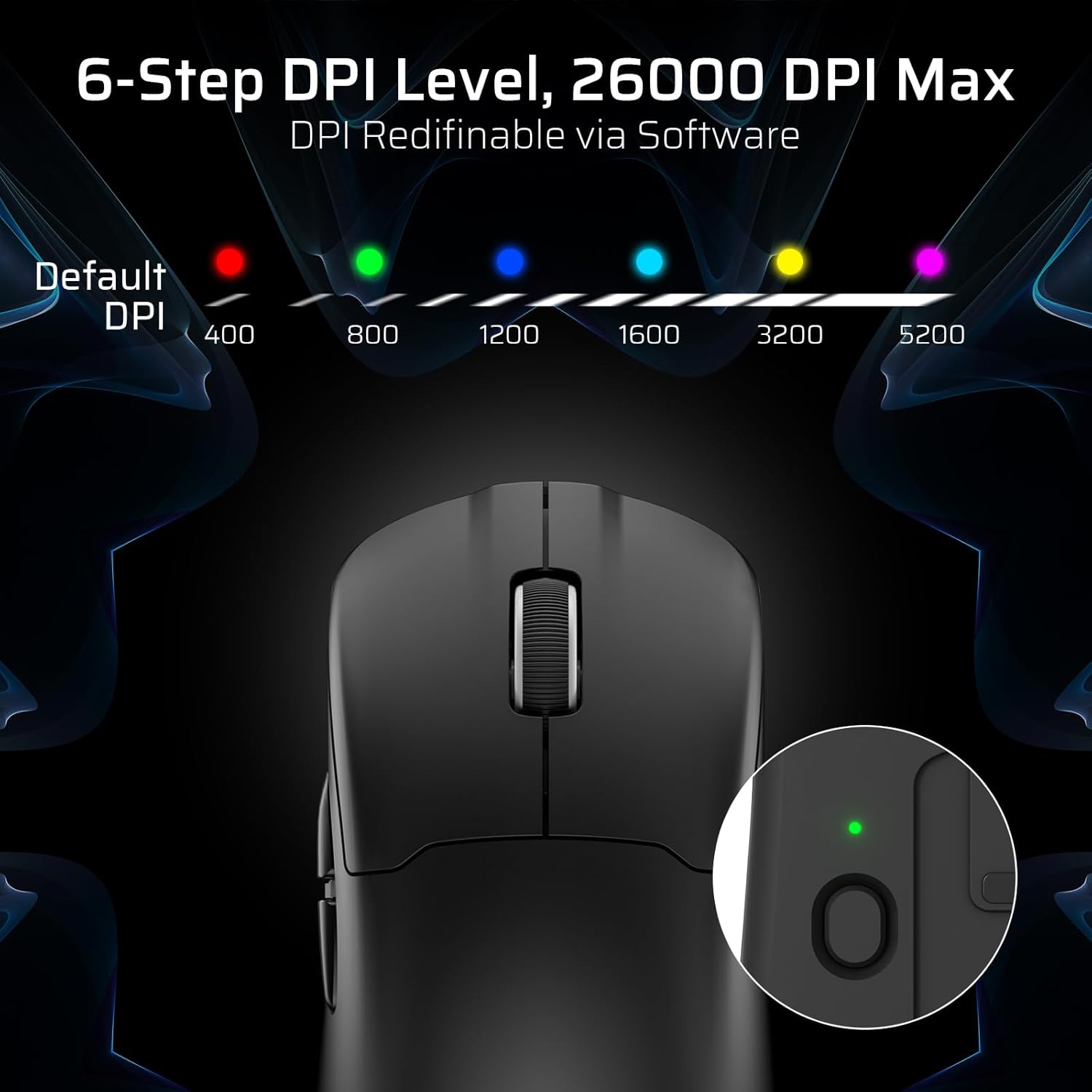
The mouse has a dedicated DPI button on its underside, allowing you to cycle through 6 preset DPI levels. Each level is indicated by a different LED color:
- 400 DPI (raudona)
- 800 DPI (žalia)
- 1200 DPI (mėlyna)
- 1600 DPI (žydra)
- 3200 DPI (geltona)
- 5200 DPI (Magenta)
These DPI levels can be further customized and redefined up to 26000 DPI using the LTC software.

Visual representation of the 6-step DPI levels (400, 800, 1200, 1600, 3200, 5200) and the corresponding LED indicator colors.
3.3. Programinės įrangos pritaikymas
Download and install the official LTC software from the manufacturer's website to unlock full customization options. The software allows you to:
- Priskirkite makrokomandas mygtukams.
- Pertvarkyti pagrindines funkcijas.
- Redefine 6-step DPI levels up to 26000 DPI.
- Adjust polling rate (up to 1000Hz).
- Modify click and scroll speed.
- Stebėkite akumuliatoriaus būseną.

Screenshot of the LTC software interface for customizing mouse settings, including key assignments, DPI, polling rate, and battery monitoring.
4. Pelės įkrovimas
The LTC GM022 mouse is equipped with a 400mAh battery and can be charged using the included magnetic RGB charging dock or directly via the USB-C cable.
4.1. Using the Magnetic Charging Dock
- Connect the USB-C cable to the charging dock and then to a power source (e.g., computer USB port, USB wall adapter).
- Place the mouse onto the charging dock. The magnetic connection will secure it in place, and charging will begin automatically.
- The RGB lighting on the dock will indicate charging status.
4.2. Direct USB-C Charging
- Connect the USB-C cable directly to the mouse's front port.
- Kitą USB-C laido galą prijunkite prie maitinimo šaltinio.
- Įkraunant pelę galima naudoti laidiniu režimu.

The LTC GM022 mouse magnetically charging on its RGB illuminated dock, indicating a 400mAh battery.
5. Priežiūra ir priežiūra
To ensure the longevity and optimal performance of your LTC GM022 mouse, follow these maintenance guidelines:
- Valymas: Pelės paviršių nuvalykite minkšta, sausa šluoste. Jei nešvarumai sunkiai įveikiami, šiek tiek pamirkykite.ampNuvalykite šluostę vandeniu arba švelniu valymo tirpalu. Venkite stiprių cheminių medžiagų ar abrazyvinių medžiagų.
- Jutiklio priežiūra: Kad sekimo tikslumas būtų užtikrintas, pelės apačioje esantį optinį jutiklį laikykite švarų, be dulkių ar šiukšlių.
- PTFE pėdos: The mouse comes with durable PTFE feet for smooth gliding. If they show significant wear, replacement feet may be available from the manufacturer.
- Saugykla: Kai ilgesnį laiką nenaudojate pelės, laikykite ją švarioje, sausoje vietoje.
Close-up of the mouse's underside, detailing the PTFE feet for smooth gliding and the inclusion of backup feet.
6. Problemų sprendimas
If you encounter issues with your LTC GM022 mouse, refer to the following common problems and solutions:
| Problema | Galimas sprendimas |
|---|---|
| Mouse not responding in 2.4G wireless mode | Ensure the USB receiver is securely plugged in. Check if the mouse mode switch is set to "2.4G". Try a different USB port. Ensure the mouse battery is charged. |
| Mouse not connecting via Bluetooth | Ensure the mouse mode switch is set to "BT". Make sure Bluetooth is enabled on your device. Remove previous pairings and re-pair the mouse. Ensure the mouse battery is charged. |
| Pelė neįkraunama | Ensure the USB-C cable is properly connected to both the dock/mouse and the power source. Verify the power source is active. Clean the charging contacts on the mouse and dock. |
| Netikslus sekimas arba žymeklio vėlavimas | Clean the optical sensor on the underside of the mouse. Ensure you are using the mouse on a suitable surface (e.g., a mouse pad). Check for interference in wireless modes. Adjust DPI settings. |
| Mygtukai nereaguoja | Ensure the mouse is powered on and connected. If using software, check button assignments. Try restarting your computer. |
If the issue persists after trying these solutions, please contact LTC customer support for further assistance.
7. Specifikacijos
Key technical specifications for the LTC GM022 Ultralight 3-Mode Wireless Gaming Mouse:
- Modelis: GM022
- Ryšys: 2.4 GHz belaidis ryšys, „Bluetooth 5.0“, laidinis USB-C ryšys
- Jutiklis: „PixArt PAW3395“ optinis jutiklis
- Maksimalus DPI: 26000 DPI (6-step re-definable via software)
- Balsavimo rodiklis: 1000 Hz
- Stebėjimo greitis: „650 IPS“
- Pagreitis: 50G
- Mygtukai: 5 programuojami mygtukai
- Jungiklio tarnavimo laikas: 80 milijonų paspaudimų
- Baterija: 400mAh ličio polimeras
- Svoris: Maždaug 55 gramų (2.01 uncijos)
- Matmenys: 4.7 x 2.44 x 0.04 colio
- Ypatingos savybės: RGB Charging Dock, Ultralight Design, PTFE Feet

Išsamus view of the PixArt PAW3395 sensor specifications including 26K DPI Max, 1000Hz Polling Rate, 650 IPS Tracking Speed, and 50G Acceleration.

Illustration highlighting the durable switches with an 80 million click lifespan.
8. Garantija ir palaikymas
LTC products are designed and manufactured to the highest quality standards. For information regarding warranty coverage, technical support, or to download the latest software and drivers, please visit the official LTC websvetainėje arba susisiekite su klientų aptarnavimo skyriumi.
Išsaugokite pirkimo kvitą kaip pirkimo įrodymą garantiniams reikalavimams.