1. Įvadas
This manual provides detailed instructions for the safe and proper installation, operation, and maintenance of your USX Mount Long Arm Full Motion TV Wall Mount. Please read this manual thoroughly before installation and retain it for future reference. Incorrect installation may result in property damage, injury, or voiding of your warranty.
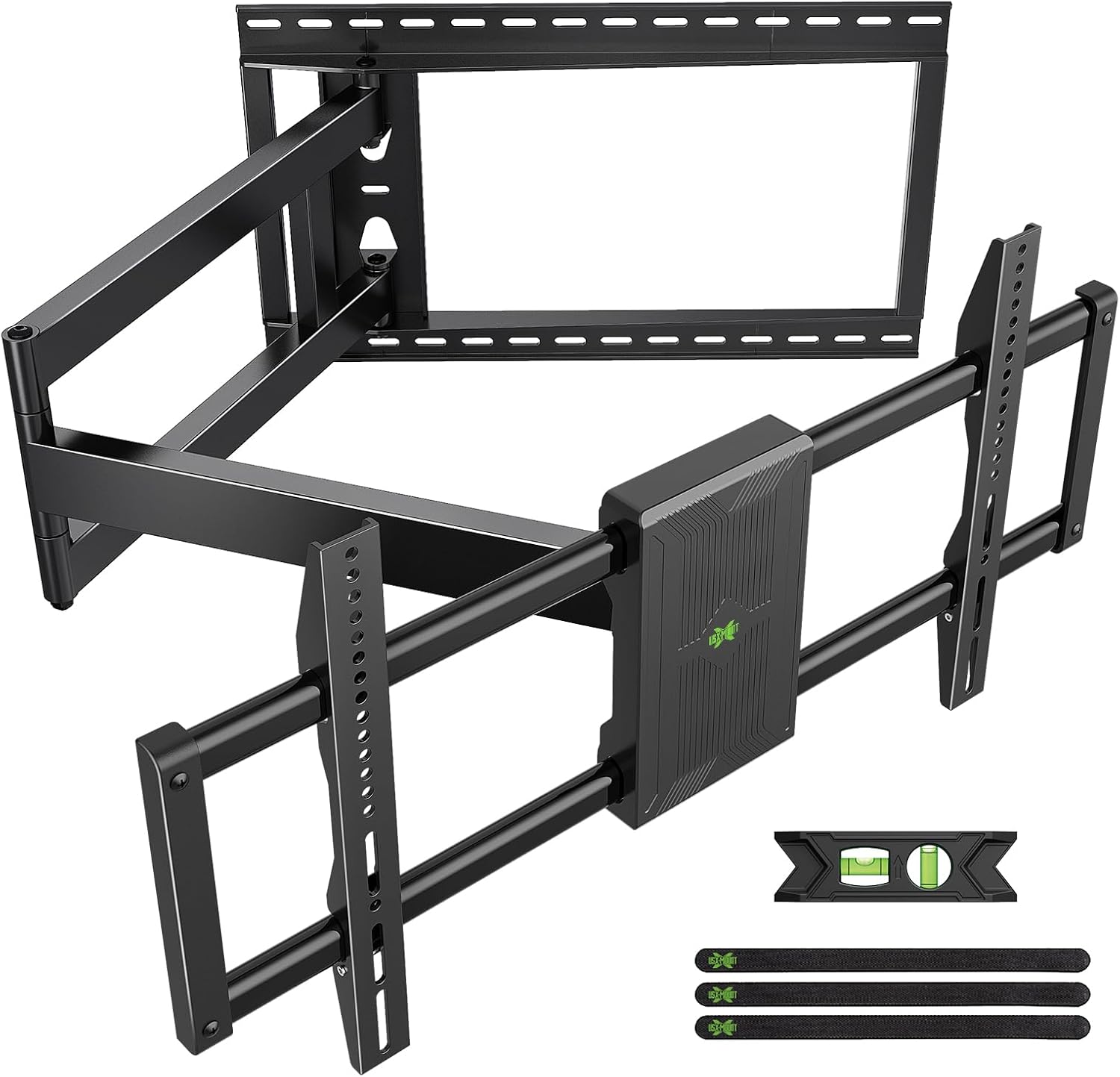
1.1 vaizdas: Baigtaview of the USX Mount Long Arm Full Motion TV Wall Mount, showing the wall plate, articulating arms, and TV mounting brackets, along with included accessories like a level and cable ties.
2. Saugos informacija
ĮSPĖJIMAS: Failure to read and follow all instructions may result in personal injury, property damage, or voiding of your warranty. Do not install into drywall alone. Always ensure the mounting surface can support the combined weight of the mount and your television.
- Ensure all components are present and undamaged before installation. Do not use damaged parts.
- This product is designed for installation on wood studs (16", 18", 20", 24" spacing), solid concrete walls, or brick walls. NEDARYK montuoti tik į gipso kartoną.
- The wall mount is designed to support TVs weighing up to 150 lbs (68 kg). Do not exceed this weight limit.
- Ensure the VESA pattern of your TV is compatible with the mount (200x100mm to 800x400mm).
- Visada naudokite sijų ieškiklį, kad tiksliai rastumėte medines sijas.
- Siekiant užtikrinti saugumą, montavimą rekomenduojama atlikti dviem žmonėms.
- Montavimo metu dėvėkite tinkamas apsaugos priemones, įskaitant akių apsaugą.
3. Pakuotės turinys
Verify that all parts are included in your package. If any parts are missing or damaged, contact customer service immediately.
- Sieninės plokštės surinkimas
- TV laikikliai (2)
- Tvirtinimo detalių rinkinys (varžtai, inkarai, poveržlės, tarpinės)
- Burbulo lygis
- Cable Ties (Velcro)
- Diegimo šablonas
- Instrukcijų vadovas
4. Reikalingi įrankiai (neįtraukta)
- Pieštukas
- „Phillips“ atsuktuvas
- Elektrinis gręžtuvas
- Smeigių ieškiklis (medinių smeigių montavimui)
- Masonry Drill Bit (for concrete/brick installation)
- Lizdinis raktas (13 mm)
- Matavimo juosta
5. Suderinamumo patikrinimas
Before proceeding with installation, ensure your TV and wall are compatible with this mount.
- TV dydis: Fits most 42-95 inch televisions.
- TV svoris: Supports TVs up to 150 lbs (68 kg).
- VESA modelis: Compatible with VESA patterns from 200x100mm to 800x400mm.
- Sienos tipas: Suitable for 16", 18", 20", 24" wood stud walls, solid concrete walls, and brick walls. Not for drywall only installation.
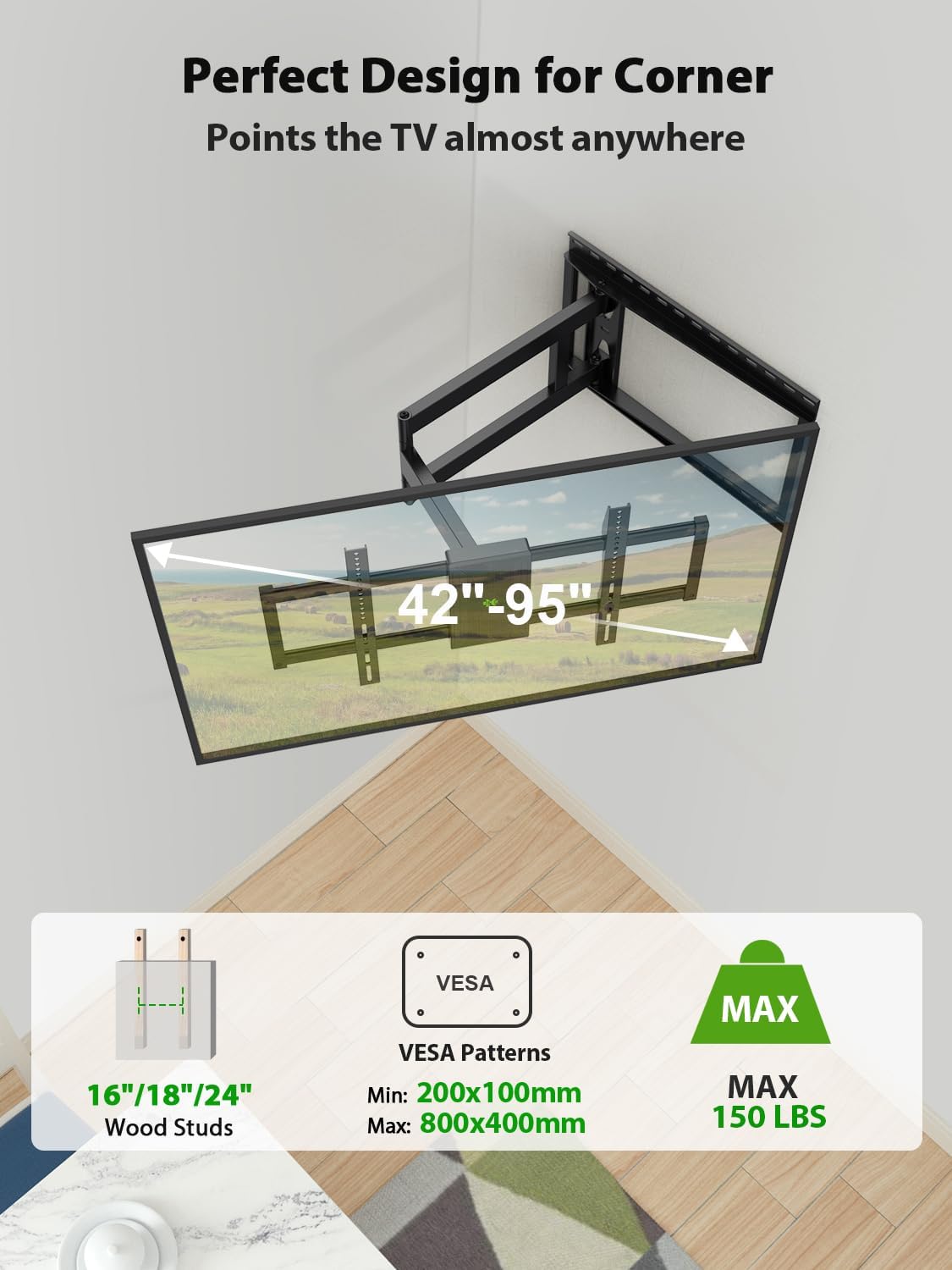
Image 5.1: Illustrates the compatibility of the mount with 16"/18"/20"/24" wood studs, VESA patterns from 200x100mm to 800x400mm, and a maximum weight capacity of 150 lbs. It also shows the mount installed in a corner, highlighting its suitability for such placements.

Image 5.2: Depicts the compatible wall types: concrete wall, wood wall (with studs), and brick wall. A warning indicates not to install on drywall alone.
6. Sąranka ir diegimas
6.1. Attaching TV Brackets to Your TV
- Place your TV face down on a soft, clean surface to prevent scratches.
- Identify the correct diameter and length of screws for your TV's VESA mounting holes. Refer to your TV's manual if unsure.
- Attach the two TV brackets to the back of your TV using the selected screws and washers. If your TV has an uneven back, use spacers as needed to ensure the brackets are flush and secure. Do not overtighten.
6.2. Sieninės plokštės montavimas
- Nustatykite montavimo vietą: Decide on the desired height for your TV. Use the provided installation template to mark the drill holes on the wall.
- Medinių sijų montavimui:
- Use a stud finder to locate the center of the wood studs. Mark the drill holes.
- Drill pilot holes (e.g., 7/32" or 5.5mm) into the center of the marked studs to a depth of approximately 2.75 inches (70mm).
- Attach the wall plate to the wall using the lag bolts and washers. Tighten firmly but do not overtighten.
- Tvirtos betoninės arba plytų sienos montavimas:
- Pažymėkite gręžimo skyles.
- Drill pilot holes (e.g., 3/8" or 10mm) into the solid concrete or brick to a depth of approximately 3 inches (75mm).
- Insert concrete anchors into the pilot holes, ensuring they are flush with the wall surface.
- Pritvirtinkite sieninę plokštę prie sienos naudodami varžtus su sijomis ir poveržles, įsukdami juos į inkarus. Tvirtai priveržkite.
- Use the included bubble level to ensure the wall plate is perfectly horizontal before fully tightening all bolts.
6.3. Hanging the TV on the Wall Plate
- Su pagalba atsargiai pakelkite televizorių (su pritvirtintais laikikliais) ir pritvirtinkite televizoriaus laikiklius prie sieninės plokštės.
- Įsitikinkite, kad televizorius tvirtai pritvirtintas prie sieninės plokštės.
- Locate the safety screws or locking mechanisms on the TV brackets and secure them to prevent accidental dislodgement.
7. Naudojimo instrukcijos
This full motion TV mount offers various adjustments for optimal viewing.
7.1. Rankos ištiesimas ir atitraukimas
Gently pull the TV away from the wall to extend the arm. Push the TV back towards the wall to retract it. The mount can extend up to 40 inches (101.6 cm) and retract to 3.02 inches (7.67 cm) from the wall.

Image 7.1: Illustrates the mount's ability to extend up to 40 inches from the wall and retract to 3 inches, providing flexibility for viewpozicijų.

Image 7.2: Shows the long arm extended and swiveled, demonstrating how it allows for optimal viewing positions from various angles in a room.
7.2. Pasukimo reguliavimas
The TV can swivel up to ±90° left or right, depending on the TV size and its distance from the wall. Gently push or pull the TV to the desired angle.

Image 7.3: Demonstrates the swivel capability of the TV mount, allowing the TV to be angled up to ±90 degrees for flexible viewing. The maximum swivel angle depends on the TV size.
7.3. Pakreipimo reguliavimas
The TV can be tilted +5° upwards and -12° downwards to reduce glare and achieve a comfortable viewing angle. Loosen the tilt adjustment knobs on the TV brackets, adjust to the desired angle, and then retighten the knobs.

Image 7.4: Illustrates the tilt adjustment feature, showing the TV can tilt +5 degrees up and -12 degrees down. A close-up highlights the friction gear mechanism for smooth adjustment.
7.4. Lygio reguliavimas
After installation, if the TV is not perfectly level, you can adjust it by ±3°. Loosen the leveling screws on the TV brackets, adjust the TV to be level, and then retighten the screws.

Image 7.5: Shows the post-installation level adjustment feature, allowing the TV to be rotated ±3 degrees to ensure it is perfectly horizontal.
8. Priežiūra
- Periodiškai patikrinkite visus varžtus ir jungtis, kad jie būtų tvirtai priveržti ir užtikrinti jų tvirtumą.
- Laikiklį valykite minkštu, sausu skudurėliu. Venkite abrazyvinių valiklių ar tirpiklių.
- Ensure cables are properly managed using the provided cable ties to prevent snagging or damage during adjustments.
9. Problemų sprendimas
| Problema | Galima priežastis | Sprendimas |
|---|---|---|
| Televizorius nėra lygus po įrengimo. | Sieninė plokštė arba televizoriaus laikikliai yra šiek tiek nelygūs. | Use the post-installation level adjustment feature (±3°). Loosen leveling screws, adjust, and retighten. |
| Laikiklis atrodo laisvas arba nestabilus. | Mounting bolts are not fully tightened; incorrect wall type used. | Ensure all wall plate and TV bracket bolts are securely tightened. Verify installation on a compatible wall type (wood stud, concrete, brick). Do not install on drywall alone. |
| Sunku reguliuoti pakreipimą/pasukimą. | Adjustment knobs/screws are too tight. | Loosen the relevant adjustment knobs/screws slightly, make the adjustment, then retighten to secure the position. |
| Televizorius netinka laikikliui. | Incompatible VESA pattern or TV weight/size. | Verify your TV's VESA pattern (200x100mm to 800x400mm) and weight (max 150 lbs) against the mount's specifications. |
10. Specifikacijos
- Modelis: B0CZ42ZHCN
- Prekinis ženklas: USX MOUNT
- Montavimo tipas: Sieninis laikiklis
- Judėjimo tipas: Swivel, Tilt, Articulating
- Medžiaga: Legiruotasis plienas
- Spalva: Juoda
- Suderinami televizoriaus dydžiai: 42-95 colių
- Svorio talpa: Iki 150 svarų (68 kg)
- VESA suderinamumas: 200x100mm iki 800x400mm
- Prailginimas nuo sienos: 3.02 colio (sutrauktas) iki 40 colio (išskleistas)
- Pakreipimo kampas: +5° iki -12°
- Pasukimo kampas: ±90° (maks., priklauso nuo televizoriaus dydžio)
- Lygio reguliavimas: ±3° po įrengimo
- Suderinamas tarpas tarp dyglių: 16", 18", 20", 24"
- UPC: 797505421606
11. Garantija ir klientų aptarnavimas
USX MOUNT has been established for thirty years, offering rich experience and excellent product quality. We provide professional after-sales service. If you encounter any issues or have questions regarding your TV mount, please feel free to contact our professional customer service team. They can provide suitable advice before sale and assist you with any problems after sale.
For support, please refer to the contact information provided with your product packaging or visit the official USX MOUNT websvetainę.


