BRAZE-6 Portable Bluetooth Speaker User Manual
Model: BRAZE-6-BK | Brand: TOPTECH
1. Įvadas
The TOPTECH BRAZE-6 is a portable wireless Bluetooth speaker system designed to deliver powerful sound with an integrated LED light show. Featuring dual 3-inch woofers, this rechargeable speaker is suitable for various indoor and outdoor settings, including parties, gatherings, and personal listening.
It supports multiple audio input sources, including Bluetooth, USB, TF card, FM radio, and AUX, and offers True Wireless Stereo (TWS) functionality for enhanced audio experience. The built-in rechargeable battery provides extended standby time, ensuring your music accompanies you for longer durations.

1.1 vaizdas: priekis view of the BRAZE-6 Portable Bluetooth Speaker, showcasing its dual woofers and multi-color LED lighting.
2. Pakuotės turinys
Patikrinkite, ar jūsų siuntinyje yra visi toliau išvardyti daiktai:
- BRAZE-6 Portable Bluetooth Speaker
- Nuotolinio valdymo pultas
- Laidinis mikrofonas
- Maitinimo adapteris
- Vartotojo vadovas (šis dokumentas)
- Garantijos kortelė
3. Produktas baigtasview
Familiarize yourself with the main components and controls of your BRAZE-6 speaker.

3.1 paveikslėlis: Šonas view of the BRAZE-6 speaker, highlighting the top-mounted control buttons.
Valdymo skydas (viršuje)
- Maitinimo mygtukas: Įjungia / išjungia garsiakalbį.
- Režimo mygtukas: Switches between Bluetooth, FM Radio, AUX, USB, and TF card modes.
- Atkūrimo / pristabdymo mygtukas: Paleidžia arba pristabdo garso atkūrimą.
- Ankstesnio / kito takelio mygtukai: Naršo per takelius arba FM radijo stotis.
- Garsumo valdymas: Reguliuoja pagrindinį garsumą.
- LED šviesos mygtukas: Activates or changes the LED light patterns.
Input Ports (Rear/Side)
- USB prievadas: USB atmintinėms.
- TF kortelės lizdas: For TF (MicroSD) cards.
- AUX įvestis: Skirta išoriniams garso įrenginiams prijungti per 3.5 mm garso kabelį.
- Mikrofono įvestis: Laidinio mikrofono prijungimui.
- DC 5V įvestis: Garsiakalbio įkrovimui.
4. Darbo pradžia
4.1 Garsiakalbio įkrovimas
Before first use, fully charge the speaker for optimal battery life.
- Connect the provided power adapter to the DC 5V input port on the speaker.
- Įkiškite adapterį į standartinį sieninį lizdą.
- Užsidegs įkrovimo indikatoriaus lemputė (spalva gali skirtis), rodanti, kad vyksta įkrovimas.
- Once fully charged, the indicator light will change or turn off. Disconnect the adapter.
Note: The speaker can be used while charging, but it is recommended to fully charge it before initial use.
4.2 Įjungimas / išjungimas
- Norėdami įjungti, paspauskite ir palaikykite Maitinimo mygtukas until the speaker activates and you hear an audible prompt.
- Norėdami išjungti, paspauskite ir palaikykite Maitinimo mygtukas vėl, kol garsiakalbis išsijungs.
5. Naudojimo instrukcijos
5.1 „Bluetooth“ ryšys
Pair your BRAZE-6 speaker with a Bluetooth-enabled device (e.g., smartphone, tablet, computer).
- Įsitikinkite, kad garsiakalbis įjungtas ir veikia „Bluetooth“ režimu. Jei ne, paspauskite Režimo mygtukas until you hear the "Bluetooth mode" prompt. The LED lights may flash to indicate pairing mode.
- Įrenginyje įjunkite Bluetooth ir ieškokite galimų įrenginių.
- Select "BRAZE-6" from the list of found devices.
- Once paired, you will hear a confirmation sound, and the LED lights may change their pattern.
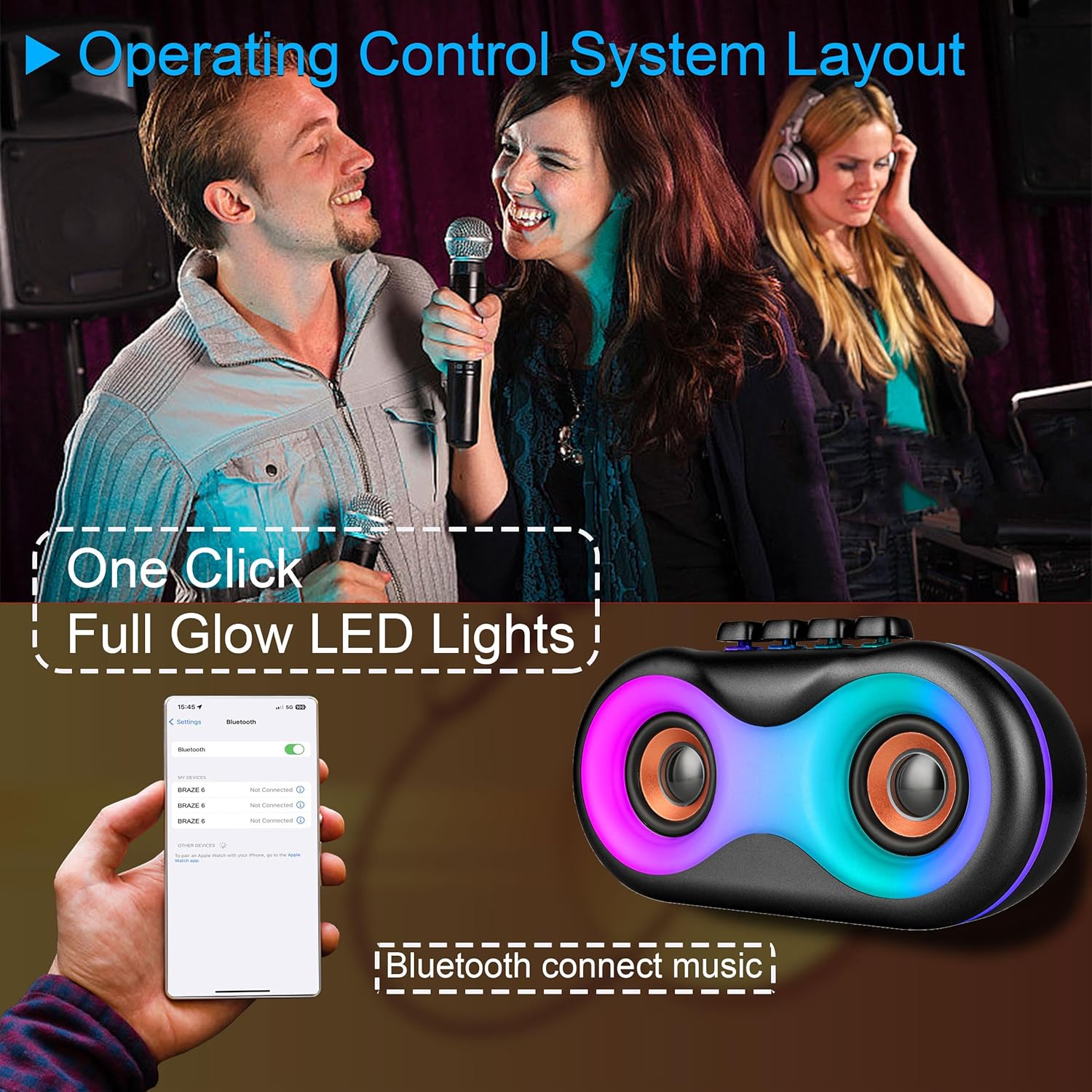
Image 5.1: Illustration of Bluetooth pairing process with a smartphone, showing the speaker's LED lights active.
Note: The speaker supports BLE agreements for stable wireless audio streaming up to 10 meters (33 feet).
5.2 Playing Audio from Various Sources
The BRAZE-6 speaker supports multiple input methods:

Image 5.2: Visual representation of supported input types: USB, Bluetooth, FM Radio, TWS, AUX, and TF Card.
- USB/TF kortelė: Insert a USB flash drive or TF card into the respective port. The speaker will automatically switch to the correct mode and begin playing audio files.
- AUX įvestis: Connect an external audio device (e.g., MP3 player, laptop) to the AUX port using a 3.5mm audio cable. Press the Režimo mygtukas norėdami pasirinkti AUX režimą.
- FM radijas: Paspauskite Režimo mygtukas to switch to FM Radio mode. Use the Previous/Next Track buttons to scan for stations.
5.3 LED šviesų šou
The BRAZE-6 features dynamic multi-color LED lights that enhance your listening experience.
- Paspauskite LED šviesos mygtukas on the control panel to activate the light show.
- Press the button again to cycle through different light patterns or turn the lights off.

Image 5.3: The BRAZE-6 speaker with its powerful stereo sound output and integrated lighting effects.
5.4 Wired Microphone Usage
Connect the included wired microphone for karaoke or public address functions.
- Plug the microphone cable into the dedicated Microphone Input port on the speaker.
- Adjust the microphone volume using the speaker's controls or the microphone's built-in controls if available.
5.5 Tikrojo belaidžio stereo (TWS) funkcija
The TWS function allows you to pair two BRAZE-6 speakers together for a true stereo sound experience.
- Ensure both BRAZE-6 speakers are powered on and in Bluetooth pairing mode (not connected to any device).
- Ant vieno iš garsiakalbių (tai bus pagrindinis garsiakalbis) paspauskite ir palaikykite nuspaudę TWS mygtukas (if available, or a combination of buttons as per specific model instructions, typically the Play/Pause button).
- The speakers will attempt to connect to each other. Once connected, you will hear a confirmation sound.
- Now, connect your Bluetooth device to the primary speaker. Audio will play through both speakers in stereo.
6. Priežiūra ir priežiūra
6.1 Valymas
- Garsiakalbio išorę nuvalykite minkšta, sausa arba šiek tiek sudrėkinta šluoste.amp audinys.
- Do not use abrasive cleaners, alcohol, benzene, or other volatile solvents, as they may damage the surface.
- Ensure no liquid enters the speaker's ports or openings.
6.2 Saugykla
- Garsiakalbį laikykite vėsioje, sausoje vietoje, toliau nuo tiesioginių saulės spindulių ir ekstremalių temperatūrų.
- Venkite laikyti dulkėtoje ar drėgnoje aplinkoje.
6.3 Akumuliatoriaus priežiūra
- Norėdami pailginti akumuliatoriaus veikimo laiką, venkite dažnai visiškai jį iškrauti.
- If the speaker will not be used for an extended period, charge it to approximately 50% every 3-6 months.
- Saugokite bateriją nuo per didelio karščio, pvz., tiesioginių saulės spindulių ar ugnies.
7. Problemų sprendimas
If you encounter issues with your BRAZE-6 speaker, refer to the following common problems and solutions:
| Problema | Galima priežastis | Sprendimas |
|---|---|---|
| Garsiakalbis neįsijungia. | Išsikrovusi baterija; netinkamai paspaustas maitinimo mygtukas. | Įkraukite garsiakalbį; paspauskite ir kelias sekundes palaikykite nuspaudę maitinimo mygtuką. |
| Nėra garso. | Per mažas garsumas; pasirinktas neteisingas režimas; įrenginys netinkamai prijungtas. | Increase volume; Press Mode button to select correct input; Reconnect device. |
| „Bluetooth“ susiejimas nepavyksta. | Garsiakalbis neįjungtas susiejimo režimu; Įrenginio „Bluetooth“ išjungtas; Per toli nuo garsiakalbio. | Ensure speaker is in Bluetooth mode; Turn on device Bluetooth; Move device closer (within 10m). |
| Neveikia LED lemputės. | LED light feature turned off. | Press the LED Light Button to activate. |
| Prastas FM radijo priėmimas. | Silpnas signalas; trukdžiai. | Adjust speaker position; Extend antenna if available. |
8. Techninės specifikacijos
Detailed specifications for the BRAZE-6 Portable Bluetooth Speaker:

Image 8.1: Product dimensions of the BRAZE-6 speaker.
| Funkcija | Specifikacija |
|---|---|
| Modelio pavadinimas | BRAZE-6-BK |
| Prekės ženklas | TOPTECH |
| Garsiakalbio tipas | Woofer (Dual 3-inch) |
| Ryšio technologija | „Bluetooth“, pagalbinis, USB, belaidis |
| Ryšio protokolas | Bluetooth |
| Ypatinga funkcija | LED šviesa |
| Maitinimo šaltinis | Maitinamas baterijomis |
| Gaminio matmenys (D x P x A) | 18.9" x 13.2" x 22.83" |
| Spalva | Juoda |
| Valdiklio tipas | Mygtukas |
| Rekomenduojami naudojimo būdai | Išmaniesiems telefonams ar planšetiniams kompiuteriams |
| Suderinami įrenginiai | Išmanusis telefonas |
| Yra atsparus vandeniui | TIESA |
| Prekių skaičius | 1 |
| UPC | 755824425996 |
| Gamintojas | Top Tech Audio |
9. Garantija ir palaikymas
Your BRAZE-6 Portable Bluetooth Speaker comes with a warranty. Please refer to the included warranty card for specific terms and conditions, including coverage period and claim procedures.
For technical support, troubleshooting assistance beyond this manual, or warranty inquiries, please contact TOPTECH customer service through the following channels:
- Palaikymas internetu: Visit the official TOPTECH website or Amazon store page for contact information.
- Pagalba el. paštu: Refer to your warranty card or product packaging for the customer service email address.
For more information about TOPTECH products, you can visit the TOPTECH Store on Amazon.


