Įvadas
The Qingping Air Quality Monitor Gen 2 is an advanced indoor air quality monitoring device designed to provide real-time data on various environmental factors. This manual provides detailed instructions on setting up, operating, and maintaining your device to ensure optimal performance and accurate readings.
It monitors 7 key metrics: temperature, humidity, carbon dioxide (CO2), particulate matter (PM2.5 and PM10), estimated total volatile organic compounds (eTVOC), and noise level. Additionally, it features an alarm clock function and smart connectivity via Wi-Fi to the Qingping+ app.
Produktas baigtasview

The Qingping Air Quality Monitor Gen 2 is a compact and stylish device that provides comprehensive insights into your indoor environment. Its intuitive touchscreen display and seamless integration with the Qingping+ mobile application make it easy to track and understand air quality trends.
Pagrindinės funkcijos:
- Multifunction Air Quality Detection: Real-time monitoring of Temperature, Humidity, CO2, PM2.5, PM10, eTVOC, and Noise Level.
- Accurate and Reliable Measurement: Equipped with top-level sensors and a multi-mode compensation algorithm for precise data.
- Replaceable PM Sensor: Innovative pop-up design allows for easy replacement of the PM sensor.
- High-resolution Touchscreen: A 4-inch IPS touchscreen with 254 PPI, auto-adjustable brightness, and color indicators for quick understanding of air quality.
- Išmanusis „Wi-Fi“ ryšys: Connects to 2.4GHz or 5GHz Wi-Fi for remote monitoring and historical data export via the Qingping+ app.
- Žadintuvo funkcija: Supports setting multiple alarms with customizable ringtones.
- Įkraunama baterija: Built-in lithium battery provides up to 3 hours of operation, with continuous power via USB-C.

The device is available in white and black, offering a sleek design that blends into any home or office environment. Its core functionalities are centered around providing comprehensive and accessible air quality information.
Sąrankos vadovas
1. Išpakavimas ir pirminė apžiūra:
Carefully remove the Qingping Air Quality Monitor Gen 2 from its packaging. Verify that all components are present: the monitor unit, a USB-C charging cable, and this user manual. Inspect the device for any visible damage.
2. Įrenginio įjungimas:
The device includes a built-in rechargeable lithium-ion battery. For initial use and continuous operation, it is recommended to connect the device to a power source using the provided USB-C cable and a 5V∷1A USB power adapter (not included). The device can operate for up to 3 hours on battery power after a full charge.
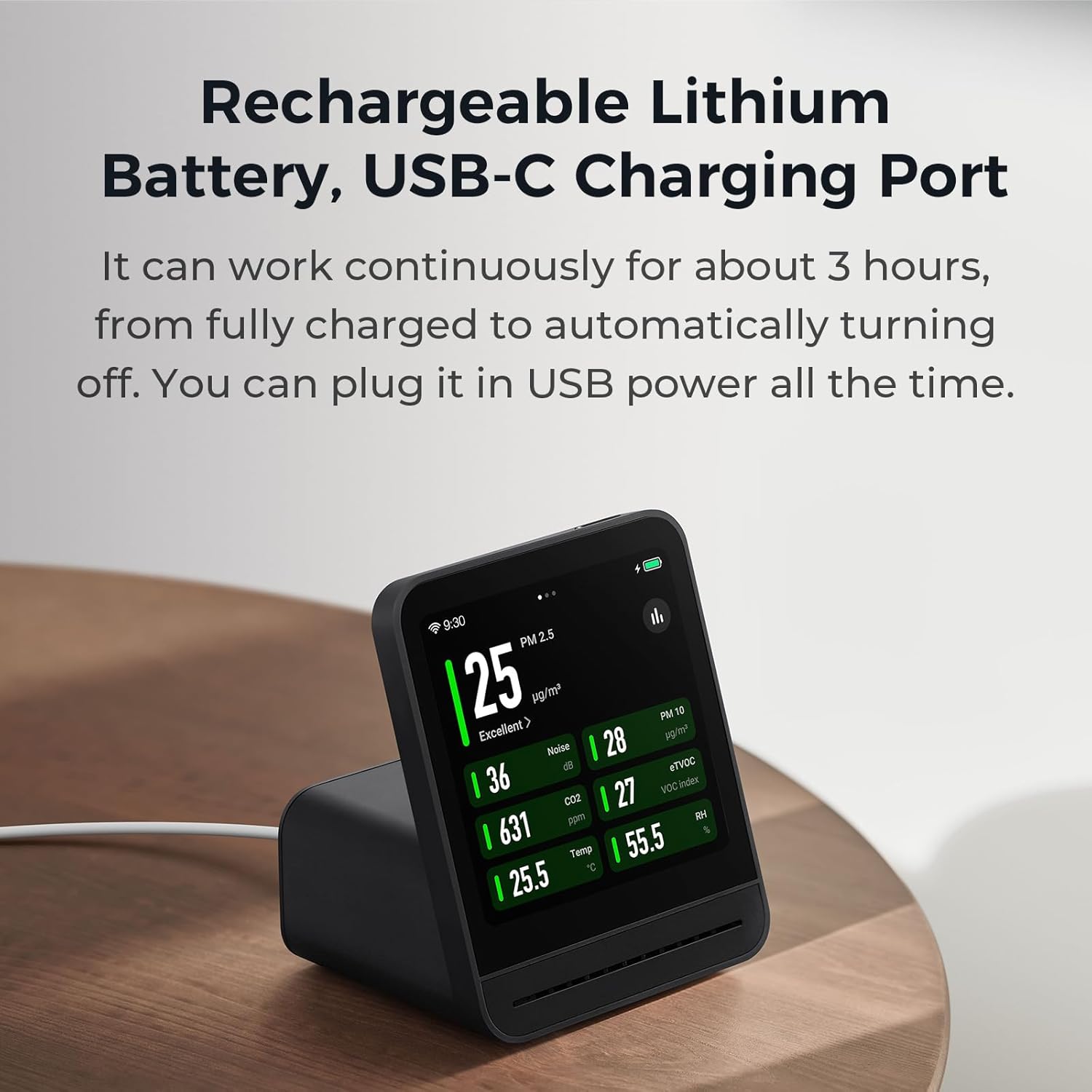
Connect the USB-C cable to the port on the back of the monitor and the other end to a compatible USB power adapter. The device will automatically power on. Ensure a stable power supply for consistent monitoring.
3. Wi-Fi Connection and App Setup:
To utilize smart features and remote monitoring, connect your device to Wi-Fi and pair it with the Qingping+ app.
- Download the "Qingping+" app from the App Store (for iOS) or Google Play Store (for Android).
- Atidarykite programą ir vadovaukitės ekrane pateikiamomis instrukcijomis, kad sukurtumėte paskyrą arba prisijunkite.
- On the device's touchscreen, navigate to the Wi-Fi settings (usually found in the system settings menu).
- Select your 2.4GHz or 5GHz Wi-Fi network and enter the password.
- Once connected, the app will guide you through pairing the device. This typically involves scanning a QR code displayed on the monitor or selecting the device from a list.

The Qingping+ app allows you to monitor all 7 metrics remotely, check historical data for up to 30 days, and receive firmware updates for new features and optimizations.
Naudojimo instrukcijos
Ekrano supratimas:
The 4-inch IPS touchscreen provides clear and concise information. Each metric displayed has a color indicator beneath its numerical value, allowing for a quick assessment of the indoor air quality and noise level.

The display automatically adjusts its brightness for optimal visibility in different lighting conditions. You can interact with the device by tapping and sliding on the screen.
Naršymas sąsajoje:
- Bakstelėkite: Select options, confirm actions, or view detailed information for a specific metric.
- Perbraukimas: Navigate between different screens or views (e.g., daily view, historical data, settings).
- Nustatymų meniu: Access system settings, Wi-Fi configuration, alarm settings, and display preferences.
Žadintuvo funkcija:
The monitor includes an integrated alarm clock. To set an alarm:
- Access the Alarm Clock section from the main menu or settings.
- Tap to add a new alarm.
- Set the desired time, repeat days, and choose a ringtone.
- Confirm to save the alarm.

The alarm clock supports time auto-sync, multiple alarms, snooze functionality, and customizable ringtones to fit your preferences.
Priežiūra
Prietaiso valymas:
To maintain optimal performance and appearance, regularly clean the exterior of the device with a soft, dry cloth. Avoid using abrasive cleaners, solvents, or excessive moisture, as these can damage the screen or internal components.
Replacing the PM Sensor:
The PM sensor is designed to be replaceable, ensuring long-term accuracy. Over time, dust and particles can accumulate, affecting sensor performance. Refer to the following steps for replacement:
- Ensure the device is powered off or disconnected from the power source.
- Locate the magazine-type PM sensor compartment on the back of the device.
- Gently press the release mechanism (if present) or slide out the existing PM sensor module.
- Insert a new, genuine Qingping PM sensor module into the compartment until it clicks securely into place.
- Power on the device. The new sensor will be automatically detected.

This innovative design ensures that the PM sensor can be easily replaced when needed, extending the lifespan and accuracy of your air quality monitor.
Trikčių šalinimas
If you encounter issues with your Qingping Air Quality Monitor Gen 2, please refer to the following common troubleshooting steps:
- Įrenginys neįsijungia: Ensure the USB-C cable is securely connected to both the device and a working 5V∷1A power adapter. Check if the power outlet is functional. If using battery, ensure it is charged.
- „Wi-Fi“ ryšio problemos: Verify that your Wi-Fi network (2.4GHz or 5GHz) is active and the password is correct. Ensure the device is within range of your router. Try restarting both the monitor and your router.
- Netikslūs rodmenys: Ensure the device is placed in an area with good air circulation, away from direct drafts, vents, or sources of high heat/humidity. Allow the device to stabilize for at least 10-15 minutes after initial power-on or relocation. If PM readings seem consistently off, consider replacing the PM sensor.
- Programos ryšio problemos: Ensure your smartphone has a stable internet connection. Verify that the Qingping+ app is updated to the latest version. Try restarting the app or reinstalling it if issues persist.
- Ekranas nereaguoja: Try restarting the device by disconnecting and reconnecting the power. If the issue persists, contact customer support.
For further assistance, please refer to the official Qingping support resources or contact their customer service.
Specifikacijos
| Prekės ženklas | Čingpingas |
| Modelio numeris | CGS2 |
| Matmenys | 5.71 x 4.72 x 3.22 colio |
| Prekės svoris | 1.17 svaro (0.53 kilogramo) |
| Maitinimo šaltinis | Battery Powered (Rechargeable Lithium Ion) / USB-C (5V∷1A) |
| Baterijos veikimo laikas | Iki 3 valandų (su baterija) |
| Jutiklio tipas | Photoelectric (PM sensor) |
| Monitored Metrics | PM2.5, PM10, CO2, eTVOC, Noise, Temperature, Humidity |
| Ryšys | Wi-Fi (IEEE 802.11a/b/g/n/ac/ax, 2.4GHz & 5GHz) |
| Ekranas | 4-inch IPS Touchscreen, 254 PPI, Auto-brightness |

Detailed specifications are also available on the product packaging and the official Qingping websvetainę.
Garantija ir palaikymas
For information regarding warranty coverage, technical support, or to purchase replacement parts (such as the PM sensor), please visit the official Qingping website or contact their customer service department. Contact details may also be found on the product packaging or within the Qingping+ application.
Gamintojas: Qingping Technology (Beijing) Co., Ltd.
Websvetainė: www.qingping.co


