Produktas baigtasview
The MONODEAL MD08 Air Conduction Headphones are designed for comfort and clear communication, featuring an open-ear design, Bluetooth 5.1 connectivity, and a noise-canceling microphone with a mute function. These headphones transmit sound through air conduction, providing an alternative to traditional in-ear or bone conduction devices, aiming to reduce pressure and discomfort during extended use.

Image: MONODEAL MD08 Air Conduction Headphones, showcasing the open-ear design and boom microphone.
Kas yra dėžutėje
- Air Conduction Headphones (1 unit)
- USB-C įkrovimo laidas (1 vnt.)
- Vartotojo vadovas (1 vnt.)
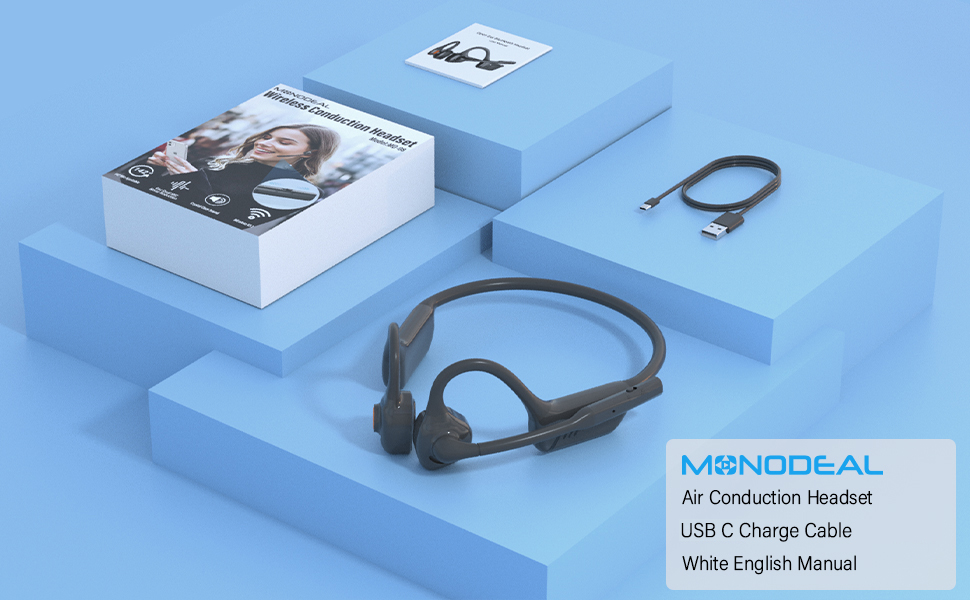
Image: The MONODEAL MD08 headphones, USB-C charging cable, and user manual laid out, representing the package contents.
Sąranka
1. Ausinių įkrovimas
Before initial use, fully charge the headphones. Connect the provided USB-C charging cable to the charging port on the headphones and plug the other end into a compatible USB power source. A full charge typically takes approximately 2 hours.

Image: Diagram illustrating the charging process and battery life indicators: 8 hours usage, 36 hours standby, 2 hours charging time.
2. „Bluetooth“ poravimas
To connect your MONODEAL MD08 headphones to a device:
- Įsitikinkite, kad ausinės yra išjungtos.
- Press and hold the multi-function button until the indicator light flashes red and blue, indicating pairing mode.
- Savo įrenginyje (išmaniajame telefone, planšetiniame kompiuteryje, kompiuteryje) įjunkite „Bluetooth“ ir ieškokite galimų įrenginių.
- Select "MD08" from the list of found devices to connect. A voice prompt will confirm successful pairing.
3. Multi-Point Connection (Connecting to Two Devices Simultaneously)
The MD08 headphones support connecting to two Bluetooth devices at the same time. This allows you to seamlessly switch between audio sources, for example, listening to music on your tablet and answering calls on your phone.
- 1 veiksmas: Pair the headphones with the first device (e.g., your phone) as described in the Bluetooth Pairing section.
- 2 veiksmas: Once connected to the first device, turn off Bluetooth on the first device. This will put the headphones back into pairing mode.
- 3 veiksmas: Pair the headphones with the second device (e.g., your tablet).
- 4 veiksmas: Turn Bluetooth back on for the first device. The headphones should automatically reconnect to both devices.
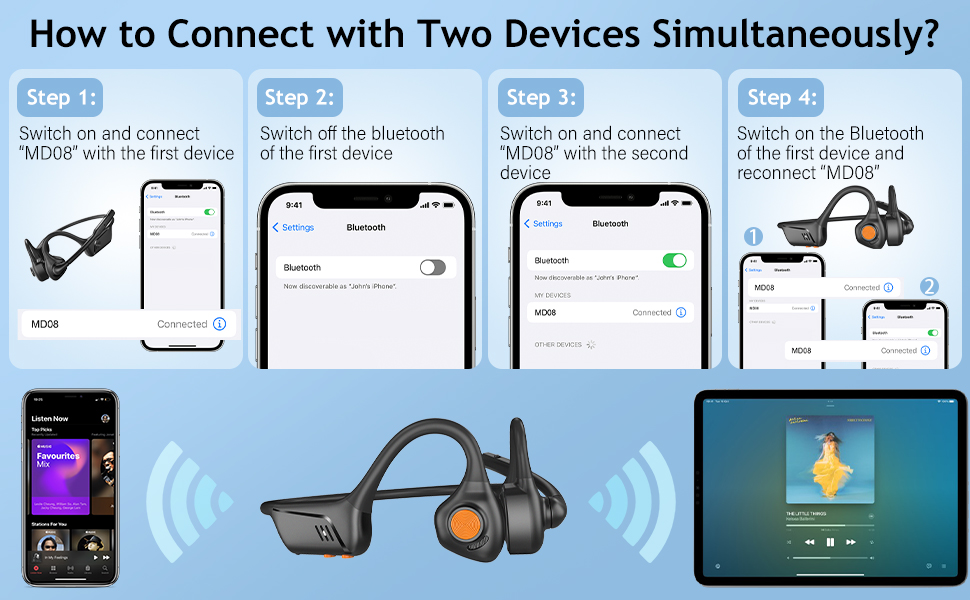
Image: Visual guide demonstrating the four steps to connect the MD08 headphones to two devices simultaneously, showing a phone and a tablet.
Naudojimo instrukcijos
1. Ausinių dėvėjimas
Position the headphones with the speakers resting gently in front of your ears, allowing the sound to be transmitted through air conduction. The flexible band should rest comfortably around the back of your head. The open-ear design ensures you remain aware of your surroundings.

Image: A man wearing the MD08 headphones, illustrating the open-ear design and comfortable fit, emphasizing its lightweight nature (40g) and stable design.
2. Pagrindiniai valdikliai
The headphones feature a multi-functional button and volume controls for easy operation:
- Maitinimo įjungimas/išjungimas: Paspauskite ir palaikykite daugiafunkcį mygtuką.
- Leisti / pristabdyti: Vieną kartą paspauskite daugiafunkcį mygtuką.
- Atsiliepti / Baigti skambutį: Vieną kartą paspauskite daugiafunkcį mygtuką įeinančio arba aktyvaus skambučio metu.
- Atmesti skambutį: Įeinančio skambučio metu paspauskite ir palaikykite daugiafunkcį mygtuką.
- Garsumo didinimas / sumažinimas: Naudokite specialius garsumo mygtukus.
- Kitas takelis: Dukart paspauskite daugiafunkcį mygtuką.
- Ankstesnis takelis: Tris kartus paspauskite daugiafunkcį mygtuką.
- Įjunkite balso asistentą („Siri“ / „Google“ asistentas): Paspauskite ir 2 sekundes palaikykite daugiafunkcį mygtuką.

Image: A user demonstrating the controls of the MD08 headphones, with icons indicating functions like Play/Pause, Skip Track, Control Calls, Volume+/-, and Voice Assistant.
3. Mikrofono nutildymo funkcija
The MD08 headphones feature a dedicated mute button on the microphone boom. During a call, you can easily touch this button to mute or unmute your microphone, providing privacy when needed.

Image: A woman using the MD08 headphones, highlighting the microphone mute function and environmental noise reduction technology, showing 96% noise filtered during calls.
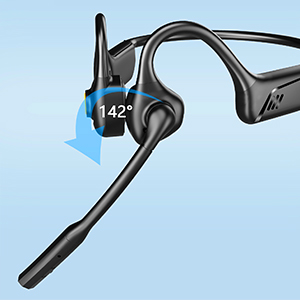
Image: Close-up of the MD08 microphone, showing its 142-degree rotation capability for optimal positioning.
Priežiūra
- Valymas: Ausinėms valyti naudokite minkštą, sausą šluostę. Venkite naudoti stiprias chemines medžiagas ar abrazyvines medžiagas.
- Saugykla: Ausines laikykite vėsioje, sausoje vietoje, toliau nuo tiesioginių saulės spindulių ir ekstremalių temperatūrų.
- Įkrovimas: Norėdami pailginti baterijos veikimo laiką, venkite dažnai visiškai ją iškrauti. Reguliariai kraukite ausines, net jei jų ilgą laiką nenaudojate.
- Atsparumas vandeniui: While designed for active use, avoid submerging the headphones in water.
Trikčių šalinimas
| Problema | Sprendimas |
|---|---|
| Ausinės neįsijungia. | Įsitikinkite, kad ausinės yra visiškai įkrautos. Prijunkite prie maitinimo šaltinio ir bandykite dar kartą. |
| Nepavyksta susieti su įrenginiu. |
|
| Nėra garso arba garsas per mažas. |
|
| Mikrofonas neveikia. |
|
| Pertraukiamas ryšys. |
|
Specifikacijos
| Funkcija | Detalė |
|---|---|
| Modelio pavadinimas | MD08 |
| Ryšio technologija | Belaidis ryšys („Bluetooth“) |
| Bluetooth versija | 5.1 |
| Bluetooth diapazonas | Iki 10 metrų (33 pėdų) |
| Garso tvarkyklės tipas | Oro laidumo tvarkyklė |
| Battery Life (Music/Talk Time) | Iki 8 valandų |
| Budėjimo laikas | Iki 36 valandų |
| Įkrovimo laikas | Maždaug 2 val |
| Įkrovimo prievadas | USB-C |
| Svoris | 1.41 uncijos (apie 40 g) |
| Ausų išdėstymas | Atidarykite ausį |
| Triukšmo valdymas | Aktyvus triukšmo slopinimas (mikrofonui) |
| Ypatingos savybės | Microphone Included, Multipoint Pairing, Rechargeable Battery, Volume Control, Mute Function |
Garantija ir palaikymas
MONODEAL products are designed and manufactured to high-quality standards. For warranty information, technical support, or customer service inquiries, please refer to the contact information provided with your purchase or visit the official MONODEAL websvetainę.
Manufacturer: MONODEAL