Įvadas
This manual provides comprehensive instructions for the setup, operation, maintenance, and troubleshooting of your MageGee Moon104 Wireless Mechanical Keyboard. Please read this manual thoroughly to ensure optimal performance and longevity of your device.

Image: The MageGee Moon104 Wireless Mechanical Keyboard, showcasing its full layout and the included USB receiver.
Pakuotės turinys
Atidarius pakuotę, patikrinkite, ar yra visi reikalingi daiktai:
- MageGee Moon104 Wireless Mechanical Keyboard
- USB-C į USB-A laidas
- 2.4 GHz USB imtuvas
- Vartotojo vadovas (šis dokumentas)
Specifikacijos
| Funkcija | Detalė |
|---|---|
| Modelis | Moon104 |
| Matmenys (I x P x A) | 16.73 colio x 16.73 colio x 0.98 colio (42.49 cm x 42.49 cm x 2.49 cm) |
| Prekės svoris | 2.33 svaro (1.06 kg) |
| Ryšys | USB-C Wired, 2.4GHz Wireless, Bluetooth 3.0/5.0 |
| Klaviatūros tipas | Mechaninis, Low Profile |
| Jungikliai | Rudi mechaniniai jungikliai |
| Foninis apšvietimas | RGB Backlit (Seven-color breathing system) |
| Suderinamumas | Windows, macOS |
| Rekomenduojamas naudojimas | Biuras |

Paveikslėlis: Viršview of the MageGee Moon104 keyboard's key features, including its tri-mode connectivity, low-profile switches, RGB backlighting, and ergonomic design.
Sąranka
1. Klaviatūros įkrovimas
Before first use, it is recommended to fully charge the keyboard using the provided USB-C cable. Connect the USB-C end to the keyboard and the USB-A end to a powered USB port on your computer or a wall adapter.

Vaizdas: Stambus planas view of the MageGee Moon104 keyboard showing the detachable USB-C cable connected to its port.
2. Klaviatūros prijungimas
The MageGee Moon104 supports three connection modes: USB-C Wired, 2.4GHz Wireless, and Bluetooth.

Image: The MageGee Moon104 keyboard demonstrating its tri-mode connection capabilities, showing both wired USB-C and the 2.4GHz receiver in use.
2.1. Laidinis USB-C ryšys
- Connect the USB-C end of the cable to the keyboard's port.
- Prijunkite USB-A galą prie laisvo kompiuterio USB prievado.
- Klaviatūra bus automatiškai atpažinta ir paruošta naudoti.
2.2. 2.4 GHz belaidis ryšys
- Locate the 2.4GHz USB receiver (usually stored in a compartment on the keyboard or included separately).
- Prijunkite USB imtuvą prie laisvo kompiuterio USB prievado.
- Klaviatūroje paspauskite Fn + Q to switch to 2.4GHz wireless mode. The indicator light will confirm the connection.
2.3. „Bluetooth“ ryšys
- Klaviatūroje paspauskite Fn + W or Fn + E to select a Bluetooth channel (BT1 or BT2). The indicator light will flash, indicating pairing mode.
- On your device (computer, laptop, smart TV), enable Bluetooth and search for new devices.
- Select "MageGee Moon104" from the list of available devices to pair.
- Suporavus klaviatūrą, indikatoriaus lemputė ims šviesti nuolat.
Naudojimo instrukcijos
1. Switching Between Connection Modes
To switch between the three connection modes, use the following key combinations:
- Fn + TAB: Switch to USB-C Wired Mode
- Fn + Q: Switch to 2.4GHz Wireless Mode
- Fn + W: Switch to Bluetooth Channel 1 (BT1)
- Fn + E: Switch to Bluetooth Channel 2 (BT2)
2. RGB foninio apšvietimo valdymas
The keyboard features an RGB backlight system with multiple effects and brightness levels.

Image: The MageGee Moon104 keyboard displaying its vibrant RGB backlighting across the keys.
- Ryškumo reguliavimas: Naudokite Fn + ↑ (increase brightness) and Fn + ↓ (sumažinkite ryškumą).
- Apšvietimo režimų keitimas: Naudokite Fn + → or Fn + ← to cycle through different RGB effects.
- Greičio reguliavimas: Naudokite Fn + - (sumažinkite greitį) ir Fn + = (increase speed) for dynamic lighting effects.
3. Windows/macOS Compatibility Switch
The keyboard includes a physical switch to toggle between Windows and macOS layouts for optimal key mapping.

Image: A close-up of the MageGee Moon104 keyboard highlighting the physical switch to select between Windows and Mac operating system compatibility.
- Raskite WIN/MAC switch on the side or back of the keyboard.
- Slide the switch to the appropriate operating system setting.
4. Funkciniai klavišai (F1–F12)
The F-keys often have secondary functions accessible by pressing them in combination with the Fn key. Refer to the keycaps for specific icons indicating these functions (e.g., media control, volume, brightness).
Ergonomiškas dizainas
The MageGee Moon104 is designed with ergonomics in mind to reduce wrist strain during extended use. It features low-profile mechanical switches and adjustable tilt feet.

Image: The MageGee Moon104 keyboard positioned on a desk, showcasindėl ergonomiško profesionalumofile and comfortable typing angle.
- Adjustable Tilt Feet: Extend the feet on the underside of the keyboard to adjust the typing angle to your preference.
- „Low Pro“file Jungikliai: Mažai profesionalusfile design of the mechanical switches contributes to a flatter keyboard, reducing the need for excessive wrist extension.
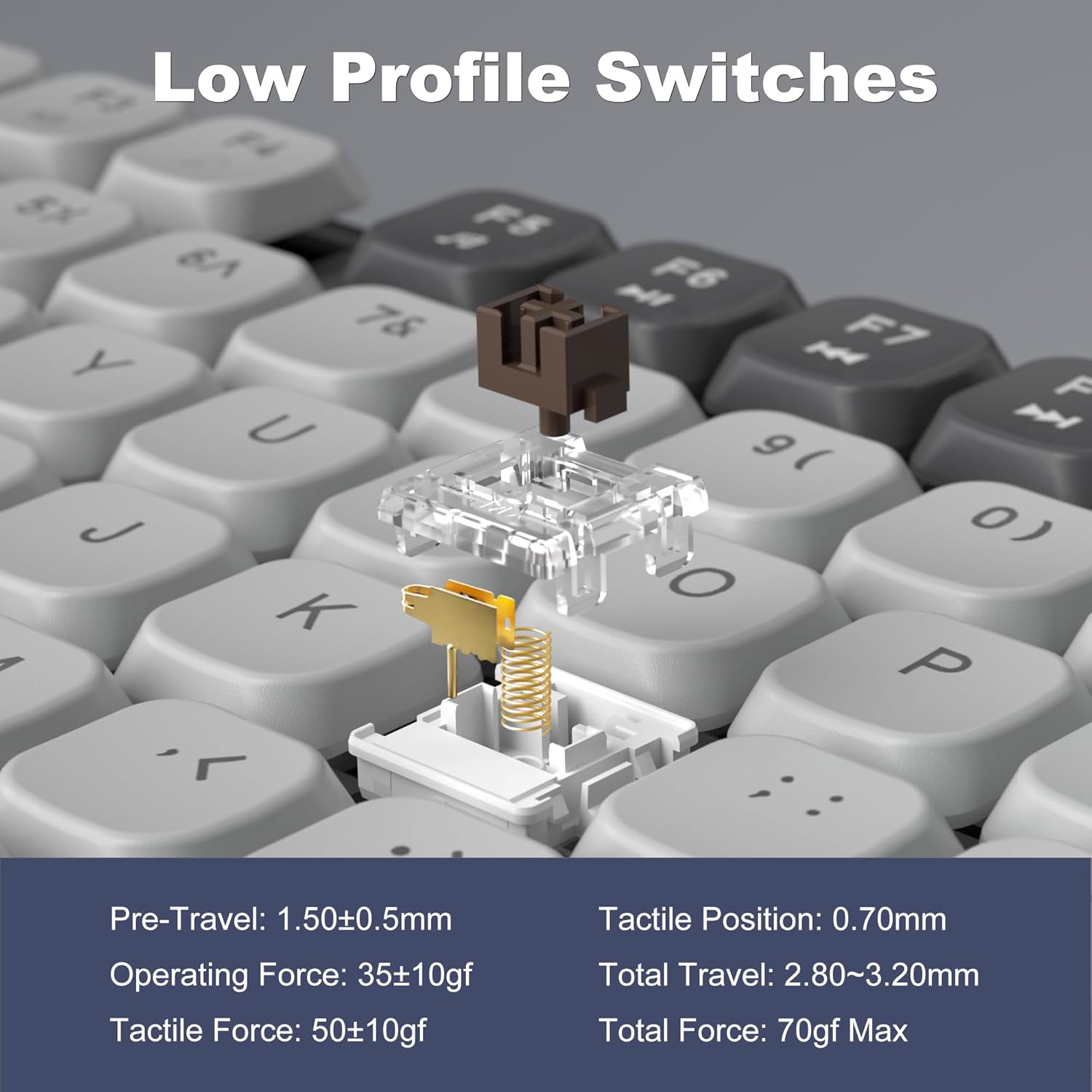
Image: A detailed diagram illustrating the internal structure and operational specifications of the low-profile mechanical switches used in the MageGee Moon104 keyboard.
Priežiūra
Norėdami užtikrinti klaviatūros ilgaamžiškumą ir optimalų veikimą, laikykitės šių priežiūros nurodymų:
- Valymas: Klaviatūros paviršių nuvalykite minkšta, sausa šluoste. Gilesniam valymui naudokite suslėgtą orą, kad pašalintumėte dulkes ir šiukšles iš tarpų tarp klavišų dangtelių. Venkite naudoti stiprias chemines medžiagas ar abrazyvines medžiagas.
- Saugykla: Kai klaviatūra ilgesnį laiką nenaudojama, ją laikykite vėsioje, sausoje vietoje, toliau nuo tiesioginių saulės spindulių ir ekstremalių temperatūrų.
- Akumuliatoriaus priežiūra: Venkite dažnai visiškai iškrauti bateriją. Reguliariai įkraukite klaviatūrą, kad palaikytumėte baterijos veikimo laiką.
Trikčių šalinimas
If you encounter issues with your MageGee Moon104 keyboard, refer to the following common solutions:
- Klaviatūra nereaguoja:
- Įsitikinkite, kad klaviatūra įkrauta.
- Verify the correct connection mode is selected (Wired, 2.4GHz, or Bluetooth).
- Jei naudojate 2.4 GHz dažnį, įsitikinkite, kad USB imtuvas yra tvirtai prijungtas.
- For Bluetooth, ensure the keyboard is paired and within range of your device. Try re-pairing if necessary.
- If using wired mode, try a different USB port or cable.
- Foninis apšvietimas neveikia arba yra netinkamas:
- Patikrinkite foninio fono ryškumo nustatymus naudodami Fn + ↑.
- Perjunkite apšvietimo režimus naudodami Fn + → or Fn + ←.
- Įsitikinkite, kad klaviatūros akumuliatorius yra pakankamai įkrautas.
- Raktai neregistruojami arba įvedami du kartus:
- Clean the affected key with compressed air to remove any debris.
- Įsitikinkite, kad klaviatūra yra visiškai įkrauta.
- If the issue persists, try connecting the keyboard to a different device to rule out software or driver issues on your primary computer.
- Function Keys (F1-F12) Not Working:
- Įsitikinkite, kad paspaudžiate Fn key in combination with the desired F-key for secondary functions.
- Verify the keyboard is set to the correct operating system (Windows/Mac) using the physical switch.
Garantija ir palaikymas
MageGee provides a 1-year warranty for the Moon104 Wireless Mechanical Keyboard. If you encounter any product issues or have questions, please contact MageGee customer support via Amazon email. They aim to reply within 24 hours and provide a satisfactory solution.
Dėl pagalbos apsilankykite „MageGee“ parduotuvė „Amazon“ platformoje or contact their customer service directly through your Amazon order details.


