Įvadas
This manual provides comprehensive instructions for the Douk Audio T7 7-Band Equalizer Balanced XLR/RCA Preamplifier. Please read this manual carefully before operating the device to ensure proper use and optimal performance.
Svarbios saugos instrukcijos
- Perskaitykite šias instrukcijas.
- Išsaugokite šias instrukcijas.
- Atkreipkite dėmesį į visus įspėjimus.
- Vykdykite visas instrukcijas.
- Nenaudokite šio prietaiso šalia vandens.
- Valykite tik sausa šluoste.
- Neužblokuokite jokių ventiliacijos angų. Montuokite pagal gamintojo instrukcijas.
- Nemontuokite šalia jokių šilumos šaltinių, pvz., radiatorių, šilumokaičių, viryklių ar kitų įrenginių (įskaitant ampkeltuvai), kurie gamina šilumą.
- Saugokite maitinimo laidą, kad ant jo neužeitų ar nesuspaustų, ypač prie kištukų, patogių lizdų ir toje vietoje, kur jie išeina iš aparato.
- Naudokite tik gamintojo nurodytus priedus/priedus.
- Atjunkite šį įrenginį žaibuojant arba kai nenaudojate ilgą laiką.
- Visus techninės priežiūros darbus patikėkite kvalifikuotam techninės priežiūros personalui. Techninė priežiūra reikalinga, kai aparatas buvo kaip nors pažeistas, pvz., pažeistas maitinimo laidas arba kištukas, į aparatą išsiliejo skystis ar įkrito daiktai, aparatas buvo paveiktas lietaus ar drėgmės, neveikia normaliai. , arba buvo numestas.
Pakuotės turinys

The image displays the Douk Audio T7 unit, a DC 12V power adapter, and a diagram showing the dimensions and weight of the unit and package.
Į paketą įeina:
- 1 x Douk Audio T7 7-Band Equalizer Preampgyvybingesnis
- 1 x DC 12V maitinimo adapteris
Produkto savybės
- 7-Band EQ Equalizer: Independent frequency band control (64Hz/125Hz/250Hz/500Hz/2KHz/4KHz/8KHz) with a range of -6dB to +6dB. Allows precise adjustment of treble, midrange, and bass to compensate for speaker characteristics and room acoustics.
- Subalansuotas XLR Preampgyvybingesnis: Supports both XLR and RCA inputs and outputs. Delivers high-quality audio to amplifiers or active speakers with excellent channel separation, resolution, soundstage, and a clean background.
- Bypass Design & High Performance: Features a bypass mode that can be activated by turning off the power, allowing for the enjoyment of the original audio signal without equalization. The T7 boasts a Signal-to-Noise Ratio (SNR) exceeding 104dB, a frequency response range of 20Hz-20kHz, and a distortion level as low as 0.003%, ensuring accurate audio reproduction.
- Attractive and Robust Design: Housed in a black aluminum alloy chassis, providing effective shielding, a cool aesthetic, and durable construction. Ideal for audiophiles seeking high-fidelity sound.
- Patogios funkcijos: Operates without a volume control, outputting a predetermined level. Both XLR and RCA outputs function simultaneously.
Valdikliai ir jungtys
Priekinis skydelis

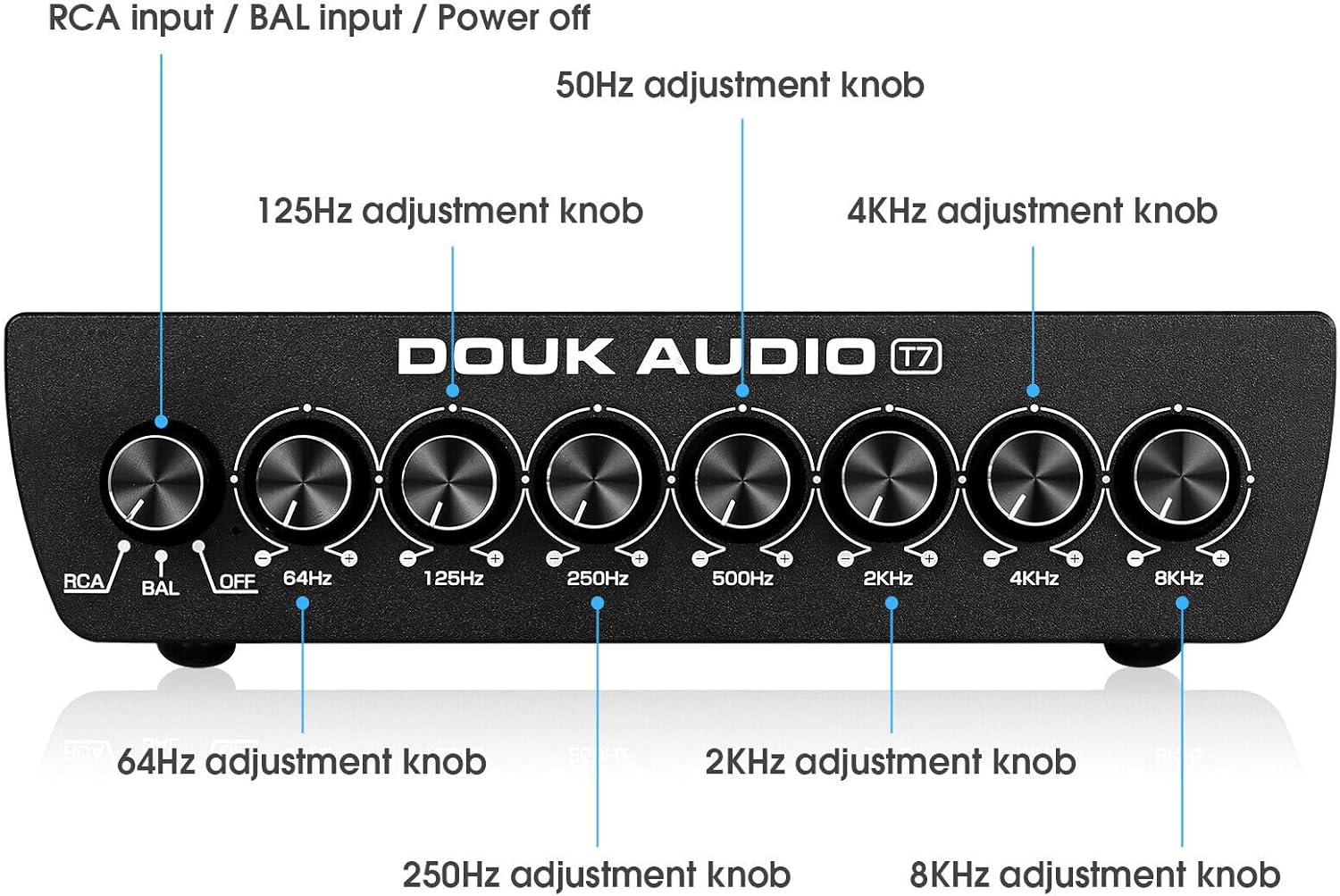
This image shows the front panel of the Douk Audio T7, highlighting the input selector knob (RCA/BAL/OFF) and the seven equalizer adjustment knobs for 64Hz, 125Hz, 250Hz, 500Hz, 2KHz, 4KHz, and 8KHz.
The front panel features the following controls:
- Input Selector Knob (RCA/BAL/OFF): Selects between RCA input, Balanced (XLR) input, or activates bypass mode (OFF).
- 64Hz Adjustment Knob: Reguliuoja 64 Hz dažnių juostos stiprinimą.
- 125Hz Adjustment Knob: Reguliuoja 125 Hz dažnių juostos stiprinimą.
- 250Hz Adjustment Knob: Reguliuoja 250 Hz dažnių juostos stiprinimą.
- 500Hz Adjustment Knob: Reguliuoja 500 Hz dažnių juostos stiprinimą.
- 2KHz Adjustment Knob: Adjusts the gain for the 2KHz frequency band.
- 4KHz Adjustment Knob: Adjusts the gain for the 4KHz frequency band.
- 8KHz Adjustment Knob: Adjusts the gain for the 8KHz frequency band.
Galinis skydelis
This image illustrates the rear panel connections of the Douk Audio T7, showing the Balanced XLR/RCA inputs, Balanced XLR/RCA outputs, and the DC 12V power input.
Galiniame skydelyje yra šios jungtys:
- Balanced XLR Input (L/R): For connecting balanced audio sources using XLR cables.
- RCA įvestis (K/D): For connecting unbalanced audio sources using RCA cables.
- Balanced XLR Output (L/R): Norėdami prisijungti prie amplifiers or active speakers using XLR cables.
- RCA išvestis (K/D): Norėdami prisijungti prie amplifiers or active speakers using RCA cables.
- DC 12 V IN: Power input for the included 12V DC adapter.
Sąrankos vadovas
1. Maitinimo prijungimas
Connect the included DC 12V power adapter to the "DC 12V IN" port on the rear panel of the T7. Plug the adapter into a suitable power outlet.
2. Garso įvesties jungtis
RCA įėjimui: Connect your audio source (e.g., CD player, DAC, phone, tablet PC, TV set-top box, laptop) to the "RCA Input" jacks on the rear panel using RCA cables.
For Balanced XLR Input: Connect your audio source to the "Balanced XLR Input" jacks on the rear panel using XLR cables.
3. Garso išvesties jungtis
Connect the "RCA Output" jacks or "Balanced XLR Output" jacks on the rear panel of the T7 to your amplifier or active speakers using appropriate RCA or XLR cables. Both outputs can be used simultaneously.
4. Pradinis įjungimas
Ensure all connections are secure. Turn on your audio source and amplifier/active speakers. Then, power on the Douk Audio T7.
Naudojimo instrukcijos
1. Įvesties režimo pasirinkimas
Use the input selector knob on the front panel to choose your desired input: "RCA" for RCA sources, or "BAL" for Balanced XLR sources.
2. Adjusting Equalization
Once an input is selected, use the seven frequency adjustment knobs (64Hz, 125Hz, 250Hz, 500Hz, 2KHz, 4KHz, 8KHz) to fine-tune the audio frequencies. Rotate the knobs clockwise to boost the frequency band (+6dB) and counter-clockwise to cut the frequency band (-6dB).
Experiment with different settings to achieve your preferred sound profile or to correct room acoustics and speaker response.
3. Apėjimo režimas
To listen to the original, unequlized audio signal, set the input selector knob to "OFF". This activates the bypass mode, allowing the audio signal to pass through the unit without any equalization.
4. Simultaneous Outputs
The T7 outputs audio simultaneously through both the RCA and Balanced XLR output ports. You can connect to multiple devices if needed.
Priežiūra
Valymas
Wipe the unit with a soft, dry cloth. Do not use any liquid cleaners or solvents, as they may damage the finish or internal components.
Sandėliavimas
If the unit will not be used for an extended period, disconnect it from the power supply and store it in a cool, dry place.
Vėdinimas
Ensure that the ventilation openings are not blocked to prevent overheating. Maintain adequate space around the unit for proper airflow.
Trikčių šalinimas
Nėra garso išvesties
- Patikrinkite galią: Ensure the power adapter is securely connected to the T7 and a working power outlet.
- Check Input Selection: Verify that the input selector knob on the front panel is set to the correct input (RCA or BAL), not "OFF" (bypass mode).
- Patikrinkite jungtis: Ensure all audio cables (input and output) are securely connected to both the T7 and your source/ampkeltuvas/garsiakalbiai.
- Check Source/Ampgyvybingesnis: Confirm that your audio source is playing and your amp„Lifier“ / aktyvūs garsiakalbiai įjungti ir veikia tinkamai.
Iškraipytas garsas
- Check Gain Levels: Ensure that the equalizer knobs are not set to extreme boost levels, which can cause clipping or distortion. Try reducing the gain on specific frequency bands.
- Patikrinkite kabelius: Patikrinkite garso kabelius, ar nėra pažeistų ar atsilaisvinusių jungčių.
- Šaltinio kokybė: Verify the quality of the audio source. Poor quality source material can result in distorted output.
Dūzgimas arba triukšmas
- Įžeminimo kilpa: A hum can sometimes indicate a ground loop. Try connecting all audio equipment to the same power strip or outlet. If the issue persists, a ground loop isolator may be necessary.
- Kabelio kokybė: Naudokite aukštos kokybės, ekranuotus garso kabelius.
- Trikdžiai: Keep the unit away from other electronic devices that may cause interference.
Specifikacijos
| Modelis: | T7 |
| Dažnio juostos: | 64 Hz, 125 Hz, 250 Hz, 500 Hz, 2 kHz, 4 kHz, 8 kHz |
| Gauti diapazonas: | Nuo -6dB iki +6dB vienai juostai |
| Įėjimai: | Balanced XLR (L/R), RCA (L/R) |
| Išėjimai: | Balanced XLR (L/R), RCA (L/R) |
| Signalo ir triukšmo santykis (SNR): | >104dB |
| Dažnio atsakas: | 20 Hz–20 kHz |
| Iškraipymas: | <0.003 % |
| Maitinimas: | DC 12V |
| Gaminio matmenys (I x P x A): | 15.2 x 12.6 x 4.2 cm (5.98 x 4.96 x 1.65 colio) |
| Grynasis svoris: | 1.02 kg (2.25 svaro) |
| Gamintojas: | „Douk Audio“. |
| Kilmės šalis: | Kinija |
Garantija ir palaikymas
Douk Audio products are designed for reliability and performance. For warranty information and technical support, please refer to the documentation included with your purchase or visit the official Douk Audio websvetainėje. Išsaugokite pirkimo kvitą kaip pirkimo įrodymą garantiniams reikalavimams.


