Įvadas
The FREEWOLF M96 Wireless Gaming Keyboard is designed for versatile use, offering both Bluetooth and 2.4G wireless connectivity. It features a mechanical feel, RGB LED backlighting, a digital display screen, and durable PBT keycaps. This manual provides detailed instructions to help you set up, operate, and maintain your keyboard for optimal performance.
Produktas baigtasview
The FREEWOLF M96 keyboard combines advanced features with a user-friendly design. Key components include:
- Dvigubas ryšys: Supports Bluetooth (BT1, BT2) and 2.4G wireless modes for seamless switching between multiple devices.
- Skaitmeninis ekranas: Provides real-time information on battery capacity, connection mode, and charging status.
- Multimedia Control Knob: Allows for easy adjustment of volume and backlight settings.
- PBT klavišų dangteliai: Durable, spherical keycaps designed for comfortable typing and longevity.
- RGB LED Backlight: Customizable lighting effects to enhance your gaming or typing experience.
- Ilgai veikianti baterija: Equipped with a 3000 mAh battery for extended use.
- Ergonomiškas dizainas: Features adjustable feet for optimal typing comfort.

Vaizdas: Viršview of the FREEWOLF M96 Wireless Keyboard, highlighting its 90% US layout, PBT keycaps, Bluetooth/2.4G connectivity, LED backlight, 3000 mAh battery, multimedia knob, LED screen, and compatibility with Win/Mac/Linux/iOS/Android systems.

Vaizdas: Stambus planas view of the PBT color blocking keycaps, emphasizing their durability and longer lifespan.
Sąranka
1. Klaviatūros įkrovimas
Before first use, it is recommended to fully charge the keyboard. Connect the provided USB-C cable to the charging port on the keyboard and the other end to a USB power source (e.g., computer USB port, wall adapter).
- The digital display screen will indicate the charging status.
- Pilnas įkrovimas paprastai trunka kelias valandas.

Vaizdas: Šoninė view of the keyboard illustrating the power switch, Type-C charging port, and the 2.4G/BT1/BT2 mode switch. The Type-C port is for charging only and cannot be used for wired connection.
2. Prisijungimas per 2.4G belaidį ryšį
- Locate the 2.4G wireless receiver (USB dongle), usually stored in a compartment on the keyboard's underside.
- Prijunkite 2.4G imtuvą prie laisvo kompiuterio USB prievado.
- Slide the mode switch on the keyboard to the "2.4G" position.
- The keyboard should automatically connect to your device. The display screen will show the 2.4G connection status.
3. Prisijungimas per Bluetooth
The keyboard supports two Bluetooth channels (BT1 and BT2) for connecting to multiple devices.
- Slide the mode switch on the keyboard to either "BT1" or "BT2" position.
- Savo įrenginyje (kompiuteryje, planšetiniame kompiuteryje, išmaniajame telefone) įjunkite „Bluetooth“ ir ieškokite naujų įrenginių.
- Select "FREEWOLF M96" (or similar name) from the list of available devices.
- If prompted, enter the pairing code displayed on your device.
- Once connected, the digital display screen will show the active Bluetooth channel (BT1 or BT2).
To switch between connected Bluetooth devices, simply slide the mode switch to the desired BT1 or BT2 channel.
Video: Demonstrates the dual-mode connectivity of the FREEWOLF M96 Wireless Gaming Keyboard, showing how to switch between 2.4G wireless and Bluetooth connections (BT1, BT2) for seamless multi-device operation.
Naudojimo instrukcijos
1. Skaitmeninis ekranas
The integrated electronic display provides essential information at a glance:
- Baterijos talpa: Rodo esamą baterijos procentątage.
- Ryšio režimas: Indicates whether the keyboard is in 2.4G, BT1, or BT2 mode.
- Įkrovimo būsena: Displays an icon when the keyboard is charging.
- Senkančios baterijos indikatorius: Alerts you when the battery is low.

Vaizdas: Išsamus view of the digital display screen on the FREEWOLF M96 keyboard, showing indicators for power display, connection status (2.4G, BT1, BT2), charging, and low battery.
2. Multimedijos valdymo rankenėlė
The knob located on the top right of the keyboard offers dual functionality:
- Default Function (Volume Control):
- Pasukite pagal laikrodžio rodyklę, kad padidintumėte garsumą.
- Rotate counter-clockwise to decrease volume.
- Press the knob to mute/unmute audio.
- Foninio apšvietimo valdymas:
- Press and hold the knob for five seconds to switch to backlight control mode.
- In backlight control mode:
- Rotate clockwise to increase backlight brightness.
- Rotate counter-clockwise to decrease backlight brightness.
- Press the knob to switch between different backlight effects/modes.

Image: Illustration of the advanced dial control, detailing its default functions for volume (volume up, volume down, mute) and its backlight control functions (backlight brightness up, backlight brightness down, light effect switching) when pressed and held for 5 seconds.
3. Backlight Control (Function Keys)
In addition to the knob, you can control the backlight using function key combinations:
- FN + N: Perjunkite foninio apšvietimo režimą
- FN + Up Arrow / Down Arrow: Sureguliuokite foninio apšvietimo ryškumą
- FN + Left Arrow / Right Arrow: Reguliuokite foninio apšvietimo greitį
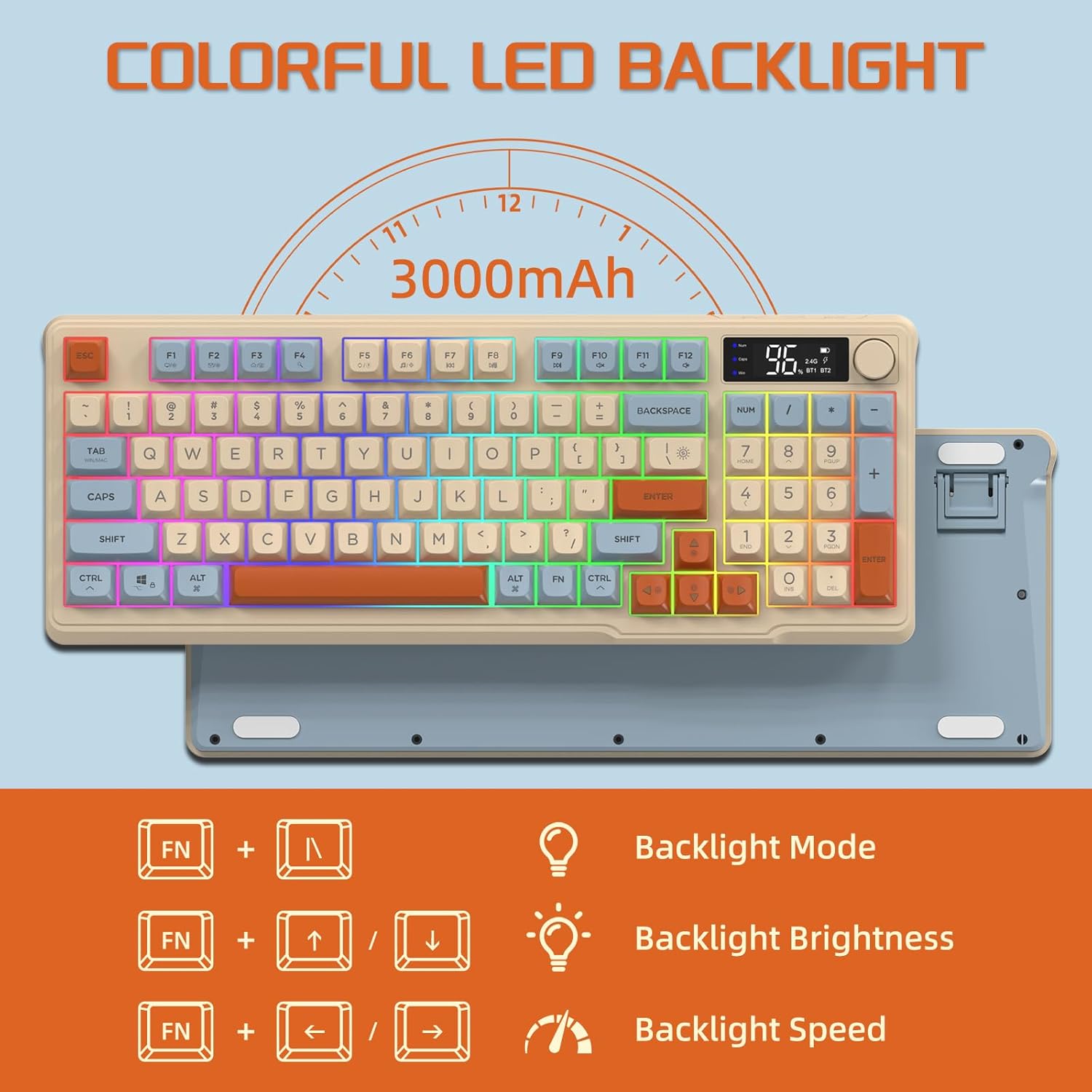
Image: The keyboard displaying the key combinations for controlling the colorful LED backlight, including changing backlight mode, brightness, and speed using the FN key with N, arrow keys.
4. Energijos taupymo režimai
The keyboard is designed with power-saving features to extend battery life:
- Sleep Mode (3 minutes inactivity): After 3 minutes of inactivity, the keyboard enters sleep mode, and the backlight turns off.
- Deep Sleep Mode (10 minutes inactivity): After 10 minutes in sleep mode, the keyboard enters deep sleep. The first key press will be ignored to wake the keyboard, and the second key press will activate it.
5. Suderinamumas
The FREEWOLF M96 keyboard is compatible with a wide range of operating systems, including Windows, Mac, and Linux, ensuring broad usability.
Priežiūra
1. Valymas
- Prieš valydami išjunkite klaviatūrą.
- Šiek tiek naudokite minkštą, be pūkelių šluostę damppaviršių nuvalykite vandeniu arba švelniu valymo tirpalu.
- For cleaning between keycaps, use compressed air or a small brush.
- Venkite naudoti stiprių cheminių medžiagų ar abrazyvinių medžiagų.
2. Akumuliatoriaus priežiūra
- Venkite dažnai visiškai iškrauti akumuliatorių.
- Kai klaviatūra ilgesnį laiką nenaudojama, laikykite ją vėsioje, sausoje vietoje.
- Naudokite tik pridėtą įkrovimo laidą arba suderinamą USB-C laidą.
Trikčių šalinimas
| Problema | Galima priežastis | Sprendimas |
|---|---|---|
| Klaviatūra nereaguoja. | Low battery; incorrect connection mode; receiver not plugged in (2.4G); Bluetooth not paired. | Charge the keyboard; switch to correct mode (2.4G/BT1/BT2); ensure 2.4G receiver is connected; re-pair Bluetooth. |
| Neveikia foninis apšvietimas. | Backlight turned off; low battery; brightness set to minimum. | Check backlight settings using the knob or FN key combinations; charge the keyboard. |
| Raktai neregistruoja arba rodo šešėlius. | Software conflict; low battery; interference. | Restart your device; charge the keyboard; move closer to the receiver/device; check for driver updates. |
| „Bluetooth“ ryšys nestabilus. | Trikdžiai; atstumas nuo įrenginio; išsikrovusi baterija. | Reduce interference (other wireless devices); move keyboard closer to device; charge keyboard. |
Specifikacijos
| Funkcija | Detalė |
|---|---|
| Prekės ženklas | LAISVAS VILKAS |
| Modelio numeris | M96 |
| Ryšio technologija | „Bluetooth“, 2.4G belaidis ryšys |
| Klaviatūros aprašymas | Mechanical feel with PBT keycaps |
| Raktų skaičius | 94 keys (US Layout) |
| Foninis apšvietimas | RGB LED foninis apšvietimas |
| Baterijos talpa | 3000 mAh |
| Ypatingos savybės | Electronic display, multimedia control knob, power saving modes |
| Suderinami įrenginiai | PC (Windows, Mac, Linux), iOS, Android |
| Spalva | Blueberry (Myrtille) |
| Gaminio matmenys | 385 mm (15.16 colio) x 145 mm (5.71 colio) x 40 mm (1.57 colio) |

Image: Diagram illustrating the product dimensions of the FREEWOLF M96 keyboard: 385mm (15.16 inches) length, 145mm (5.71 inches) width, and 40mm (1.57 inches) height.
Garantija ir palaikymas
This FREEWOLF M96 Wireless Gaming Keyboard comes with a standard manufacturer's warranty. Please refer to the product packaging or the seller's information for specific warranty terms and conditions. For technical support or further assistance, please contact the retailer or manufacturer directly.
For the latest information and support, visit the official FREEWOLF websvetainėje arba susisiekite su jų klientų aptarnavimo tarnyba.


