1. Įvadas
This manual provides essential information for the setup, operation, maintenance, and troubleshooting of your TULPAR T5 V23.4 Gaming Laptop. Please read this guide thoroughly to ensure proper use and to maximize your device's performance and longevity.
The TULPAR T5 V23.4 is a high-performance gaming laptop designed for immersive gaming and demanding tasks. It features an Intel Core i7 12700H processor, NVIDIA RTX 4060 graphics, a vibrant 15.6-inch Full HD 144Hz IPS display, 16GB of RAM, and a fast 1TB NVMe SSD, all running on Windows 11 Home.
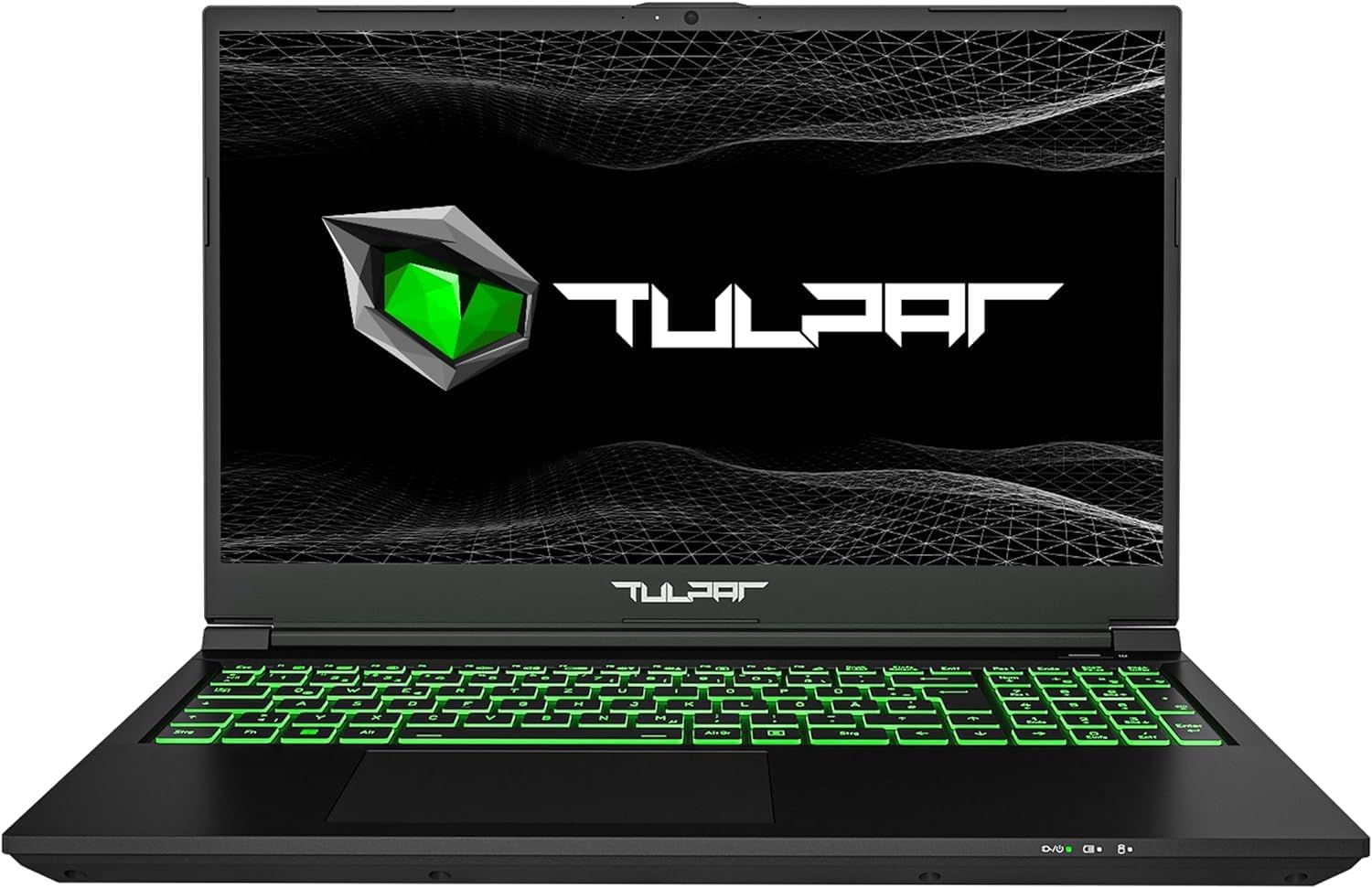
1.1 vaizdas: priekis view of the TULPAR T5 V23.4 Gaming Laptop, showcasing its illuminated keyboard and display.
2. Pradinė sąranka
2.1 Išpakavimas ir pirmasis įjungimas
- Atsargiai išimkite nešiojamąjį kompiuterį ir visus priedus iš pakuotės.
- Prijunkite maitinimo adapterį prie nešiojamojo kompiuterio maitinimo įvesties prievado, o tada – prie maitinimo lizdo.
- Atidarykite nešiojamojo kompiuterio dangtį ir paspauskite maitinimo mygtuką, kuris paprastai yra virš klaviatūros arba šone.
2.2 „Windows 11“ sąranka
Upon first boot, you will be guided through the Windows 11 Home setup process. Follow the on-screen instructions to:
- Pasirinkite savo regioną ir klaviatūros išdėstymą.
- Prisijunkite prie „Wi-Fi“ tinklo.
- Prisijunkite naudodami „Microsoft“ paskyrą arba sukurkite naują.
- Set up privacy settings and create a user PIN.
2.3 Tvarkyklės diegimas ir atnaujinimai
Your TULPAR T5 V23.4 comes with pre-installed drivers. However, it is recommended to check for and install the latest drivers and system updates for optimal performance and security. This can typically be done via the manufacturer's support website or through the pre-installed Tulpar Control Center application.
3. Operacija
3.1 Pagrindinės funkcijosview
- Procesorius: Intel Core i7-12700H (12th Gen) for high-speed processing.
- Grafika: NVIDIA GeForce RTX 4060 8GB GDDR6 for advanced gaming and creative tasks.
- Ekranas: 15.6-inch Full HD (1920x1080) IPS LED display with a 144Hz refresh rate for smooth visuals.
- Atmintis: 16GB RAM, expandable up to 64GB.
- Saugykla: 1TB NVMe Gen4 SSD for rapid boot times and data access.
- Operacinė sistema: Windows 11 Home.

Image 3.1: The Intel Core i7-12700H 12th Generation processor, designed for high performance and efficiency.

Image 3.2: The NVIDIA RTX 4060 8GB graphics card, providing advanced visual processing for gaming.

Image 3.3: The 15.6-inch 144Hz Full HD IPS display offers smooth motion and vibrant colors.

Image 3.4: NVMe Gen4 SSD technology ensures fast loading and data transfer speeds.
3.2 Klaviatūra ir jutiklinė planšetė
The laptop features a backlit QWERTZ keyboard with customizable RGB single-zone lighting. Use the Tulpar Control Center application to personalize the lighting effects and assign colors to specific games or applications.

Image 3.5: The RGB keyboard with customizable single-zone backlighting.
3.3 Garso sistema
Enhance your audio experience with Sound Blaster Studio. This software allows you to individually customize settings for both headphones and speakers, creating a more immersive sound environment.

Image 3.6: Sound Blaster Studio interface for audio customization.
3.4 Ryšiai ir prievadai
The TULPAR T5 V23.4 offers a range of connectivity options:
- Belaidis ryšys: Wi-Fi 6 (AX201) for fast and stable internet connections.
- Laidinis: RJ45 Ethernet port for reliable wired network access.
- Prievadai:

Image 3.7: Port layout of the TULPAR T5 V23.4 Gaming Laptop.
- USB 3.2 Gen2 Type-C (Data Only)
- HDMI 1.4
- Mini DP 1.4
- Maitinimo jungtis
- „Kensington Lock“ lizdas
- USB 3.2 Gen1
- USB 2.0
- Mikrofono lizdas
- Ausinių lizdas
- Micro-SD kortelių skaitytuvas
- USB 3.2 Gen2 tipo C
- RJ45 Ethernet prievadas

Image 3.8: The laptop supports Wi-Fi 6 for enhanced wireless performance.
3.5 Tulpar Control Center
The Tulpar Control Center software allows you to manage various aspects of your laptop's performance, including:
- Switching between performance modes (e.g., Silent, Performance, Power-saving).
- Customizing keyboard RGB lighting.
- Monitoring system status.
4. Priežiūra
4.1 Valymas
- Ekranas: Naudokite minkštą, nepūkuotą šluostę, specialiai skirtą elektronikai.ampLengvai pamirkykite vandenyje arba ekrano valiklio tirpale. Venkite stiprių cheminių medžiagų.
- Klaviatūra ir korpusas: Dulkėms ir šiukšlėms pašalinti naudokite minkštą šepetį arba suslėgtą orą. Paviršius nuvalykite šiek tiek drėgnu skudurėliu.amp, minkštas audinys.
- Aušinimo angos: Reguliariai naudokite suslėgtą orą, kad pašalintumėte dulkes iš aušinimo angų, ir palaikytumėte optimalų oro srautą.
4.2 Programinės įrangos naujiniai
Regularly update your operating system (Windows 11) and device drivers to ensure security, stability, and optimal performance. You can check for updates through Windows Update and the Tulpar Control Center or the official TULPAR support websvetainę.
4.3 Atminties ir RAM atnaujinimai
The TULPAR T5 V23.4 is designed with upgradeability in mind. It typically includes an additional M.2 slot for expanding storage and allows for RAM upgrades up to 64GB. For detailed instructions on how to perform these upgrades, please refer to the official TULPAR service documentation or consult a qualified technician.
5. Problemų sprendimas
5.1 Bendrosios problemos ir sprendimai
- Nešiojamasis kompiuteris neįsijungia: Ensure the power adapter is securely connected to both the laptop and a working power outlet. Check if the power button is functioning correctly.
- Fan noise is loud during gaming: This is normal behavior for high-performance gaming laptops. The cooling system increases fan speed to dissipate heat during intensive tasks. Ensure cooling vents are not obstructed.
- Short battery life during gaming: Gaming is a power-intensive activity. It is normal for battery life to be significantly shorter when gaming compared to general use. For extended gaming sessions, keep the laptop connected to the power adapter.
- Performance issues (lag, stuttering):
- Ensure all drivers (especially graphics drivers) are up to date.
- Check power settings in Windows and the Tulpar Control Center to ensure the laptop is in a performance mode.
- Uždarykite nereikalingas fonines programas.
- Monitor system temperatures to prevent thermal throttling.
- „Wi-Fi“ ryšio problemos:
- Iš naujo paleiskite maršrutizatorių ir modemą.
- Ensure Wi-Fi drivers are updated.
- Check network settings in Windows.
6. Specifikacijos
| Funkcija | Specifikacija |
|---|---|
| Prekės ženklas | TULPARAS |
| Modelio numeris | T5 V23.4 |
| Serija | T5 V23.2 Series |
| Spalva | Juoda |
| Operacinė sistema | Windows 11 Home |
| Procesoriaus prekės ženklas | Intel |
| Procesoriaus tipas | Core i7-12700H (12th Gen) |
| Procesoriaus greitis | 2.3 GHz (bazinis), iki 4.7 GHz (stiprinimas) |
| Šerdžių skaičius | 10 (6 Performance, 8 Efficiency) |
| Įdiegta RAM | 16 GB |
| Maksimali atmintis | 64 GB |
| Sandėliavimo tipas | 1 TB NVMe Gen4 SSD |
| Ekrano dydis | 15.6 colių |
| Ekrano raiška | 1920 x 1080 pikselių (Full HD) |
| Ekrano technologija | IPS LED, 144Hz Refresh Rate |
| Vaizdo plokštė | NVIDIA GeForce RTX 4060 (8 GB GDDR6) |
| Belaidė technologija | Wi-Fi 6 (802.11a/b/g/n/ax) |
| Bluetooth | Not specified as compatible |
| USB prievadai | 2x USB 3.2 Gen2 Type-C, 1x USB 3.2 Gen1, 1x USB 2.0 |
| Vaizdo išvestis | HDMI 1.4, Mini DP 1.4 |
| Ethernet | RJ45 Ethernet prievadas |
| Garso lizdai | Microphone, Headphone |
| Kortelių skaitytuvas | Micro-SD |
| Matmenys (I x P x A) | 35 x 2 x 23 cm |
| Klaviatūra | Backlit QWERTZ |
| Pasiekiama pirmoji data | 26 m. balandžio 2024 d |
7. Garantija ir palaikymas
7.1 Informacija apie garantiją
Your TULPAR T5 V23.4 Gaming Laptop is covered by a manufacturer's warranty. Please refer to the warranty card included with your product or visit the official TULPAR website for detailed terms and conditions. Some manufacturers may offer additional services, such as annual free cleaning and maintenance; verify such offers directly with TULPAR.

Image 7.1: TULPAR's service promise, which may include free lifetime maintenance. Please check official documentation for details.
7.2 Techninė pagalba
For technical assistance, driver downloads, or service inquiries, please contact TULPAR customer support through their official website. Have your product model number (T5 V23.4) and serial number ready when contacting support.


